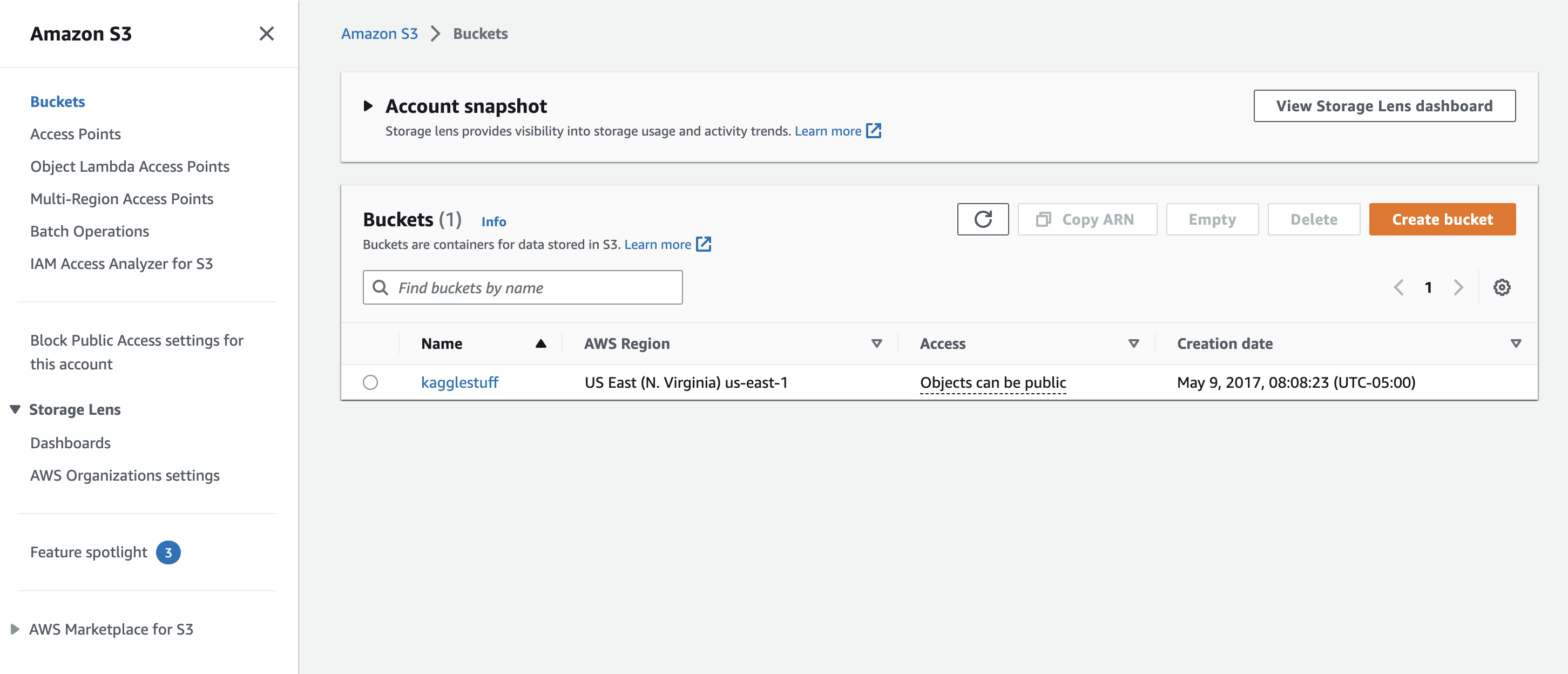
1. Amazon S3• Amazon S3 allows you to store objects (files) in "buckets" (directories).• Buckets must have a globally unique name.• Objects (files) have a key → which is the full path → <my_bucket>/my_folder/myfile.txt• Max object size 5TB.• We also have object tags → key, value pairs up to 10 → useful for security/lifecycle.1.1. S3 for Machine Learning• Backbone for many AWS ML services (example: SageMaker)• It's also helpful to create a Data Lake. With Data Lake you have:– Infinite size, no provisioning– 99.99999999% durability– Decoupling of storage (S3) to compute (EC2, Amazon Athena, Amazon Redshift, Spectrum, Amazon Rekognition, AWS Glue).• It's centralized architecture → i.e. all your data can be in one place.• Object Storage → supports any file format.– Common formats → CSV, JSON, Parquet, ORC, Avro, Protobuf1.2. S3 for Data Partitioning• Pattern for speeding up range queries (e.g. AWS Athena) → a service to query data in serverless manner.– e.g. You may want to partition by date. This is how you can do it in S3 → s3://bucket/my-data-set/year/month/day/hour/data_00.csv– e.g. query by product → s3://bucket/my-data-set/product-id/data_32.csv• • You can define whatever partitioning strategy you like.• Data partitioning will be handled by some tools we use (e.g. AWS Glue).1.3. How to Create a S3 Bucket?• Go to AWS website → Services → Storage → S3 → (after customizing the settings) → Create Bucket.– Once the S3 bucket is created, the rest of it is just like working with a File Explorer (on a cloud) like Google Drive where you can create folders or upload files.
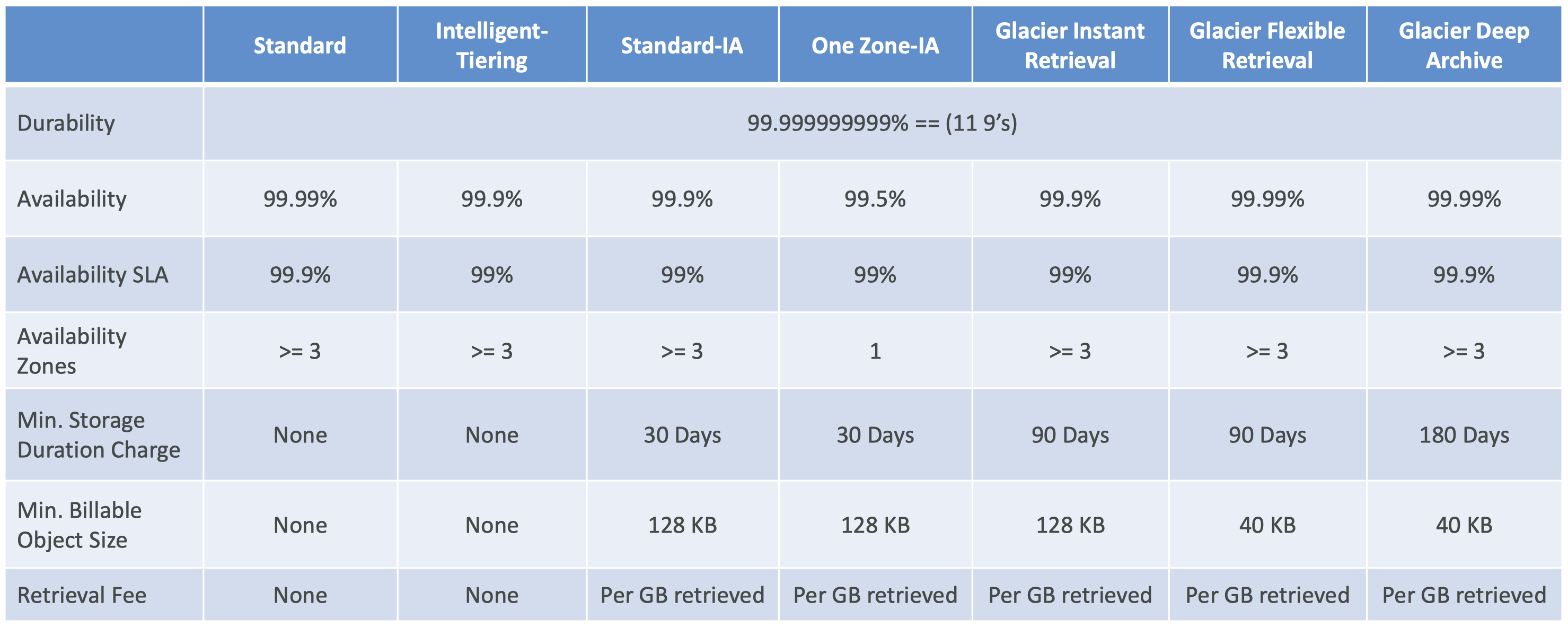
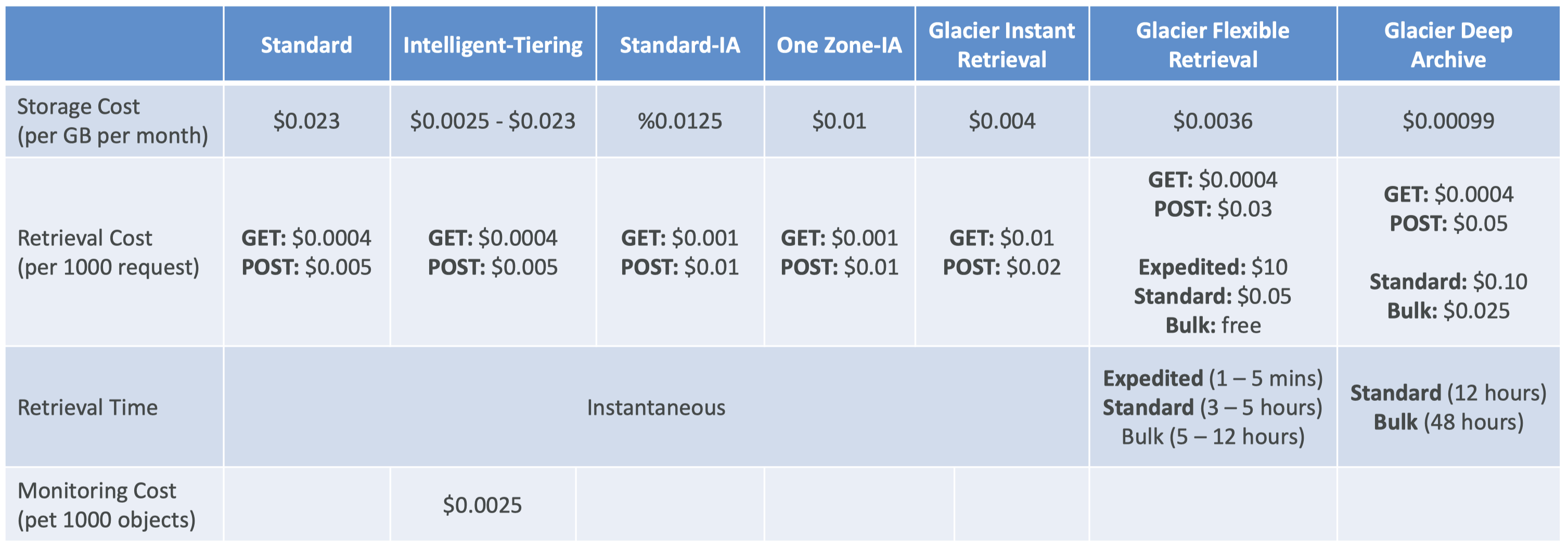
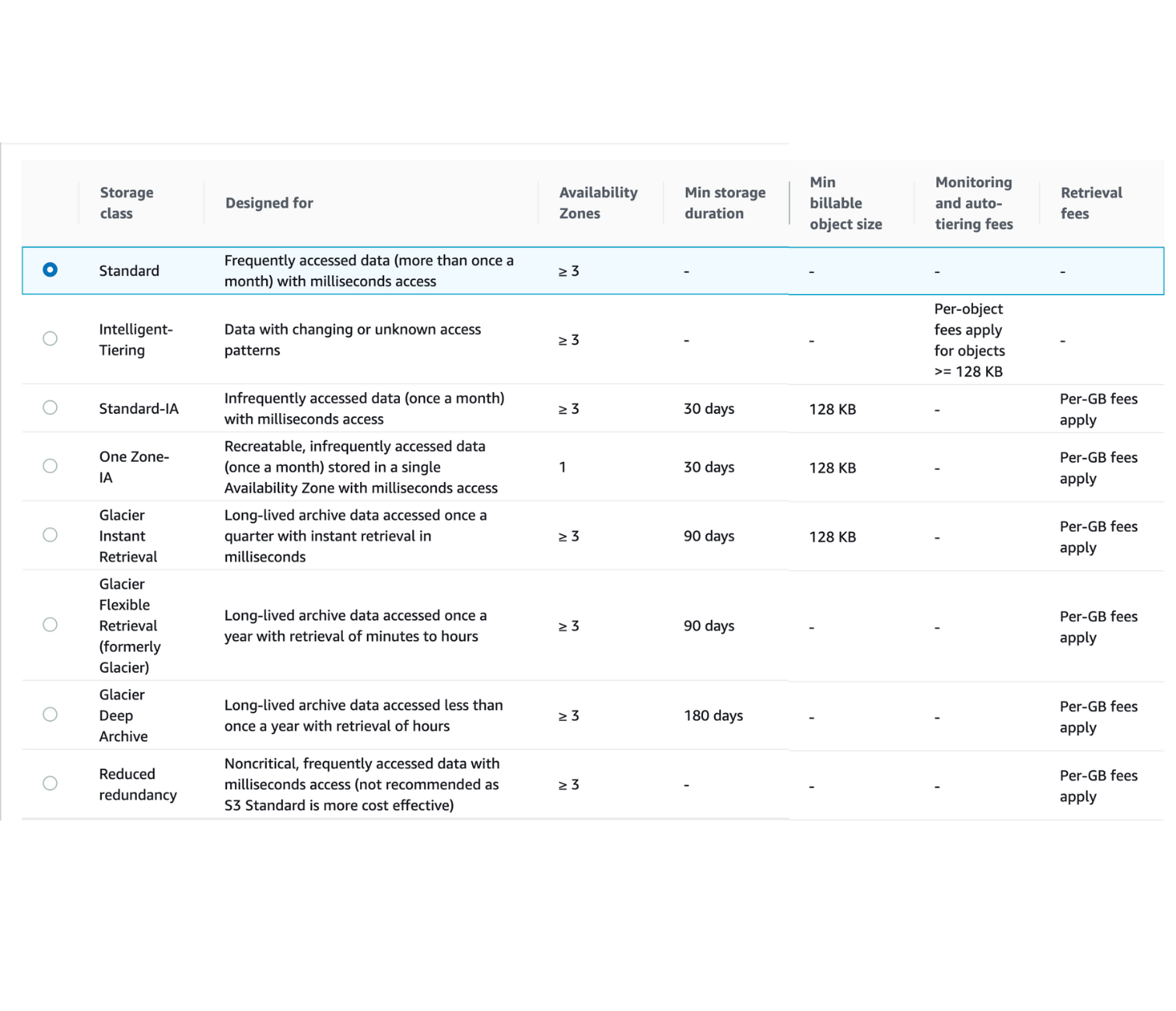
2. Amazon S3 Storage Classes + Glacier• There are different S3 storage classes:– Amazon S3 Standard - General Purpose– Amazon S3 Standard - Infrequent Access (IA)– Amazon S3 One Zone - Infrequent Access (IA)– Amazon S3 Glacier Instant Retrieval– Amazon S3 Glacier Flexible Retrieval– Amazon S3 Glacier Deep Archive– Amazon S3 Intelligent Tiering• When creating S3: – You can choose the class. – You can also modify it manually. – You can use S3 Lifecycle configurations to move objects automatically between all these storage classes.2.1. S3 Durability and Availability• Durability– Definition: How many times an object is going to be lost by S3.– High durability (99.999999999%, 11 9's) of objects across multiple AZ– If you store 10,000,000 objects with S3, you can on average expect to incur a loss of a single object once every 10,000 years.– Durability is the same for all storage classes.• Availability– Definition: measures how readily available a service is.– It depends on the storage class.* S3 Standard has 99.99% availability → not available 53 minutes/year2.2. S3 Standard Storage Classes2.2.1. S3 Standard - General Purpose• 99.99% availability• Used for frequently accessed data• Low latency and high throughput• Sustains two concurrent facility failures• Use cases:– Big data analytics– Mobile & Gaming applications– Content distribution2.2.2. S3 Standard - Infrequent Access (Standard-IA)• For data that is less frequently accessed, but requires rapid access when needed.• Lower cost than S3 Standard• 99.9% availability• Use cases:– Disaster recovery– Backups2.2.3. S3 One Zone - Infrequent Access (One Zone-IA)• High durability (99.999999999%) in a single AZ• Data is lost when AZ is destroyed.• 99.5% availability• Use cases:– Storing secondary backups– Copies of on-premise data– Data you can recreate2.3. S3 Glacier Storage Classes• It's a low-cost object storage meant for archiving/backup• Pricing: price for storage + object retrieval cost2.3.1. S3 Glacier Instant Retrieval• Milliseconds retrieval• Great for data accessed once a quarter• Minimum storage duration is 90 days.2.3.2. S3 Glacier Flexible Retrieval (formerly Amazon S3 Glacier)• There are three flexibility here:– Expedited (1 to 5 minutes)– Standard (3 to 5 hours)– Bulk (5 to 12 hours) → FREE• Minimum storage duration is 90 days.2.3.3. S3 Glacier Deep Archive• Meant for long-term storage.• There are two tiers here:– Standard (12 hours)– Bulk (48 hours)• It has the minimum cost.• Minimum storage duration is 180 days.2.4. S3 Intelligent-Tiering• Small monthly monitoring and auto-tiering fee• Move objects automatically between Access Tiers based on usage patterns.• There are no retrieval charges. • Different tiers are:– Frequent Access Tier (automatic) → default tier– Infrequent Access Tier (automatic) → objects not accessed for 30 days– Archive Instant Access Tier (automatic) → objects not accessed for 90 days– Archive Access Tier (optional) → configurable from 90 days to 700+ days– Deep Archive Access Tier (optional) → configurable from 180 days to 700+ days2.5. S3 Storage Classes Comparison
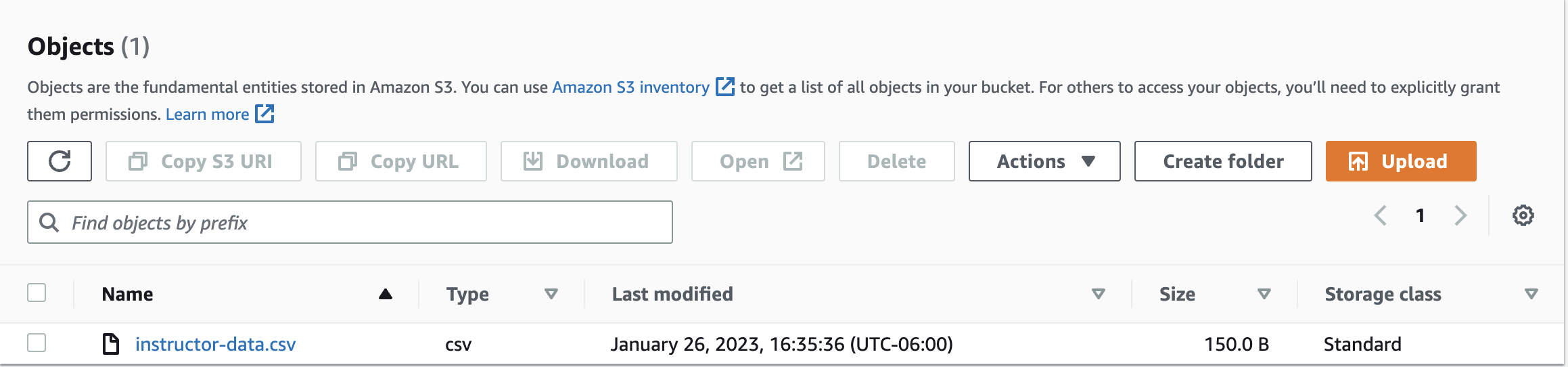
2.6. Amazon S3 Storage Classes + Glacier Hands On• Create a Bucket → Upload a file → Under "Storage Class", you'll get these options:
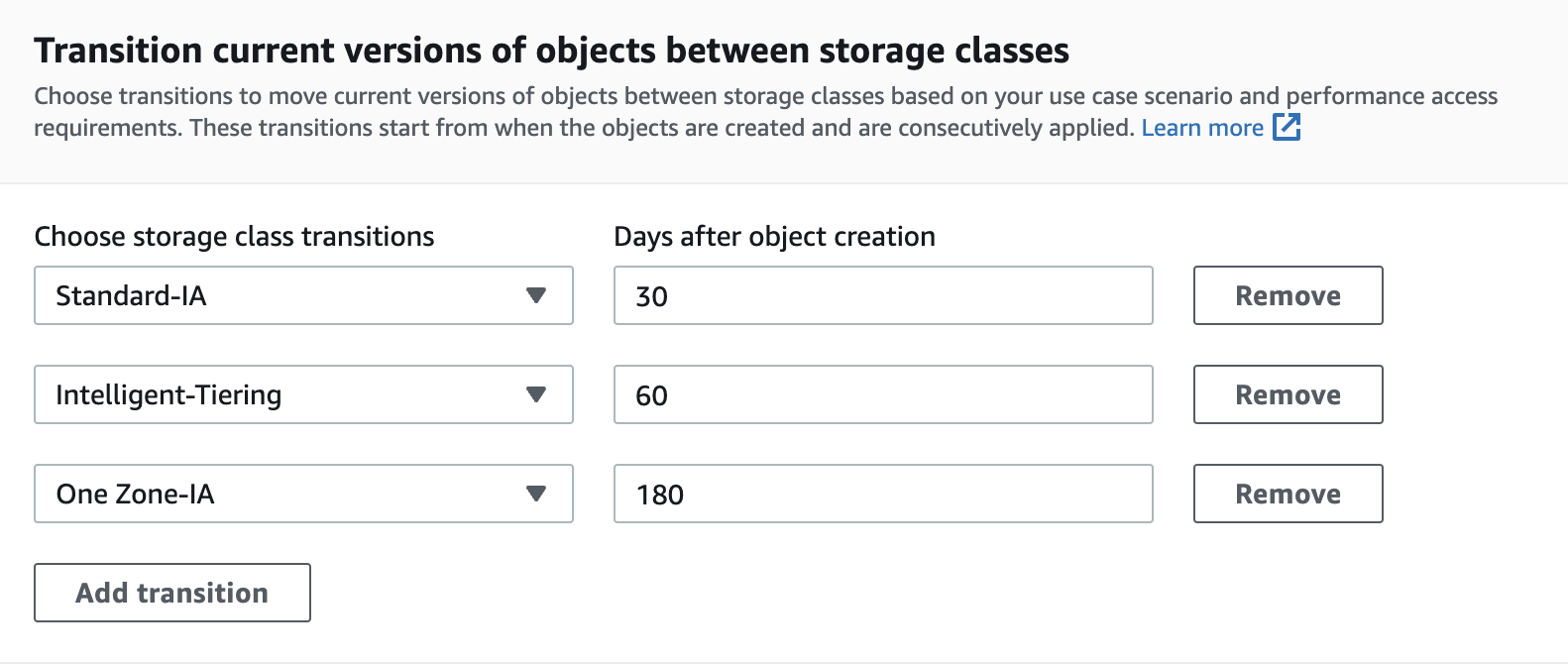
• Note: You can edit the Storage Class after you uploaded the file.• We can also automate moving objects between different storage classes.– In your bucket page, under "Management" → "Create lifecycle rule"– Figure 4 shows an example of these automation rules:
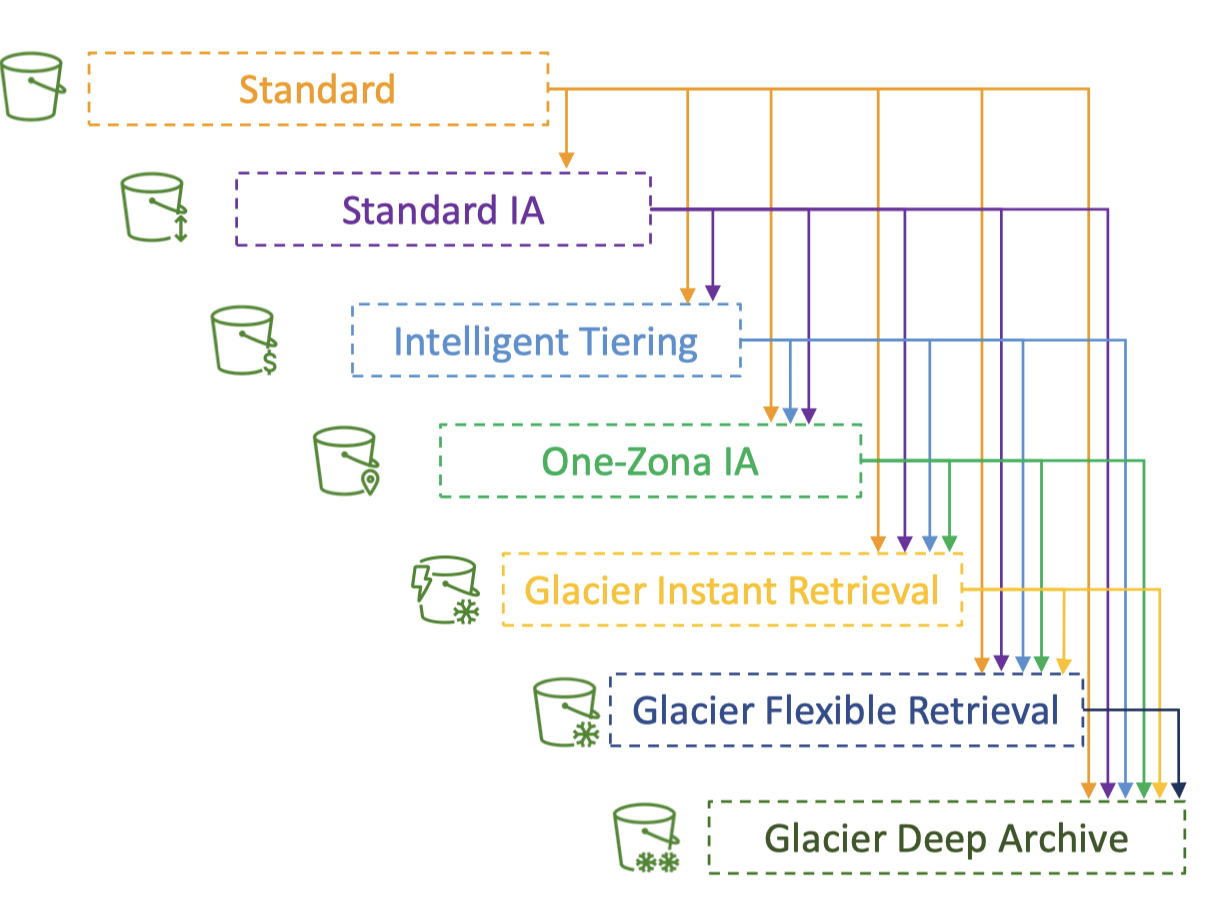
3. Amazon S3 Lifecycle Rules• You can transition objects between storage classes.• Moving objects between storage classes can be automated using "Lifecycle Rules".
Figure 5:Transition objects between storage classes
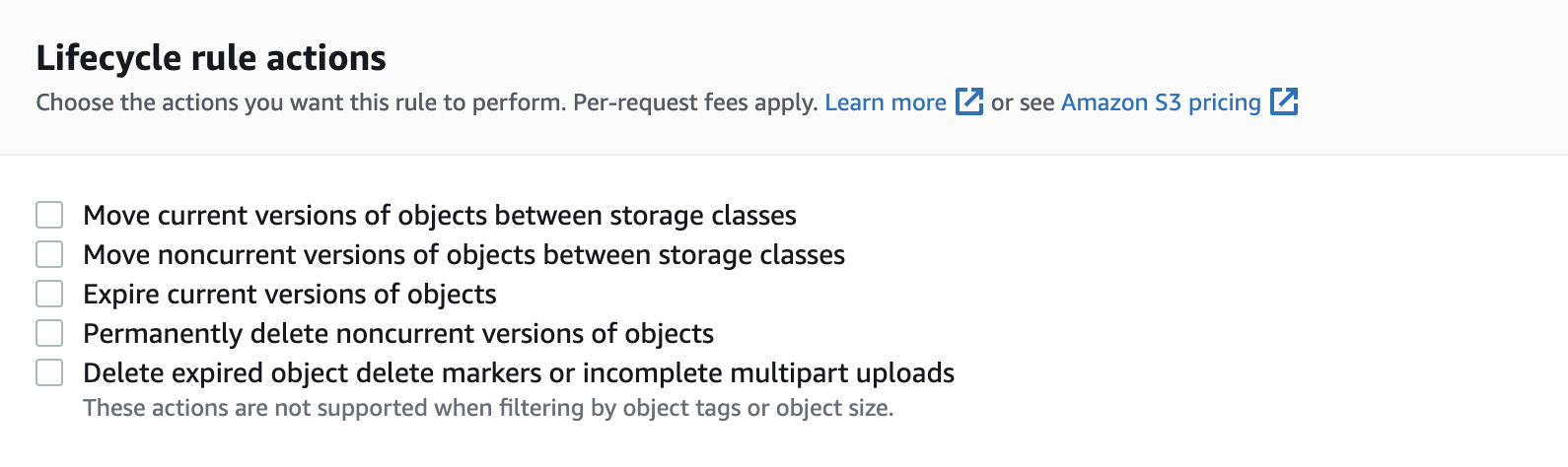
• Here are some useful rules:– For infrequently accessed objects, move them to "Standard IA".– For archive objects that you don't need fast access to, move them to "Glacier" or "Glacier Deep Archive". • Lifecycle rules are made up of the following actions (Figure 6):– Transition Actions → configure objects to transition to another storage class (Figure 4).– Expiration Actions → configure objects to expire (delete) after some time.* e.g. Access log files can be deleted after a 365 days.* Can be used to delete old versions of files (if versioning is enabled)
Figure 6:Lifecycle actions
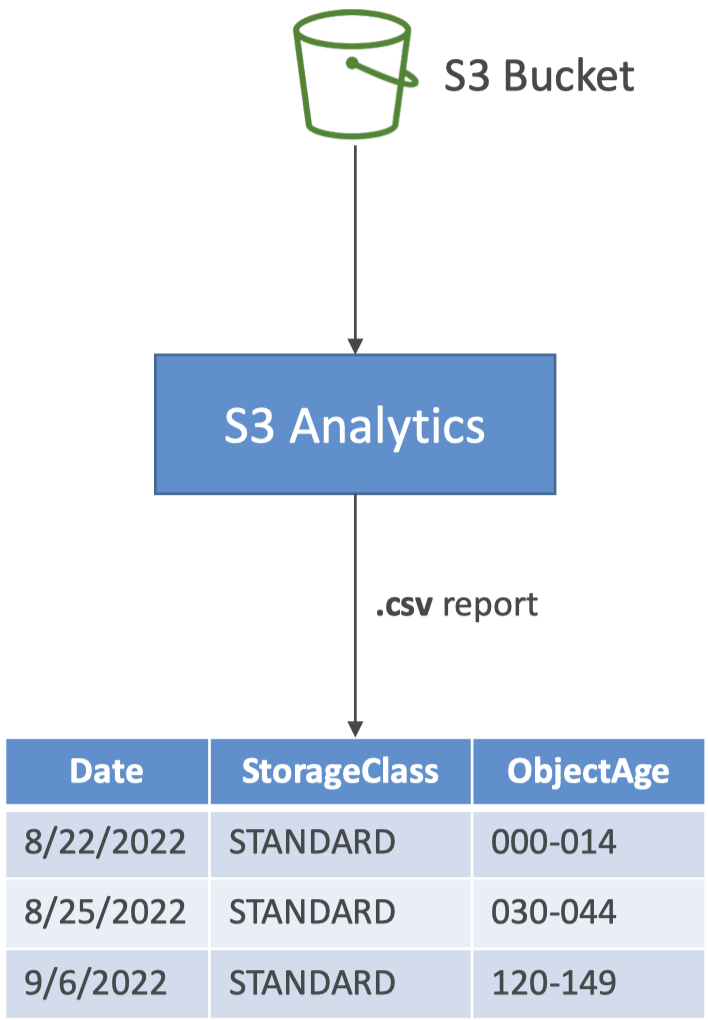
• Note: Rules can be created for a certain prefix → s3://<bucket_name≯mp3/*• Note: Rules can be created for a certain tag (e.g. finance department) • Lifecycle rule: Scenario 1– Your application on EC2 creates images thumbnails after profile photos are uploaded to Amazon S3. These thumbnails can be easily recreated, and only need to be kept for 60 days. The source images should be able to be immediately retrieved for these 60 days, and afterwards, the user can wait up to 6 hours. How would you design this?* S3 source images can be on Standard, with a lifecycle configuration to transition them to Glacier after 60 days.* S3 thumbnails can be on One-Zone IA, with a lifecycle configuration to expire them (delete them) after 60 days.• Lifecycle rule: Scenario 2– A rule in your company states that you should be able to recover your deleted S3 objects immediately for 30 days, although this may happen rarely. After this time, and for up to 365 days, deleted objects should be recoverable within 48 hours.* Enable S3 Versioning in order to have object versions, so that “deleted objects” are in fact hidden by a “delete marker” and can be recovered.* Transition the “non-current versions” of the object to Standard IA.* Transition afterwards the “non-current versions” to Glacier Deep Archive.3.1. Amazon S3 Analytics• How do we determine what's the optimal number of days to transition an object from one class to another?– Help you decide when to transition objects to the right storage class.– Recommendations for Standard and Standard IA.* Does NOT work for One-Zone IA or Glacier.– Report is updated daily.* 24 to 48 hours to start seeing data analysis.– Good first step to put together Lifecycle Rules (or improve them)!
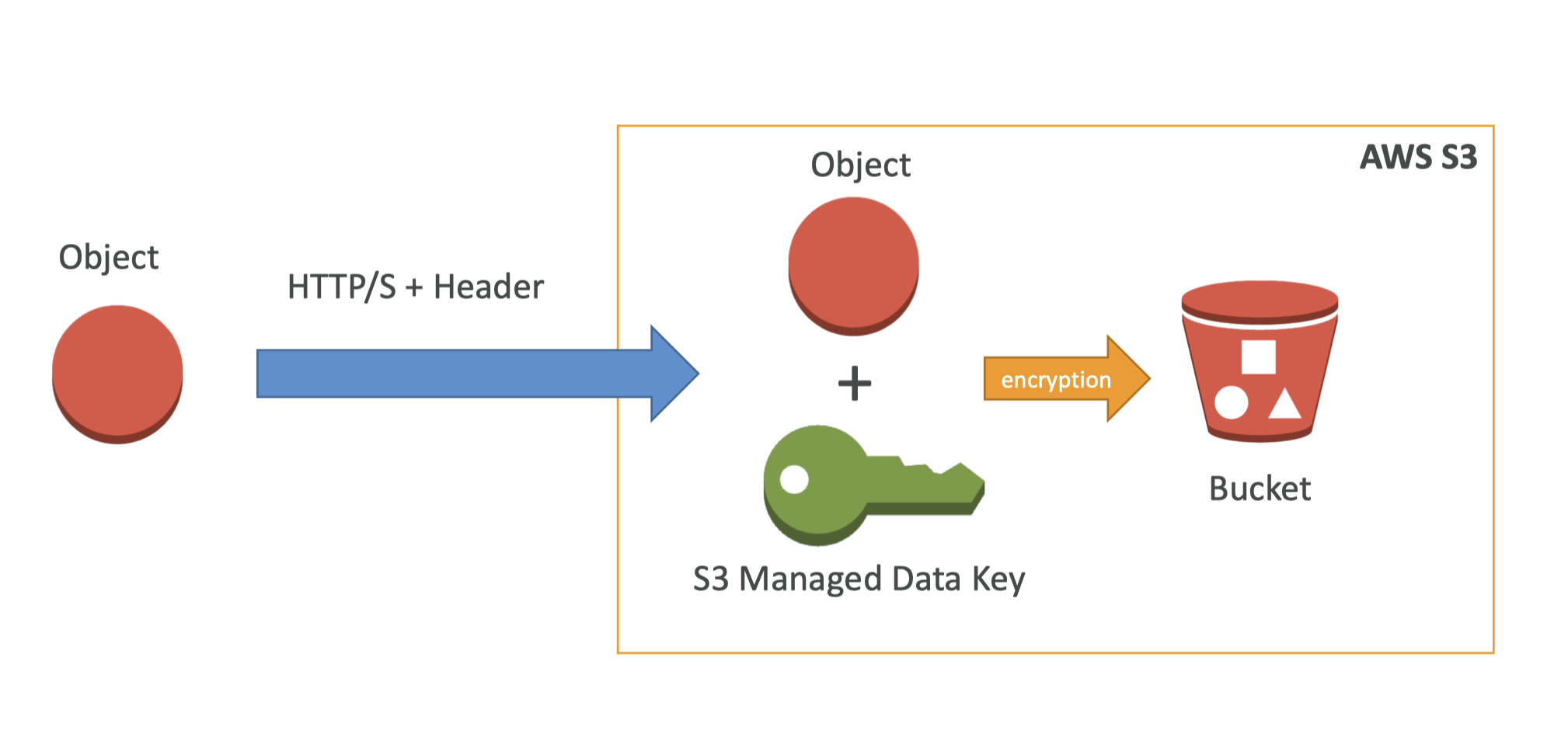
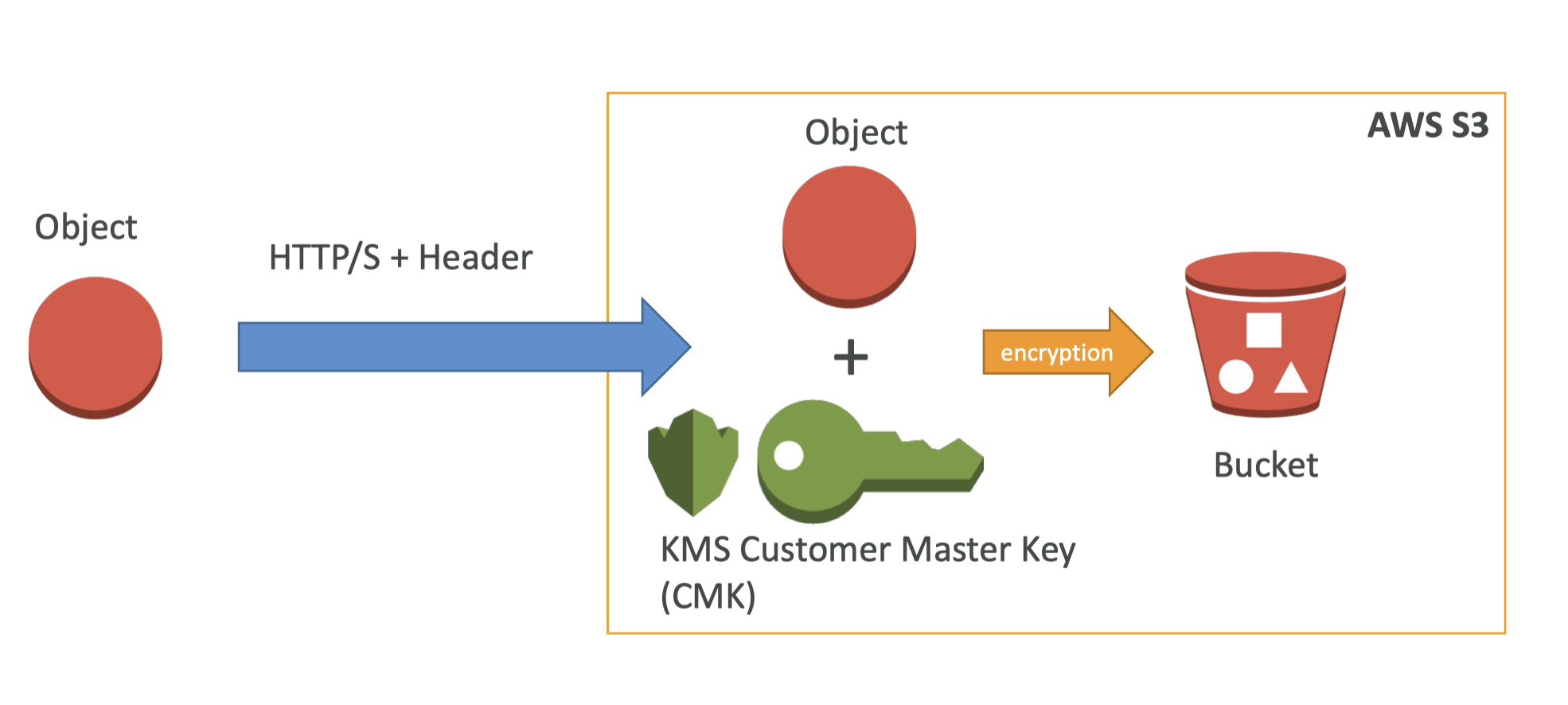
4. Amazon S3 Security• There are 4 methods for encrypting objects in S3:– SSE-S3: encrypts S3 objects using keys handled & managed by AWS.– SSE-KMS: use AWS Key Management Service to manage encryption keys* Additional security (user must have access to KMS key)* Audit trail for KMS key usage* Here, we can manage our keys, but with SSE-S3 we have no control over the keys, it's just S3 having its own data key.– SSE-C: when you want to manage your own encryption keys– Client Side Encryption• Note: From an ML perspective, SSE-S3 and SSE-KMS will be most likely used.4.1. SSE-S3
Figure 8:SSE-S3
4.2. SSE-KMS
Figure 9:SSE-KMS
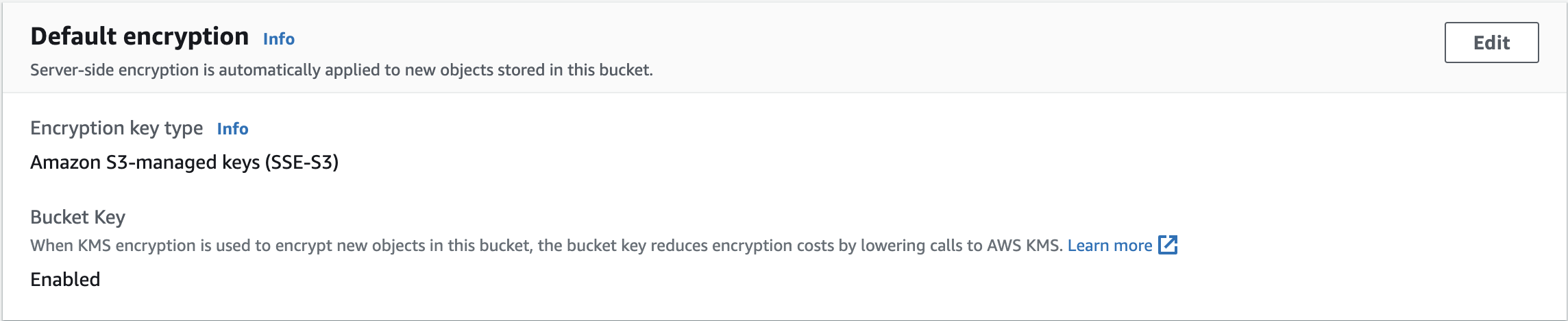
• You can find the encryption used for an object from the "Property" tab → "default encryption". You can also modify the encryption method there.
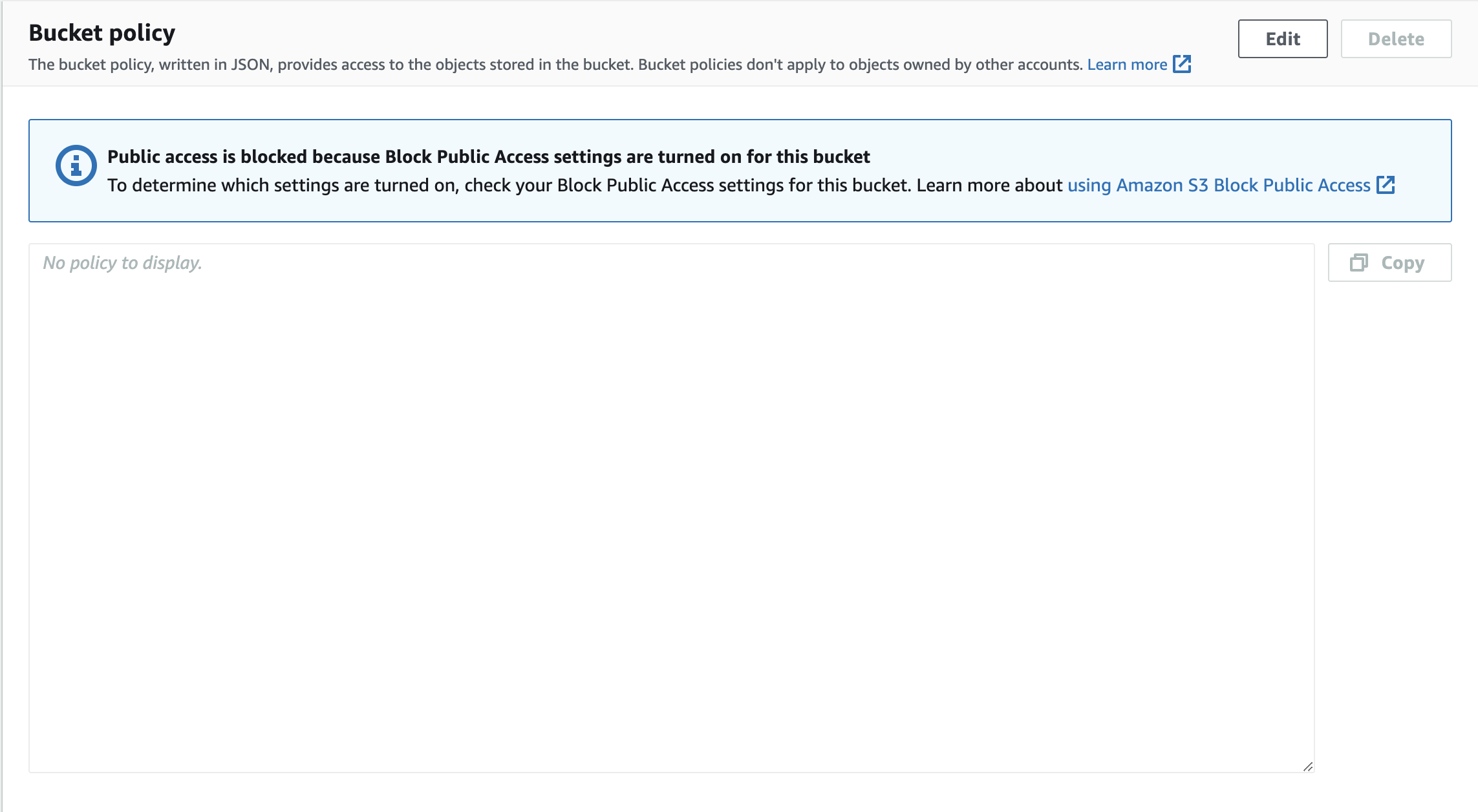
4.3. S3 Security• How do we manage access directly into S3?– User-based* IAM policies - which API calls should be allowed for a specific user– Resource-based* Bucket Policies - bucket wide rules from the S3 console - allows cross account.* Object Access Control List (ACL) – finer grain.* Bucket Access Control List (ACL) – less common.4.3.1. S3 Bucket Policies• JSON based policies:– Resources: buckets and objects– Actions: Set of API to Allow or Deny– Effect: Allow/Deny– Principal: The account or user to apply the policy to
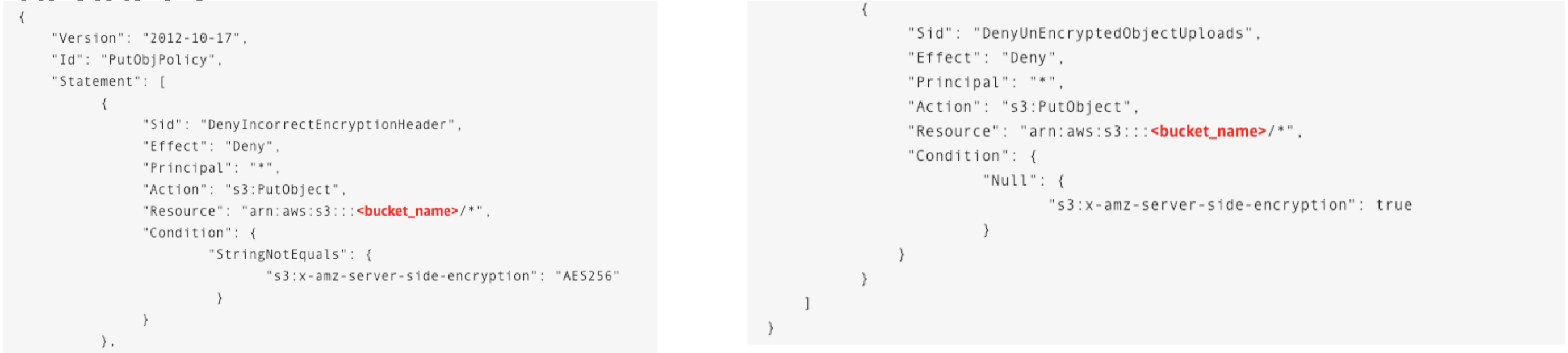
• • Use S3 bucket for policy to:– Grant public access to the bucket– Force objects to be encrypted at upload– Grant access to another account (Cross Account)4.3.2. S3 Default Encryption vs. Bucket Policies• The old way to enable default encryption was to use a bucket policy and refuse any HTTP command without the proper headers:
• The new way is to use the “default encryption” option in S3 → It basically encrypts every objects that is sent to it.• Note:Bucket Policies are evaluated before “default encryption”.4.4. S3 Security - Other• Networking -VPC Endpoint Gateway:– VPC → Virtual Private Cloud– Allow traffic to stay within your VPC (instead of going through public web)– Make sure your private services (AWS SageMaker) can access S3– Very important for AWS ML Exam!• Logging and Audit:– S3 access logs can be stored in other S3 bucket– API calls can be logged in AWSCloudTrail• Tagged Based (combined with IAM policies and bucket policies)– Example: Add tag Classification=PHI to your objects* PHI → Personal Health Information– You can add tags to an object from Properties → Tags → you can set (key, value) pair tags, for example: key=Classification, value=PHI.[Back To Top]
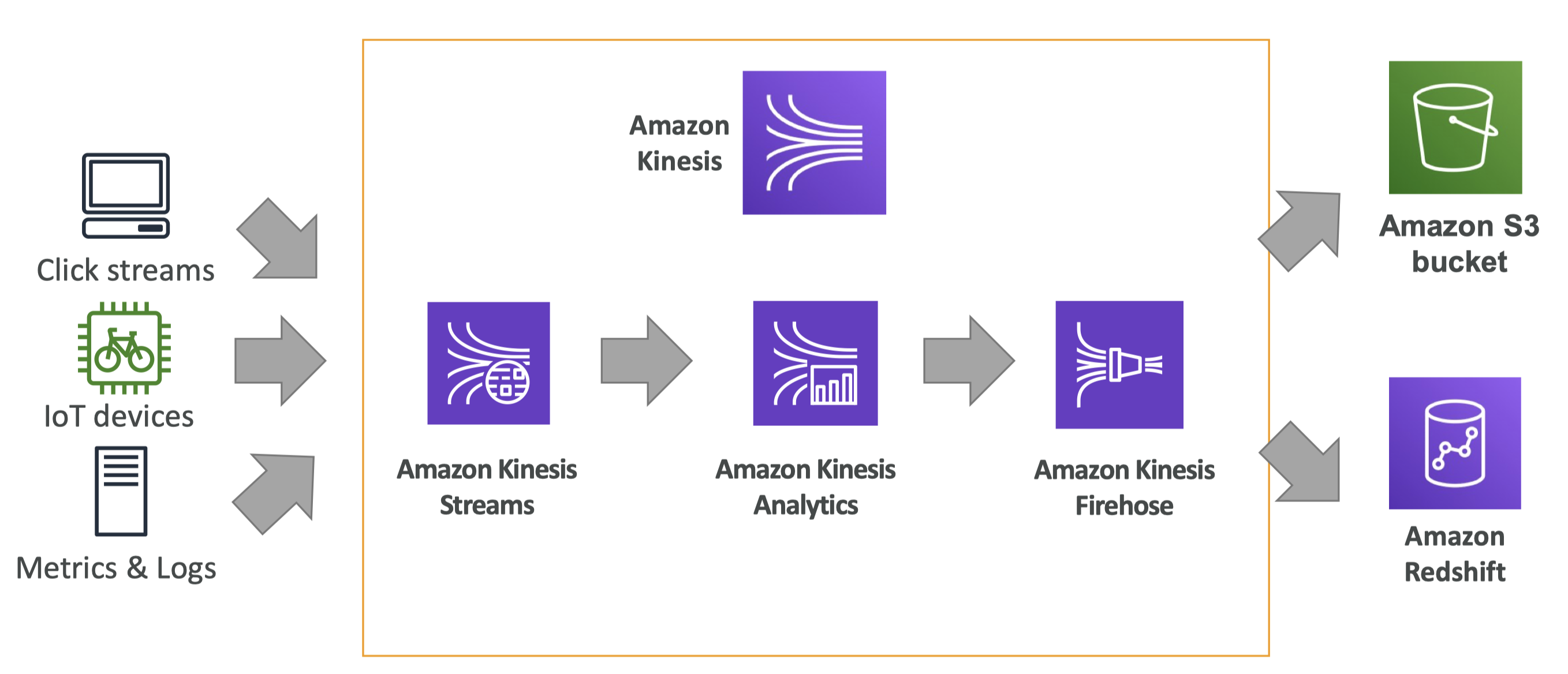
5. AWS Kinesis• Kinesis is a stream service and it's an alternative to Apache Kafka.• Great for:– Application logs, metrics, IoT, clickstreams.– “real-time” big data– Streaming processing frameworks (Spark, NiFi, etc…)• Data is automatically replicated synchronously to 3 AZ (Availability Zone).• There are four services under the Kinesis umbrella:– Kinesis Streams: low latency streaming ingest at scale.– Kinesis Analytics: perform real-time analytics on streams using SQL.– Kinesis Firehose: load streams into S3, Redshift, ElasticSearch & Splunk.– Kinesis Video Streams: meant for streaming video in real-time.5.1. Kinesis Architecture• A simple Kinesis architecture looks like this:
Figure 10:Kinesis Architecture
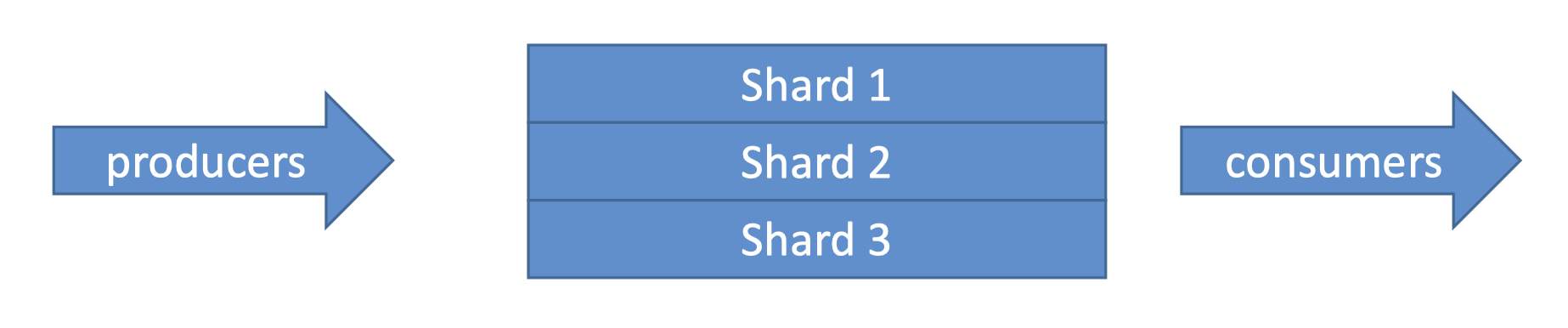
5.2. Kinesis Streams• Kinesis Streams is great when you want to create real-time streaming applications.• Streams are divided in ordered Shards/Partitions.
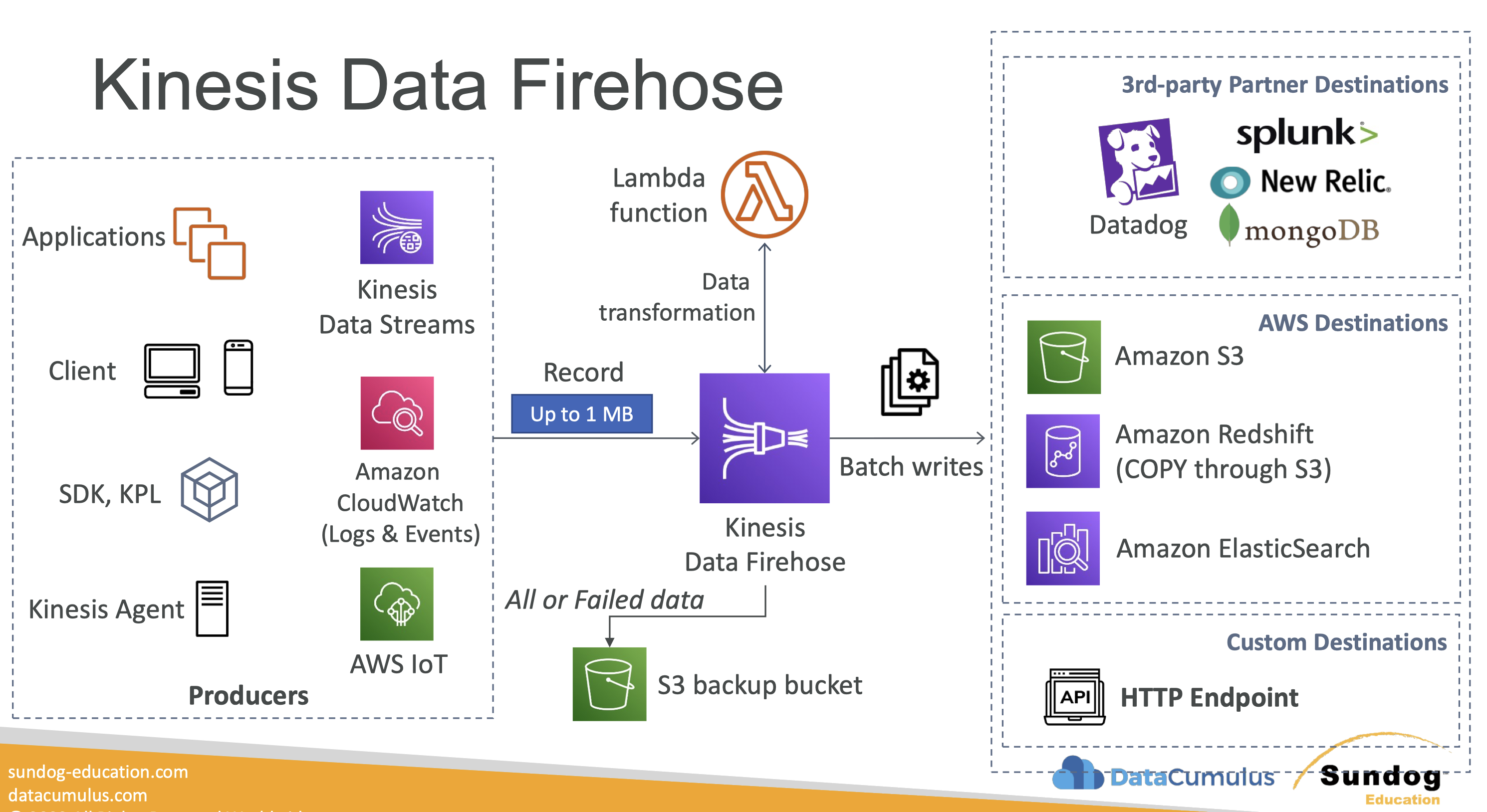
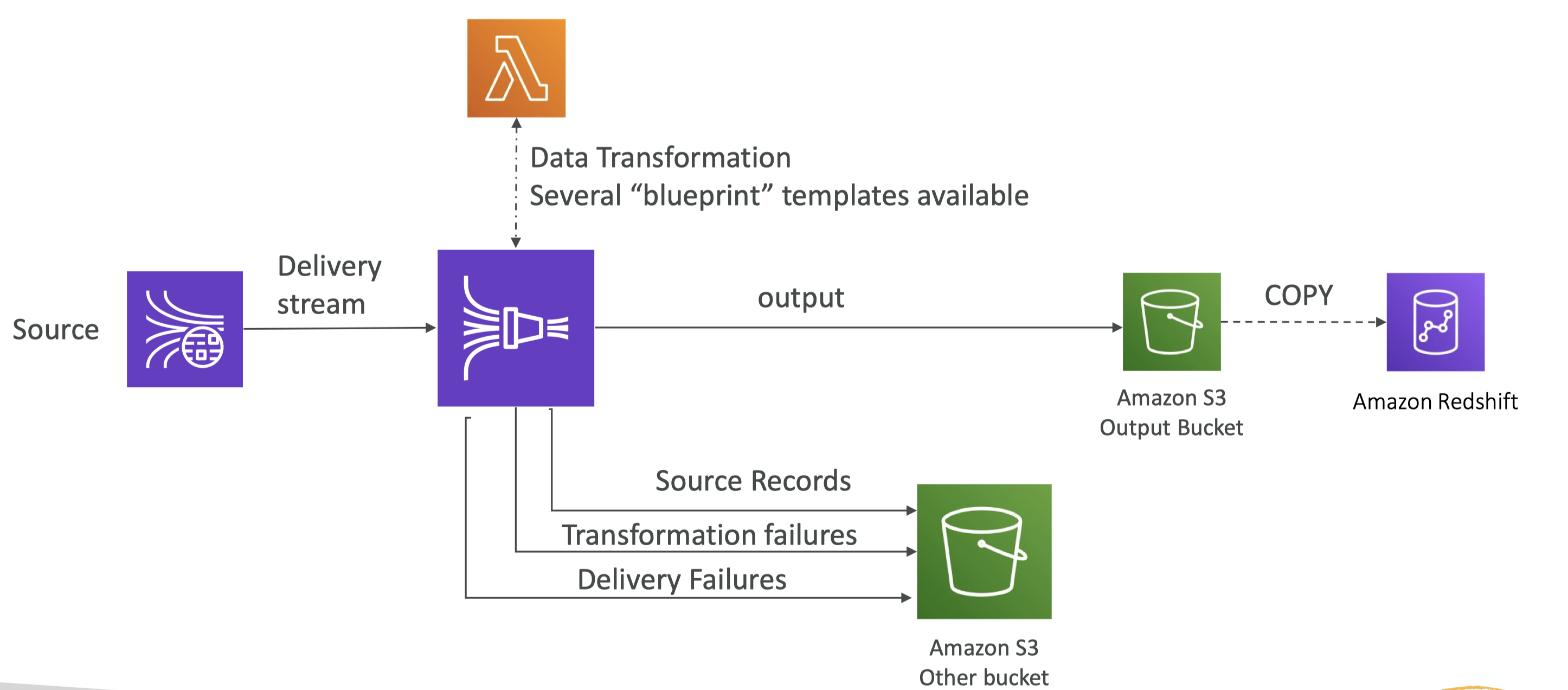
• Data retention is 24 hours by default, can go up to 365 days.• Ability to reprocess/replay data (because it retains it for at least 24 hrs).• Multiple applications can consume the same stream → This is great for a Pub/Sub type architecture.• Once data is inserted in Kinesis, it can’t be deleted (immutability).• Records can be up to 1MB in size → Kinesis Data Streams is great for use cases where a small amount of data going fast through your stream, but not for petabyte scale batch processing.5.2.1. Kinesis Streams - Capacity Modes• For capacity modes you have two options:– Provisioned Mode: * You choose the number of shards provisioned, scale manually or using API.* Each shard gets 1MB/s in (or 1000 records per second).* Each shard gets 2MB/s out (classic or enhanced fan-out consumer).* You pay per shard provisioned per hour.– On-Demand Mode:* No need to provision or manage the capacity.* Default capacity provisioned (4 MB/s in or 4000 records per second).* Scales automatically based on observed throughput peak during the last 30 days.* Pay per stream per hour & data in/out per GB.5.2.2. Kinesis Streams Limitations• Producer:– 1MB/s or 1000 messages/s at write PER SHARD.– “ProvisionedThroughputException” otherwise• Consumer Classic:– 2MB/s at read PER SHARD across all consumers– 5 API calls per second PER SHARD across all consumers– This means that the more capacity you want → You need to add shards.• Data Retention:– 24 hours data retention by default– Can be extended to 365 days5.3. Kinesis Data Firehose• Firehose is used to store data into target destinations (It's meant for delivering the data).• Firehose reads the data from producers (see below). – If we want to transform the record, we could have a Lambda function.– Then, Kinesis Data Firehose try to fill a big batch of data to write that data into a target database or a target destination.• It writes in batches, not instantaneously.– Therefore, it's a near-real-time data service.• In terms of destinations, we could have:– S3– Redshift → to write to Redshift, Firehose first writes to S3 and then issue a copy command into Redshift.– Amazon ElasticSearch– Splunk
Figure 11:Kinesis Data Firehose
• Firehose is a fully-managed service, no administration needed.• Near Real Time (60 seconds latency minimum for non full batches)• Automatic Scaling → There's no capacity to create in advance.• It supports many data formats → Data Conversions from CSV / JSON to Parquet / ORC (only for S3).• Data Transformation through AWS Lambda (ex: CSV => JSON)• Supports compression when target is Amazon S3 (GZIP, ZIP, and SNAPPY).• Pay for the amount of data going through Firehose.
Figure 12:Kinesis Data Firehose in nutshell
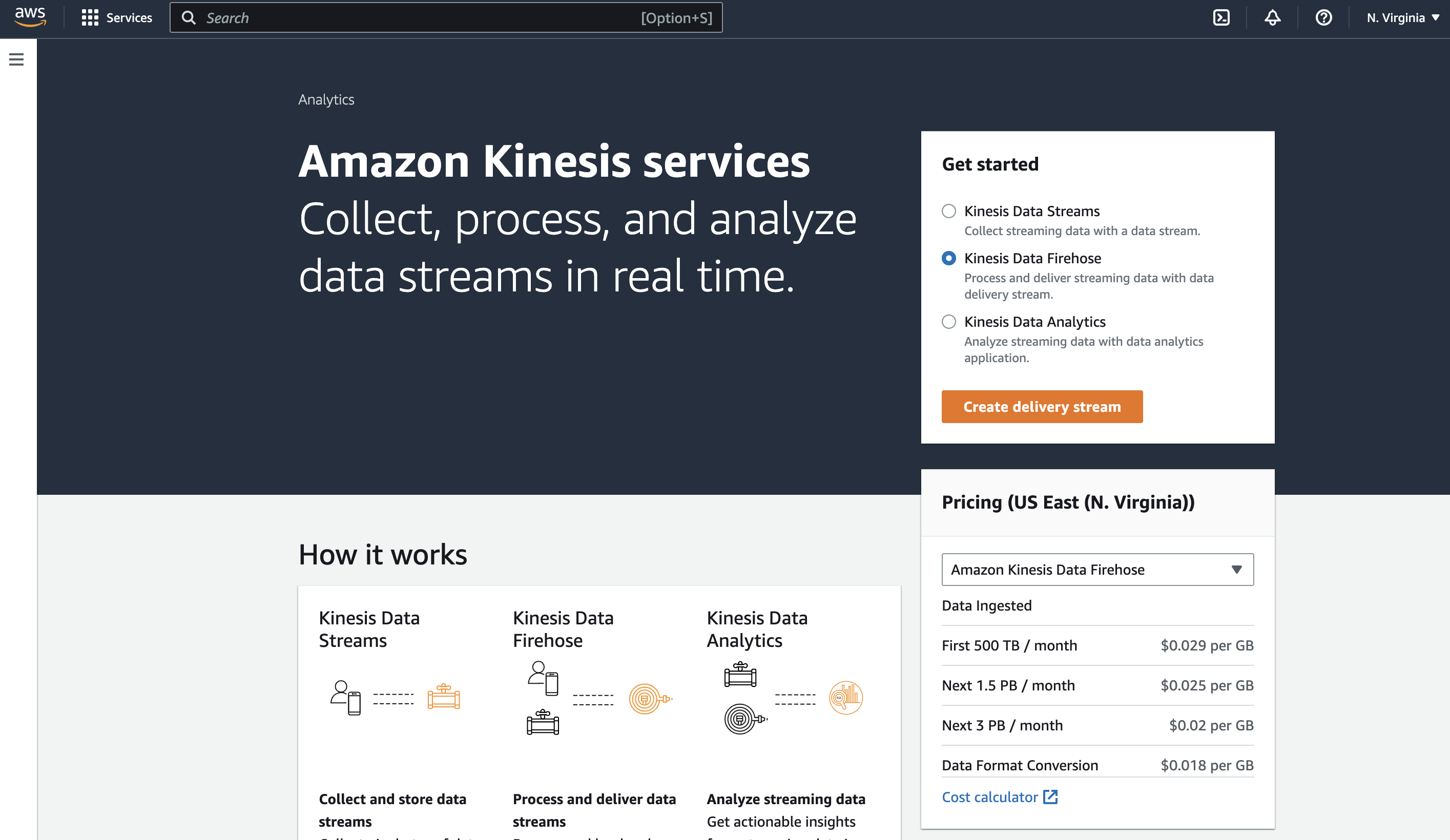
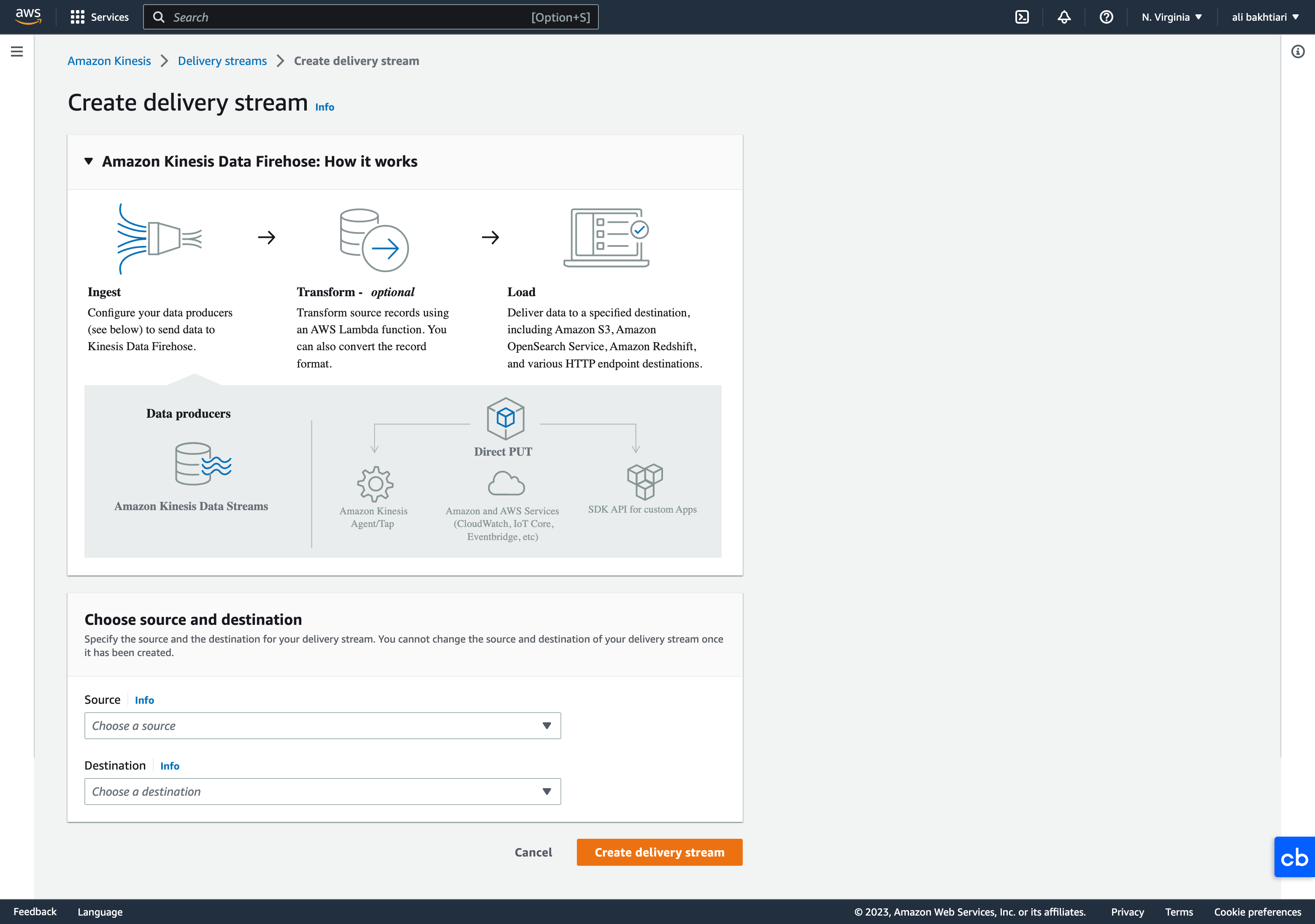
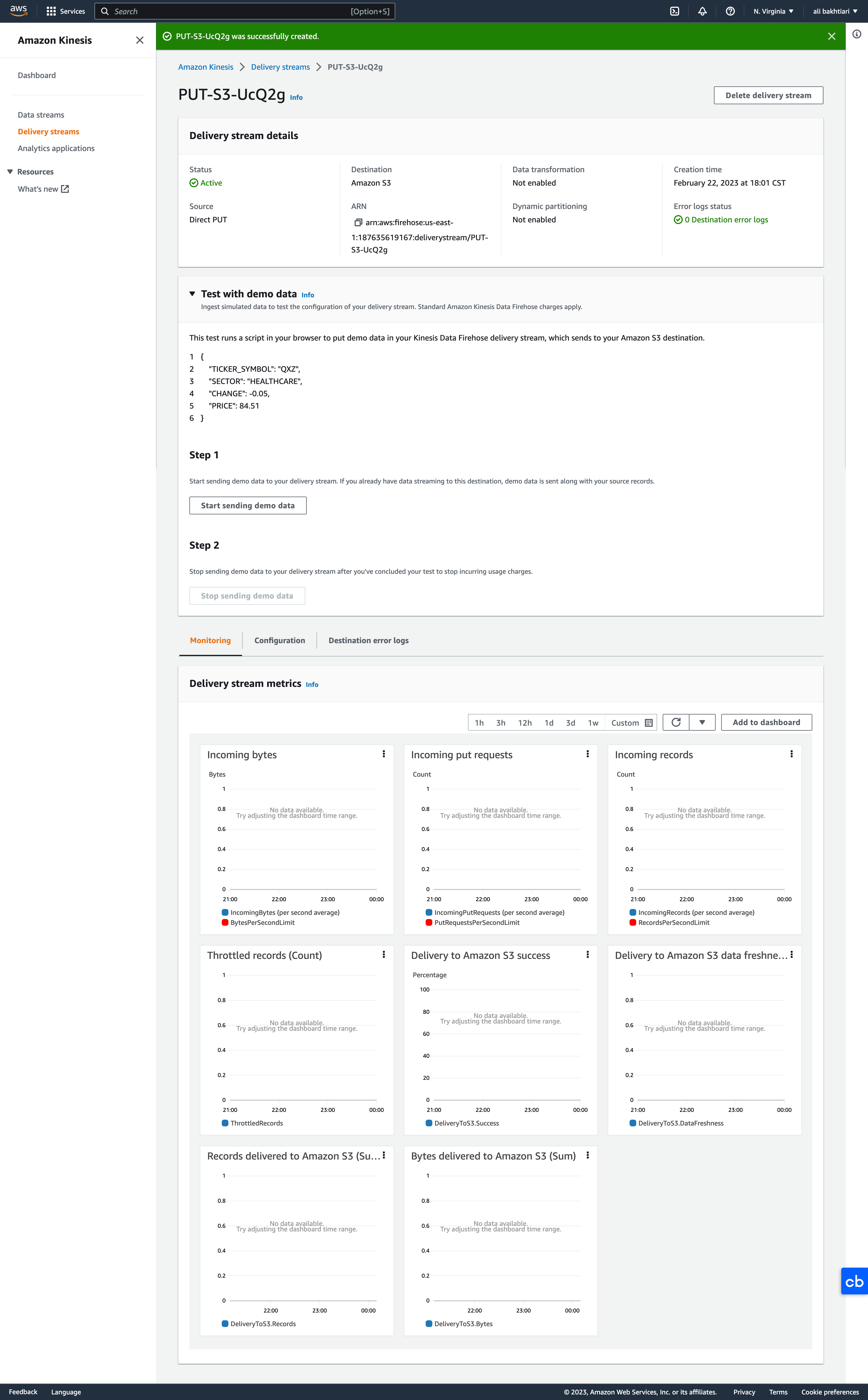
5.3.1. Difference between Firehose and Kinesis Streams• Streams– Going to write custom code (producer / consumer)– Real time (~200 ms latency for classic, ~70 ms latency for enhanced fan-out)– Automatic scaling with On-demand Mode– Data Storage for 1 to 365 days, replay capability, multi consumers• Firehose– Fully managed, send to S3, Splunk, Redshift, ElasticSearch– Serverless data transformations with Lambda– Near real time (lowest buffer time is 1 minute)– Automated Scaling– No data storage5.4. Kinesis Lab• We want to set up a Kinesis Data Firehose (for data delivery). • Search Kinesis in AWS → select Kinesis Data Firehose → Create delivery stream
• For Source, we choose Direct PUT for now, since we haven't set up a Kinesis Data Stream, and besides, Direct PUT is the cheaper option.• For Destination, we can choose Amazon S3.
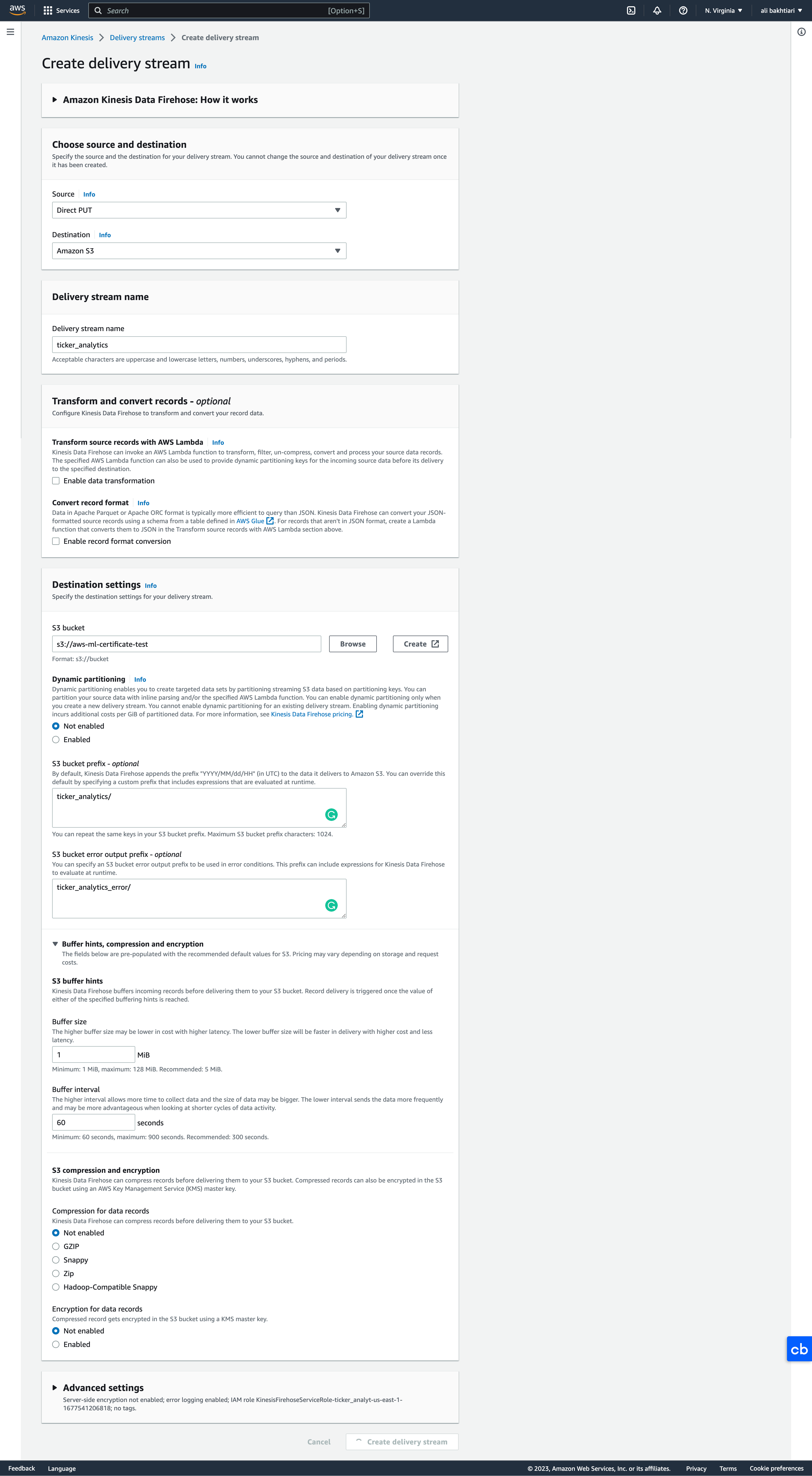
• Below, you can see all the options when creating a delivery system with Kinesis:
Figure 13:Create Kinesis delivery system
• Once the delivery system is created, we can view/modify different things through its console page:
Figure 14:Kinesis Firehose Console
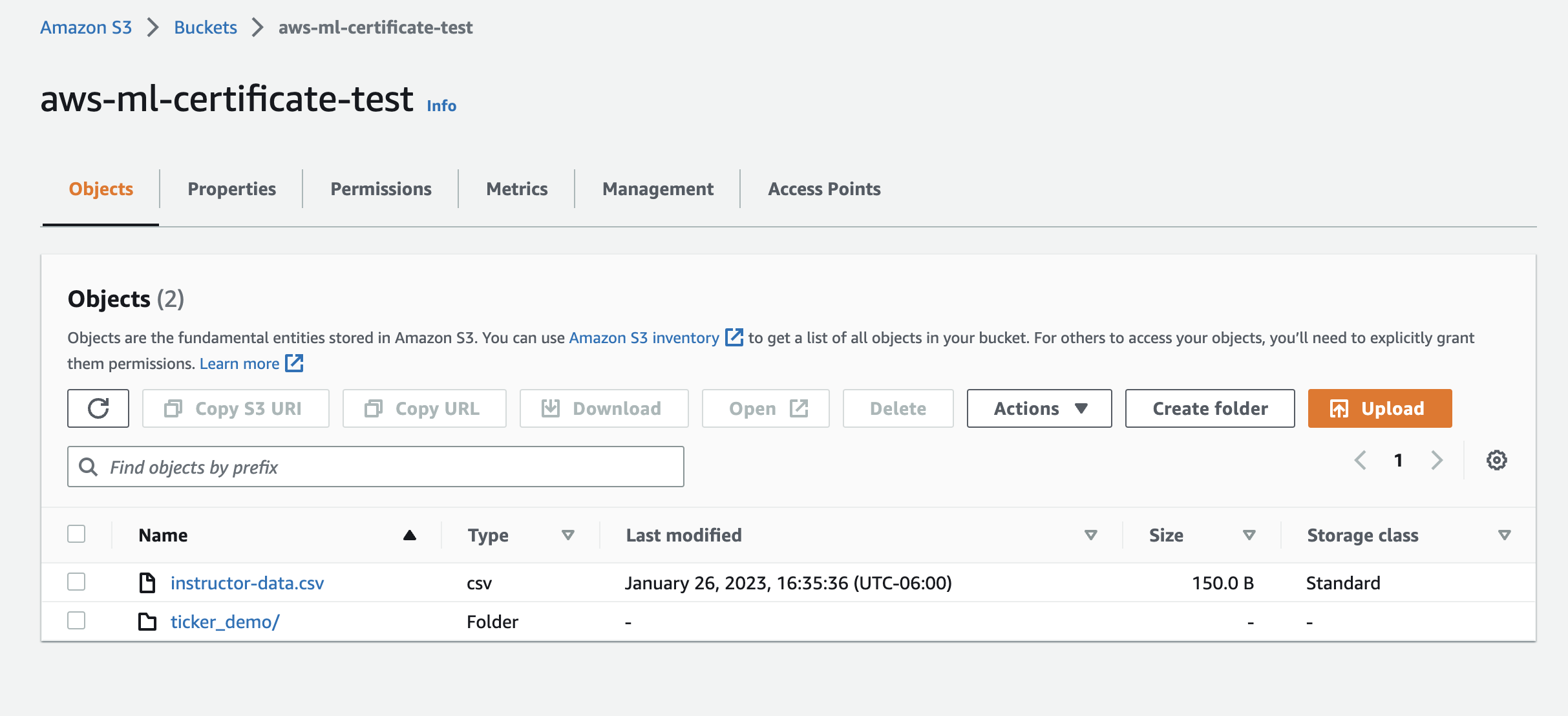
• To check if the system works, we can click on Start sending demo data from the Test with demo data section.– It will take 60 seconds (Firehose is near real-time) to receive the data in the S3 bucket.– They will show up under the "ticker_demo" folder that we set up when creating the delivery system.
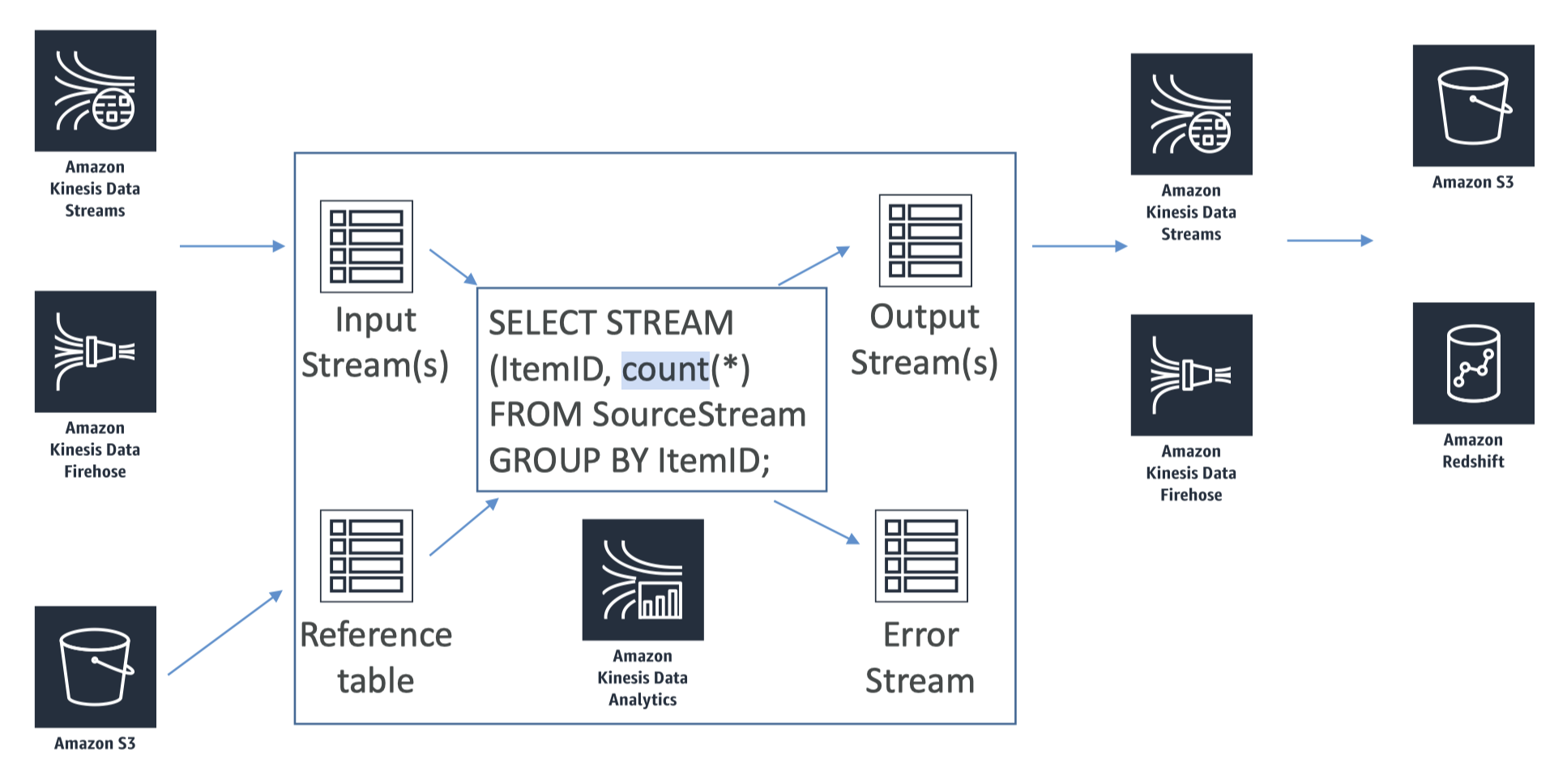
5.5. Kinesis Data Analytics• Now that we've on-boarded our data into Kinesis, we may to perform some real time analytics on it → For this we can use Kinesis Data Analytics.• Kinesis Data Analytics will take the data either from Kinesis Data Streams or Kinesis Data Firehose. → performs some stuff in SQL language → output can be sent to analytics tools or output destinations.• Figure 15 shows how it works:
Figure 15:Kinesis Data Analytics
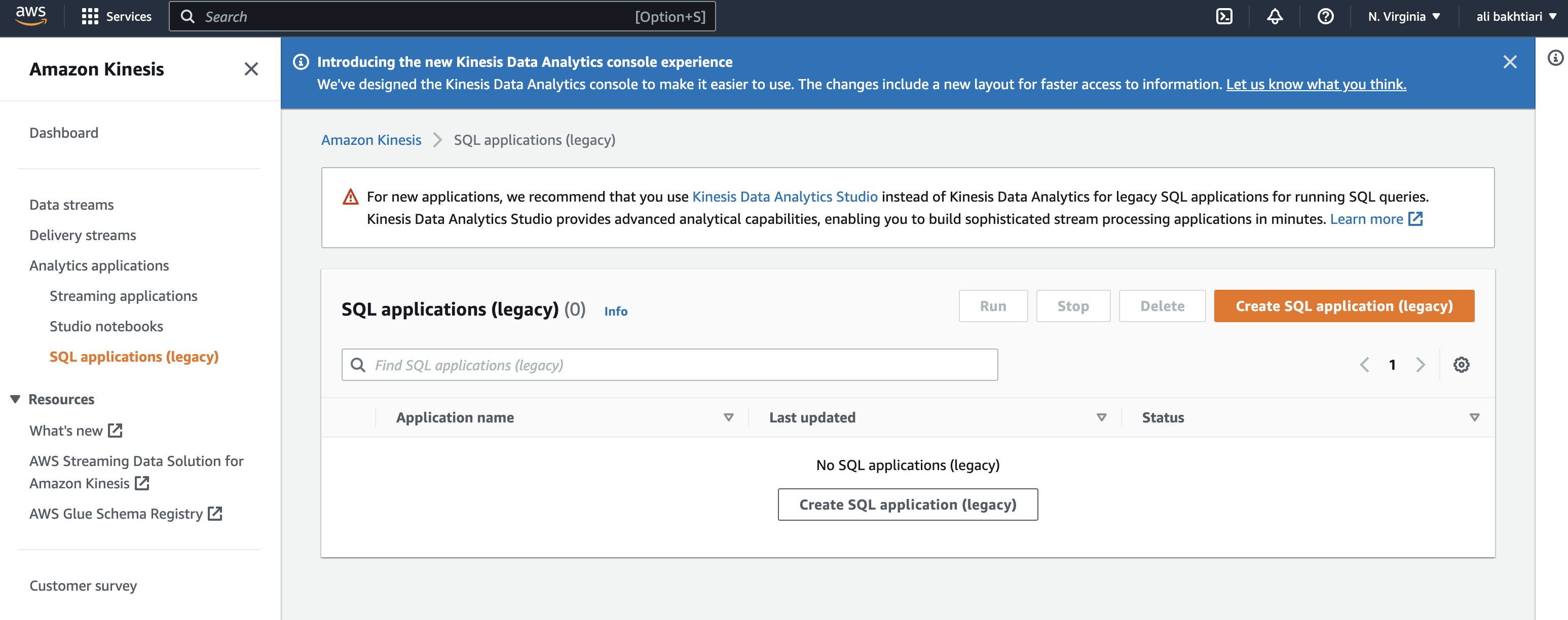
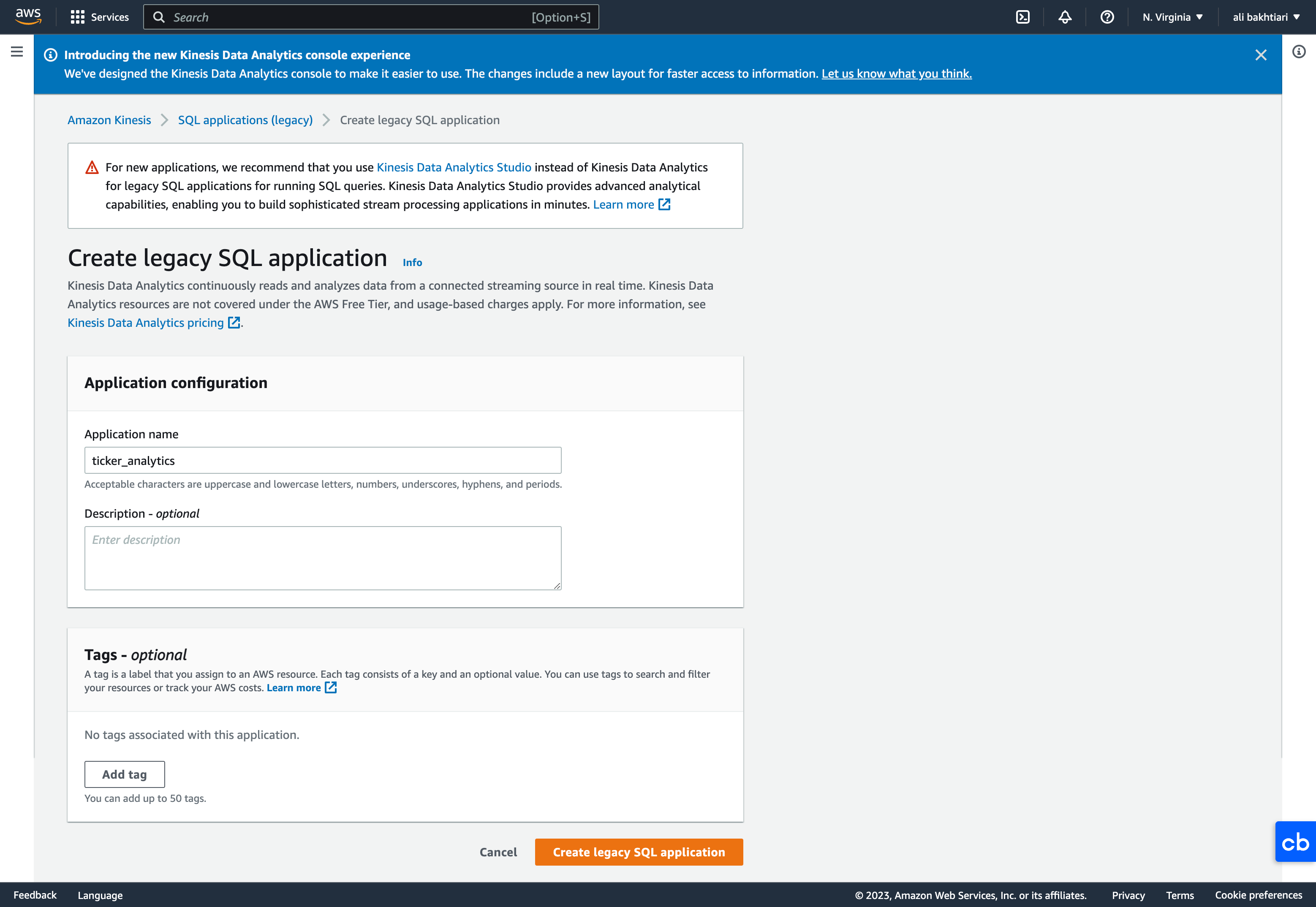
• Use cases:– Streaming ETL: select columns, make simple transformations, on streaming data– Continuous metric generation: live leaderboard for a mobile game– Responsive analytics: look for certain criteria and build alerting (filtering)• Features:– Pay only for resources consumed (but it’s not cheap)– Serverless; scales automatically– Use IAM permissions to access streaming source and destination(s)– SQL or Flink to write the computation– Schema discovery– Lambda can be used for pre-processing5.5.1. Machine Learning on Kinesis Data Analytics• There are two algorithms that you can do directly:– RANDOM_CUT_FOREST* SQL function used for anomaly detection on numeric columns in a stream.* This is an algorithm that adapts over time, so it only uses resources recent history to compute the model.* Example: detect anomalous subway ridership during the NYC marathon.– HOTSPOTS* Locate and return information about relatively dense regions in your data.* Example: A collection of overheated servers in a data center.5.5.2. Kinesis Data Analytics: Lab• Before starting this lab, go to Kinesis Firehose → click "start sending demo data".• Amazon Kinesis → Analytics applications:– Streaming applications → representing Apache Flink → a way more powerful application– SQL applications → We're using this option for this lab, because it's easier and requires less coding → This option lets us writing SQL query directly to our Kinesis Firehose streaming data.– Studio notebooks → This option did not exist when this course was recorded.• SQL applications → Create SQL application (legacy)
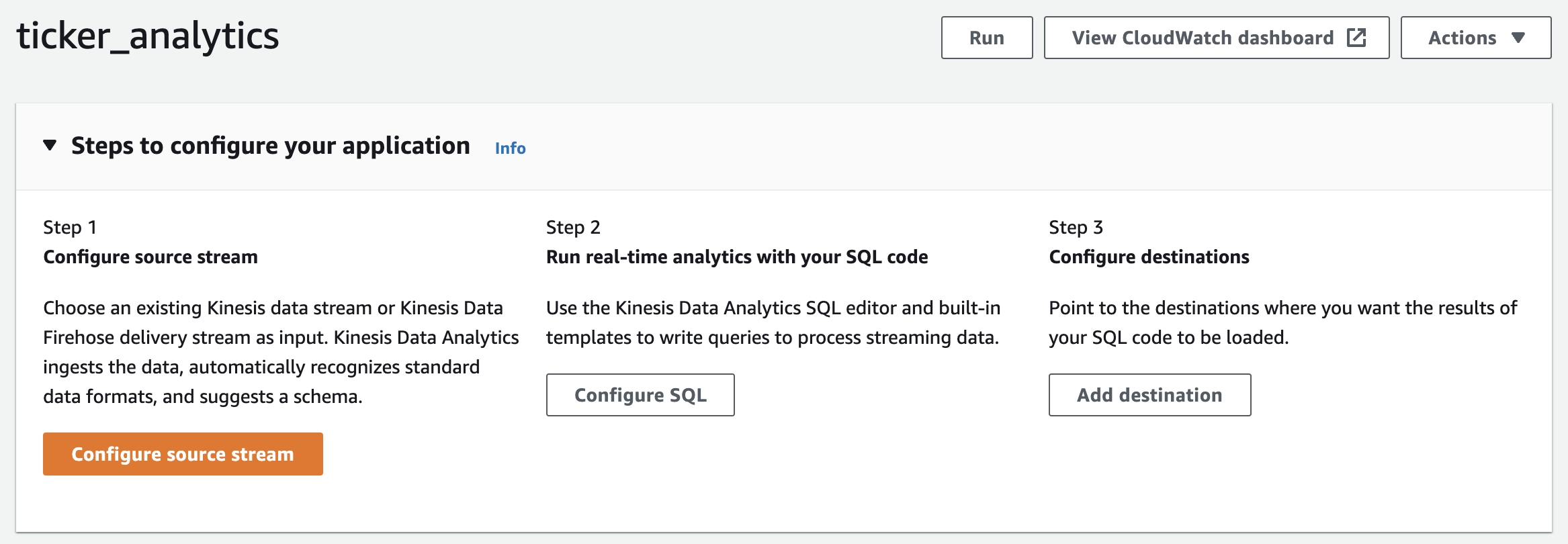
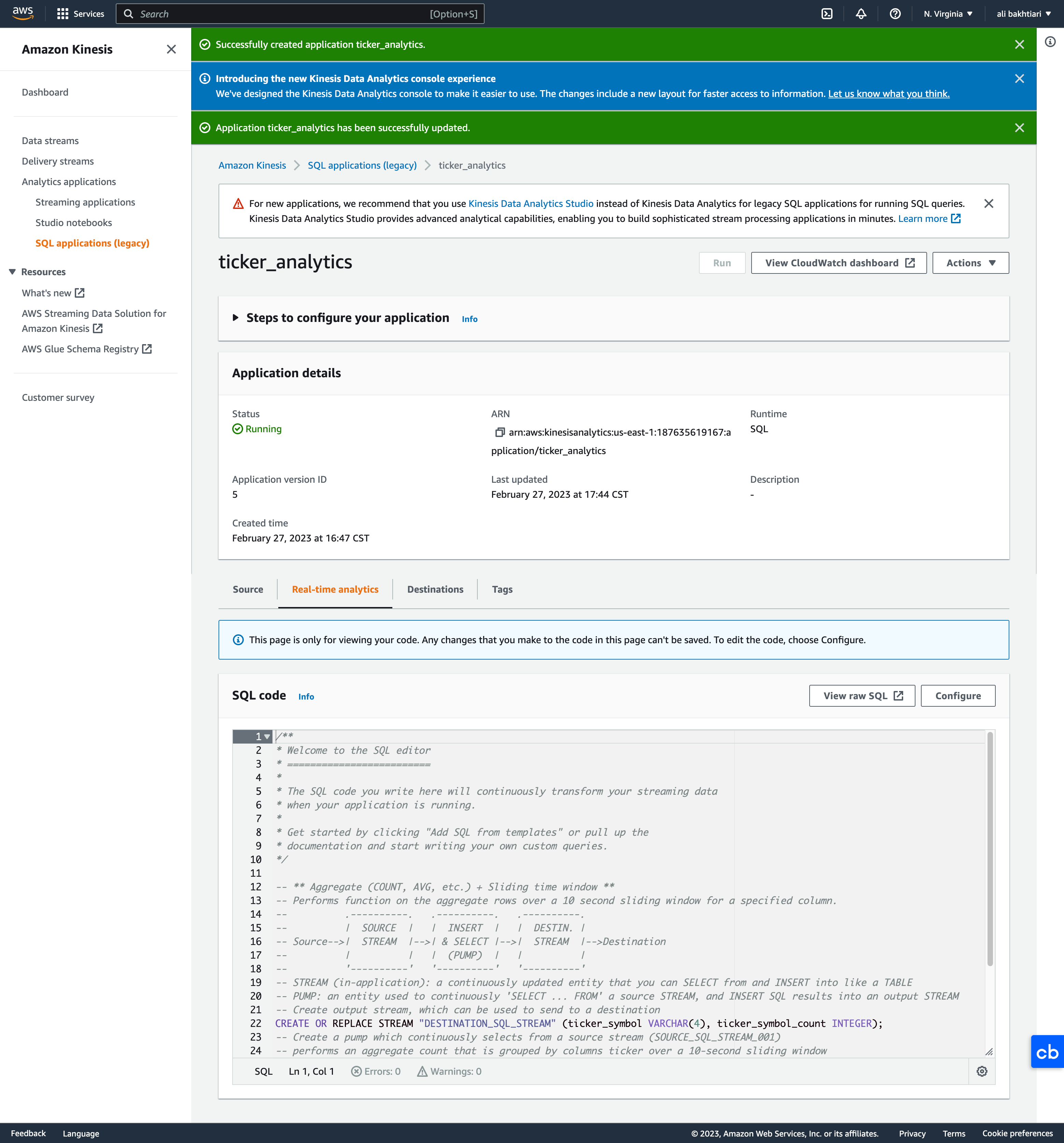
• Once we created the application, we need to configure three things:– Configure source stream– Run real-time analytics with your SQL code– Configure destinations
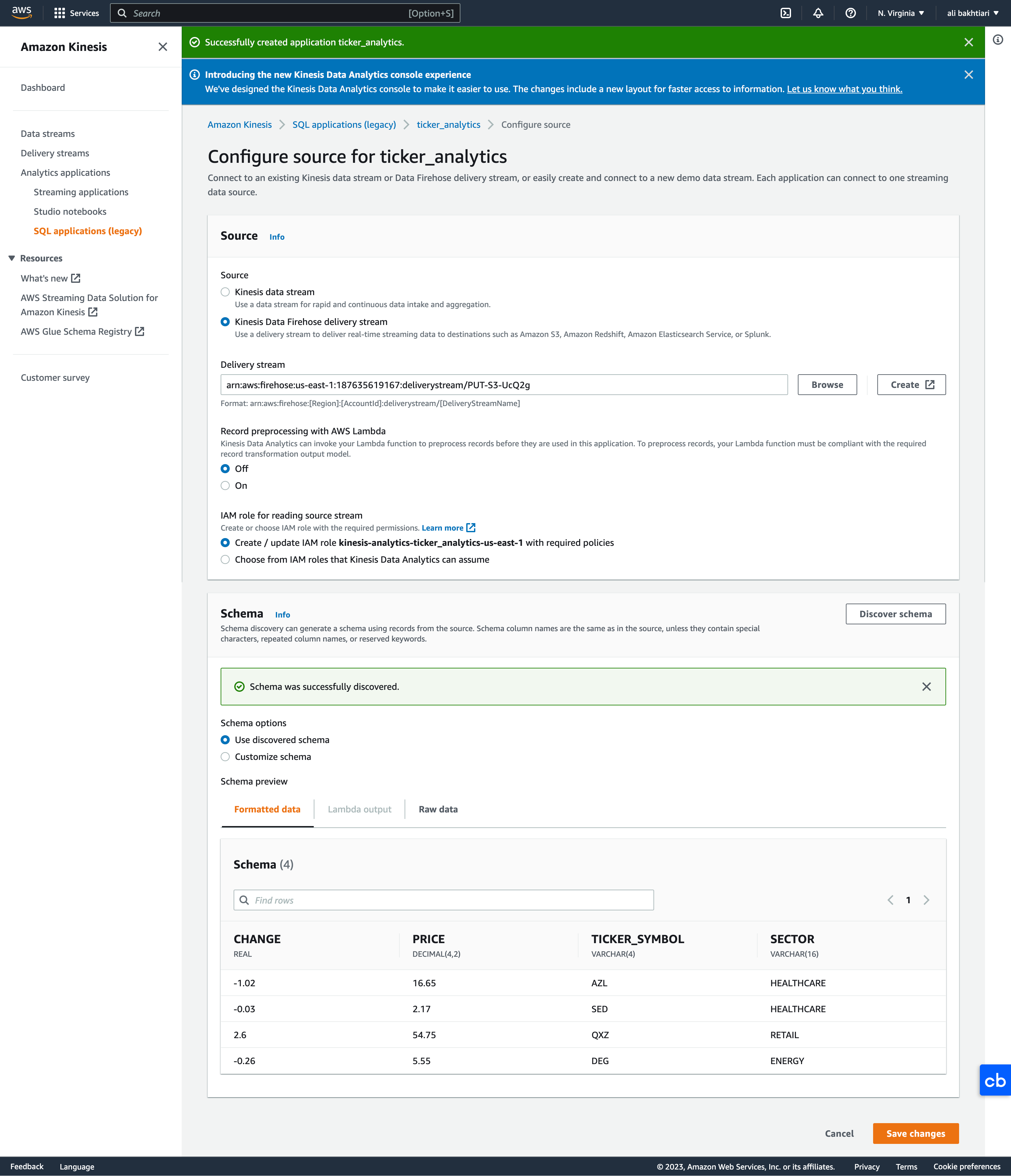
• Configure source stream– Note: To avoid getting error from "Discover schema", you should be streaming data from Firehose. If not, you'll get an error. * Generally, this may take a few times of getting error to work.
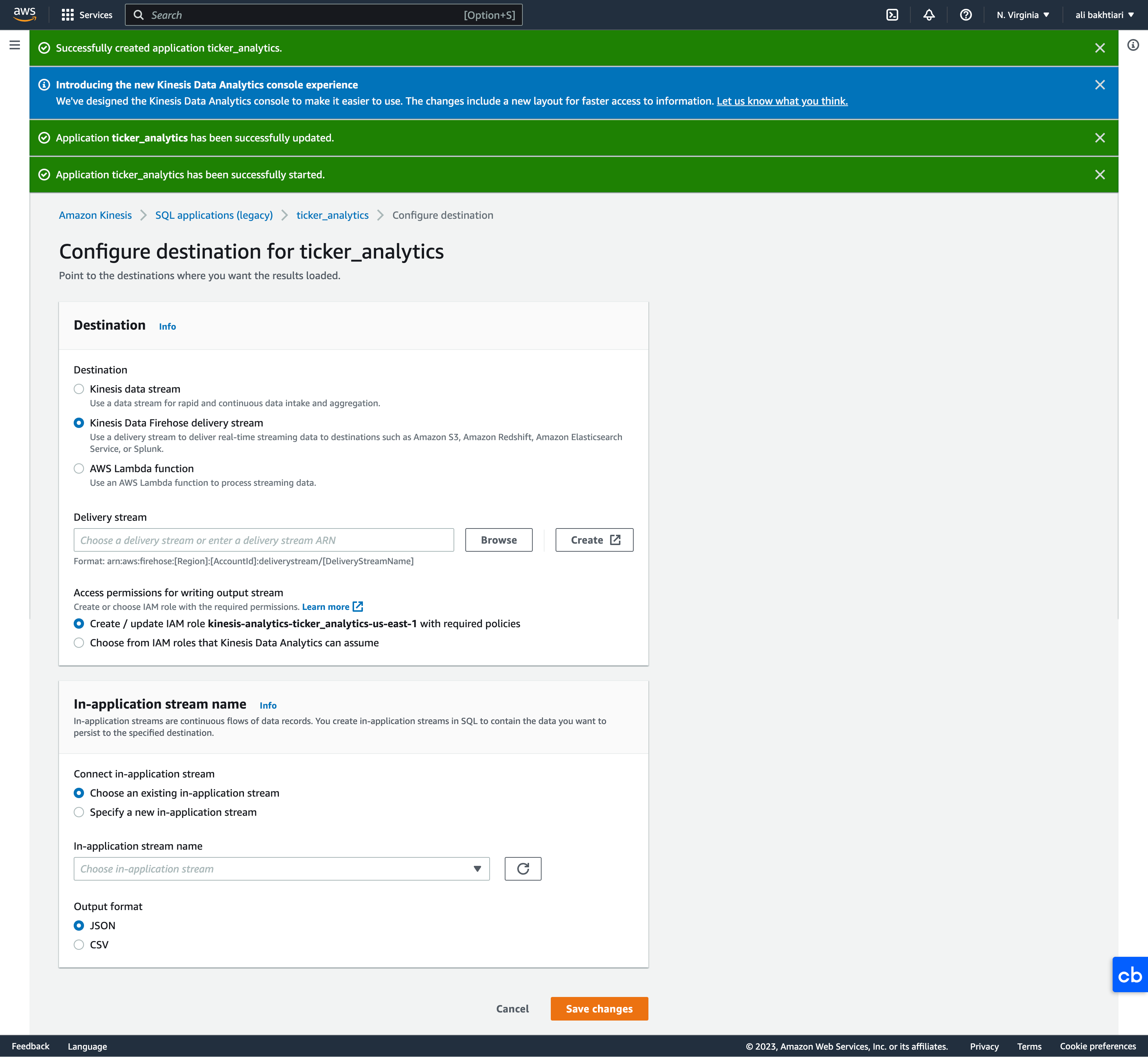
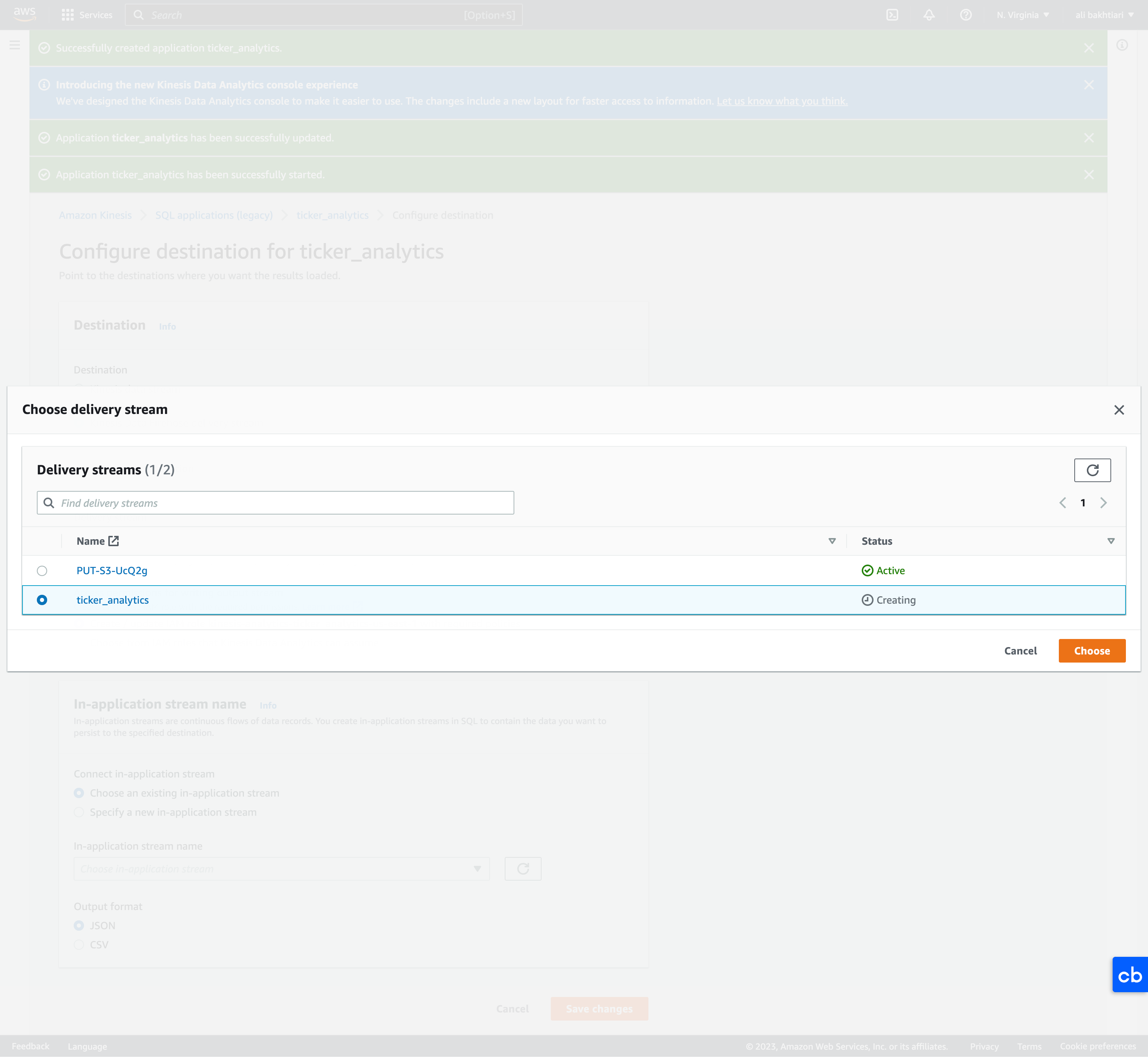
• Configure SQL– Here, we just choose a SQL from the templates → Append SQL to the editor → Save and run application* Note: Running application will cost you money. Make sure to stop it when you're done.– Once it started running, then we can go and configure the destinations.• Configure destinations– Configure destinations → Add destination → Kinesis Data Firehose delivery stream → Create* We create a new bucket for delivery and storing the analytics.· Source → Direct PUT· Destination → Amazon S3* Once we created the new bucket, we're going "Browse" it and set it as destination.
Figure 18:Setting destinations
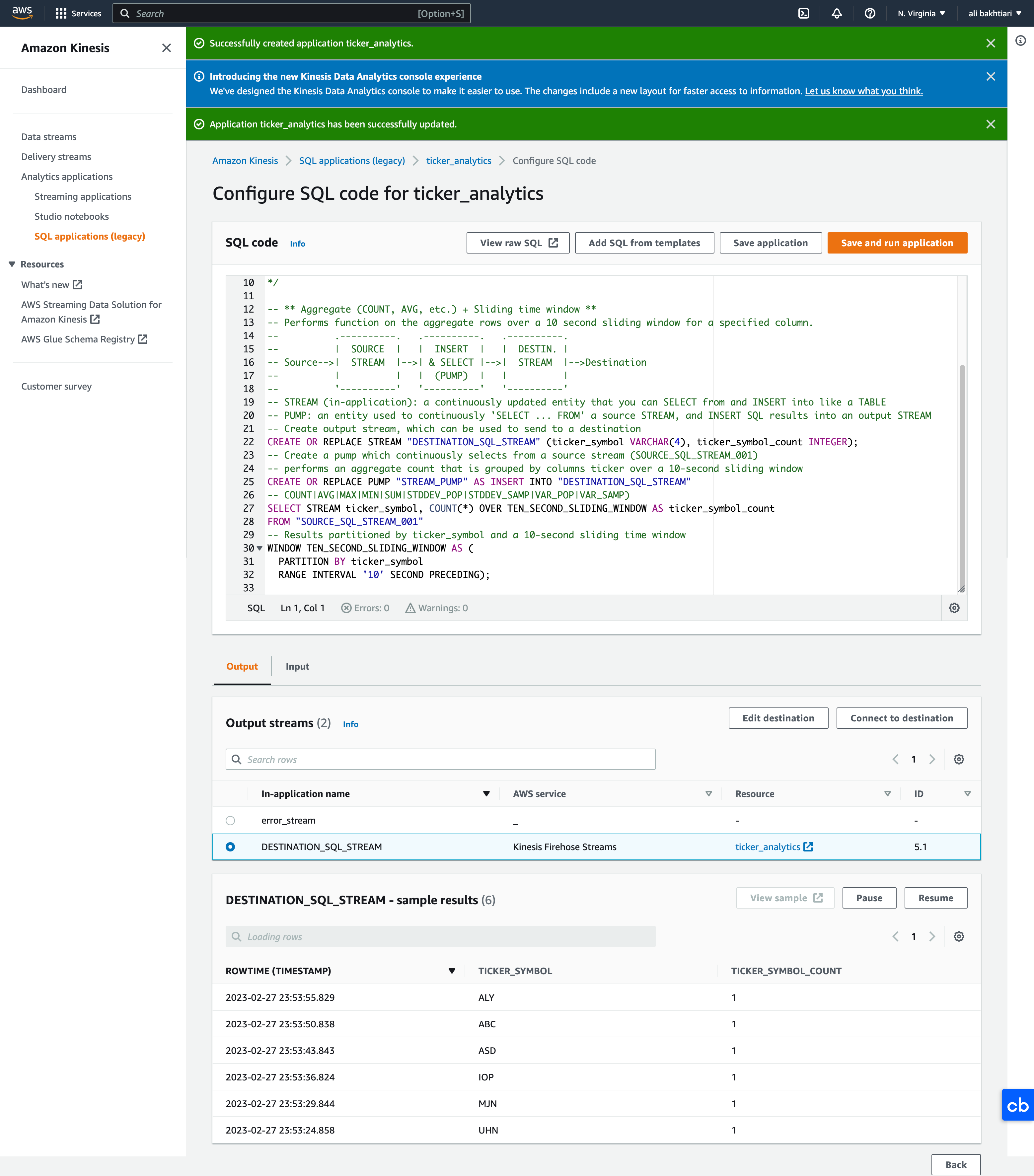
• Real-time analytics– Once the application started running, we can go to Real-time analytics and check the incoming data.
Figure 19:Kinesis Data Analytics output
5.6. Kinesis Video Streams• Producers:– Security camera– body camera– AWS DeepLens– smartphone camera– audio feeds– images– RADAR data– RTSP camera• Video playback capability → i.e. ability to show the live video to the users• Consumers:– build your own (Tensorflow)– AWS SageMaker– Amazon Rekognition Video• Keep data for 1 hour to 10 years.
5.7. Kinesis Summary• Kinesis Data Streams → create real-time ML applications• Kinesis Data Firehose → ingest massive data near real time• Kinesis Data Analytics → real-time ETL/ML algorithms on streams• Kinesis Video Streams → real-time video stream to create ML applications[Back To Top]
6. Glue Data Catalog and Crawlers• Glue Data Catalog is a metadata repository for all your tables within your accounts. It'll have the following elements:– Automated schema inference– Schemas are versioned• This metadata repository has integration with Athena or Redshift Spectrum (schema & data discovery).• Glue Crawlers can help build the Glue Data Catalog.– Crawlers would go around all your data tables, databases, and S3 buckets and figure out what data is there for you.
Figure 21:Glue Data Catalog
6.1. Crawlers• Crawlers go through your data to infer schemas and partitions.• Works JSON, Parquet, CSV, relational store.• Crawlers work for: S3, Amazon Redshift, Amazon RDS.• Run the Crawler on a Schedule or On Demand.• Need an IAM role/credentials to access the data stores.6.2. Glue and S3 Partitions• Glue crawler will extract partitions based on how your S3 data is organized.• Think up front about how you will be querying your data lake in S3.– Example: devices send sensor data every hour.• Do you query primarily by time ranges?– If so, organize your buckets as s3://my-bucket/dataset/yyyy/mm/dd/device• Do you query primarily by device?– If so, organize your buckets as s3://my-bucket/dataset/device/yyyy/mm/dd6.3. Lab: Glue Data Catalog• Notes here.6.4. Glue ETL• Transform data, Clean Data, Enrich Data (before doing analysis)– Generate ETL code in Python or Scala, you can modify the code.– Can provide your own Spark or PySpark scripts.– Target can be S3, JDBC (RDS, Redshift), or in Glue Data Catalog.• Fully managed, cost effective, pay only for the resources consumed• Jobs are run on a serverless Spark platform• Glue Scheduler to schedule the jobs • Glue Triggers to automate job runs based on “events”.6.4.1. Glue ETL - Transformations• Bundled Transformations:– DropFields, DropNullFields – remove (null) fields– Filter – specify a function to filter records– Join – to enrich data– Map - add fields, delete fields, perform external lookups.• Machine Learning Transformations:– FindMatches ML:identify duplicate or matching records in your dataset, even when the records do not have a common unique identifier and no fields match exactly.• Format conversions: CSV, JSON, Avro, Parquet, ORC, XML• Apache Spark transformations (example: K-Means)6.5. Lab: Glue ETL• Notes here.6.6. Lab: Athena• Notes here.6.7. Lab: Cleanup• Notes here.[Back To Top]
7. AWS Data Stores for Machine Learning7.1. Redshift• Data Warehousing, SQL analytics (OLAP - Online analytical processing)• When you need to run massively parallel SQL queries to perform some analytics, then Redshift is the way to go.• Need to load data from S3 to Redshift• Use Redshift Spectrum to query data directly in S3 (no loading)• Columnar-based7.2. RDS, Aurora• Relational Store, SQL (OLTP Online Transaction Processing)• RDS may be used for example if you want to store a little bit of data regarding your model for exports → but it will not be used directly for machine learning.• Must provision servers in advance.• Row-based7.3. DynamoDB• NoSQL data store• Serverless• Provision read/write capacity• Useful to store a machine learning model served by your application– You'll not be using it directly for ML but the model output may be stored into DynamoDB.7.4. S3• Object storage• Serverless• Infinite storage• Integration with most AWS Services7.5. OpenSearch (previously ElasticSearch)• Indexing of data• Search amongst data points• Clickstream Analytics7.6. ElastiCache• Caching mechanism• Not really used for machine learning[Back To Top]
8. AWS Data Pipeline• Destinations include: – S3– RDS– DynamoDB– Redshift – EMR• Manages task dependencies• Retries and notifies on failures• Data sources may be on-premises• Highly available
Figure 22:AWS Data Pipeline
8.1. AWS Data Pipeline vs Glue• Glue– Glue ETL - Run Apache Spark code, Scala or Python based, focus on the ETL.– Glue ETL - Do not worry about configuring or managing the resources.– Data Catalog to make the data available to Athena or Redshift Spectrum.– • Data Pipeline– Orchestration service– More control over the environment, compute resources that run code, & code– Allows access to EC2 or EMR instances (creates resources in your own account)[Back To Top]
9. AWS Batch• Run batch jobs as Docker images• Dynamic provisioning of the instances (EC2 & Spot Instances)• Optimal quantity and type based on volume and requirements• No need to manage clusters, fully serverless• You just pay for the underlying EC2 instances• Schedule Batch Jobs using CloudWatch Events• Orchestrate Batch Jobs using AWS Step Functions9.1. AWS Batch vs Glue• Glue– Glue ETL - Run Apache Spark code, Scala or Python based, focus on the ETL– Glue ETL - Do not worry about configuring or managing the resources– Data Catalog to make the data available to Athena or Redshift Spectrum– • Batch– For any computing job regardless of the job (must provide Docker image)– Resources are created in your account, managed by Batch– For any non-ETL related work, Batch is probably better[Back To Top]
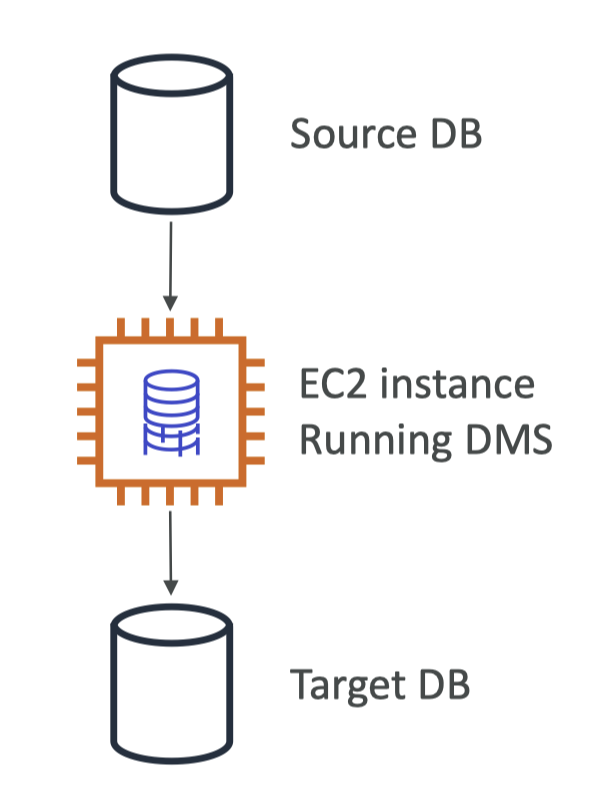
10. DMS – Database Migration Service• Quickly and securely migrate databases to AWS, resilient, self healing• The source database remains available during the migration• Supports:– Homogeneous migrations: ex Oracle to Oracle– Heterogeneous migrations: ex Microsoft SQL Server to Aurora• Continuous Data Replication using CDC• You must create an EC2 instance to perform the replication tasks
10.1. AWS DMS vs Glue• Glue– Glue ETL - Run Apache Spark code, Scala or Python based, focus on the ETL– Glue ETL - Do not worry about configuring or managing the resources– Data Catalog to make the data available to Athena or Redshift Spectrum• AWS DMS– Continuous Data Replication– No data transformation– Once the data is in AWS, you can use Glue to transform it[Back To Top]
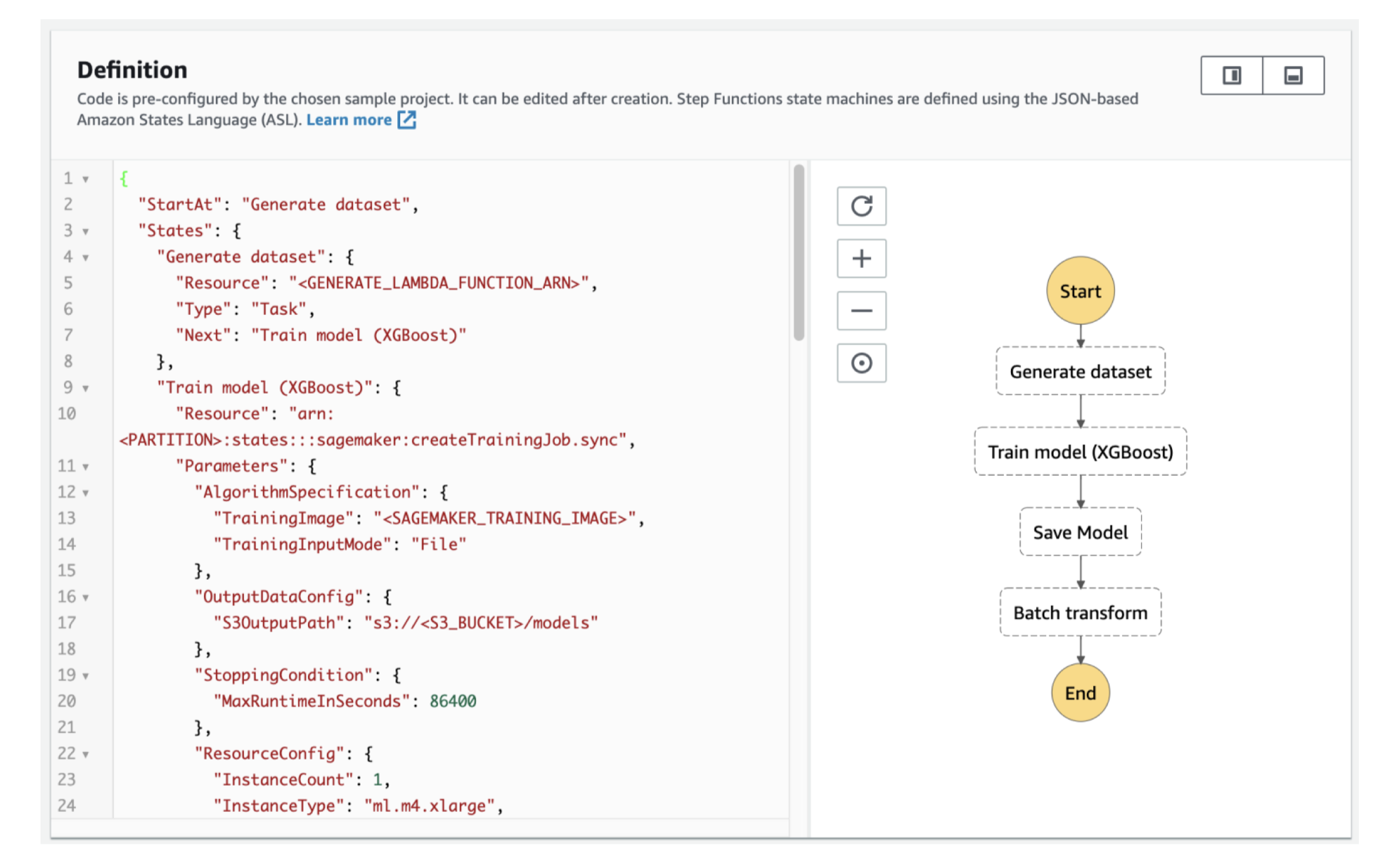
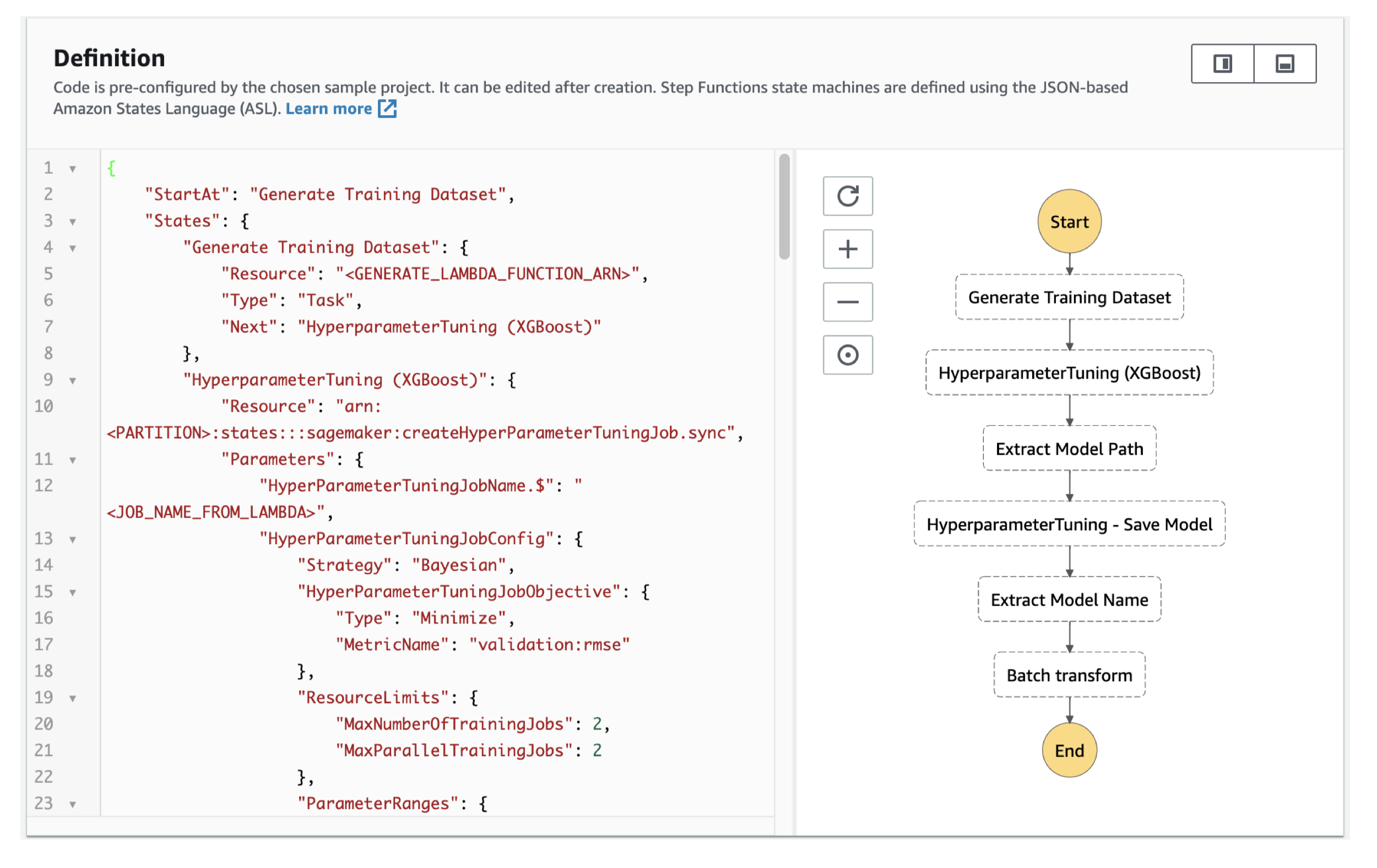
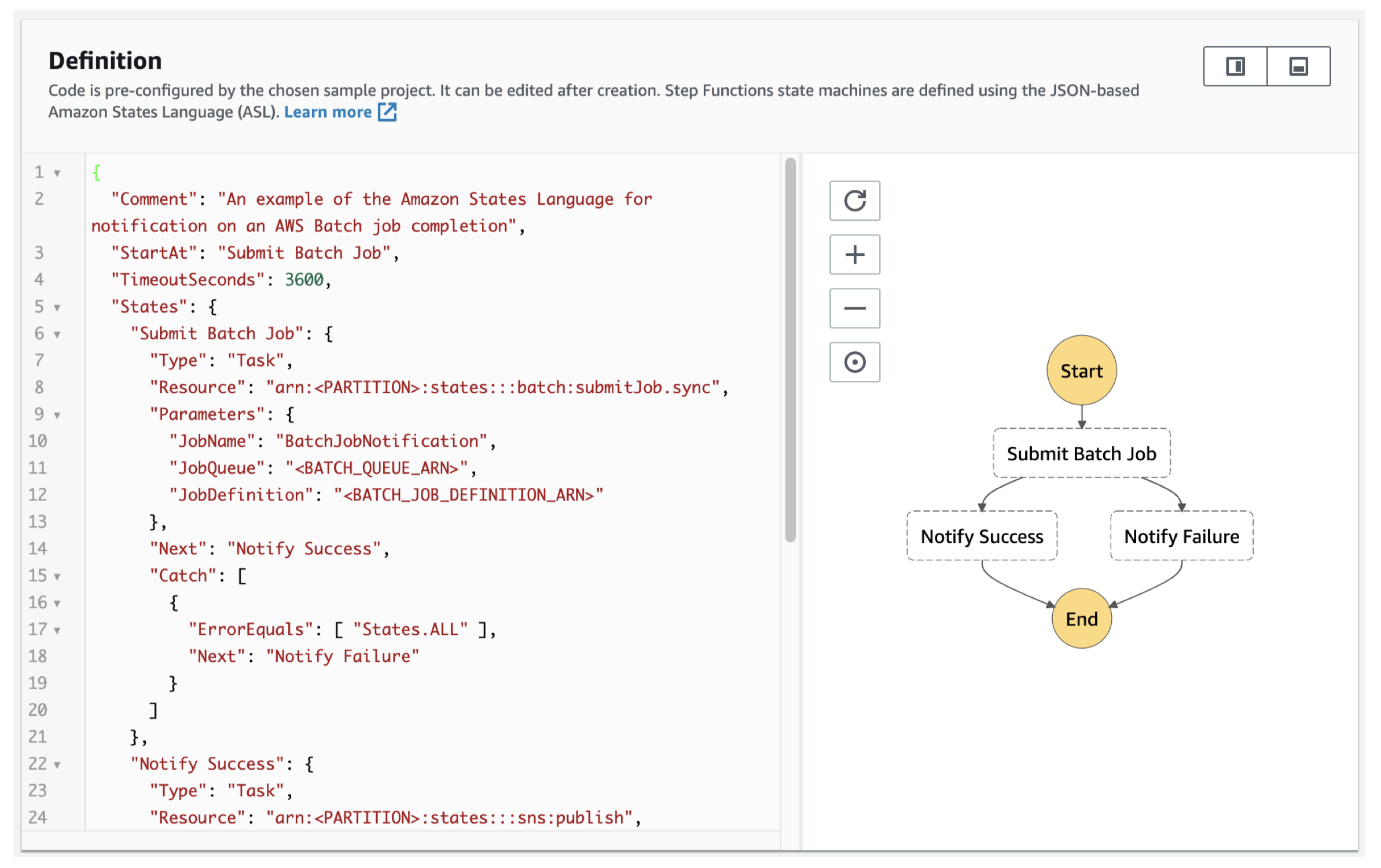
11. AWS Step Functions• Use to design workflows• Easy visualizations• Advanced Error Handling and Retry mechanism outside the code• Audit of the history of workflows• Ability to “Wait” for an arbitrary amount of time• Max execution time of a State Machine is 1 year
Figure 23:Step Functions – Examples Train a Machine Learning Mode
Figure 24:Step Functions – Examples Tune a Machine Learning Model
Figure 25:Step Functions – Examples Manage a Batch Job
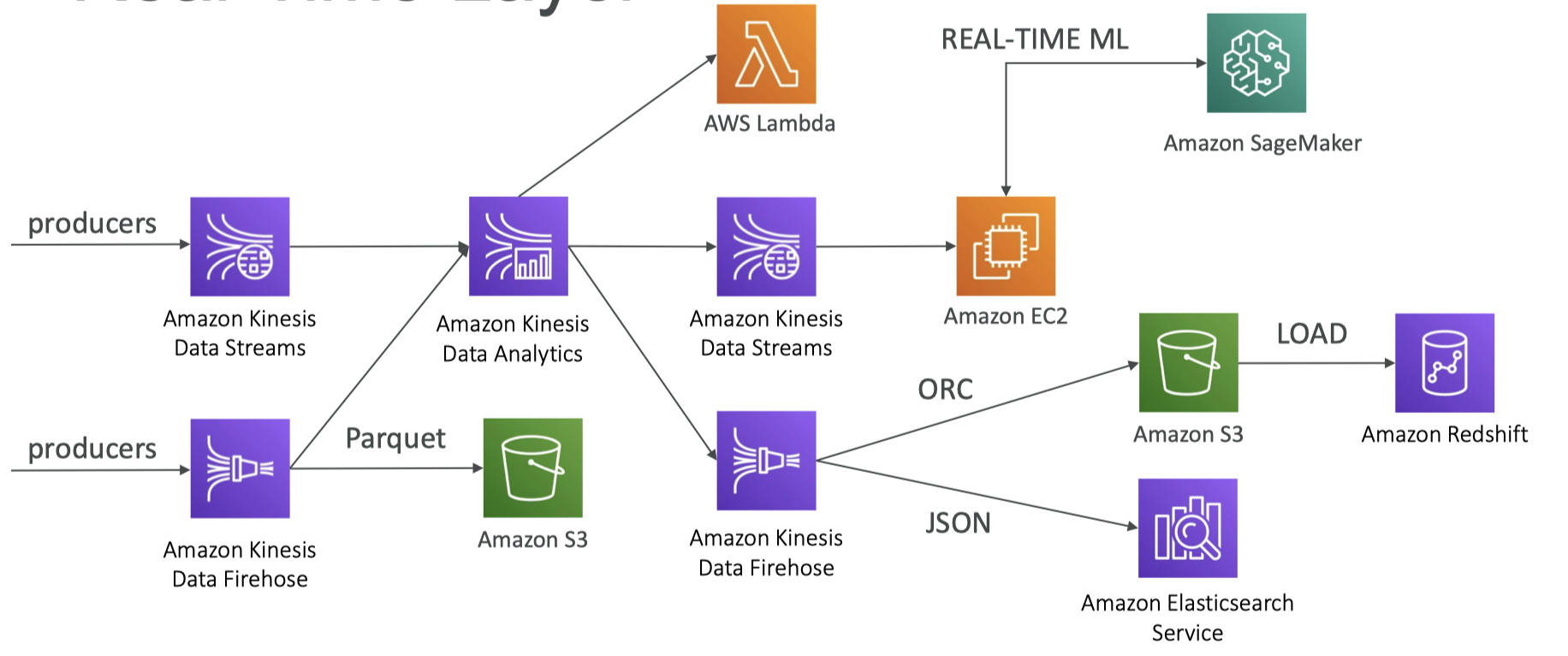
12. Full Data Engineering Pipeline Real-Time Layer
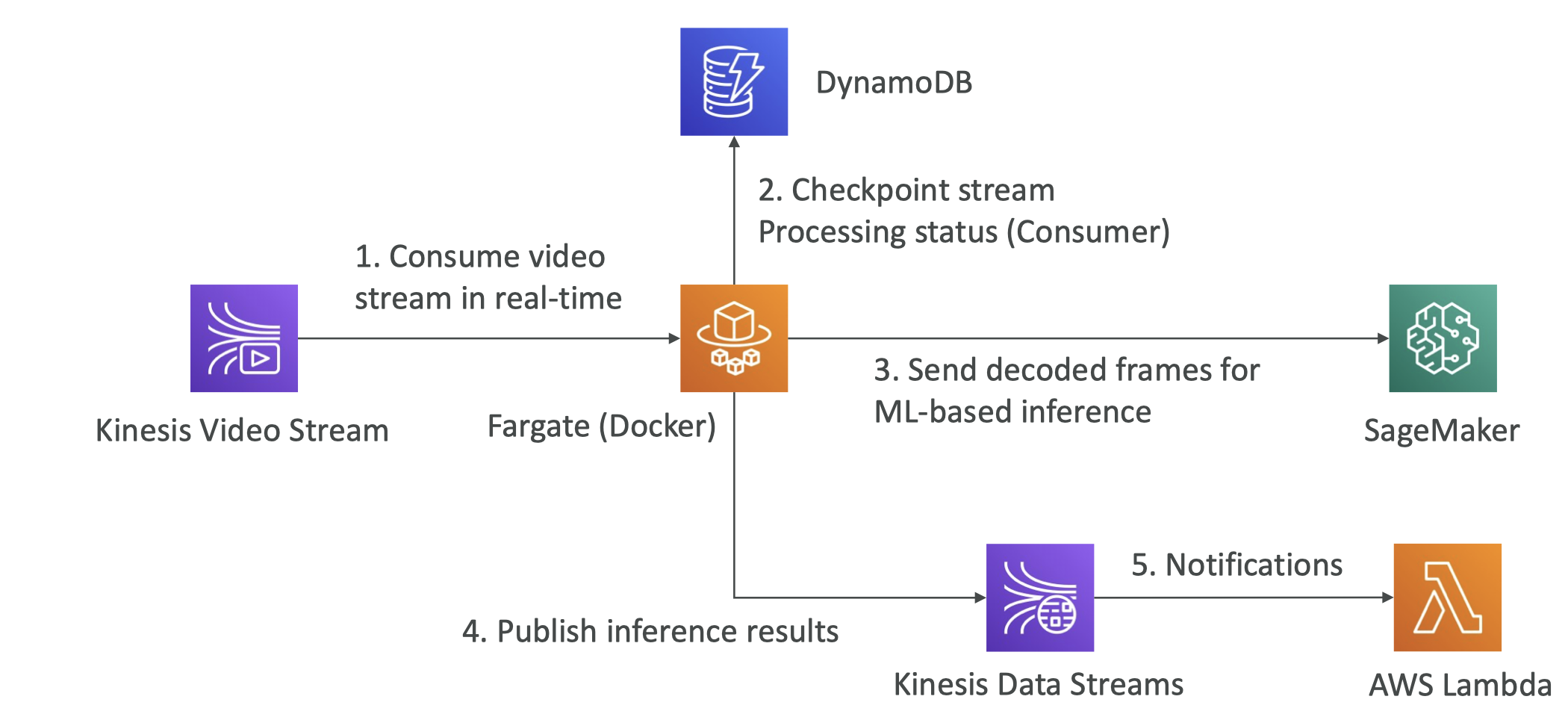
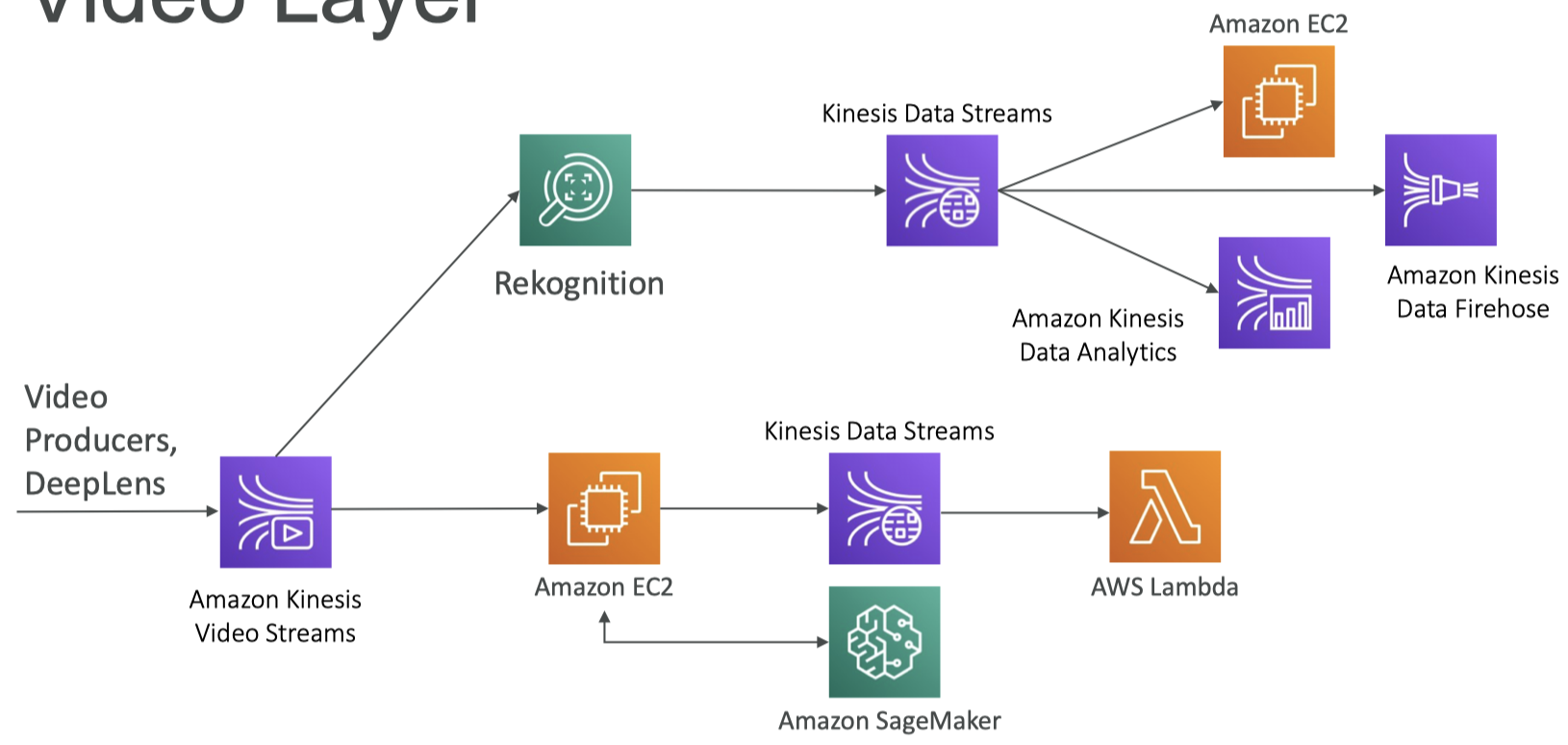
13. Full Data Engineering Pipeline Video Layer
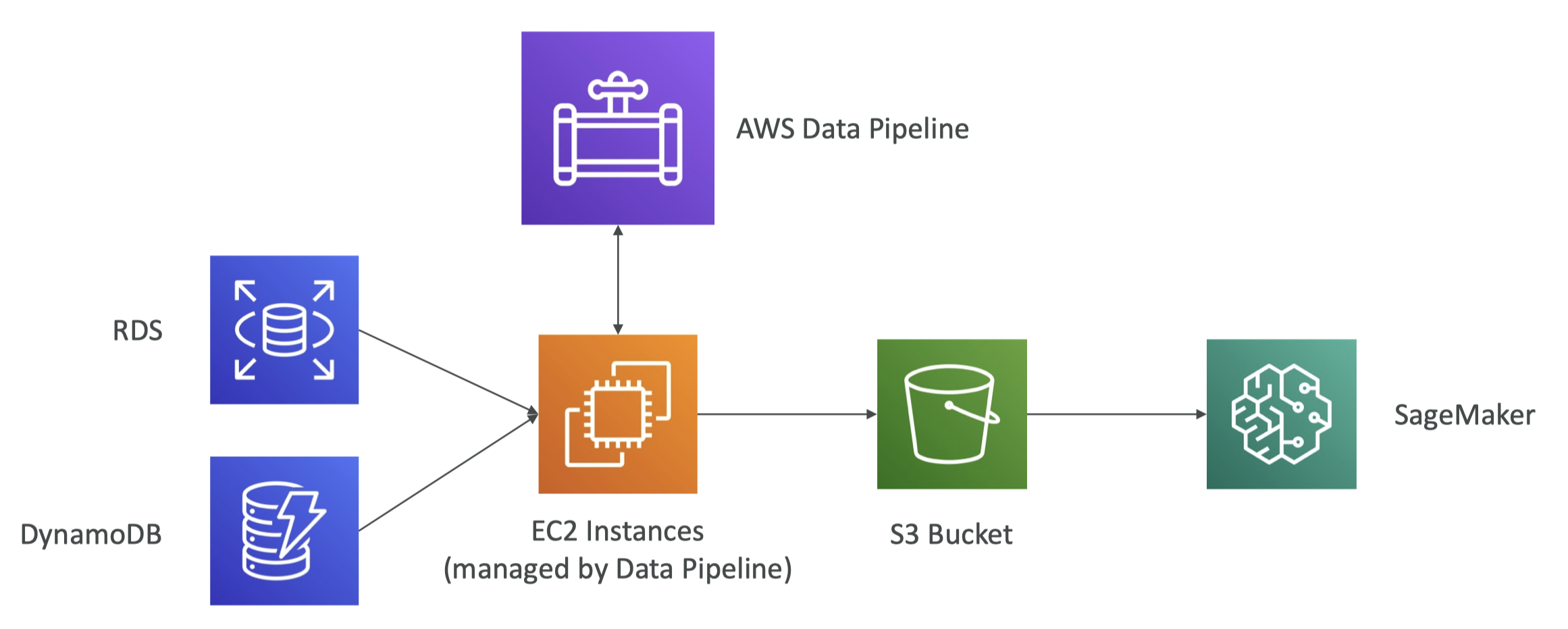
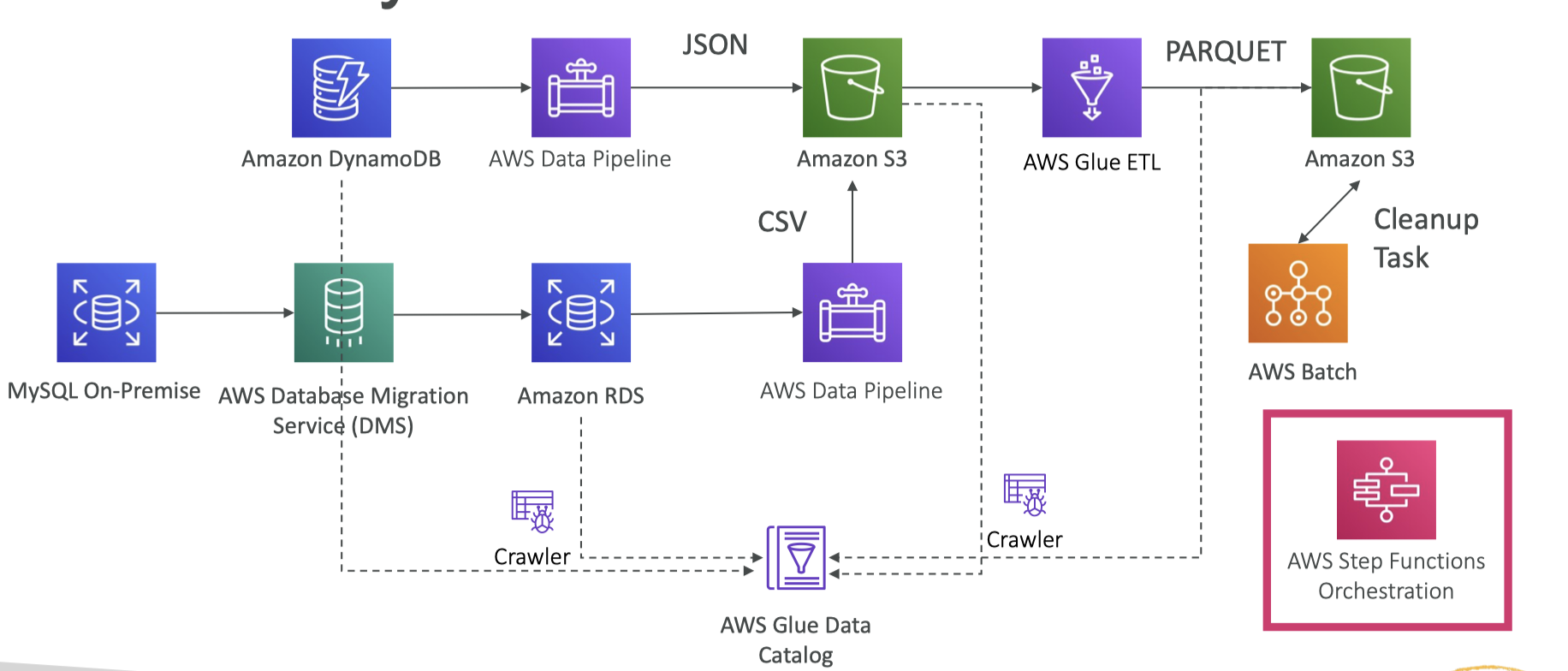
14. Full Data Engineering Pipeline Batch Layer
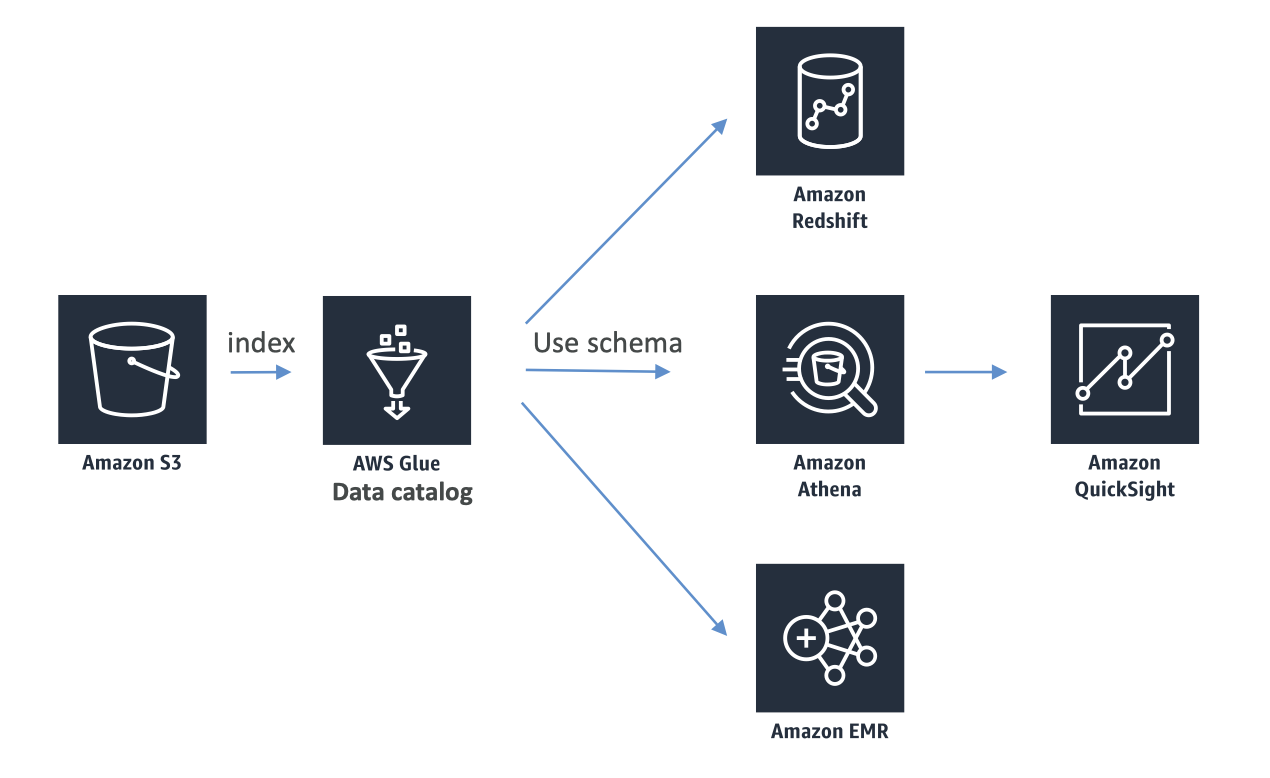
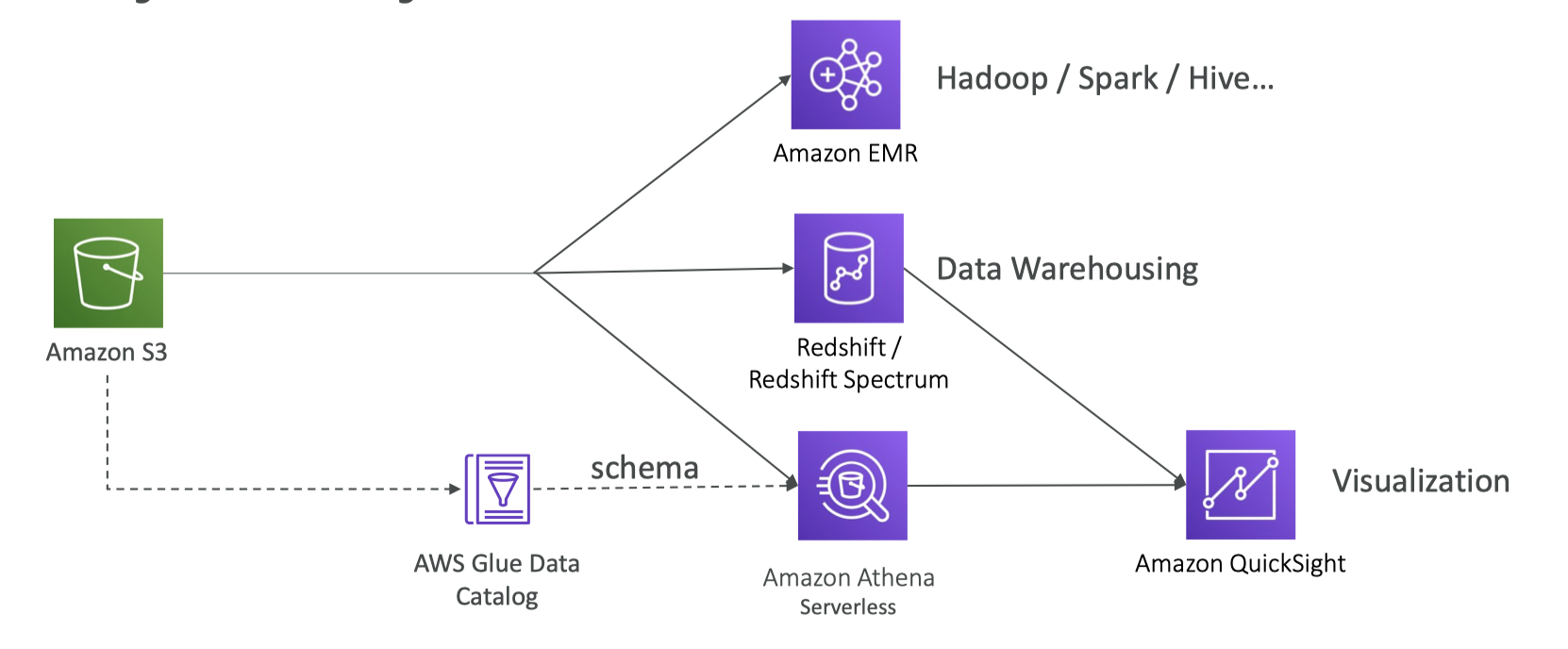
15. Full Data Engineering Pipeline Analytics layer
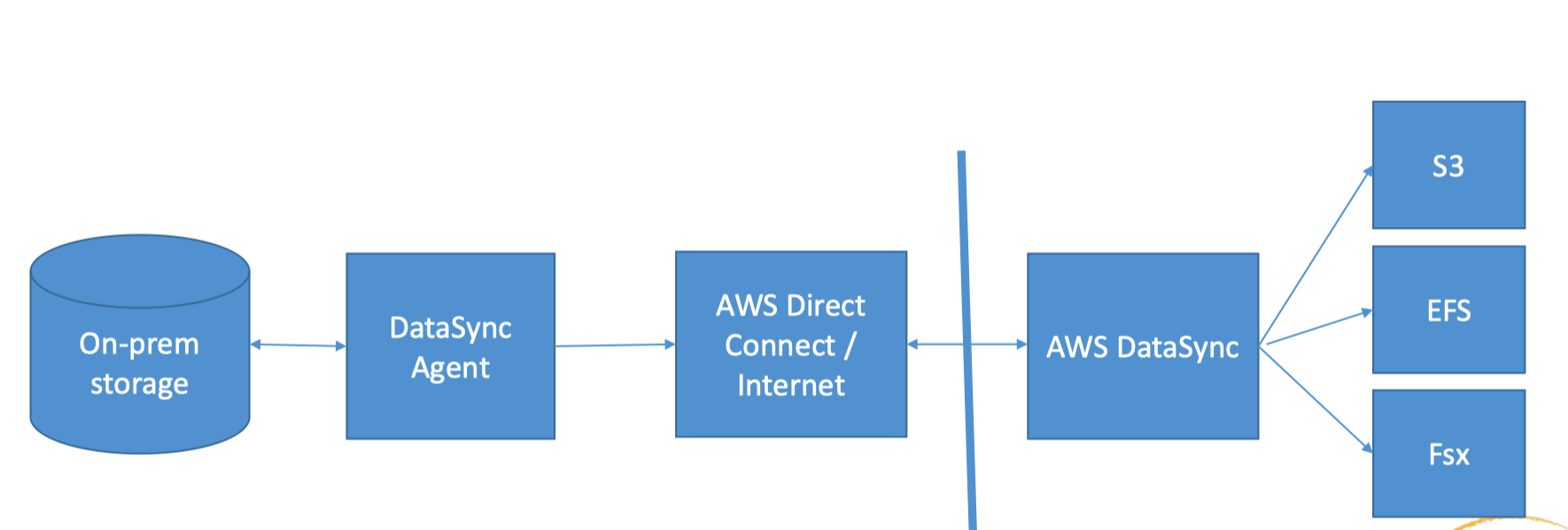
16. AWS DataSync• For data migrations from on-premises to AWS storage services• A DataSync Agent is deployed as a VM and connects to your internal storage– NFS, SMB, HDFS• Encryption and data validation
17. MQTT• An Internet of Things (IoT) thing• Standard messaging protocol• Think of it as how lots of sensor data might get transferred to your machine learning model• The AWS IoT Device SDK can connect via MQTT.[Back To Top]
18. Summary• Here's a quick summary of all the services we've mentioned– Amazon S3: Object Storage for your data– VPC Endpoint Gateway: Privately access your S3 bucket without going through the public internet– Kinesis Data Streams: real-time data streams, need capacity planning, real-time applications– Kinesis Data Firehose: near real-time data ingestion to S3, Redshift, ElasticSearch, Splunk– Kinesis Data Analytics: SQL transformations on streaming data– Kinesis Video Streams: real-time video feeds– Glue Data Catalog & Crawlers: Metadata repositories for schemas and datasets in your account– Glue ETL: ETL Jobs as Spark programs, run on a serverless Spark Cluster– DynamoDB: NoSQL store– Redshift: Data Warehousing for OLAP, SQL language– Redshift Spectrum: Redshift on data in S3 (without the need to load it first in Redshift)– RDS/Aurora: Relational Data Store for OLTP, SQL language– ElasticSearch: index for your data, search capability, clickstream analytics– ElastiCache: data cache technology– Data Pipelines: Orchestration of ETL jobs between RDS, DynamoDB, S3. Runs on EC2 instances– Batch: batch jobs run as Docker containers - not just for data, manages EC2 instances for you– DMS: Database Migration Service, 1-to-1 CDC replication, no ETL– Step Functions: Orchestration of workflows, audit, retry mechanisms• Briefly mentioned, covered by Frank Kane:– EMR: Managed Hadoop Clusters– Quicksight: Visualization Tool– Rekognition: ML Service– SageMaker: ML Service– DeepLens: camera by Amazon– Athena: Serverless Query of your data