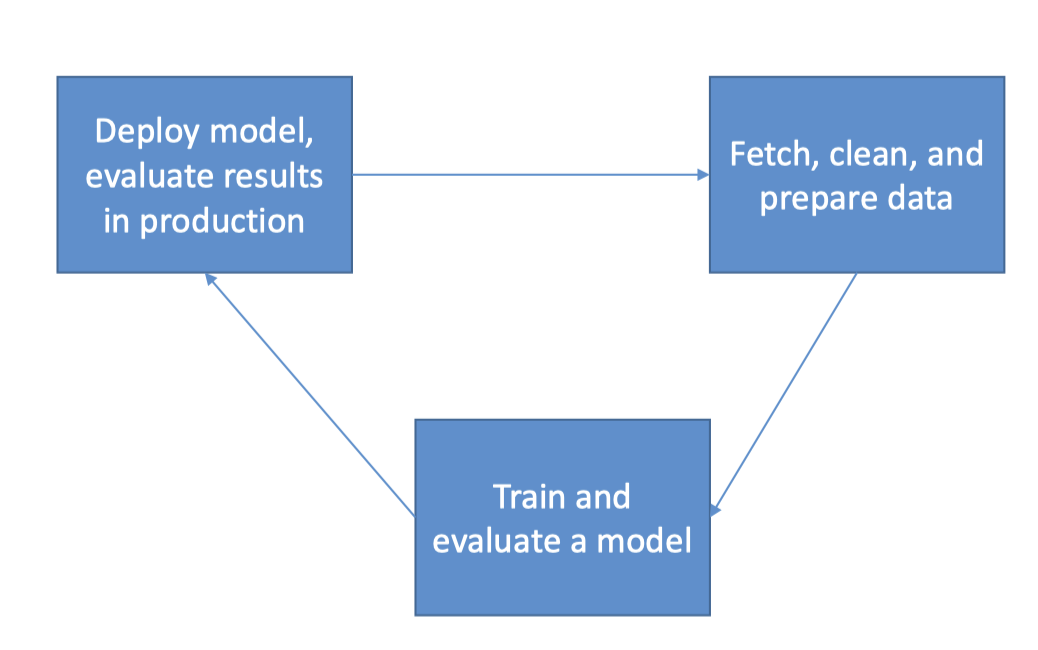
1. Introduction• SageMaker is built to handle the entire machine learning workflow.
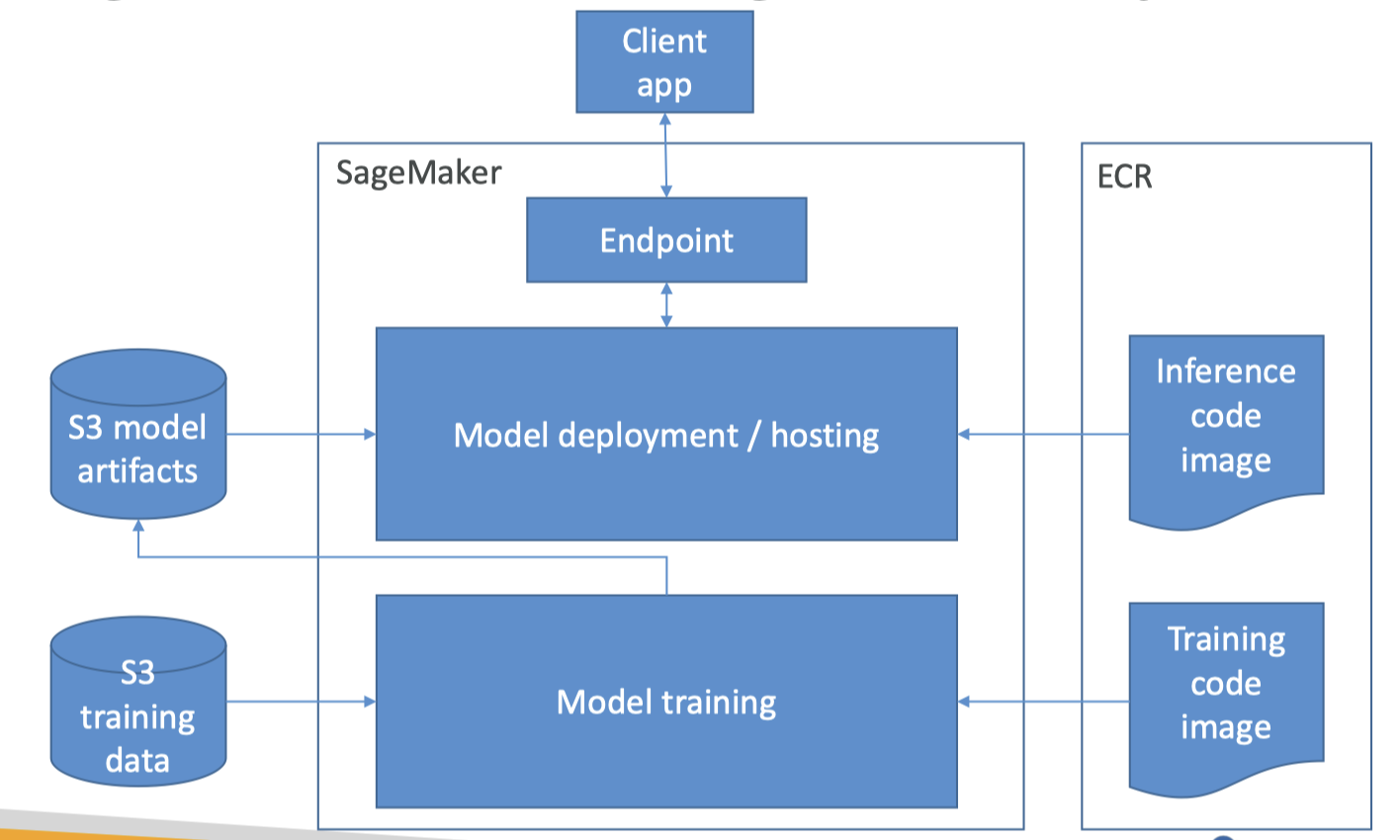
1.1. SageMaker Training & Deployment
1.2. SageMaker Notebook• SageMaker Notebooks can direct the process, so can the SageMaker console.• Notebook Instances on EC2 are spun up from the console:– S3 data access– Scikit_learn, Spark, Tensorflow– Wide variety of built-in models– Ability to spin up training instances– Ability to deploy trained models for making predictions at scale
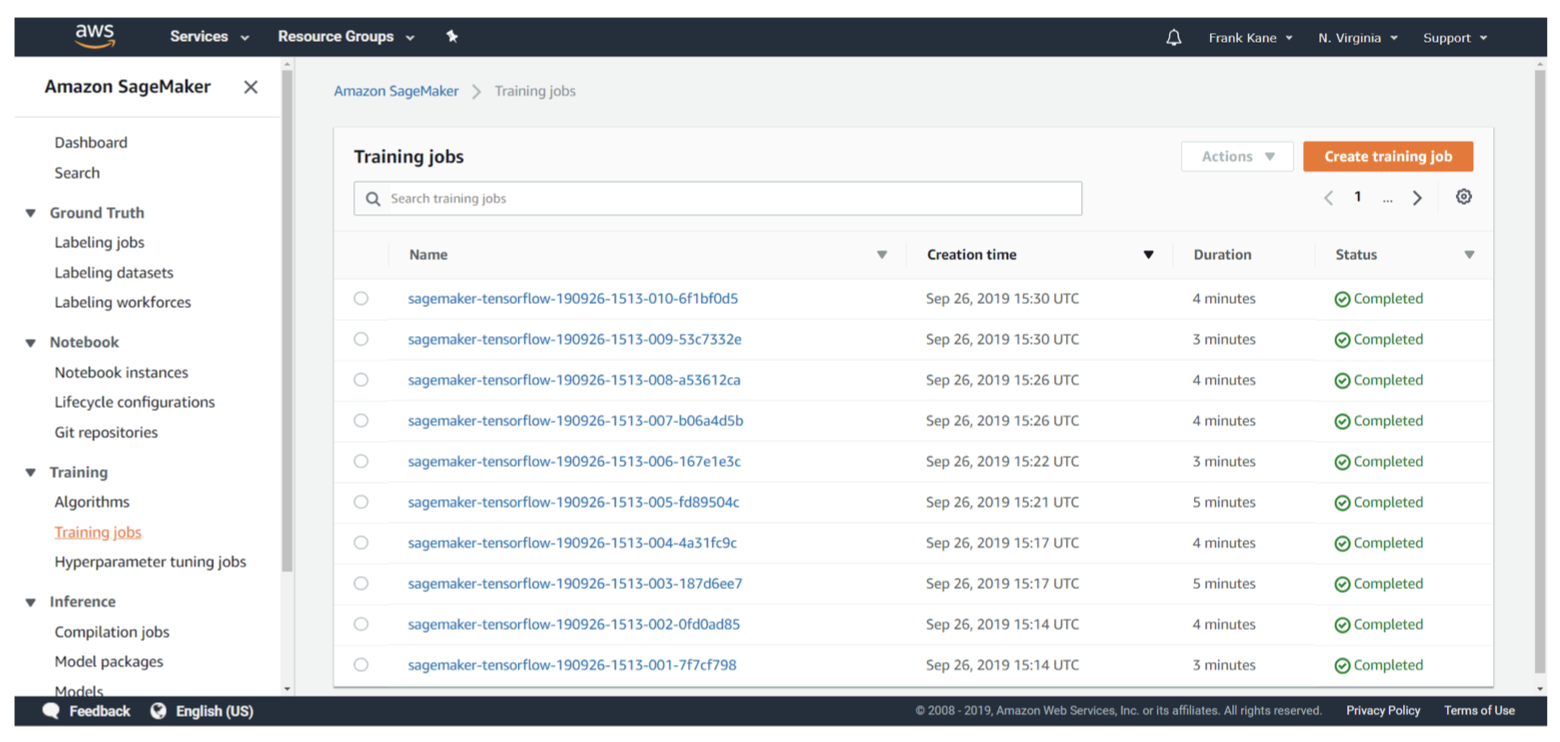
1.3. Data prep on SageMaker• Data usually comes from S3– Ideal format varies with algorithm often it is RecordIO/Protobuf.• Can also ingest fromAthena, EMR, Redshift, andAmazon Keyspaces DB• Apache Spark integrates with SageMaker.• Scikit-learn, numpy, pandas all at your disposal within a notebook.1.4. Training on SageMaker• Create a training job– URL of S3 bucket with training data– ML compute resources– URL of S3 bucket for output– ECR path to training code• Training options– Built-in training algorithms– Spark MLLib– Custom Python Tensorflow/MXNet code– Your own Docker image– Algorithm purchased from AWS marketplace1.5. Deploying Trained Models• Save your trained model to S3• Can deploy two ways:– Persistent endpoint for making individual predictions on demand– SageMaker Batch Transform to get predictions for an entire dataset• Lots of cool options– Inference Pipelines for more complex processing– SageMaker Neo for deploying to edge devices– Elastic Inference for accelerating deep learning models– Automatic scaling (increase # of endpoints as needed)1.6. SageMaker Built-in Algorithms1. Linear Learner2. XGBoost3. Seq2Seq4. DeepAR5. BlazingText6. Object2Vec7. Object Detection8. Image Classification9. Semantic Segmentation10. Random Cut Forest11. Neural Topic Model12. Latent Dirichlet Allocation (LDA)13. K-Nearest Neighbors (KNN)14. K-Means Clustering15. Principal Component Analysis (PCA)16. Factorization Machines (FM)17. IP Insights18. Reinforcement Learning19. Automatic Model Tuning20. Apache Spark
2. SageMaker: Linear Learner2.1. What’s it for?• Linear regression– Fit a line to your training data– Predictions based on that line• Can handle both regression (numeric) predictions and classification predictions– For classification, a linear threshold function is used.– Can do binary or multi-class.2.2. What training input does it expect?• RecordIO-wrapped protobuf– Float32 data only!• CSV– First column assumed to be the label• File or Pipe mode both supported2.3. How is it used?• Preprocessing– Training data must be normalized (so all features are weighted the same)– Linear Learner can do this for you automatically– Input data should be shuffled• Training– Uses stochastic gradient descent– Choose an optimization algorithm (Adam, AdaGrad, SGD, etc)– Multiple models are optimized in parallel– Tune L1, L2 regularization• Validation– Most optimal model is selected2.4. Important Hyperparameters• balance_multiclass_weights– Gives each class equal importance in loss functions• learning_rate, mini_batch_size• l1– Regularization• wd– Weight decay (L2 regularization)2.5. Instance Types• Training– Single or multi-machine CPU or GPU– Multi-GPU does not help
3. SageMaker: XGBoost3.1. What’s it for?• eXtreme Gradient Boosting– Boosted group of decision trees– New trees made to correct the errors of previous trees– Uses gradient descent to minimize loss as new trees are added• It’s been winning a lot of Kaggle competitions– And it’s fast, too• Can be used for classification• And also for regression– Using regression trees3.2. What training input does it expect?• XGBoost is weird, since it’s not made for SageMaker. It’s just open source XGBoost• So, it takes CSV or libsvminput.• AWS recently extended it to accept recordIO-protobuf and Parquet as well.3.3. How is it used?• Models are serialized/deserialized with Pickle• Can use as a framework within notebooks– Sagemaker.xgboost• Or as a built-in SageMaker algorithm3.4. Important Hyperparameters• There are a lot of them. A few:• subsample– Prevents overfitting• eta– Step size shrinkage, prevents overfitting• gamma– Minimum loss reduction to create a partition; larger = more conservative• alpha– L1 regularization term; larger = more conservative• lambda– L2 regularization term; larger = more conservative• eval_metric– Optimize on AUC, error, rmse…– For example, if you care about false positives more than accuracy, you might use AUC here• scale_pos_weight– Adjusts balance of positive and negative weights– Helpful for unbalanced classes– Might set to sum(negative cases) / sum(positive cases)• max_depth– Max depth of the tree– Too high and you may overfit3.5. Instance Types• Uses CPU’s only for multiple instance training• Is memory-bound, not computebound• So, M5 is a good choice• As of XGBoost 1.2, single-instance GPU training is available– For example P3– Must set tree_method hyperparameter to gpu_hist– Trains more quickly and can be more cost effective.
4. Seq2Seq4.1. What’s it for?• Input is a sequence of tokens, output is a sequence of tokens• Machine Translation• Text summarization• Speech to text• Implemented with RNN’s and CNN’s with attention4.2. What training input does it expect?• RecordIO-Protobuf– Tokens must be integers (this is unusual, since most algorithms want floating point data.)• Start with tokenized text files• Convert to protobuf using sample code– Packs into integer tensors with vocabulary files– A lot like the TF/IDF lab we did earlier.• Must provide training data, validation data, and vocabulary files.4.3. How is it used?• Training for machine translation can take days, even on SageMaker• Pre-trained models are available– See the example notebook• Public training datasets are available for specific translation tasks4.4. Important Hyperparameters• batch_size• optimizer_type (adam, sgd, rmsprop)• learning_rate• num_layers_encoder• num_layers_decoder• Can optimize on:– Accuracy* Vs. provided validation dataset– BLEU score* Compares against multiple reference translations– Perplexity* Cross-entropy4.5. Instance Types• Can only use GPU instance types (P3 for example)• Can only use a single machine for training– But can use multi-GPU’s on one machine
5. DeepAR5.1. What’s it for?• Forecasting one-dimensional time series data• Uses RNN’s• Allows you to train the same model over several related time series• Finds frequencies and seasonality5.2. What training input does it expect?• JSON lines format– Gzip or Parquet• Each record must contain:– Start: the starting time stamp– Target: the time series values• Each record can contain:– dynamic_feat: dynamic features (such as, was a promotion applied to a product in a time series of product purchases)– cat: categorical features
5.3. How is it used?• Always include entire time series for training, testing, and inference• Use entire dataset as training set, remove last time points for testing. Evaluate on withheld values.• Don’t use very large values for prediction length (> 400)• Train on many time series and not just one when possible5.4. Important Hyperparameters• context_length– Number of time points the model sees before making a prediction– Can be smaller than seasonalities; the model will lag one year anyhow.• epochs• mini_batch_size• learning_rate• num_cells5.5. Instance Types• Can use CPU or GPU• Single or multi machine• Start with CPU (C4.2xlarge, C4.4xlarge)• Move up to GPU if necessary– Only helps with larger models• CPU-only for inference• May need larger instances for tuning
6. BlazingText6.1. What’s it for?• Text classification– Predict labels for a sentence– Useful in web searches, information retrieval– Supervised• Word2vec– Creates a vector representation of words– Semantically similar words are represented by vectors close to each other– This is called a word embedding– It is useful for NLP, but is not an NLP algorithm in itself!* Used in machine translation, sentiment analysis– Remember it only works on individual words, not sentences or documents6.2. What training input does it expect?• For supervised mode (text classification):– One sentence per line– First “word” in the sentence is the string __label__ followed by the label• Also, “augmented manifest text format”• Word2Vec just wants a text file with one training sentence per line.6.3. How is it used?• Word2vec has multiple modes– CBOW (Continuous Bag of Words)– Skip-gram– Batch skip-gram* Distributed computation over many CPU nodes6.4. Important Hyperparameters• Word2vec:– mode (batch_skipgram, skipgram, cbow)– learning_rate– window_size– vector_dim– negative_samples• Text classification:– epochs– learning_rate– word_ngrams– vector_dim6.5. Instance Types• For cbow and skipgram, recommend a single ml.p3.2xlarge– Any single CPU or single GPU instance will work• For batch_skipgram, can use single or multiple CPU instances• For text classification, C5 recommended if less than 2GB training data. • For larger data sets, use a single GPU instance (ml.p2.xlarge or ml.p3.2xlarge)
7. Object2Vec7.1. What’s it for?• Remember word2vec from Blazing Text? It’s like that, but arbitrary objects• It creates low-dimensional dense embeddings of high-dimensional objects• It is basically word2vec, generalized to handle things other than words.• Compute nearest neighbors of objects• Visualize clusters• Genre prediction• Recommendations (similar items or users)7.2. What training input does it expect?• Data must be tokenized into integers• Training data consists of pairs of tokens and/or sequences of tokens– Sentence – sentence– Labels-sequence (genre to description?)– Customer-customer– Product-product– User-item
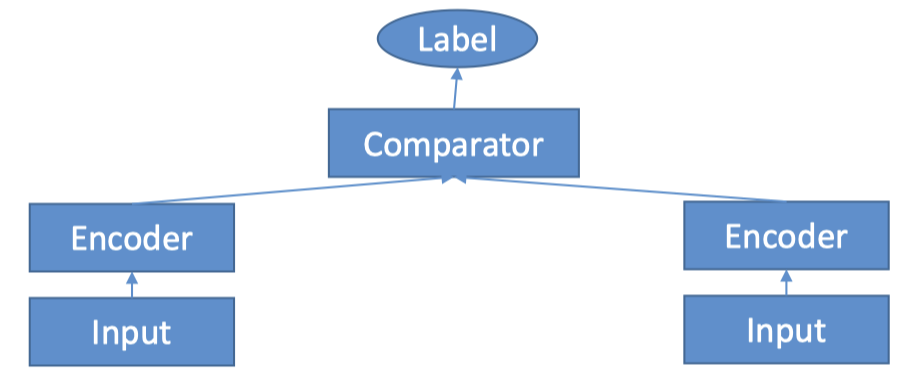
7.3. How is it used?• Process data into JSON Lines and shuffle it• Train with two input channels, two encoders, and a comparator• Encoder choices:– Average-pooled embeddings– CNN’s– Bidirectional LSTM• Comparator is followed by a feed-forward neural network
7.4. Important Hyperparameters• The usual deep learning ones…– Dropout, early stopping, epochs, learning rate, batch size, layers, activation function, optimizer, weight decay• enc1_network, enc2_network– Choose hcnn, bilstm, pooled_embedding7.5. Instance Types• Can only train on a single machine (CPU or GPU, multi-GPU OK)– Ml.m5.2xlarge– Ml.p2.xlarge– If needed, go up to ml.m5.4xlarge or ml.m5.12xlarge• Inference: use ml.p2.2xlarge– Use INFERENCE_PREFERRED_MODE environment variable to optimize for encoder embeddings rather than classification or regression.
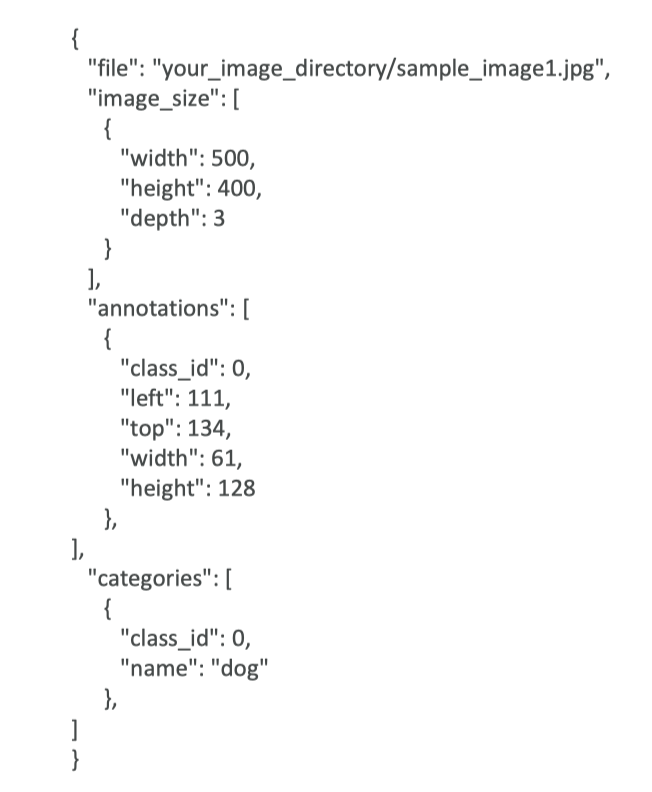
8. Object Detection8.1. What’s it for?• Identify all objects in an image with bounding boxes• Detects and classifies objects with a single deep neural network• Classes are accompanied by confidence scores• Can train from scratch, or use pretrained models based on ImageNet8.2. What training input does it expect?• RecordIO or image format (jpg or png)• With image format, supply a JSON file for annotation data for each image
8.3. How is it used?• Takes an image as input, outputs all instances of objects in the image with categories and confidence scores• Uses a CNN with the Single Shot multibox Detector (SSD) algorithm– The base CNN can be VGG-16 or ResNet-50• Transfer learning mode / incremental training– Use a pre-trained model for the base network weights, instead of random initial weights• Uses flip, rescale, and jitter internally to avoid overfitting8.4. Important Hyperparameters• mini_batch_size• learning_rate• Optimizer– sgd, adam, rmsprop, adadelta8.5. Instance Types• Use GPU instances for training (multi-GPU and multi-machine OK)– Ml.p2.xlarge, ml.p2.8xlarge, ml.p2.16xlarge, ml.p3.2xlarge, ml.p3.8clarge, ml.p3.16xlarge• Use CPU or CPU for inference– C5, M5, P2, P3 all OK
9. Image Classification9.1. What’s it for?• Assign one or more labels to an image• Doesn’t tell you where objects are, just what objects are in the image9.2. What training input does it expect?• Apache MXNet RecordIO– Not protobuf!– This is for interoperability with other deep learning frameworks.• Or, raw jpg or png images• Image format requires .lst files to associate image index, class label, and path to the image• Augmented Manifest Image Format enables Pipe mode• 5 1 your_image_directory/train_img_dog1.jpg 1000 0 your_image_directory/train_img_cat1.jpg 22 1 your_image_directory/train_img_dog2.jpg
9.3. How is it used?• ResNet CNN under the hood• Full training mode– Network initialized with random weights• Transfer learning mode– Initialized with pre-trained weights– The top fully-connected layer is initialized with random weights– Network is fine-tuned with new training data• Default image size is 3-channel 224x224 (ImageNet’s dataset)9.4. Important Hyperparameters• The usual suspects for deep learning– Batch size, learning rate, optimizer• Optimizer-specific parameters– Weight decay, beta 1,beta 2, eps, gamma9.5. Instance Types• GPU instances for training (P2, P3) Multi-GPU and multi-machine OK.• CPU or GPU for inference (C4, P2, P3)
10. Semantic Segmentation10.1. What’s it for?• Pixel-level object classification• Different from image classification that assigns labels to whole images• Different from object detection – that assigns labels to bounding boxes• Useful for self-driving vehicles, medical imaging diagnostics, robot sensing• Produces a segmentation mask10.2. What training input does it expect?• JPG Images and PNG annotations• For both training and validation• Label maps to describe annotations• Augmented manifest image format supported for Pipe mode.• JPG images accepted for inference10.3. How is it used?• Built on MXNet Gluon and Gluon CV• Choice of 3 algorithms:– Fully-Convolutional Network (FCN)– Pyramid Scene Parsing (PSP)– DeepLabV3• Choice of backbones:– ResNet50– ResNet101– Both trained on ImageNet• Incremental training, or training from scratch, supported too10.4. Important Hyperparameters• Epochs, learning rate, batch size, optimizer, etc• Algorithm• Backbone10.5. Instance Types• Only GPU supported for training (P2 or P3) on a single machine only– Specifically ml.p2.xlarge, ml.p2.8xlarge, ml.p2.16xlarge, ml.p3.2xlarge, ml.p3.8xlarge, or ml.p3.16xlarge• Inference on CPU (C5 or M5) or GPU (P2 or P3)
11. Random Cut Forest11.1. What’s it for?• Anomaly detection• Unsupervised• Detect unexpected spikes in time series data• Breaks in periodicity• Unclassifiable data points• Assigns an anomaly score to each data point• Based on an algorithm developed by Amazon that they seem to be very proud of!11.2. What training input does it expect?• RecordIO-protobuf or CSV• Can use File or Pipe mode on either• Optional test channel for computing accuracy, precision, recall, and F1 on labeled data (anomaly or not)11.3. How is it used?• Creates a forest of trees where each tree is a partition of the training data; looks at expected change in complexity of the tree as a result of adding a point into it• Data is sampled randomly• Then trained• RCF shows up in Kinesis Analytics as well; it can work on streaming data too.11.4. Important Hyperparameters• num_trees– Increasing reduces noise• num_samples_per_tree– Should be chosen such that 1/num_samples_per_tree approximates the ratio of anomalous to normal data11.5. Instance Types• Does not take advantage of GPUs• Use M4, C4, or C5 for training• ml.c5.xl for inference
12. Neural Topic Model12.1. What’s it for?• Organize documents into topics• Classify or summarize documents based on topics• It’s not just TF/IDF– “bike”, “car”, “train”, “mileage”, and “speed” might classify a document as “transportation” for example (although it wouldn’t know to call it that)• Unsupervised– Algorithm is “Neural Variational Inference”12.2. What training input does it expect?• Four data channels– “train” is required– “validation”, “test”, and “auxiliary” optional• recordIO-protobuf or CSV• Words must be tokenized into integers– Every document must contain a count for every word in the vocabulary in CSV– The “auxiliary” channel is for the vocabulary• File or pipe mode12.3. How is it used?• You define how many topics you want• These topics are a latent representation based on top ranking words• One of two topic modeling algorithms in SageMaker – you can try them both!12.4. Important Hyperparameters• Lowering mini_batch_size and learning_rate can reduce validation loss– At expense of training time• num_topics12.5. Instance Types• GPU or CPU– GPU recommended for training– CPU OK for inference– CPU is cheaper
13. LDA13.1. What’s it for?• Latent Dirichlet Allocation• Another topic modeling algorithm– Not deep learning• Unsupervised– The topics themselves are unlabeled; they are just groupings of documents with a shared subset of words• Can be used for things other than words– Cluster customers based on purchases– Harmonic analysis in music13.2. What training input does it expect?• Train channel, optional test channel• recordIO-protobuf or CSV• Each document has counts for every word in vocabulary (in CSV format)• Pipe mode only supported with recordIO13.3. How is it used?• Unsupervised; generates however many topics you specify• Optional test channel can be used for scoring results– Per-word log likelihood• Functionally similar to NTM, but CPU-based– Therefore maybe cheaper / more efficient13.4. Important Hyperparameters• num_topics• alpha0– Initial guess for concentration parameter– Smaller values generate sparse topic mixtures– Larger values (>1.0) produce uniform mixtures13.5. Instance Types• Single-instance CPU training
14. KNN14.1. What’s it for?• K-Nearest-Neighbors• Simple classification or regression algorithm• Classification– Find the K closest points to a sample point and return the most frequent label• Regression– Find the K closest points to a sample point and return the average value14.2. What training input does it expect?• Train channel contains your data• Test channel emits accuracy or MSE• recordIO-protobuf or CSV training– First column is label• File or pipe mode on either14.3. How is it used?• Data is first sampled• SageMaker includes a dimensionality reduction stage– Avoid sparse data (“curse of dimensionality”)– At cost of noise / accuracy– “sign” or “fjlt” methods• Build an index for looking up neighbors• Serialize the model• Query the model for a given K14.4. Important Hyperparameters• k!• sample_size14.5. Instance Types• Training on CPU or GPU– Ml.m5.2xlarge– Ml.p2.xlarge• Inference– CPU for lower latency– GPU for higher throughput on large batches
15. K-Means15.1. What’s it for?• Unsupervised clustering• Divide data into K groups, where members of a group are as similar as possible to each other– You define what “similar” means– Measured by Euclidean distance• Web-scale K-Means clustering• 15.2. What training input does it expect?• Train channel, optional test– Train ShardedByS3Key, test FullyReplicated• recordIO-protobuf or CSV• File or Pipe on either15.3. How is it used?• Every observation mapped to n-dimensional space (n = number of features)• Works to optimize the center of K clusters– “extra cluster centers” may be specified to improve accuracy (which end up getting reduced to k) → K = k*x• Algorithm:– Determine initial cluster centers* Random or k-means++ approach* K-means++ tries to make initial clusters far apart– Iterate over training data and calculate cluster centers– Reduce clusters from K to k* Using Lloyd’s method with kmeans++15.4. Important Hyperparameters• k!– Choosing K is tricky– Plot within-cluster sum of squares as function of K– Use “elbow method”– Basically optimize for tightness of clusters• mini_batch_size• extra_center_factor• init_method15.5. Instance Types• CPU or GPU, but CPU recommended– Only one GPU per instance used on GPU– So use p*.xlarge if you’re going to use GPU
16. PCA16.1. What’s it for?• Principal Component Analysis• Dimensionality reduction– Project higher-dimensional data (lots of features) into lower-dimensional (like a 2D plot) while minimizing loss of information– The reduced dimensions are called components* First component has largest possible variability* Second component has the next largest…• Unsupervised16.2. What training input does it expect?• recordIO-protobuf or CSV• File or Pipe on either16.3. How is it used?• Covariance matrix is created, then singular value decomposition (SVD)• Two modes– Regular* For sparse data and moderate number of observations and features– Randomized* For large number of observations and features* Uses approximation algorithm16.4. Important Hyperparameters• algorithm_mode• subtract_mean– Unbias data16.5. Instance Types• GPU or CPU– It depends “on the specifics of the input data”
17. Factorization Machines17.1. What’s it for?• Dealing with sparse data– Click prediction– Item recommendations– Since an individual user doesn’t interact with most pages / products the data is sparse• Supervised– Classification or regression• Limited to pair-wise interactions– e.g. user → item17.2. What training input does it expect?• recordIO-protobuf with float32– Sparse data means CSV isn’t practical17.3. How is it used?• Finds factors we can use to predict a classification (click or not? Purchase or not?) or value (predicted rating?) given a matrix representing some pair of things (users & items?)• Usually used in the context of recommender systems17.4. Important Hyperparameters• Initialization methods for bias, factors, and linear terms– Uniform, normal, or constant– Can tune properties of each method17.5. Instance Types• CPU or GPU– CPU recommended– GPU only works with dense data
18. IP Insight18.1. What’s it for?• Unsupervised learning of IP address usage patterns• Identifies suspicious behavior from IP addresses– Identify logins from anomalous IP’s– Identify accounts creating resources from anomalous IP’s18.2. What training input does it expect?• User names, account ID’s can be fed in directly; no need to pre-process• Training channel, optional validation (computes AUC score)• CSV only– Entity, IP18.3. How is it used?• Uses a neural network to learn latent vector representations of entities and IP addresses.• Entities are hashed and embedded– Need sufficiently large hash size• Automatically generates negative samples during training by randomly pairing entities and IP’s18.4. Important Hyperparameters• num_entity_vectors– Hash size– Set to twice the number of unique entity identifiers• vector_dim– Size of embedding vectors– Scales model size– Too large results in overfitting• epochs, learning_rate, batch_size, etc.18.5. Instance Types• CPU or GPU– GPU recommended– Ml.p3.2xlarge or higher– Can use multiple GPU’s– Size of CPU instance depends on vector_dim and num_entity_vectors
19. Reinforcement Learning19.1. Q-Learning• A specific implementation of reinforcement learning• You have:– A set of environmental statess– A set of possible actions in those states a– A value of each state/actionQ• Start off with Q values of 0• Explore the space• As bad things happen after a given state/action, reduce its Q• As rewards happen after a given state/action, increase its Q• Q(s,a)⩲ 𝛼 .(reward(s,a)+max(Q(s′)- Q(s,a))) where s is the previous state, a is the previous action, s′ is the current state, and 𝛼 is the discount factor (set to 0.5 here).• What are some state/actions here?– Pac-man has a wall to the West– Pac-man dies if he moves one step South– Pac-man just continues to live if going North or East• You can “look ahead” more than one step by using a discount factor when computing Q (here s is previous state, s′ is current state)– Q(s,a)⩲discount×(reward(s,a)+max(Q(s′)- Q(s,a)))19.2. The exploration problem• How do we efficiently explore all of the possible states?– Simple approach: always choose the action for a given state with the highest Q. If there’s a tie, choose at random* But that’s really inefficient, and you might miss a lot of paths that way– Better way: introduce an epsilon term* If a random number is less than epsilon, don’t follow the highest Q, but choose at random* That way, exploration never totally stops* Choosing epsilon can be tricky19.3. Markov Decision Process• From Wikipedia: Markov decision processes (MDPs) provide a mathematical framework for modeling decision making in situations where outcomes are partly random and partly under the control of a decision maker.– Sound familiar? MDP’s are just a way to describe what we just did using mathematical notation.– States are still described as s and s′– State transition functions are described as Pa(s,s′)– Our “Q” values are described as a reward functionRa(s,s′)• Even fancier words! An MDP is a discrete time stochastic control process.19.4. Reinforcement Learning in SageMaker• Uses a deep learning framework with Tensorflow and MXNet• Supports Intel Coach and Ray Rllib toolkits.• Custom, open-source, or commercial environments supported.– MATLAB, Simulink– EnergyPlus, RoboSchool, PyBullet– Amazon Sumerian, AWS RoboMaker19.5. Distributed Training with SageMaker RL• Can distribute training and/or environment rollout• Multi-core and multi-instance19.6. Reinforcement Learning: Key Terms• Environment– The layout of the board / maze / etc• State– Where the player / pieces are• Action– Move in a given direction, etc• Reward– Value associated with the action from that state• Observation– i.e., surroundings in a maze, state of chess board19.7. Reinforcement Learning: Hyperparameter Tuning• Parameters of your choosing may be abstracted• Hyperparameter tuning in SageMaker can then optimize them19.8. Reinforcement Learning: Instance Types• No specific guidance given in developer guide• But, it’s deep learning – so GPU’s are helpful• And we know it supports multiple instances and cores
20. Automated Model Tuning with SageMaker20.1. Hyperparameter tuning• How do you know the best values of learning rate, batch size, depth, etc?• Often you have to experiment• Problem blows up quickly when you have many different hyperparameters; need to try every combination of every possible value somehow, train a model, and evaluate it every time20.2. Automatic Model Tuning• Define the hyperparameters you care about and the ranges you want to try, and the metrics you are optimizing for• SageMaker spins up a “HyperParameter Tuning Job” that trains as many combinations as you’ll allow• Training instances are spun up as needed, potentially a lot of them• The set of hyperparameters producing the best results can then be deployed as a model• It learns as it goes, so it doesn’t have to try every possible combination20.3. Automatic Model Tuning: Best Practices• Don’t optimize too many hyperparameters at once• Limit your ranges to as small a range as possible• Use logarithmic scales when appropriate• Don’t run too many training jobs concurrently• This limits how well the process can learn as it goes• Make sure training jobs running on multiple instances report the correct objective metric in the end
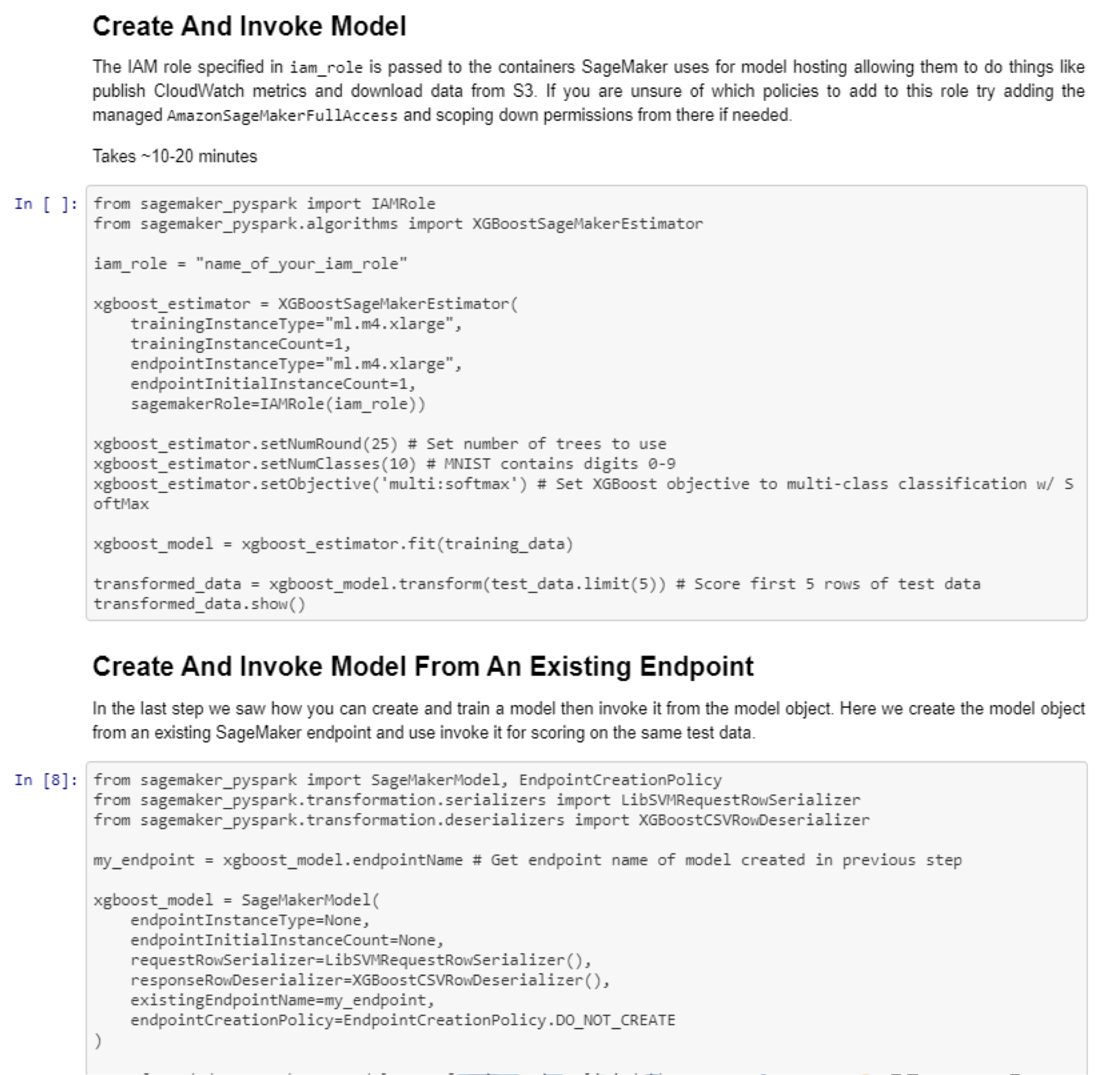
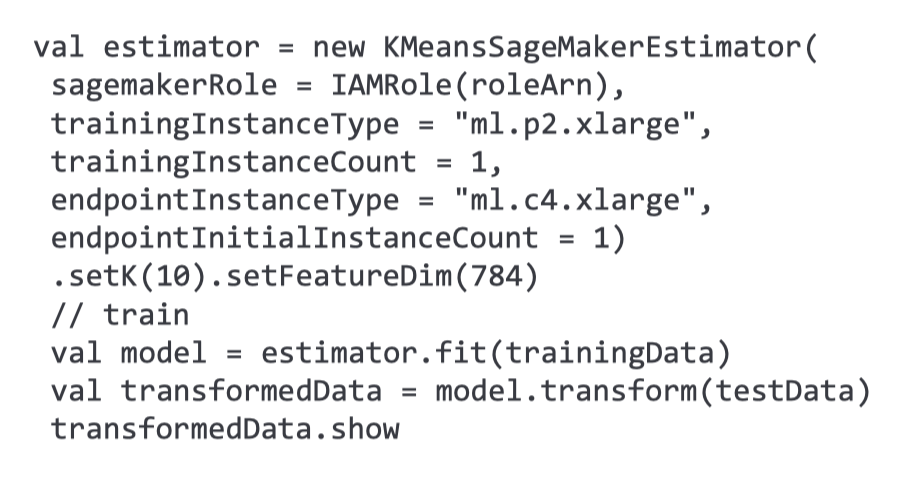
21. SageMaker and Spark21.1. Integrating SageMaker and Spark• Pre-process data as normal with Spark– Generate DataFrames• Use sagemaker-spark library• SageMakerEstimator– KMeans, PCA, XGBoost• SageMakerModel• Notebooks can use the SparkMagic (PySpark) kernel
• Connect notebook to a remote EMR cluster running Spark (or use Zeppelin)• Training dataframe should have:– A features column that is a vector of Doubles• An optional labels column of Doubles• Call fit on your SageMakerEstimator to get a SageMakerModel• Call transform on the SageMakerModel to make inferences• Works with Spark Pipelines as well.
21.2. Why bother?• Allows you to combine preprocessing big data in Spark with training and inference in SageMaker.• EMR and SageMaker are now very tightly integrated.
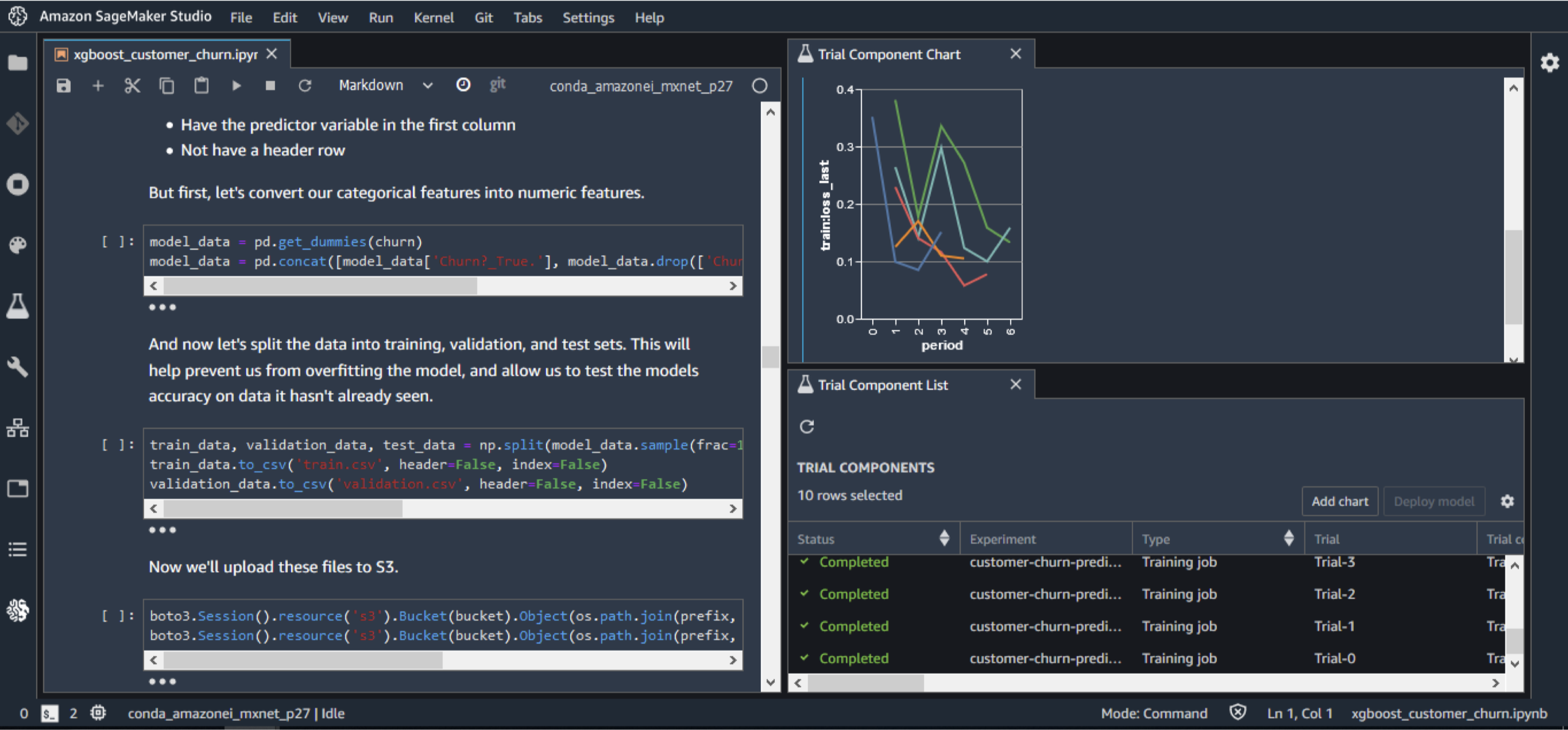
22. Modern SageMaker22.1. SageMaker Studio• Visual IDE for machine learning!• Integrates many of the features we’re about to cover.
Figure 1:SageMaker Studio
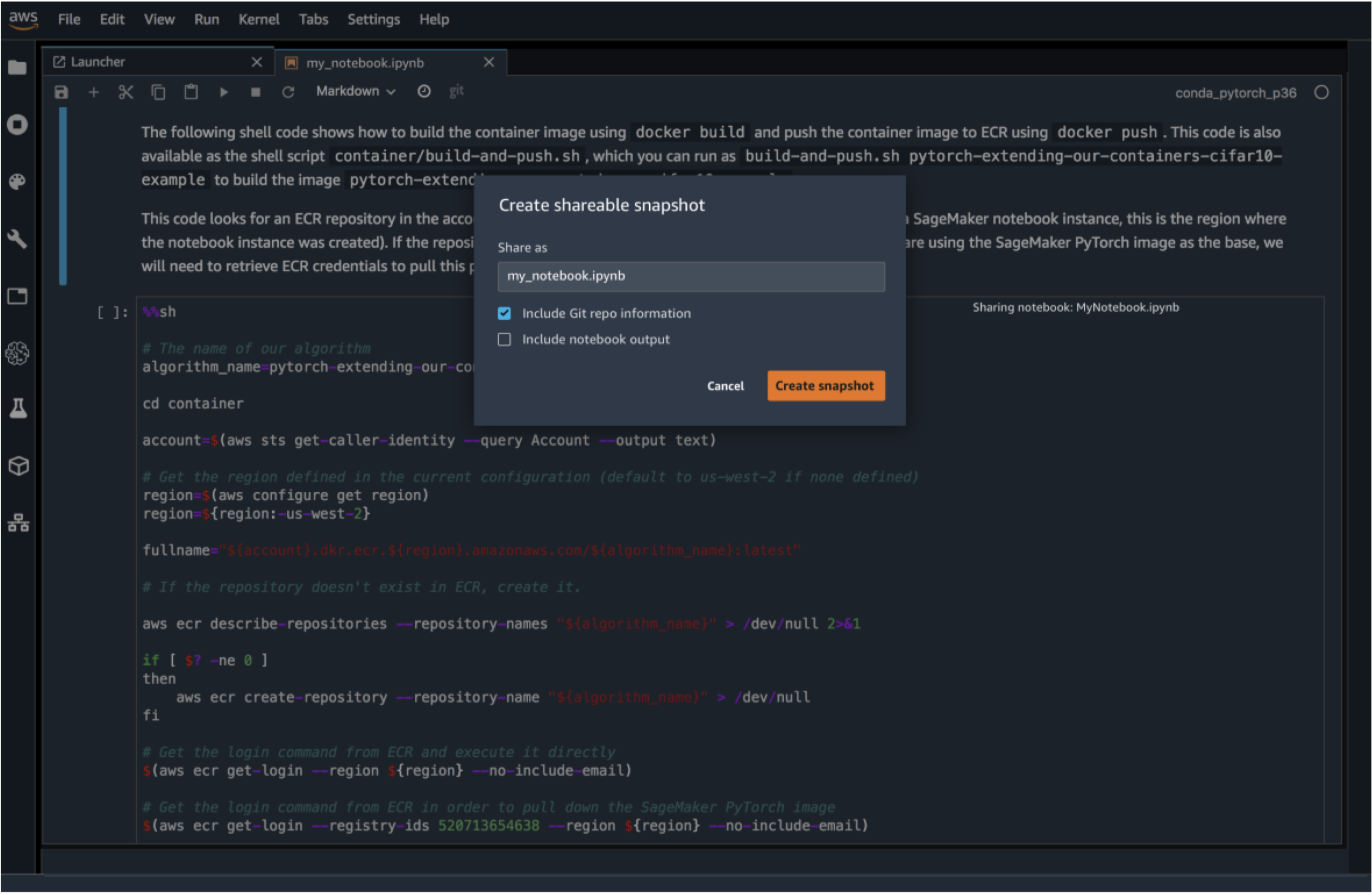
22.2. SageMaker Notebooks• Create and share Jupyter notebooks with SageMaker Studio• Switch between hardware configurations (no infrastructure to manage)
Figure 2:SageMaker Notebook
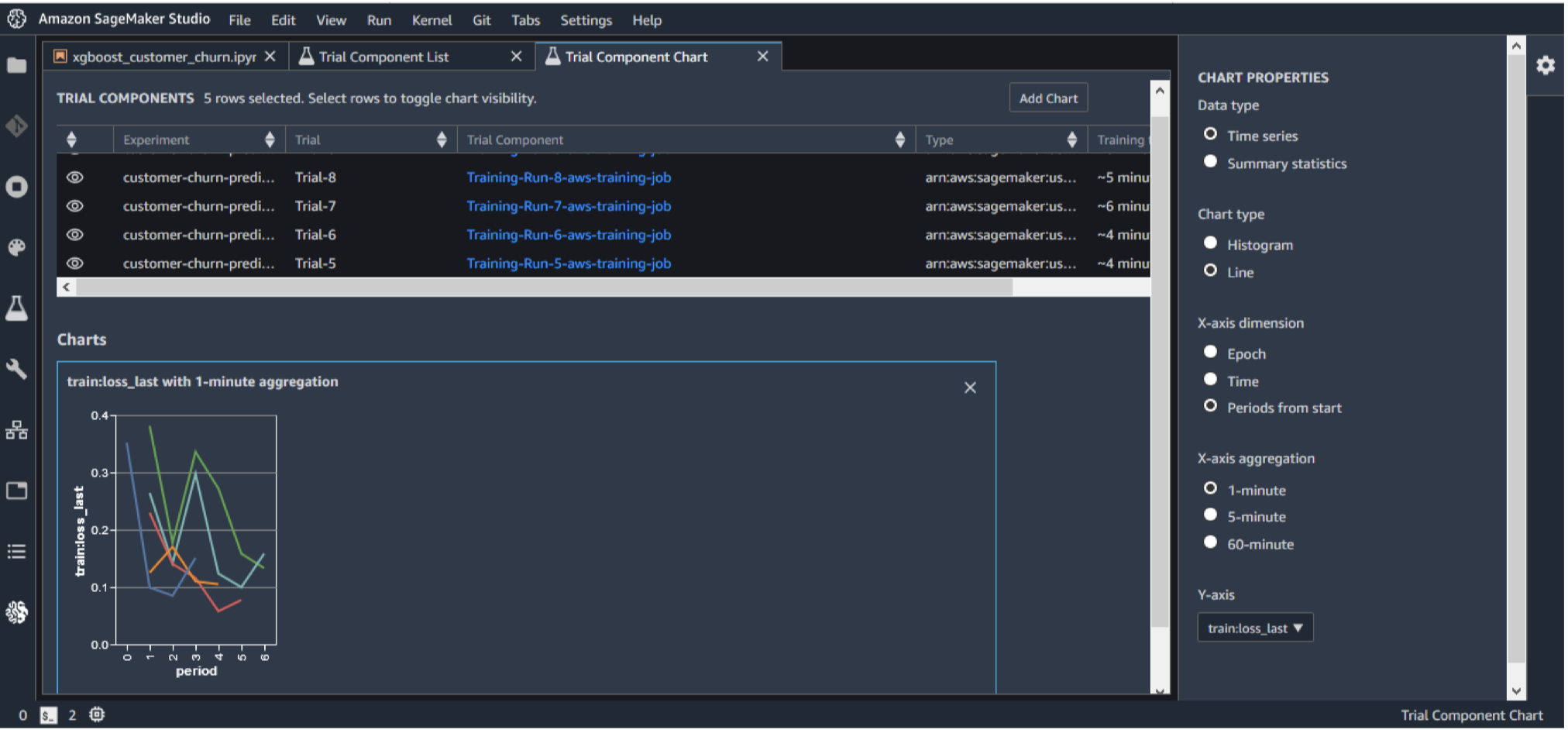
22.3. SageMaker Experiments• Organize, capture, compare, and search your ML jobs
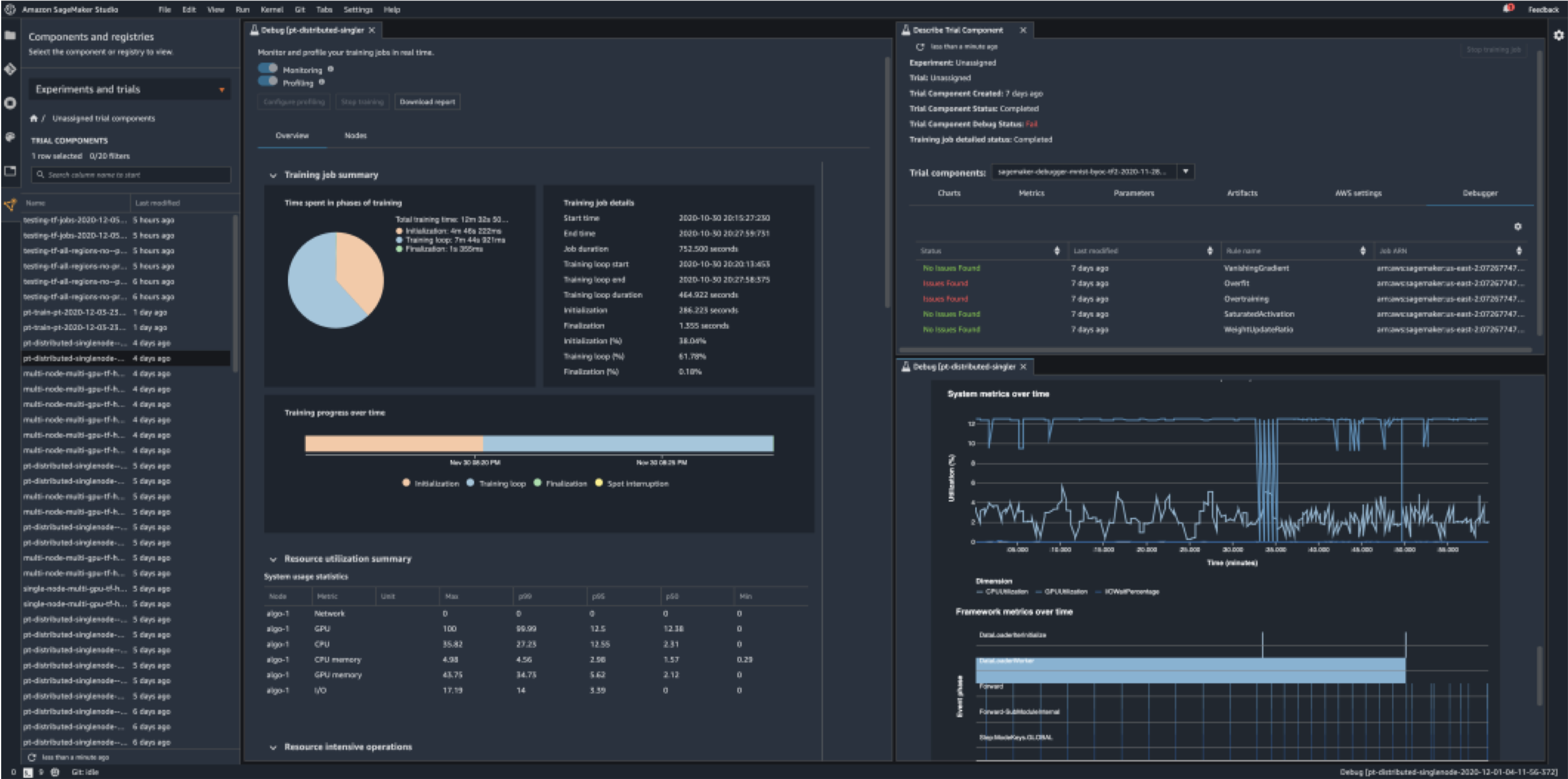
22.4. SageMaker Debugger• Saves internal model state at periodical intervals– Gradients / tensors over time as a model is trained– Define rules for detecting unwanted conditions while training– A debug job is run for each rule you configure– Logs & fires a CloudWatch event when the rule is hit• SageMaker Studio Debugger dashboards• Auto-generated training reports• Built-in rules:– Monitor system bottlenecks– Profile model framework operations– Debug model parameters• Supported Frameworks & Algorithms:– Tensorflow– PyTorch– MXNet– XGBoost– SageMaker generic estimator (for use with custom training containers)• Debugger API’s available in GitHub– Construct hooks & rules for CreateTrainingJob and DescribeTrainingJob API’s– SMDebug client library lets you register hooks for accessing training data22.5. Even Newer SageMaker Debugger Features• SageMaker Debugger Insights Dashboard• Debugger ProfilerRule– ProfilerReport– Hardware system metrics (CPUBottlenck, GPUMemoryIncrease, etc)– Framework Metrics (MaxInitializationTime, OverallFrameworkMetrics, StepOutlier)• Built-in actions to receive notifications or stop training– StopTraining(), Email(), or SMS()– In response to Debugger Rules– Sends notifications via SNS• Profiling system resource usage and training
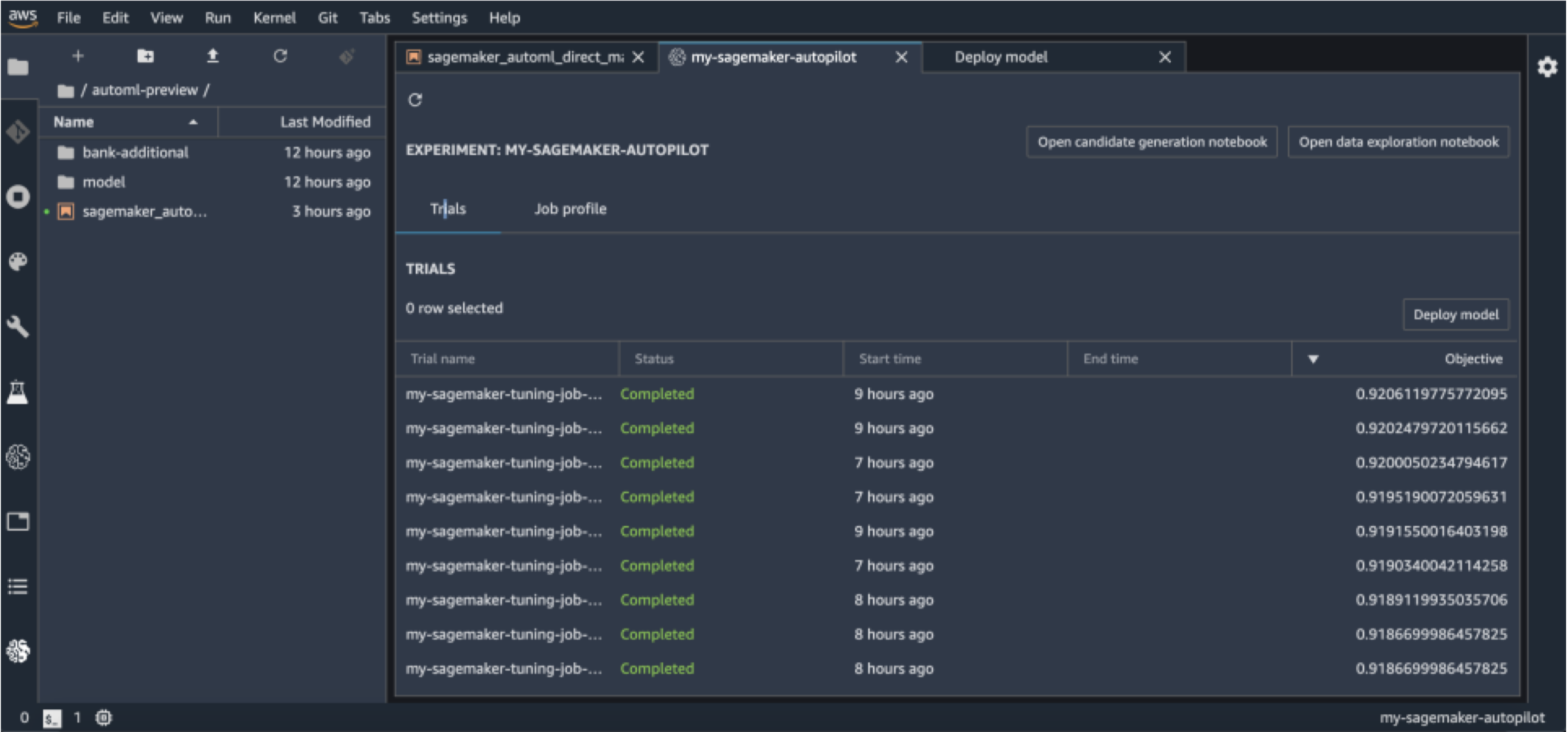
22.6. SageMaker Autopilot• Automates:– Algorithm selection– Data preprocessing– Model tuning– All infrastructure• It does all the trial & error for you• More broadly this is called AutoML•
22.7. SageMaker Autopilot workflow• Load data from S3 for training• Select your target column for prediction• Automatic model creation• Model notebook is available for visibility & control• Model leaderboard– Ranked list of recommended models– You can pick one• Deploy & monitor the model, refine via notebook if needed
22.8. SageMaker Autopilot• Can add in human guidance• With or without code in SageMaker Studio or AWS SDK’s• Problem types:– Binary classification– Multiclass classification– Regression• Algorithm Types:– Linear Learner– XGBoost– Deep Learning (MLP’s)• Data must be tabular CSV22.9. Autopilot Explainability• Integrates with SageMaker Clarify• Transparency on how models arrive at predictions• Feature attribution– Uses SHAP Baselines / Shapley Values– Research from cooperative game theory– Assigns each feature an importance value for a given prediction
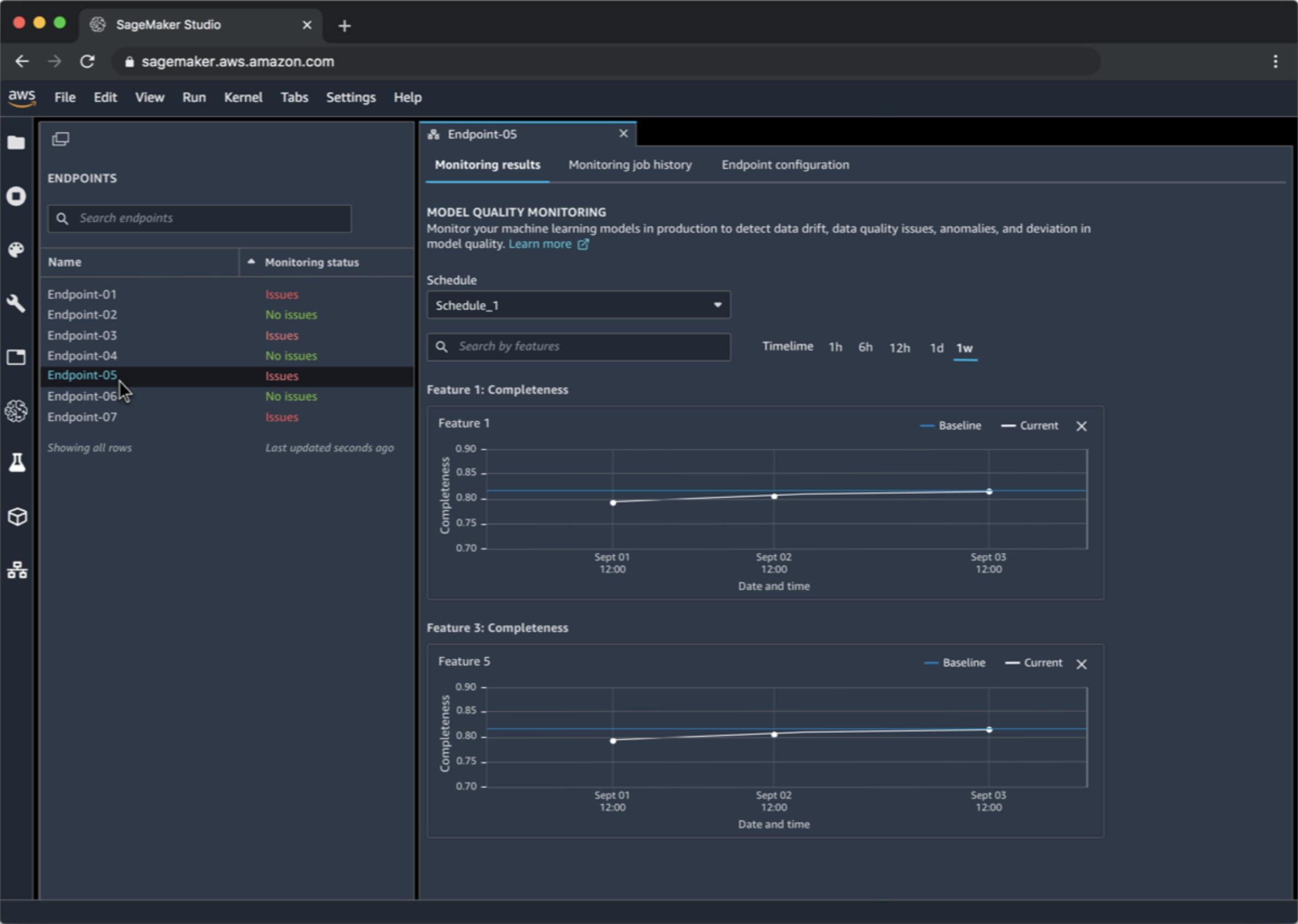
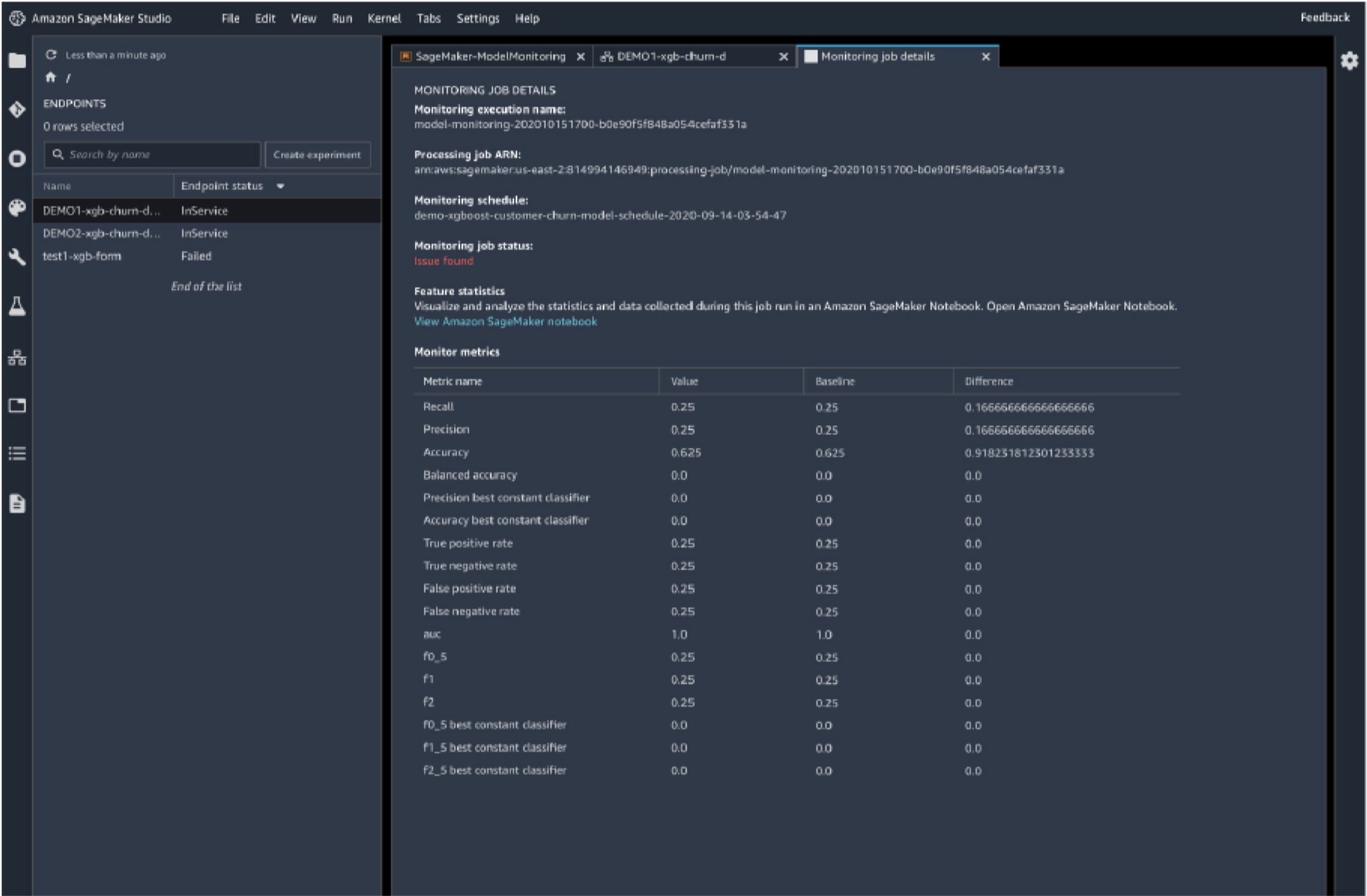
22.10. SageMaker Model Monitor• Get alerts on quality deviations on your deployed models (via CloudWatch)• Visualize data drift– Example: loan model starts giving people more credit due to drifting or missing input features• Detect anomalies & outliers• Detect new features• No code needed
22.11. SageMaker Model Monitor + Clarify• Integrates with SageMaker Clarify– SageMaker Clarify detects potential bias– i.e., imbalances across different groups / ages / income brackets– With ModelMonitor, you can monitor for bias and be alerted to new potential bias via CloudWatch– SageMaker Clarify also helps explain model behavior* Understand which features contribute the most to your predictions
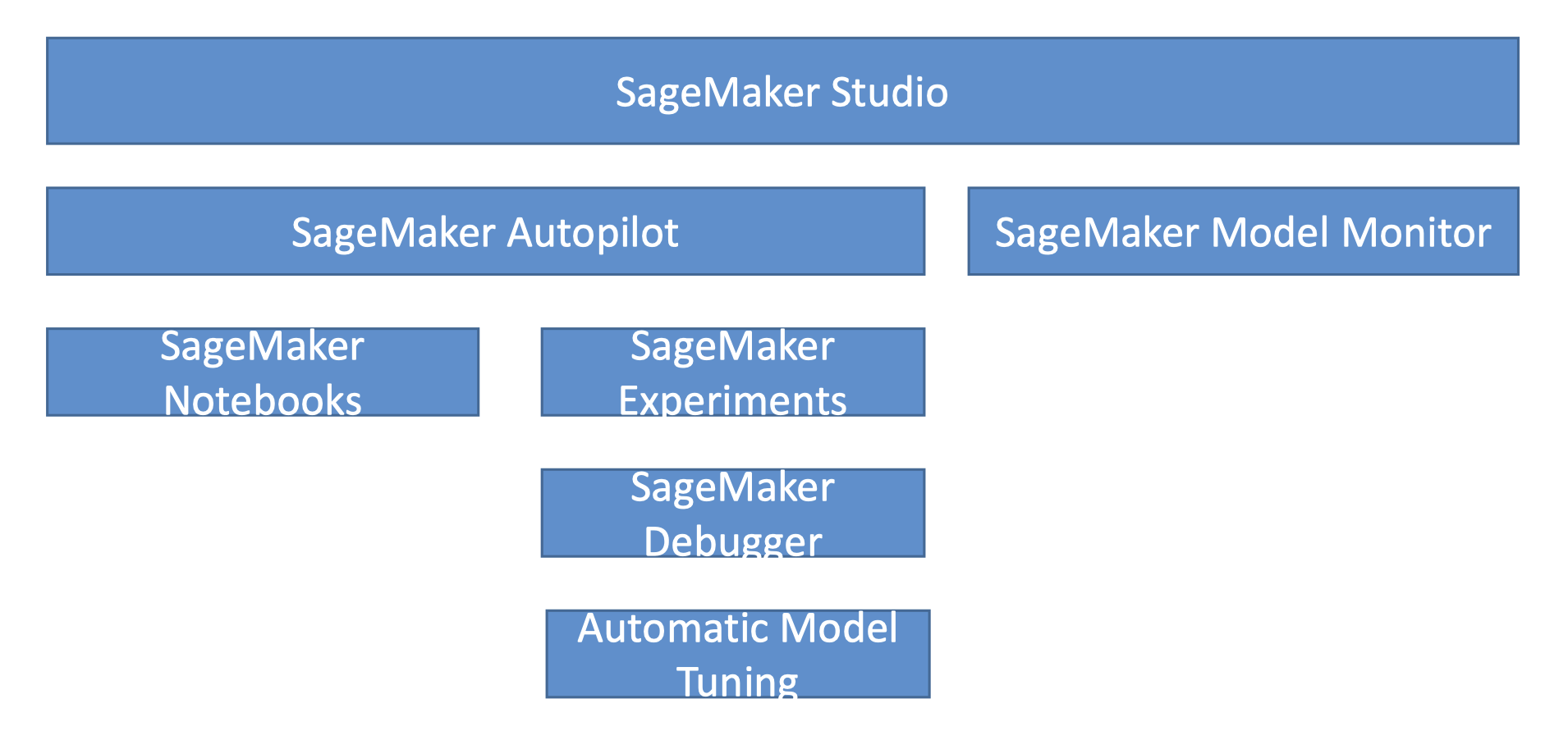
22.12. Pre-training Bias Metrics in Clarify• Class Imbalance (CI)– One facet (demographic group) has fewer training values than another• Difference in Proportions of Labels (DPL)– Imbalance of positive outcomes between facet values• Kullback-Leibler Divergence (KL), Jensen-Shannon Divergence(JS)– How much outcome distributions of facets diverge• Lp-norm (LP)– P-norm difference between distributions of outcomes from facets• Total Variation Distance (TVD)– L1-norm difference between distributions of outcomes from facets• Kolmogorov-Smirnov (KS)– Maximum divergence between outcomes in distributions from facets• Conditional Demographic Disparity (CDD)– Disparity of outcomes between facets as a whole, and by subgroups22.13. SageMaker Model Monitor• Data is stored in S3 and secured• Monitoring jobs are scheduled via a Monitoring Schedule• Metrics are emitted to CloudWatch– CloudWatch notifications can be used to trigger alarms– You’d then take corrective action (retrain the model, audit the data)• Integrates with Tensorboard, QuickSight, Tableau– Or just visualize within SageMaker Studio• Monitoring Types:– Drift in data quality* Relative to a baseline you create* “Quality” is just statistical properties of the features– Drift in model quality (accuracy, etc)* Works the same way with a model quality baseline* Can integrate with Ground Truth labels• Bias drift• Feature attribution drift– Based on Normalized Discounted Cumulative Gain (NDCG) score– This compares feature ranking of training vs. live data22.14. Putting them together
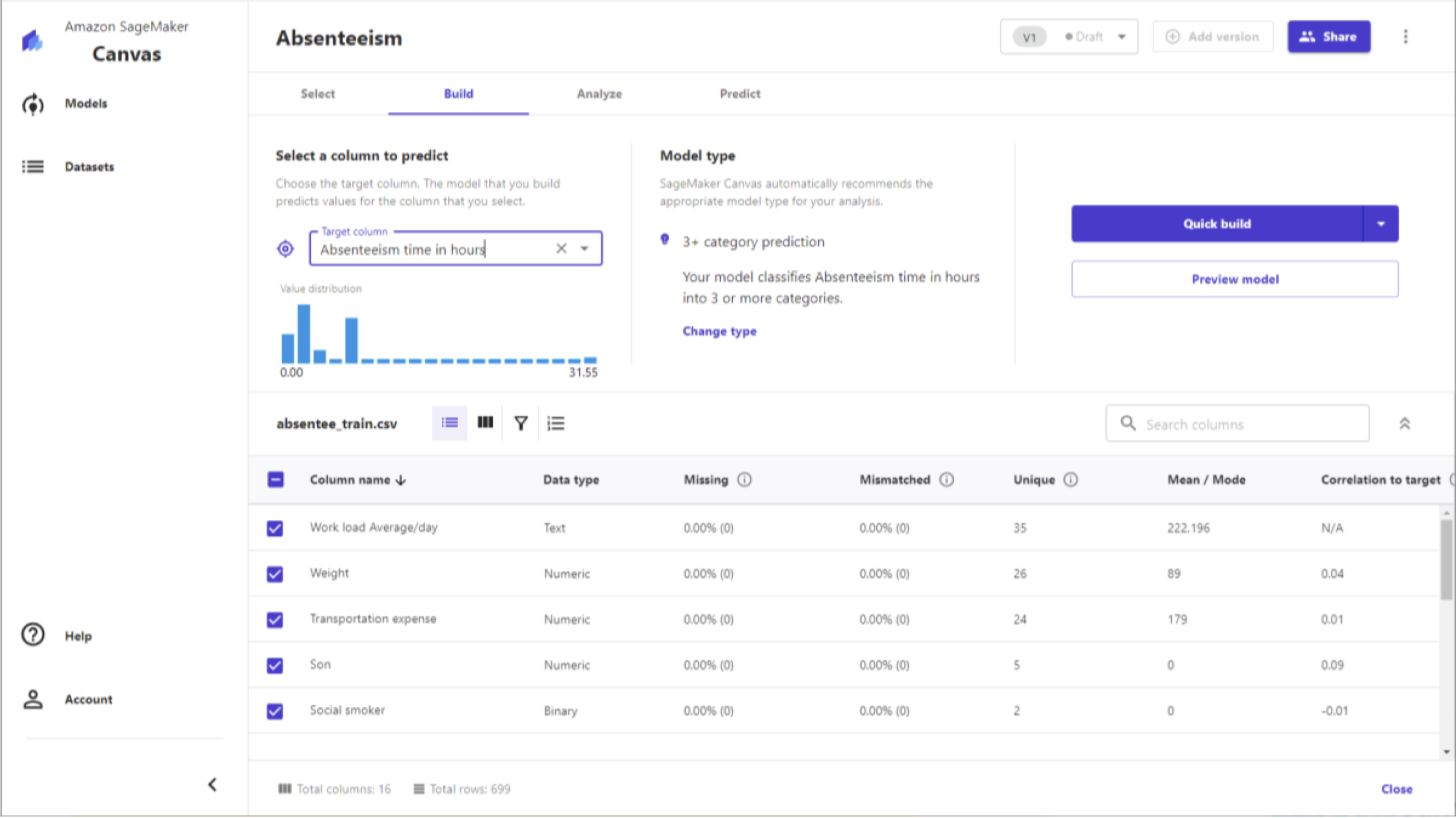
22.15. SageMaker: More New Features• SageMaker JumpStart– One-click models and algorithms from model zoos– Over 150 open source models in NLP, object detections, image classification, etc.• SageMaker Data Wrangler– Import / transform / analyze / export data within SageMaker Studio• SageMaker Feature Store– Find, discover, and share features in Studio– Online (low latency) or offline (for training or batch inference) modes– Features organized into Feature Groups• SageMaker Edge Manager– Software agent for edge devices– Model optimized with SageMaker Neo– Collects and samples data for monitoring, labeling, retraining22.16. SageMaker Canvas• No-code machine learning for business analysts• Upload csv data (csv only for now), select a column to predict, build it, and make predictions• Can also join datasets• Classification or regression• Automatic data cleaning– Missing values– Outliers– Duplicates• Share models & datasets with SageMaker Studio
22.17. SageMaker Canvas Demo22.18. SageMaker Canvas: The Finer Points• Local file uploading must be configured “by your IT administrator.”– Set up an S3 bucket with appropriate CORS permissions• Can integrate with Okta SSO• Canvas lives within a SageMaker Domain that must be manually updated• Import from Redshift can be set up• Time series forecasting must be enabled via IAM• Can run within a VPC• Pricing is $1.90/hr plus a charge based on number of training cells in a model22.19. SageMaker Training Compiler• Integrated into AWS Deep Learning Containers (DLCs)– Can’t bring your own container• Compile & optimize training jobs on GPU instances• Can accelerate training up to 50%• Converts models into hardware-optimized instructions• Tested with Hugging Face transformers library, or bring your own model• Incompatible with SageMaker distributed training libraries• Best practices:– Ensure GPU instances are used (ml.p3, ml.p4)– PyTorch models must use PyTorch/XLA’s model save function– Enable debug flag in compiler_config parameter to enable debugging