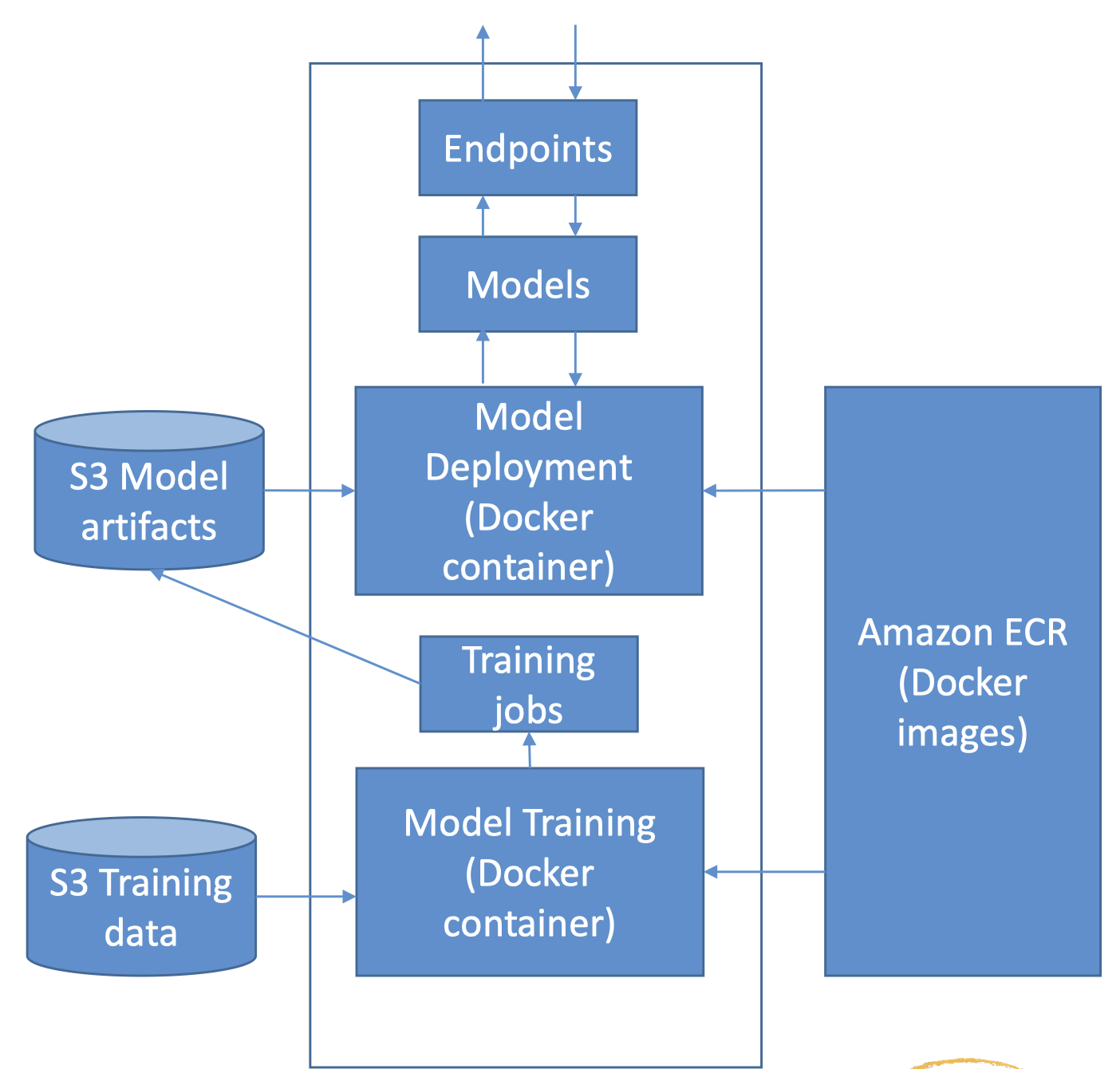
1. SageMaker and Docker Containers• All models in SageMaker are hosted in Docker containers– Pre-built deep learning– Pre-built scikit-learn and Spark ML– Pre-built Tensorflow, MXNet, Chainer, PyTorch* Distributed training via Horovod or Parameter Servers– Your own training and inference code! Or extend a pre-built image.• This allows you to use any script or algorithm within SageMaker, regardless of runtime or language– Containers are isolated, and contain all dependencies and resources needed to run1.1. Using Docker• Docker containers are created from images• Images are built from a Dockerfile• Images are saved in a repository– Amazon Elastic Container Registry
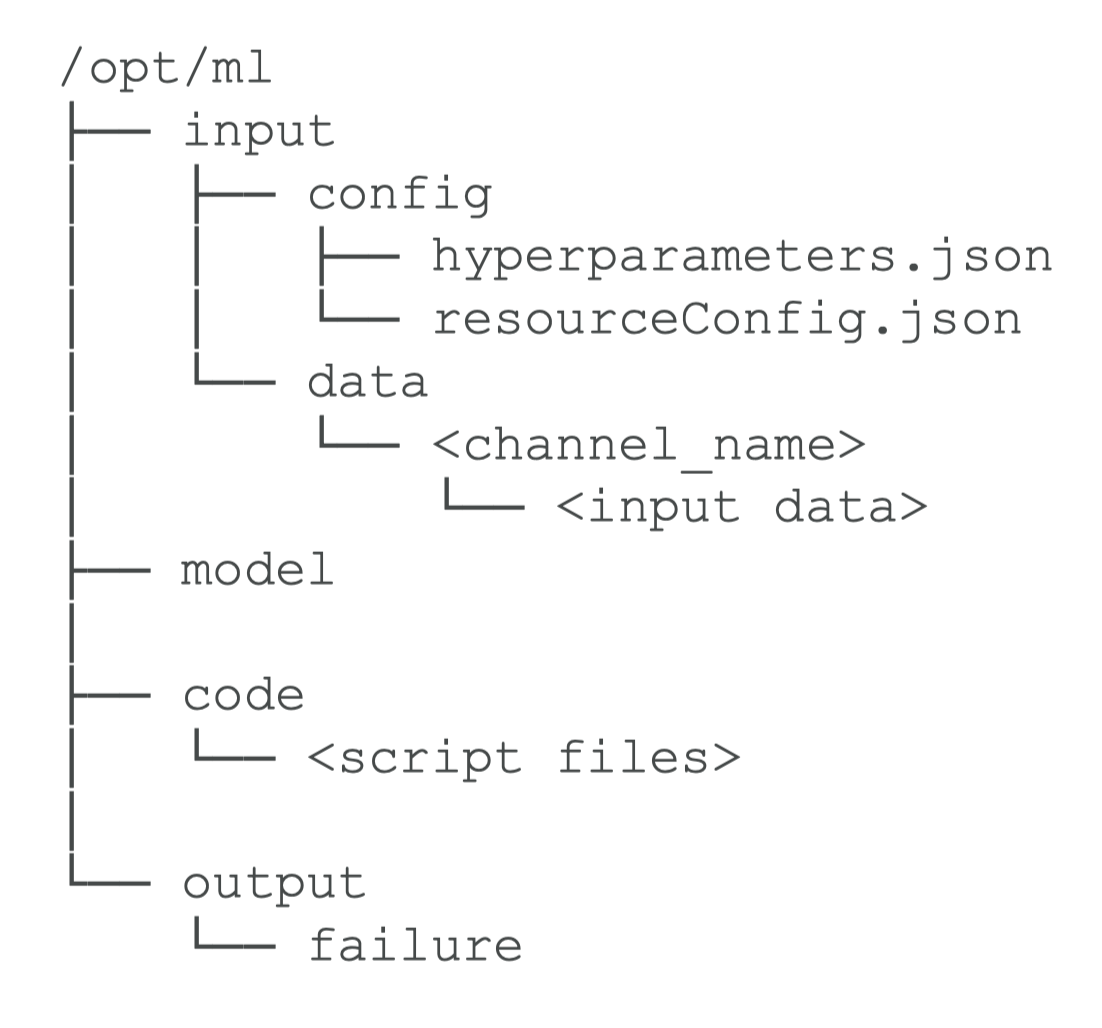
1.2. Amazon SageMaker Containers• Library for making containers compatible with SageMaker– RUN pip install sagemaker-containers in your Dockerfile1.3. Structure of a training container
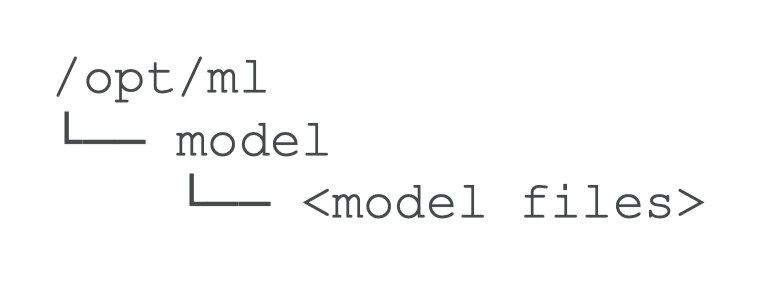
1.4. Structure of a Deployment Container
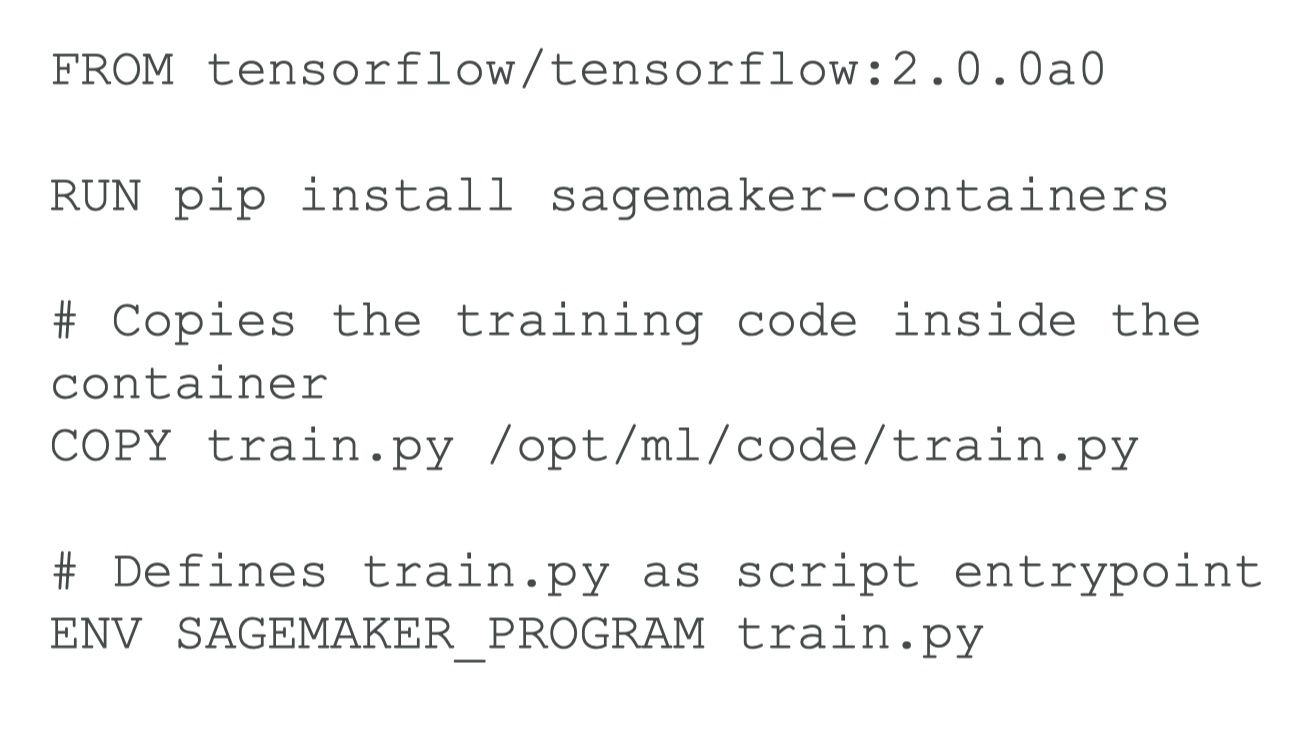
1.5. Structure of your Docker image• WORKDIR– nginx.conf– predictor.py– serve/– train/– wsgi.py1.6. Assembling it all in a Dockerfile
1.7. Environment variables• SAGEMAKER_PROGRAM– Run a script inside /opt/ml/code• SAGEMAKER_TRAINING_MODULE• SAGEMAKER_SERVICE_MODULE• SM_MODEL_DIR• SM_CHANNELS / SM_CHANNEL_*• SM_HPS / SM_HP_*• SM_USER_ARGS• …and many more1.8. Using your own image• cd dockerfile• !docker build -t foo .
from sagemaker.estimator import Estimatorestimator = Estimator(image_name=‘foo', role='SageMakerRole', train_instance_count=1, train_instance_type='local')estimator.fit()
1.9. Production Variants• You can test out multiple models on live traffic using Production Variants– Variant Weights tell SageMaker how to distribute traffic among them* So, you could roll out a new iteration of your model at say 10% variant weight* Once you’re confident in its performance, ramp it up to 100%• This lets you do A/B tests, and to validate performance in real-world settings– Offline validation isn’t always useful
2. SageMaker On The Edge2.1. SageMaker Neo• Train once, run anywhere– Edge devices* ARM, Intel, Nvidia processors* Embedded in whatever – your car?• Optimizes code for specific devices– Tensorflow, MXNet, PyTorch, ONNX, XGBoost• Consists of a compiler and a runtime2.2. Neo + AWS IoT Greengrass• Neo-compiled models can be deployed to an HTTPS endpoint– Hosted on C5, M5, M4, P3, or P2 instances– Must be same instance type used for compilation• OR! You can deploy to IoT Greengrass– This is how you get the model to an actual edge device– Inference at the edge with local data, using model trained in the cloud– Uses Lambda inference applications
2.3. SageMaker Security2.4. General AWS Security• Use Identity and Access Management (IAM)– Set up user accounts with only the permissions they need• Use MFA• Use SSL/TLS when connecting to anything• Use CloudTrail to log API and user activity• Use encryption• Be careful with PII2.5. Protecting your Data at Rest in SageMaker• AWS Key Management Service (KMS)– Accepted by notebooks and all SageMaker jobs* Training, tuning, batch transform, endpoints* Notebooks and everything under /opt/ml/ and /tmp can be encrypted with a KMS key• S3– Can use encrypted S3 buckets for training data and hosting models– S3 can also use KMS2.6. Protecting Data in Transit in SageMaker• All traffic supports TLS / SSL• IAM roles are assigned to SageMaker to give it permissions to access resources• Inter-node training communication may be optionally encrypted– Can increase training time and cost with deep learning– AKA inter-container traffic encryption– Enabled via console or API when setting up a training or tuning job2.7. SageMaker + VPC• Training jobs run in a Virtual Private Cloud (VPC)• You can use a private VPC for even more security– You’ll need to set up S3 VPC endpoints– Custom endpoint policies and S3 bucket policies can keep this secure• Notebooks are Internet-enabled by default– This can be a security hole– If disabled, your VPC needs an interface endpoint (PrivateLink) or NAT Gateway, and allow outbound connections, for training and hosting to work• Training and Inference Containers are also Internet-enabled by default– Network isolation is an option, but this also prevents S3 access2.8. SageMaker + IAM• User permissions for:– CreateTrainingJob– CreateModel– CreateEndpointConfig– CreateTransformJob– CreateHyperParameterTuningJob– CreateNotebookInstance– UpdateNotebookInstance• Predefined policies:– AmazonSageMakerReadOnly– AmazonSageMakerFullAccess– AdministratorAccess– DataScientist2.9. SageMaker Logging and Monitoring• CloudWatch can log, monitor and alarm on:– Invocations and latency of endpoints– Health of instance nodes (CPU, memory, etc)– Ground Truth (active workers, how much they are doing)• CloudTrail records actions from users, roles, and services within SageMaker– Log files delivered to S3 for auditing
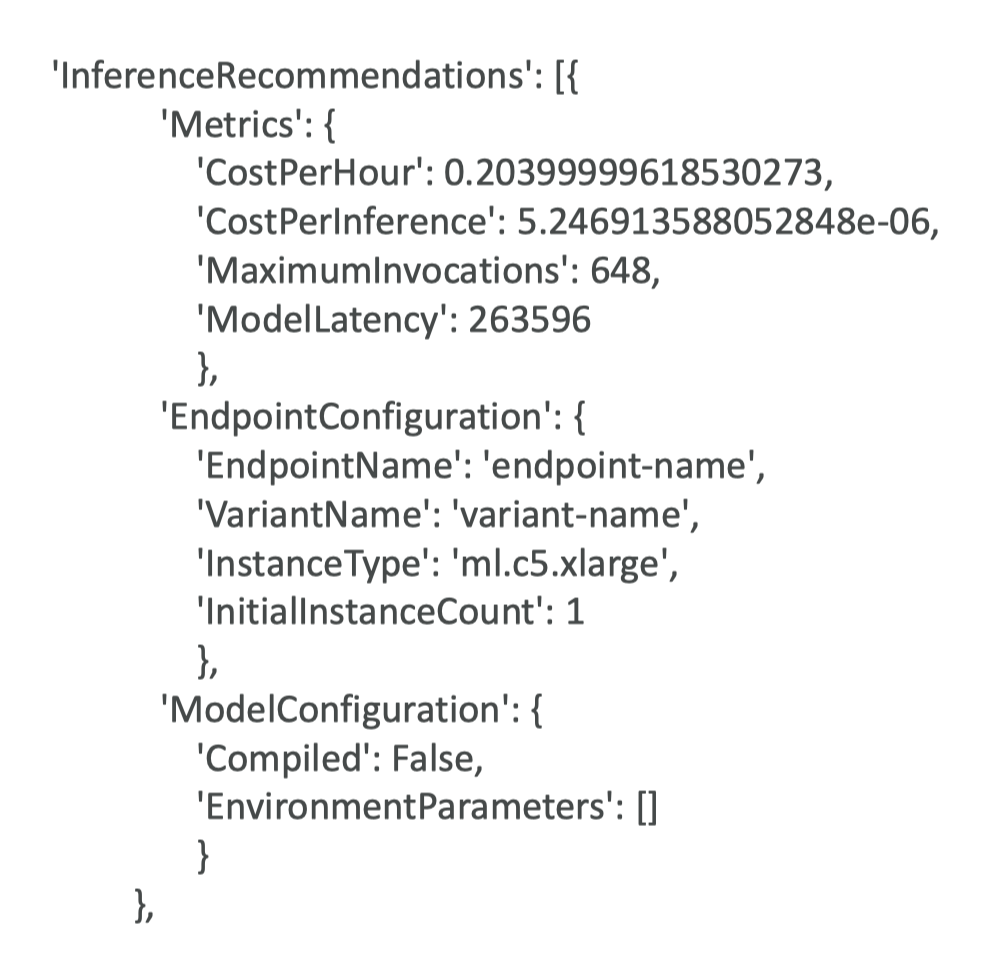
3. Managing SageMaker Resources3.1. Choosing your instance types• We covered this under “modeling”, even though it’s an operations concern• In general, algorithms that rely on deep learning will benefit from GPU instances (P2 or P3) for training• Inference is usually less demanding and you can often get away with compute instances there (C4, C5)• GPU instances can be really pricey3.2. Managed Spot Training• Can use EC2 Spot instances for training– Save up to 90% over on-demand instances• Spot instances can be interrupted!– Use checkpoints to S3 so training can resume• Can increase training time as you need to wait for spot instances to become available3.3. Elastic Inference• Accelerates deep learning inference– At fraction of cost of using a GPU instance for inference• EI accelerators may be added alongside a CPU instance– ml.eia1.medium / large / xlarge• EI accelerators may also be applied to notebooks• Works with Tensorflow, PyTorch, and MXNet pre-built containers– ONNX may be used to export models to MXNet• Works with custom containers built with EIenabled Tensorflow, PyTorch, or MXNet• Works with Image Classification and Object Detection built-in algorithms3.4. Automatic Scaling• You set up a scaling policy to define target metrics, min/max capacity, cooldown periods• Works with CloudWatch• Dynamically adjusts number of instances for a production variant• Load test your configuration before using it!3.5. Serverless Inference• Introduced for 2022• Specify your container, memory requirement, concurrency requirements• Underlying capacity is automatically provisioned and scaled• Good for infrequent or unpredictable traffic; will scale down to zero when there are no requests.• Charged based on usage• Monitor via CloudWatch– ModelSetupTime, Invocations, MemoryUtilization3.6. Amazon SageMaker Inference Recommender• Recommends best instance type & configuration for your models• Automates load testing model tuning• Deploys to optimal inference endpoint• How it works:– Register your model to the model registry– Benchmark different endpoint configurations– Collect & visualize metrics to decide on instance types– Existing models from zoos may have benchmarks already• Instance Recommendations– Runs load tests on recommended instance types– Takes about 45 minutes• Endpoint Recommendations– Custom load test– You specify instances, traffic patterns, latency requirements, throughput requirements– Takes about 2 hours
3.7. SageMaker and Availability Zones• SageMaker automatically attempts to distribute instances across availability zones• But you need more than one instance for this to work!• Deploy multiple instances for each production endpoint• Configure VPC’s with at least two subnets, each in a different AZ
4. Inference Pipelines• Linear sequence of 2-15 containers• Any combination of pre-trained built-in algorithms or your own algorithms in Docker containers• Combine pre-processing, predictions, post-processing• Spark ML and scikit-learn containers OK– Spark ML can be run with Glue or EMR– Serialized into MLeap format• Can handle both real-time inference and batch transforms