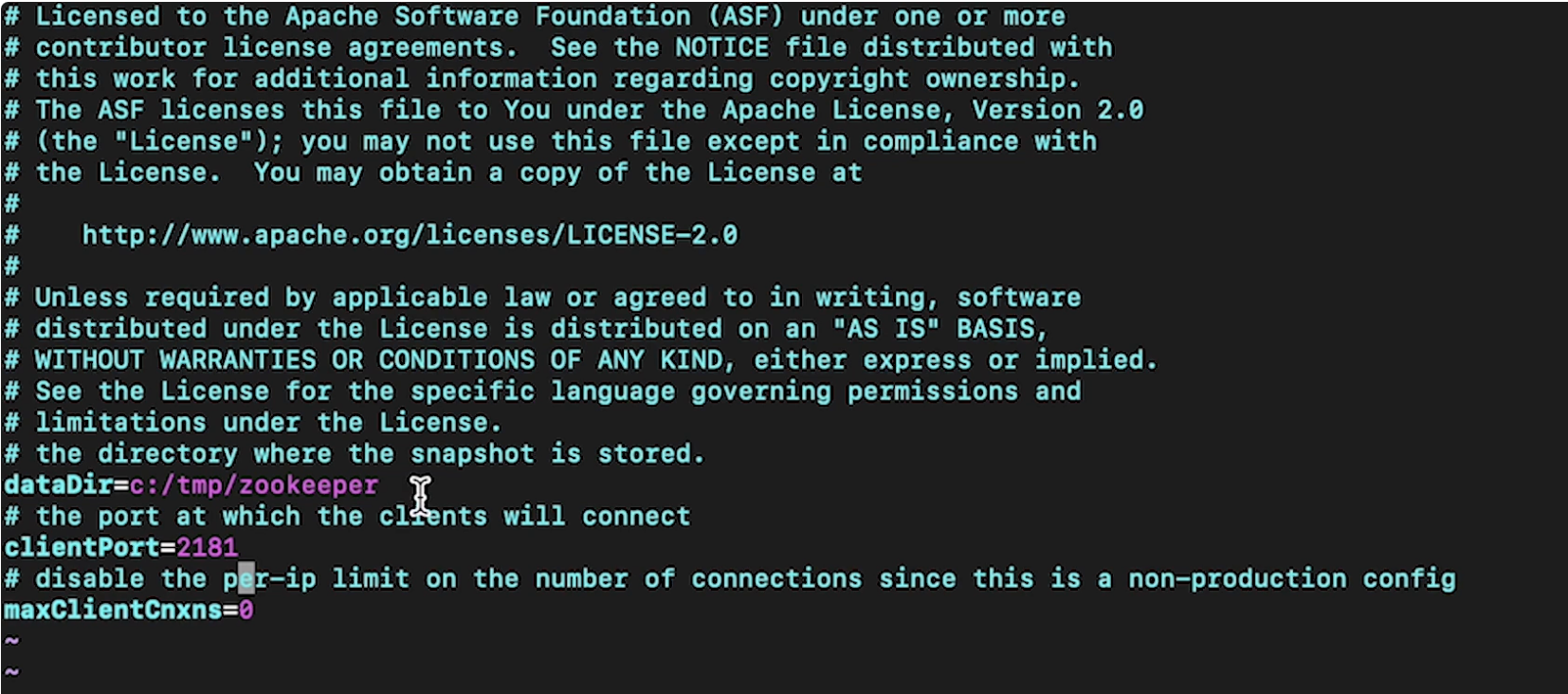
1. Data Ingestion• Data ingestion means that we want to get data into our system so that we can do some sort of analysis on it.• Streaming ingestion usually involves things like:– Clickstream– Change data capture– Live video feeds2. Clickstream: Kafka, Kinesis, Zookeeper• It keeps track of what the user interactions are with some particular interface, like a mobile app, or a voice assistant, or a desktop app.• Clickstream potentially have to manage millions of events/interactions per second• What does the clickstream actually keep track of? In most cases, clickstream is going to have a record per event which keeps track of things like:– Datetime of event– User agent → what type of browser – User ID (if logged in)– Request details → get/details/<video_id>– Session ID → especially if they're not logged in → use cookies → helps tie clickstream entries– IP address– Referrer → Google, Facebook, etc.• Two tools we can use to sort through these [potentially] millions of records every second:– Kafka– Kinesis• Note: Sometimes these tools are referred to as Pub/Sub or Publish/Subscribe.• Note: Here, we used clickstream as one example, but essentially it could be anything that has the streaming ingestion aspect of it. – Examples of such are web crawlers, RSS feeds, and even another storage (such as a database).2.1. Kafka• It's an Apache open source project.• It allows us to create brokers and these brokers manage the interactions between some producers (e.g. clickstream logs) and some consumers (storage).– Clickstream logs get sent to particular Kafka topics and they have partitions on the broker such that the consumers can consume from these brokers to store these clickstream logs.2.2. Zookeeper• What happens if the clickstream logs come in at a far faster rate than a single broker could handle?– In this case, we're going to have broker cluster.– Every single clickstream log will be sent to a particular partition and one of the brokers in the broker cluster will be assigned to be the partition leader.– All the partition leader does is to make sure that all of the reads and writes go through that particular partition and it also replicates the partition across other brokers in the broker cluster.– In order to manage all the brokers [in the broker cluster], Zookeeper handles the management of the leader of this broker cluster → such that if one of the brokers is a leader and it goes down, it can then substitute in another broker from the cluster such that it can takes its place.– Zookeeper also keeps track of different topics for each configuration.* For instance, if we had clickstreams coming from a home page, that could be one topic, etc.• In general, Kafka will give us the scalability aspects such that we can add more and more brokers to the broker cluster to support millions of clickstreams per second.2.3. Kinesis• It's a fully-managed AWS service.• Kinesis has shards instead of partitions, and the number of shards present can scale up.3. Change data capture, OLTP and OLAP• How we ingest changes to databases is a process called change data capture.• Let's say we have a DB and it's keeping track of who (in terms of user ID) is subscribed to Netflix.– So, effectively, a row in this database would be keyed on some user ID and the value would be is this user ID actively subscribed to Netflix? Also, we want to know their removal date.– If we want to build a ML model to predict whether someone will renew or not, we care about their current state of their subscription (because they can't cancel if they're already canceled), and we also care about the previous status of their membership, so that we can see when did user X canceled and tie that to some service usage before they canceled.– So, here the hypothesis is that maybe their usages have gone down before they decided to cancel.– If we wanted to model this, we couldn't just look at that DB → because we also need a history to tell us when did they unsubscribed/subscribed.• In order to capture that → we're going to use a tool called change data capture.– It will tap into a log of changes to a particular row in some DB table and will these change logs to the streaming tools (e.g. Kafka, Kinesis).– Now, our producers are these different storage instances.– Every single time a row in a table is updated, we can look at the change logs associated with these databases and send that information to the broker (e.g. Kafka).– Now, the consumers could store these changes such that we could build a ML model.3.1. OLTP (Online Transaction Processing)• In online transaction processing (OLTP), information systems typically facilitate and manage transaction-oriented applications. This is contrasted with online analytical processing.• Some examples of OLTP systems include order entry, retail sales, and financial transaction systems.• Note: The term "transaction" can have two different meanings, both of which might apply:– In the realm of computers or database transactions it denotes an atomic change of state– In the realm of business or finance, the term typically denotes an exchange of economic entities.• OLTP has also been used to refer to processing in which the system responds immediately to user requests.– An ATM (Automated Teller Machine) for a bank is an example of a commercial transaction processing application.• OLTP system design: To build an OLTP system, a designer must know that the large number of concurrent users does not interfere with the system's performance. To increase the performance of an OLTP system, a designer must avoid excessive use of indexes and clusters. The following elements are crucial for the performance of OLTP systems:– Rollback segments: Rollback segments are the portions of database that record the actions of transactions in the event that a transaction is rolled back. Rollback segments provide read consistency, rollback transactions, and recovery of the database.– Clusters: A cluster is a schema that contains one or more tables that have one or more columns in common. Clustering tables in a database improves the performance of join operations.– Discrete transactions: A discrete transaction defers all change to the data until the transaction is committed. It can improve the performance of short, non-distributed transactions.– Block size: The data block size should be a multiple of the operating system's block size within the maximum limit to avoid unnecessary I/O.– Buffer cache size: SQL statements should be tuned to use the database buffer cache to avoid unnecessary resource consumption.– Dynamic allocation: of space to tables and rollback segments.– Transaction processing: monitors and the multi-threaded server. A transaction processing monitor is used for coordination of services. It is like an operating system and does the coordination at a high level of granularity and can span multiple computing devices.– Partition (database): Partition use increases performance for sites that have regular transactions while still maintaining availability and security.– Database tuning: With database tuning, an OLTP system can maximize its performance as efficiently and rapidly as possible.3.2. OLAP (Online Analytical Processing)• OLAP is an approach to answer multi-dimensional analytical (MDA) queries swiftly in computing.• Typical applications of OLAP include business reporting for sales, marketing, management reporting, business process management (BPM),[3] budgeting and forecasting, financial reporting and similar areas, with new applications emerging, such as agriculture.• OLAP consists of three basic analytical operations: – consolidation (roll-up): involves the aggregation of data that can be accumulated and computed in one or more dimensions.* For example, all sales offices are rolled up to the sales department or sales division to anticipate sales trends.– drill-down: is a technique that allows users to navigate through the details. * For instance, users can view the sales by individual products that make up a region's sales.– slicing and dicing: is a feature whereby users can take out (slicing) a specific set of data of the OLAP cube and view (dicing) the slices from different viewpoints.* These viewpoints are sometimes called dimensions (such as looking at the same sales by salesperson, or by date, or by customer, or by product, or by region, etc.).• Note: Databases configured for OLAP use a multidimensional data model, allowing for complex analytical and ad hoc queries with a rapid execution time.• At the core of any OLAP system is an OLAP cube (also called a 'multidimensional cube' or a hypercube). • It consists of numeric facts called measures that are categorized by dimensions.– The measures are placed at the intersections of the hypercube, which is spanned by the dimensions as a vector space. • The usual interface to manipulate an OLAP cube is a matrix interface, like Pivot tables in a spreadsheet program, which performs projection operations along the dimensions, such as aggregation or averaging.• Note: The cube metadata is typically created from a star schema or snowflake schema or fact constellation of tables in a relational database. Measures are derived from the records in the fact table and dimensions are derived from the dimension tables.– Each measure can be thought of as having a set of labels, or meta-data associated with it. A dimension is what describes these labels; it provides information about the measure.3.3. OLTP vs. OLAP• OLTP vs. OLAP:OLTP is typically contrasted to OLAP (online analytical processing), which is generally characterized by much more complex queries, in a smaller volume, for the purpose of business intelligence or reporting rather than to process transactions.– Whereas OLTP systems process all kinds of queries (read, insert, update and delete), OLAP is generally optimized for read only and might not even support other kinds of queries. OLTP also operates differently from batch processing and grid computing.• An OLTP system keeps track of who was actively subscribed (referring to the example above) such that if you log in, we know to grant you some particular membership benefit.• An OLAP system keeps track of when you subscribed or when you unsubscribed.3.4. Live video, HLS• Live video could mean ingesting video content from traffic cameras, security cameras, or video streaming services.• An example is HLS → HTTP Live Streaming.– It takes an mp4, chops it up into segments, and sends out those segments over HTTP.– HLS plays videos encoded with H.264 compression– AAC encoded sounds.• • How does this look in terms of producer-broker-consumer paradigm?– The camera feeds will be sent to some collector. * The collector layer is needed to disassemble the video into some frame by frame representation and ship them to the broker.* The layer could also compress the frames to save cost of transporting it over to the broker.4. Batch Ingestion• Batch ingestion can take place when we want a periodic snapshot of some database.• It is also useful as a first step for when we want to onboard a DB before we use change data capture on it.• This allows our storage system to be fully up-to-date with the DB contents, before we start keeping track of all the changes to that particular DB.• The technologies that we can use to transfer the data to some particular DB instance into some storage layer that we want to use for analytics:– MySQL → mysqldump– Cassandra → CQL copy– MongoDB → mongoexport• • Note: This is very similar to change data capture, except that we're not waiting for a change anymore. We're simply dumping all of data in the DB into storage.• The considerations that we need to take when we're talking about ingestion:– Size of individual data– Rate at which data comes in– Support of data types (changing data types)– High availability (Multi-AZ) and fault tolerance4.1. Basic example• Here is basic example of clickstream.• First, we check out the Zookeeper properties → config/zookeeper.properties
Figure 1:Zookeeper default config by Apache
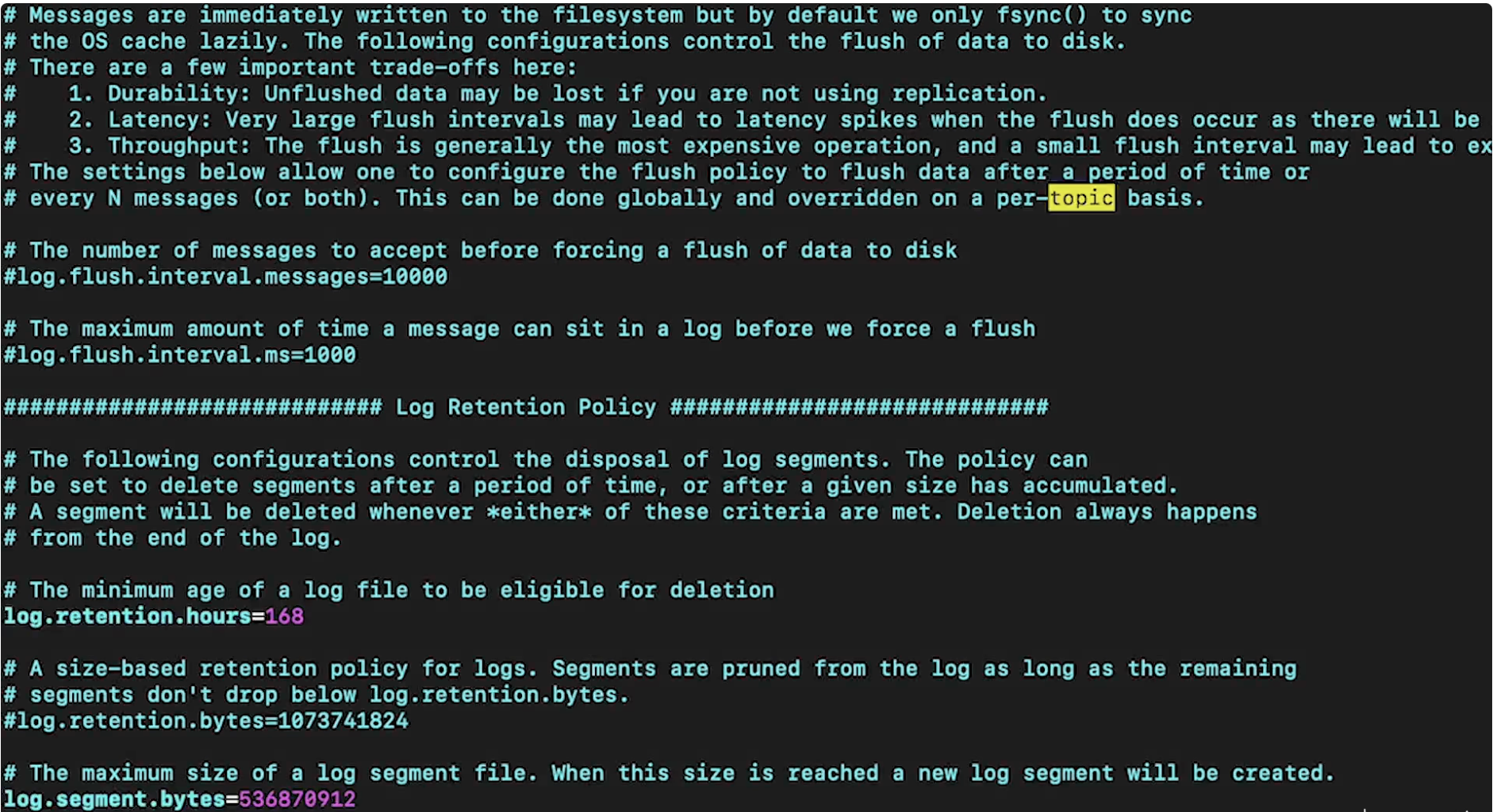
• Next, we can launch it → – bin/zookeeper-server-start.sh config/zookeeper.properties– Note: This comes default with Kafka.• • Next, we have to launch the Kafka broker. This, as well, has its own properties file →
Figure 2:Kafka default properties
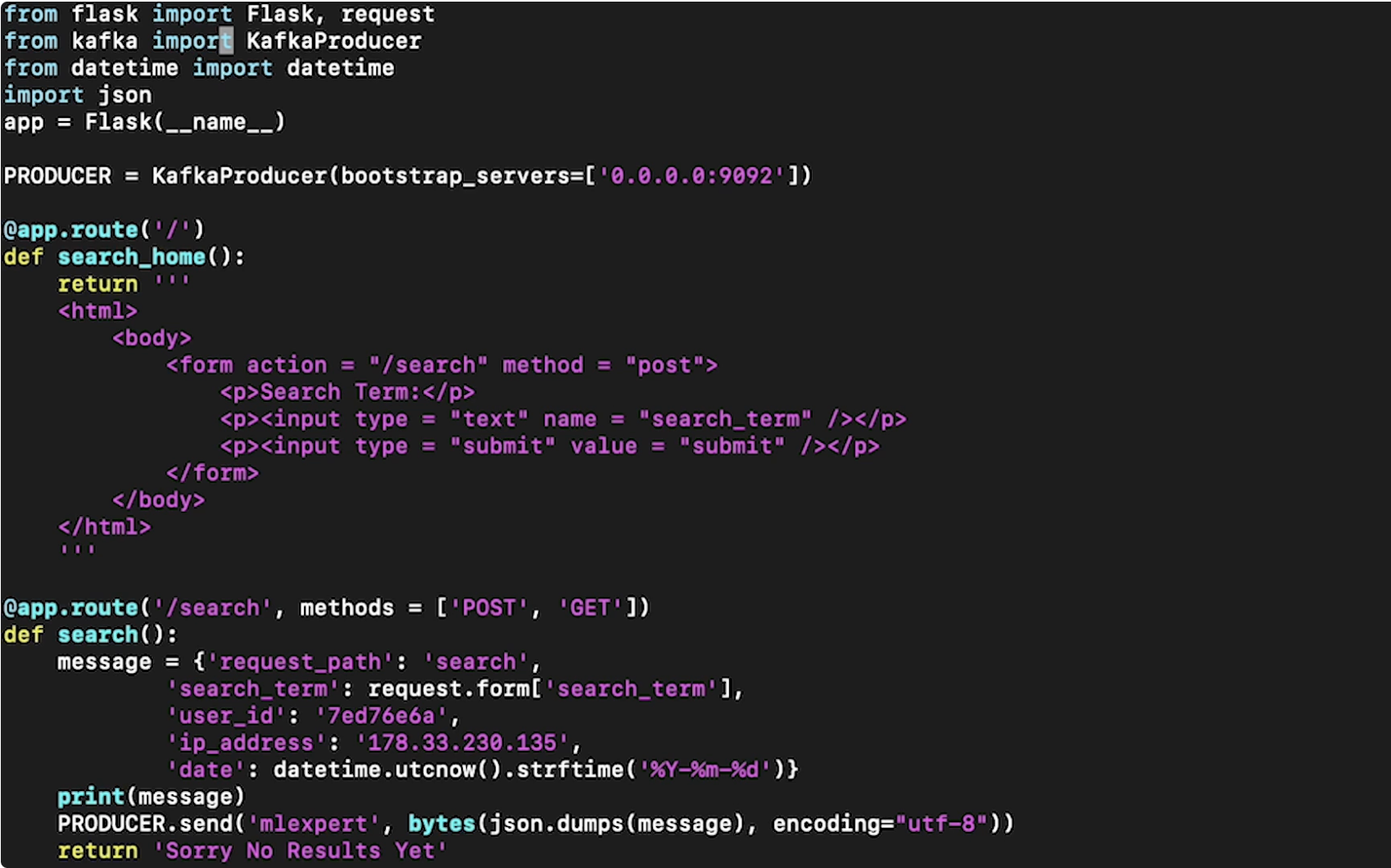
• Now, let's launch the Kafka broker →– bin/kafka-server-start.sh config/server.properties• Note: In production, we would actually spin up several Zookeeper instances and several brokers. • We also need to set up a producer. For this example, we're creating a simple web app which will have a clickstream being produced from it, and then send it to the Kafka broker to be later consumed. Here's a simple server file:
• Note: The 'mlexport' in the PRODUCER.send() is the broker topic. The topic needs to be created ahead of time so that we can reference it here.• We can create a simple Kafka consumer (which will just print results to the terminal) just to make sure that when we submit from web app, the message is actually being sent to Kafka broker → – bin/kafka-console-consumer.sh --topic mlexport --bootstrap-server localhost:9092 --zookeeper localhost:2181Back to Top