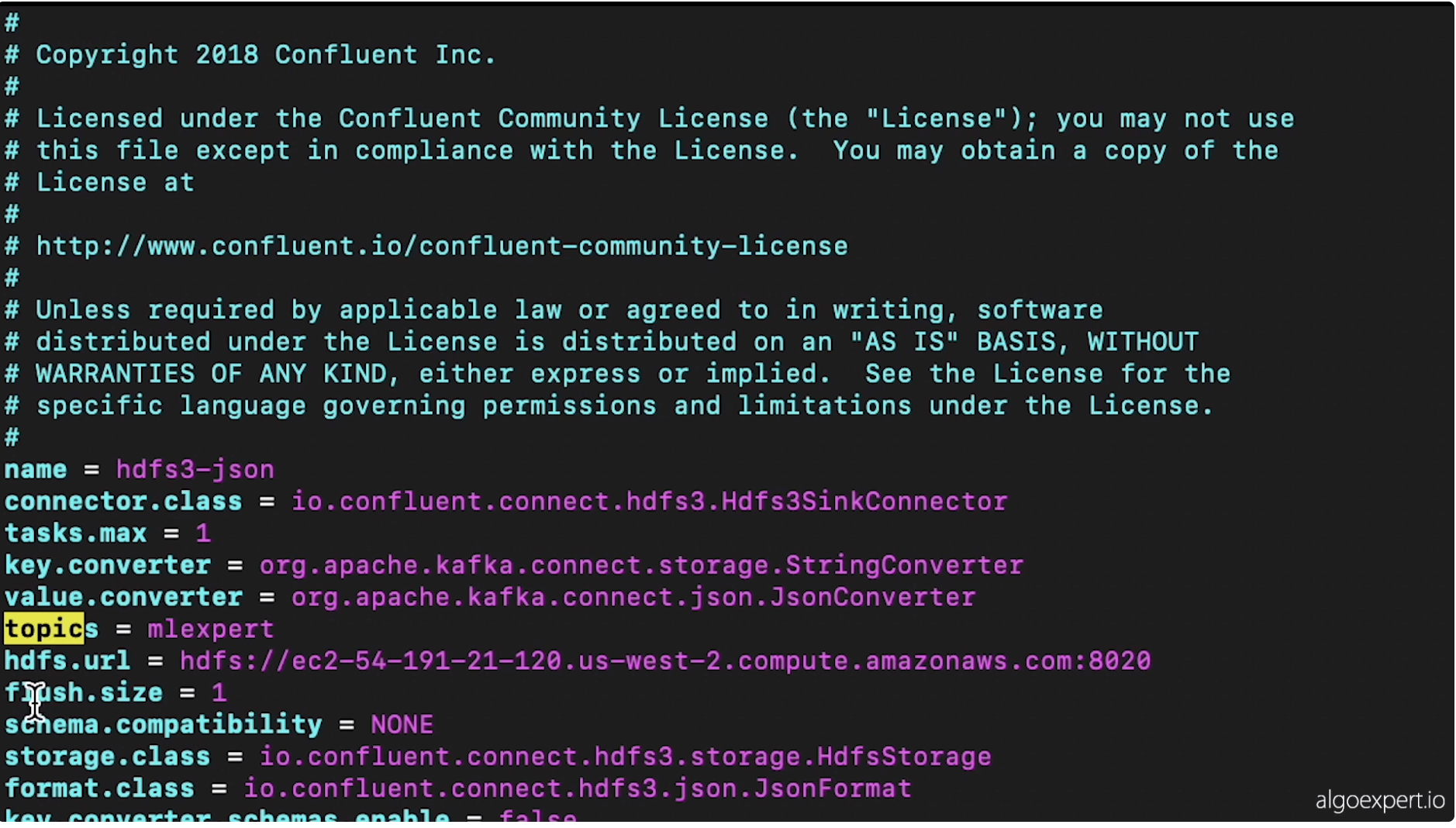
1. Data Storage• In section ? we talked about producers and brokers. In this section, we're going to discuss the "storage" layer (or consumers).• Let's say that we have single machine which has four HDDs (Hard Disk Drives).– Each of these drives can read and write at 100 MB⁄s.– Let's say we have 1TB of data to distribute equally (in parallel) across all four HDDs → This would take about 40 minutes for one terabyte to get written/read from the entire computer.– Additionally, since we're just dealing with one host, there would be no replication.* Anything happens to the host, the data is gone.• Let's say instead of having one machine we had 10 machines.– Everything else equal, it would take about 15 minutes to read/write one terabyte.– In addition, now we can replicate the data across the same cluster of hosts.2. Hadoop Distributed File System (HDFS)• In HDFS, there are data nodes associated with it.– These data nodes exist on machines that actually store the data.• You also have name node in HDFS, which keeps track of which data is on which data node.• A user would use a HDFS client to work with their files.– The HDFS client would partition the files into smaller blocks.– It would then send a request to the name node to store the partitions in data nodes.– Name node respond to HDFS client with data nodes it can use to store the file partitions.– HDFS client stores multiple copies of the file partition in different data nodes in order to replicate the data.– Now, we have our file saved in the Hadoop distributed file system.HDFS ClientfileABCData NodeData NodeData NodeData NodeName NodefileA=1,2,3B=1,3,4C=2,3,41234• The retrieve a file, the HDFS client would get the partition → data node mapping from the name node.• The good thing about HDFS is that it's very scalable.• One of the problems of HDFS is that the name node is a single point of failure.– What we can do is to have two name nodes, running at the same, one in the active state and the other in the passive state. In case one of them is down, we'll use the other one → This particular configuration is called "Hot Standby".– By doing so, it can achieve high availability.– In order to always keep the active and passive nodes in sync, all the stuff in the active node is written into a journal node cluster and then read by the passive node.• What if a data node fails?– In order to discover when a data node is inactive, we can use the name node to perform heartbeat calls to all of the known data nodes.* A heartbeat is just a call to the particular data nodes such that they must respond → "yes, I'm healthy"– If a particular data node doesn't respond to the heartbeat after some number of tries, then the name node will just replicate that data node's data to other nodes in the cluster.3. Zookeeper cluster• In the case that the name node that's currently active gets isolated due to some network failure, it will still believe that it's active and could come online soon, but instead we want to promote the passive name node to be the active.– We have to make sure that only one name node is active at a time → To do that, we use Zookeeper cluster.– Zookeeper will manage different heartbeat connections between each of the active and the passive nodes and with some additional tools, it will ensure that only one name node is active at a time.• • Note: Hadoop 3.x doesn't actually replicate the data in its entirety. It uses Erasure Coding.– Imagine we have this bit expression → 1⊕0⊕1⊕1=1 ← Parity bit.– If we remove one of the elements (e.g. 1⊕0⊕1⊕1=1),in our case, data that has gone missing in one of the data nodes, we can XOR all the other data that hasn't been lost along with the parity bit → If we XOR those, we can retrieve the data that was lost → This is a more efficient way of replicating data.– Note: The example above is actually pretty inefficient when it comes to erasure coding → The algorithm used in HDFS 3.x is Reed-Solomon Encoding.4. Kafka transactions• How do we make sure that only a single instance of an event/record ends up in storage when all of these systems (i.e. producers, brokers, consumers) could fail in some way?• Kafka transaction effectively assigns a transactional ID to each record that's being sent to a broker and there's a particular process that's followed with all the transactional IDs that are received such that we can guarantee that once a message is committed to a broker, that same message won't be committed again.• Kafka transactions can be somewhat cumbersome to work with → Kafka Streams API can simplify that.4.1. Kafka Connector Sink• This connector connects the broker and the consumer together, and specifically, they created an HDFS sink that allows us to achieve that exactly once delivery guarantee.• Note:Combining Kafka transactions (producer ⇆broker) and Kafka Connector Sink (broker ⇆consumer), we make sure that our storage layer doesn't contain any duplicated messages.4.2. Storage Formats• How do messages get stored in the HDFS storage layer?4.2.1. Avro• It's row-oriented → which means that if we have a table, Avro would represent it per each row.• This is good for queries which need all columns.• It's also good for heavy write load.• Avro supports a lot of schema evolution/change. • 4.2.2. Parquet• Parquet represents the same table in the column-oriented way.• It's good for queries which only needs some of the columns.• It's good for heavy read loads.• It's good for sparse data in the sense that if the entire column has sparse data, then we can just skip ahead to the following column.• We can also compress those column values that are similar.• However, the schema evolution support is pretty limited.4.3. Implementation example• In order to get HDFS Sink working, we need to configure it through Kafka. – → $ vim config/quickstart-hdfs.properties
• – Note: Parameter value.converter indicates that we'll be writing JSON to HDFS for now → This is just for readability. You can put Avro/Parquet here.– Note: We have to know the topic in which the sink connector should listen (e.g. mlexpert)– Note: Parameter hdfs.url indicates the sink destination to write the clickstream records that it obtains by listening to the mlexpert topic.* Here, the destination is the master node of our Hadoop cluster at port 8020.• Now, we start the connector – → $ bin/connect-standalone.sh config/connect-standalone.properties config/quickstart-hdfs.properties• We can go to Hadoop cluster name node in order to observe and monitor how records are being stored.Back to Top