Manual Similarity Measure
To calculate the similarity between two examples, you need to combine all the feature data for those two examples and combine them into a single numerical value.
Creating manual similarity measures is easier when the number of features is low.
As the number and complexity of features increase, it becomes harder to manually measure similarity. It’s better to use supervised similarity measure in such cases.
Example: Suppose there are two features:
- shoe size: Shoe size probably forms a Gaussian distribution. Confirm this. Then normalize the data.
- shoe price: The data is probably a Poisson distribution. Confirm this. If you have enough data, convert the data to quantiles and scale to [0,1].
We could use root mean square error (RMSE) to calculate a similarity measure.
Note: It’s a good idea to always scale (or normalize) the data before measuring similarity. This is to avoid one feature dominating the metric. If you don’t have enough data (to understand its distribution), scaling is enough.
Note: In general, you can prepare numerical data as described in Prepare data, and then combine the data by using Euclidean distance.
What if you have categorical data?
Categorical data can be either:
- Single valued (binary)
- Multi-valued
In the case of binary, if the data matches similarity is 1, otherwise it’s 0.
For Multi-valued, if you know all the category values, you can calculate similarity using the ratio of common values, called Jaccard similarity.
Example: Postal code
Postal codes representing areas that are close to each other should have a higher similarity. To encode the info required to calculate this similarity accurately, you can convert the postal codes into latitude and longitude. For a pair of postal codes, separately calculate the difference between their latitude and their longitude. Then add the differences to get a single numeric value.
Example: Color
Assume you have color data as text. Convert the textual values into numeric RGB values. Now you can find the difference in red, green, and blue values for two colors, and combine the differences into a numeric value by using the Euclidean distance
Notes:
- In general, your similarity measure must directly correspond to the actual similarity. If your metric does not, then it isn’t encoding the necessary information.
- The preceding example converted postal codes into latitude and longitude because postal codes by themselves did not encode the necessary information.
- Before creating your similarity measure, process your data carefully.
- Remember that quantiles are a good default choice for processing numeric data.
Limitations of Manual Similarity Measure
- When data gets complex, it is increasingly hard to process and combine the data to accurately measure similarity in a semantically meaningful way.
- Consider the color data. Should color really be categorical? Or should we assign colors like red and maroon to have higher similarity than black and white?
- And regarding combining data, we just weighted the garage feature equally with house price. However, house price is far more important than having a garage. Does it really make sense to weigh them equally?
***If you create a similarity measure that doesn’t truly reflect the similarity between examples, your derived clusters will not be meaningful. This is often the case with categorical data and brings us to a supervised measure.***
Supervised Similarity Measure (AutoEncoder)
- Instead of comparing manually-combined feature data, you can reduce the feature data to representations called embeddings, and then compare the embeddings.
- Embeddings are generated by training a supervised deep neural network (DNN) on the feature data itself.
- The embeddings map the feature data to a vector in an embedding space.
- Typically, the embedding space has fewer dimensions than the feature data in a way that captures some latent structure of the feature data set.
- The embedding vectors for similar examples, such as YouTube videos watched by the same users, end up close together in the embedding space.
- Note: Remember, we’re discussing supervised learning only to create our similarity measure. The similarity measure, whether manual or supervised, is then used by an algorithm to perform unsupervised clustering.
Comparison of Manual and Supervised Measures
| Requirement | Manual | Supervised |
|---|---|---|
| Eliminate redundant information in correlated features. | No, you need to separately investigate correlations between features. | Yes, DNN eliminates redundant information. |
| Provide insight into calculated similarities. | Yes | No, embeddings cannot be deciphered. |
| Suitable for small datasets with few features. | Yes, designing a manual measure with a few features is easy. | No, small datasets do not provide enough training data for a DNN. |
| Suitable for large datasets with many features. | No, manually eliminating redundant information from multiple features and then combining them is very difficult. | Yes, the DNN automatically eliminates redundant information and combines features. |
Process for Supervised Similarity Measure
The following figure shows how to create a supervised similarity measure:

Choose DNN Based on Training Labels
- Reduce your feature data to embeddings by training a DNN that uses the same feature data both as input and as the labels.
- For example, in the case of house data, the DNN would use the features—such as price, size, and postal code—to predict those features themselves.
- In order to use the feature data to predict the same feature data, the DNN is forced to reduce the input feature data to embeddings. You use these embeddings to calculate similarity.
- A DNN that learns embeddings of input data by predicting the input data itself is called an autoencoder.
- Because an autoencoder’s hidden layers are smaller than the input and output layers, the autoencoder is forced to learn a compressed representation of the input feature data.
- Once the DNN is trained, you extract the embeddings from the last hidden layer to calculate similarity.
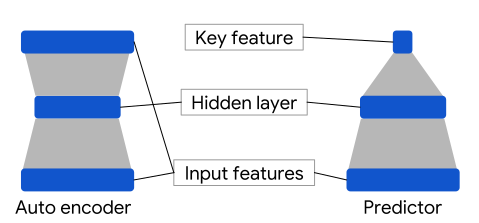
- An autoencoder is the simplest choice to generate embeddings.
- However, an autoencoder isn’t the optimal choice when certain features could be more important than others in determining similarity.
- For example, in house data, let’s assume “price” is more important than “postal code". In such cases, use only the important feature as the training label for the DNN.
- Since this DNN predicts a specific input feature instead of predicting all input features, it is called a predictor DNN.
- Use the following guidelines to choose a feature as the label:
- Prefer numeric features to categorical features as labels because loss is easier to calculate and interpret for numeric features.
- Do not use categorical features with cardinality ≲ 100 as labels. If you do, the DNN will not be forced to reduce your input data to embeddings because a DNN can easily predict low-cardinality categorical labels.
- Remove the feature that you use as the label from the input to the DNN; otherwise, the DNN will perfectly predict the output.
Depending on your choice of labels, the resulting DNN is either an autoencoder DNN or a predictor DNN.
Loss Function for DNN
To train the DNN, you need to create a loss function by following these steps:
- Calculate the loss for every output of the DNN. For outputs that are:
- Numeric, use mean square error (MSE).
- Univalent categorical, use log loss. Note that you won’t need to implement log loss yourself because you can use a library function to calculate it.
- Multivalent categorical, use softmax cross entropy loss. Note that you won’t need to implement softmax cross entropy loss yourself because you can use a library function to calculate it.
- Calculate the total loss by summing the loss for every output.
Note: When summing the losses, ensure that each feature contributes proportionately to the loss. For example, if you convert color data to RGB values, then you have three outputs. But summing the loss for three outputs means the loss for color is weighted three times as heavily as other features. Instead, multiply each output by 1/3.
Using DNN in an Online System
An online machine learning system has a continuous stream of new input data. You’ll need to train your DNN on the new data. However, if you retrain your DNN from scratch, then your embeddings will be different because DNNs are initialized with random weights. Instead, always warm-start the DNN with the existing weights and then update the DNN with new data.
Generating Embeddings Example
This example shows how to generate the embeddings used in a supervised similarity measure. Imagine you have this housing data:

Preprocessing Data
Before you use feature data as input, you need to preprocess the data. The preprocessing steps are based on the steps you took when creating a manual similarity measure. Here’s a summary:

Choose Predictor or Autoencoder
To generate embeddings, you can choose either an autoencoder or a predictor. Remember, your default choice is an autoencoder. You choose a predictor instead if specific features in your dataset determine similarity. For completeness, let’s look at both cases.
Train a Predictor
You need to choose those features as training labels for your DNN that are important in determining similarity between your examples. Let’s assume price is most important in determining similarity between houses.
Choose price as the training label, and remove it from the input feature data to the DNN. Train the DNN by using all other features as input data. For training, the loss function is simply the MSE between predicted and actual price. To learn how to train a DNN, see Training Neural Networks.
Train an Autoencoder
Train an autoencoder on our dataset by following these steps:
- Ensure the hidden layers of the autoencoder are smaller than the input and output layers.
- Calculate the loss for each output as described in Supervised Similarity Measure.
- Create the loss function by summing the losses for each output. Ensure you weight the loss equally for every feature. For example, because color data is processed into RGB, weight each of the RGB outputs by 1/3rd.
- Train the DNN.
Extracting Embeddings from the DNN
After training your DNN, whether predictor or autoencoder, extract the embedding for an example from the DNN. Extract the embedding by using the feature data of the example as input, and read the outputs of the final hidden layer. These outputs form the embedding vector. Remember, the vectors for similar houses should be closer together than vectors for dissimilar houses.
Next, you’ll see how to quantify the similarity for pairs of examples by using their embedding vectors.
Measuring Similarity from Embeddings
You now have embeddings for any pair of examples. A similarity measure takes these embeddings and returns a number measuring their similarity. Remember that embeddings are simply vectors of numbers. To find the similarity between two vectors and , you have three similarity measures to choose from, as listed in the table below.

Choosing a Similarity Measure
In contrast to the cosine, the dot product is proportional to the vector length. This is important because examples that appear very frequently in the training set (for example, popular YouTube videos) tend to have embedding vectors with large lengths. If you want to capture popularity, then choose dot product. However, the risk is that popular examples may skew the similarity metric. To balance this skew, you can raise the length to an exponent to calculate the dot product as .
To better understand how vector length changes the similarity measure, normalize the vector lengths to 1 and notice that the three measures become proportional to each other.

Supervised Similarity Calculation: Programming Exercise
Similarity Measure Summary
To summarize, a similarity measure quantifies the similarity between a pair of examples, relative to other pairs of examples. The table below compares the two types of similarity measures:
