Pyspark Interview Questions for Freshers
1. What is PySpark?
PySpark is an Apache Spark interface in Python. It is used for collaborating with Spark using APIs written in Python. It also supports Spark’s features like Spark DataFrame, Spark SQL, Spark Streaming, Spark MLlib and Spark Core. It provides an interactive PySpark shell to analyze structured and semi-structured data in a distributed environment. PySpark supports reading data from multiple sources and different formats. It also facilitates the use of RDDs (Resilient Distributed Datasets). PySpark features are implemented in the py4j library in python.
PySpark can be installed using PyPi by using the command:
pip install pyspark
2. What are the characteristics of PySpark?
There are 4 characteristics of PySpark:

- Abstracted Nodes: This means that the individual worker nodes can not be addressed.
- Spark API: PySpark provides APIs for utilizing Spark features.
- Map-Reduce Model: PySpark is based on Hadoop’s Map-Reduce model this means that the programmer provides the map and the reduce functions.
- Abstracted Network: Networks are abstracted in PySpark which means that the only possible communication is implicit communication.
3. What are the advantages and disadvantages of PySpark?
Advantages of PySpark:
- Simple to use: Parallelized code can be written in a simpler manner.
- Error Handling: PySpark framework easily handles errors.
- Inbuilt Algorithms: PySpark provides many of the useful algorithms in Machine Learning or Graphs.
- Library Support: Compared to Scala, Python has a huge library collection for working in the field of data science and data visualization.
- Easy to Learn: PySpark is an easy to learn language.
Disadvantages of PySpark:
- Sometimes, it becomes difficult to express problems using the MapReduce model.
- Since Spark was originally developed in Scala, while using PySpark in Python programs they are relatively less efficient and approximately 10x times slower than the Scala programs. This would impact the performance of heavy data processing applications.
- The Spark Streaming API in PySpark is not mature when compared to Scala. It still requires improvements.
- PySpark cannot be used for modifying the internal function of the Spark due to the abstractions provided. In such cases, Scala is preferred.
4. What is PySpark SparkContext?
PySpark SparkContext is an initial entry point of the spark functionality. It also represents Spark Cluster Connection and can be used for creating the Spark RDDs (Resilient Distributed Datasets) and broadcasting the variables on the cluster.
The following diagram represents the architectural diagram of PySpark’s SparkContext:

When we want to run the Spark application, a driver program that has the main function will be started. From this point, the SparkContext that we defined gets initiated. Later on, the driver program performs operations inside the executors of the worker nodes. Additionally, JVM will be launched using Py4J which in turn creates JavaSparkContext. Since PySpark has default SparkContext available as “sc”, there will not be a creation of a new SparkContext.
5. Why do we use PySpark SparkFiles?
PySpark’s SparkFiles are used for loading the files onto the Spark application. This functionality is present under SparkContext and can be called using the sc.addFile() method for loading files on Spark. SparkFiles can also be used for getting the path using the SparkFiles.get() method. It can also be used to resolve paths to files added using the sc.addFile() method.
6. What are PySpark serializers?
The serialization process is used to conduct performance tuning on Spark. The data sent or received over the network to the disk or memory should be persisted. PySpark supports serializers for this purpose. It supports two types of serializers, they are:
- PickleSerializer: This serializes objects using Python’s PickleSerializer (
class pyspark.PickleSerializer). This supports almost every Python object. - MarshalSerializer: This performs serialization of objects. We can use it by using
class pyspark.MarshalSerializer. This serializer is faster than the PickleSerializer but it supports only limited types.
Consider an example of serialization which makes use of MarshalSerializer:
# --serializing.py----
from pyspark.context import SparkContext
from pyspark.serializers import MarshalSerializer
sc = SparkContext("local", "Marshal Serialization", serializer = MarshalSerializer())    #Initialize spark context and serializer
print(sc.parallelize(list(range(1000))).map(lambda x: 3 * x).take(5))
sc.stop()
When we run the file using the command:
$SPARK_HOME/bin/spark-submit serializing.py
The output of the code would be the list of size 5 of numbers multiplied by 3:
[0, 3, 6, 9, 12]
7. What are RDDs in PySpark?
RDDs expand to Resilient Distributed Datasets. These are the elements that are used for running and operating on multiple nodes to perform parallel processing on a cluster. Since RDDs are suited for parallel processing, they are immutable elements. This means that once we create RDD, we cannot modify it. RDDs are also fault-tolerant which means that whenever failure happens, they can be recovered automatically. Multiple operations can be performed on RDDs to perform a certain task. The operations can be of 2 types:

- Transformation: These operations when applied on RDDs result in the creation of a new RDD. Some of the examples of transformation operations are filter, groupBy, map.
Let us take an example to demonstrate transformation operation by considering filter() operation:
from pyspark import SparkContext
sc = SparkContext("local", "Transdormation Demo")
words_list = sc.parallelize (
  ["pyspark",
  "interview",
  "questions",
  "at",
  "interviewbit"]
)
filtered_words = words_list.filter(lambda x: 'interview' in x)
filtered = filtered_words.collect()
print(filtered)
The above code filters all the elements in the list that has ‘interview’ in the element. The output of the above code would be:
[
  "interview",
  "interviewbit"
]
- Action: These operations instruct Spark to perform some computations on the RDD and return the result to the driver. It sends data from the Executer to the driver. count(), collect(), take() are some of the examples.
Let us consider an example to demonstrate action operation by making use of the count() function.
from pyspark import SparkContext
sc = SparkContext("local", "Action Demo")
words = sc.parallelize (
  ["pyspark",
  "interview",
  "questions",
  "at",
  "interviewbit"]
)
counts = words.count()
print("Count of elements in RDD -> ",  counts)
In this class, we count the number of elements in the spark RDDs. The output of this code is
Count of elements in RDD -> 5
8. Does PySpark provide a machine learning API?
Similar to Spark, PySpark provides a machine learning API which is known as MLlib that supports various ML algorithms like:
mllib.classification− This supports different methods for binary or multiclass classification and regression analysis like Random Forest, Decision Tree, Naive Bayes etc.mllib.clustering− This is used for solving clustering problems that aim in grouping entities subsets with one another depending on similarity.mllib.fpm− FPM stands for Frequent Pattern Matching. This library is used to mine frequent items, subsequences or other structures that are used for analyzing large datasets.mllib.linalg− This is used for solving problems on linear algebra.mllib.recommendation− This is used for collaborative filtering and in recommender systems.spark.mllib− This is used for supporting model-based collaborative filtering where small latent factors are identified using the Alternating Least Squares (ALS) algorithm which is used for predicting missing entries.mllib.regression− This is used for solving problems using regression algorithms that find relationships and variable dependencies.
9. What are the different cluster manager types supported by PySpark?
A cluster manager is a cluster mode platform that helps to run Spark by providing all resources to worker nodes based on the requirements.

The above figure shows the position of cluster manager in the Spark ecosystem. Consider a master node and multiple worker nodes present in the cluster. The master nodes provide the worker nodes with the resources like memory, processor allocation etc depending on the nodes requirements with the help of the cluster manager.
PySpark supports the following cluster manager types:
- Standalone – This is a simple cluster manager that is included with Spark.
- Apache Mesos – This manager can run Hadoop MapReduce and PySpark apps.
- Hadoop YARN – This manager is used in Hadoop2.
- Kubernetes – This is an open-source cluster manager that helps in automated deployment, scaling and automatic management of containerized apps.
- local – This is simply a mode for running Spark applications on laptops/desktops.
10. What are the advantages of PySpark RDD?
PySpark RDDs have the following advantages:
- In-Memory Processing: PySpark’s RDD helps in loading data from the disk to the memory. The RDDs can even be persisted in the memory for reusing the computations.
- Immutability: The RDDs are immutable which means that once created, they cannot be modified. While applying any transformation operations on the RDDs, a new RDD would be created.
- Fault Tolerance: The RDDs are fault-tolerant. This means that whenever an operation fails, the data gets automatically reloaded from other available partitions. This results in seamless execution of the PySpark applications.
- Lazy Evolution: The PySpark transformation operations are not performed as soon as they are encountered. The operations would be stored in the DAG and are evaluated once it finds the first RDD action.
- Partitioning: Whenever RDD is created from any data, the elements in the RDD are partitioned to the cores available by default.
11. Is PySpark faster than pandas?
PySpark supports parallel execution of statements in a distributed environment, i.e on different cores and different machines which are not present in Pandas. This is why PySpark is faster than pandas.
12. What do you understand about PySpark DataFrames?
PySpark DataFrame is a distributed collection of well-organized data that is equivalent to tables of the relational databases and are placed into named columns. PySpark DataFrame has better optimisation when compared to R or python. These can be created from different sources like Hive Tables, Structured Data Files, existing RDDs, external databases etc as shown in the image below:

The data in the PySpark DataFrame is distributed across different machines in the cluster and the operations performed on this would be run parallelly on all the machines. These can handle a large collection of structured or semi-structured data of a range of petabytes.
13. What is SparkSession in Pyspark?
SparkSession is the entry point to PySpark and is the replacement of SparkContext since PySpark version 2.0. This acts as a starting point to access all of the PySpark functionalities related to RDDs, DataFrame, Datasets etc. It is also a Unified API that is used in replacing the SQLContext, StreamingContext, HiveContext and all other contexts.

The SparkSession internally creates SparkContext and SparkConfig based on the details provided in SparkSession. SparkSession can be created by making use of builder patterns.
14. What are the types of PySpark’s shared variables and why are they useful?
Whenever PySpark performs the transformation operation using filter(), map() or reduce(), they are run on a remote node that uses the variables shipped with tasks. These variables are not reusable and cannot be shared across different tasks because they are not returned to the Driver. To solve the issue of reusability and sharing, we have shared variables in PySpark. There are two types of shared variables, they are:
Broadcast variables: These are also known as read-only shared variables and are used in cases of data lookup requirements. These variables are cached and are made available on all the cluster nodes so that the tasks can make use of them. The variables are not sent with every task. They are rather distributed to the nodes using efficient algorithms for reducing the cost of communication. When we run an RDD job operation that makes use of Broadcast variables, the following things are done by PySpark:
- The job is broken into different stages having distributed shuffling. The actions are executed in those stages.
- The stages are then broken into tasks.
- The broadcast variables are broadcasted to the tasks if the tasks need to use it.
Broadcast variables are created in PySpark by making use of the broadcast(variable) method from the SparkContext class. The syntax for this goes as follows:
broadcastVar = sc.broadcast([10, 11, 22, 31])
broadcastVar.value    # access broadcast variable
An important point of using broadcast variables is that the variables are not sent to the tasks when the broadcast function is called. They will be sent when the variables are first required by the executors.
Accumulator variables: These variables are called updatable shared variables. They are added through associative and commutative operations and are used for performing counter or sum operations. PySpark supports the creation of numeric type accumulators by default. It also has the ability to add custom accumulator types. The custom types can be of two types:
- Named Accumulators: These accumulators are visible under the “Accumulator” tab in the PySpark web UI as shown in the image below:
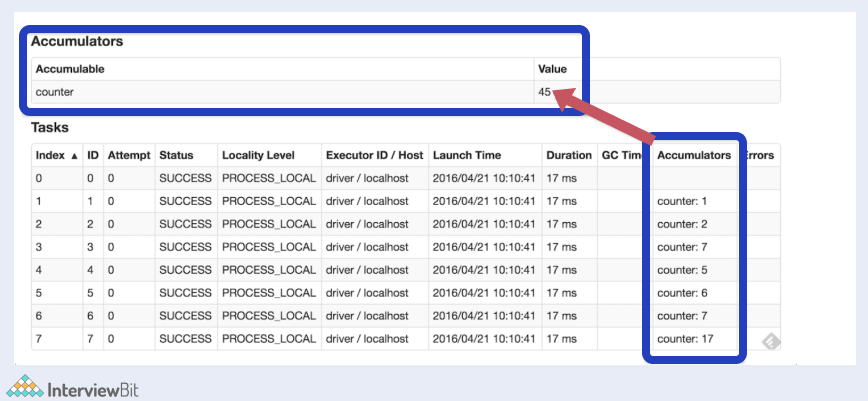
Here, we will see the Accumulable section that has the sum of the Accumulator values of the variables modified by the tasks listed in the Accumulator column present in the Tasks table.
- Unnamed Accumulators: These accumulators are not shown on the PySpark Web UI page. It is always recommended to make use of named accumulators.
Accumulator variables can be created by using SparkContext.longAccumulator(variable) as shown in the example below:
ac = sc.longAccumulator("sumaccumulator")
sc.parallelize([2, 23, 1]).foreach(lambda x: ac.add(x))
Depending on the type of accumulator variable data - double, long and collection, PySpark provide DoubleAccumulator, LongAccumulator and CollectionAccumulator respectively.
15. What is PySpark UDF?
UDF stands for User Defined Functions. In PySpark, UDF can be created by creating a python function and wrapping it with PySpark SQL’s udf() method and using it on the DataFrame or SQL. These are generally created when we do not have the functionalities supported in PySpark’s library and we have to use our own logic on the data. UDFs can be reused on any number of SQL expressions or DataFrames.
16. What are the industrial benefits of PySpark?
These days, almost every industry makes use of big data to evaluate where they stand and grow. When you hear the term big data, Apache Spark comes to mind. Following are the industry benefits of using PySpark that supports Spark:
- Media streaming: Spark can be used to achieve real-time streaming to provide personalized recommendations to subscribers. Netflix is one such example that uses Apache Spark. It processes around 450 billion events every day to flow to its server-side apps.
- Finance: Banks use Spark for accessing and analyzing the social media profiles and in turn get insights on what strategies would help them to make the right decisions regarding customer segmentation, credit risk assessments, early fraud detection etc.
- Healthcare: Providers use Spark for analyzing the past records of the patients to identify what health issues the patients might face posting their discharge. Spark is also used to perform genome sequencing for reducing the time required for processing genome data.
- Travel Industry: Companies like TripAdvisor uses Spark to help users plan the perfect trip and provide personalized recommendations to the travel enthusiasts by comparing data and review from hundreds of websites regarding the place, hotels, etc.
- Retail and e-commerce: This is one important industry domain that requires big data analysis for targeted advertising. Companies like Alibaba run Spark jobs for analyzing petabytes of data for enhancing customer experience, providing targetted offers, sales and optimizing the overall performance.
Pyspark Interview Questions for Experienced
17. What is PySpark Architecture?
PySpark similar to Apache Spark works in master-slave architecture pattern. Here, the master node is called the Driver and the slave nodes are called the workers. When a Spark application is run, the Spark Driver creates SparkContext which acts as an entry point to the spark application. All the operations are executed on the worker nodes. The resources required for executing the operations on the worker nodes are managed by the Cluster Managers. The following diagram illustrates the architecture described:

18. What PySpark DAGScheduler?
DAG stands for Direct Acyclic Graph. DAGScheduler constitutes the scheduling layer of Spark which implements scheduling of tasks in a stage-oriented manner using jobs and stages. The logical execution plan (Dependencies lineage of transformation actions upon RDDs) is transformed into a physical execution plan consisting of stages. It computes a DAG of stages needed for each job and keeps track of what stages are RDDs are materialized and finds a minimal schedule for running the jobs. These stages are then submitted to TaskScheduler for running the stages. This is represented in the image flow below:

DAGScheduler performs the following three things in Spark:
- Compute DAG execution for the job.
- Determine preferred locations for running each task
- Failure Handling due to output files lost during shuffling.
PySpark’s DAGScheduler follows event-queue architecture. Here a thread posts events of type DAGSchedulerEvent such as new stage or job. The DAGScheduler then reads the stages and sequentially executes them in topological order.
19. What is the common workflow of a spark program?
The most common workflow followed by the spark program is:
- The first step is to create input RDDs depending on the external data. Data can be obtained from different data sources.
- Post RDD creation, the RDD transformation operations like filter() or map() are run for creating new RDDs depending on the business logic.
- If any intermediate RDDs are required to be reused for later purposes, we can persist those RDDs.
- Lastly, if any action operations like first(), count() etc are present then spark launches it to initiate parallel computation.
20. Why is PySpark SparkConf used?
PySpark SparkConf is used for setting the configurations and parameters required to run applications on a cluster or local system. The following class can be executed to run the SparkConf:
class pyspark.Sparkconf(
localdefaults = True,
_jvm = None,
_jconf = None
)
where:
loadDefaults- is of type boolean and indicates whether we require loading values from Java System Properties. It is True by default._jvm- This belongs to the classpy4j.java_gateway.JVMViewand is an internal parameter that is used for passing the handle to JVM. This need not be set by the users._jconf- This belongs to the classpy4j.java_gateway.JavaObject. This parameter is an option and can be used for passing existing SparkConf handles for using the parameters.
21. How will you create PySpark UDF?
Consider an example where we want to capitalize the first letter of every word in a string. This feature is not supported in PySpark. We can however achieve this by creating a UDF capitalizeWord(str) and using it on the DataFrames. The following steps demonstrate this:
- Create Python function
capitalizeWordthat takes a string as input and capitalizes the first character of every word.
def capitalizeWord(str):
   result=""
   words = str.split(" ")
   for word in words:
      result= result + word[0:1].upper() + word[1:len(x)] + " "
   return result
- Register the function as a PySpark UDF by using the udf() method of
org.apache.spark.sql.functions.udfpackage which needs to be imported. This method returns the object of classorg.apache.spark.sql.expressions.UserDefinedFunction.
""" Converting function to UDF """
capitalizeWordUDF = udf(lambda z: capitalizeWord(z),StringType())
- Use UDF with DataFrame: The UDF can be applied on a Python DataFrame as that acts as the built-in function of DataFrame.
Consider we have a DataFrame of stored in variable df as below:
+----------+-----------------+
|ID_COLUMN |NAME_COLUMN      |
+----------+-----------------+
|1         |harry potter     |
|2         |ronald weasley   |
|3         |hermoine granger |
+----------+-----------------+
To capitalize every first character of the word, we can use:
df.select(col("ID_COLUMN"), convertUDF(col("NAME_COLUMN"))
 .alias("NAME_COLUMN") )
 .show(truncate=False)
The output of the above code would be:
+----------+-----------------+
|ID_COLUMN |NAME_COLUMN      |
+----------+-----------------+
|1         |Harry Potter     |
|2         |Ronald Weasley   |
|3         |Hermoine Granger |
+----------+-----------------+
UDFs have to be designed in a way that the algorithms are efficient and take less time and space complexity. If care is not taken, the performance of the DataFrame operations would be impacted.
22. What are the profilers in PySpark?
Custom profilers are supported in PySpark. These are useful for building predictive models. Profilers are useful for data review to ensure that it is valid and can be used for consumption. When we require a custom profiler, it has to define some of the following methods:
- profile: This produces a system profile of some sort.
- stats: This returns collected stats of profiling.
- dump: This dumps the profiles to a specified path.
- add: This helps to add profile to existing accumulated profile. The profile class has to be selected at the time of SparkContext creation.
- dump(id, path): This dumps a specific RDD id to the path given.
23. How to create SparkSession?
To create SparkSession, we use the builder pattern. The SparkSession class from the pyspark.sql library has the getOrCreate() method which creates a new SparkSession if there is none or else it returns the existing SparkSession object. The following code is an example for creating SparkSession:
import pyspark
from pyspark.sql import SparkSession
spark = SparkSession.builder.master("local[1]")
                   .appName('InterviewBitSparkSession')
                   .getOrCreate()
Here,
- master() – This is used for setting up the mode in which the application has to run - cluster mode (use the master name) or standalone mode. For Standalone mode, we use the
local[x]value to the function, where x represents partition count to be created in RDD, DataFrame and DataSet. The value of x is ideally the number of CPU cores available. - appName() - Used for setting the application name
- getOrCreate() – For returning SparkSession object. This creates a new object if it does not exist. If an object is there, it simply returns that.
If we want to create a new SparkSession object every time, we can use the newSession method as shown below:
import pyspark
from pyspark.sql import SparkSession
spark_session = SparkSession.newSession
24. What are the different approaches for creating RDD in PySpark?
The following image represents how we can visualize RDD creation in PySpark:

In the image, we see that the data we have is the list form and post converting to RDDs, we have it stored in different partitions.
We have the following approaches for creating PySpark RDD:
- Using
sparkContext.parallelize(): The parallelize() method of the SparkContext can be used for creating RDDs. This method loads existing collection from the driver and parallelizes it. This is a basic approach to create RDD and is used when we have data already present in the memory. This also requires the presence of all data on the Driver before creating RDD. Code to create RDD using the parallelize method for the python list shown in the image above:
list = [1,2,3,4,5,6,7,8,9,10,11,12]
rdd=spark.sparkContext.parallelize(list)
- Using
sparkContext.textFile(): Using this method, we can read .txt file and convert them into RDD. Syntax:
rdd_txt = spark.sparkContext.textFile("/path/to/textFile.txt")
- Using
sparkContext.wholeTextFiles(): This function returns PairRDD (RDD containing key-value pairs) with file path being the key and the file content is the value.
#Reads entire file into a RDD as single record.
rdd_whole_text = spark.sparkContext.wholeTextFiles("/path/to/textFile.txt")
We can also read csv, json, parquet and various other formats and create the RDDs.
- Empty RDD with no partition using
sparkContext.emptyRDD: RDD with no data is called empty RDD. We can create such RDDs having no partitions by using emptyRDD() method as shown in the code piece below:
empty_rdd = spark.sparkContext.emptyRDD
# to create empty rdd of string type
empty_rdd_string = spark.sparkContext.emptyRDD[String]
- Empty RDD with partitions using
sparkContext.parallelize: When we do not require data but we require partition, then we create empty RDD by using the parallelize method as shown below:
#Create empty RDD with 20 partitions
empty_partitioned_rdd = spark.sparkContext.parallelize([],20)
25. How can we create DataFrames in PySpark?
We can do it by making use of the createDataFrame() method of the SparkSession.
data = [('Harry', 20),
       ('Ron', 20),
       ('Hermoine', 20)]
columns = ["Name","Age"]
df = spark.createDataFrame(data=data, schema = columns)
This creates the dataframe as shown below:
+-----------+----------+
| Name      | Age      |
+-----------+----------+
| Harry     | 20       |
| Ron       | 20       |
| Hermoine  | 20       |
+-----------+----------+
We can get the schema of the dataframe by using df.printSchema()
>> df.printSchema()
root
|-- Name: string (nullable = true)
|-- Age: integer (nullable = true)
26. Is it possible to create PySpark DataFrame from external data sources?
Yes, it is! Realtime applications make use of external file systems like local, HDFS, HBase, MySQL table, S3 Azure etc. Following example shows how we can create DataFrame by reading data from a csv file present in the local system:
df = spark.read.csv("/path/to/file.csv")
PySpark supports csv, text, avro, parquet, tsv and many other file extensions.
27. What do you understand by Pyspark’s startsWith() and endsWith() methods?
These methods belong to the Column class and are used for searching DataFrame rows by checking if the column value starts with some value or ends with some value. They are used for filtering data in applications.
- startsWith() – returns boolean Boolean value. It is true when the value of the column starts with the specified string and False when the match is not satisfied in that column value.
- endsWith() – returns boolean Boolean value. It is true when the value of the column ends with the specified string and False when the match is not satisfied in that column value.
Both the methods are case-sensitive.
Consider an example of the startsWith() method here. We have created a DataFrame with 3 rows:
data = [('Harry', 20),
       ('Ron', 20),
       ('Hermoine', 20)]
columns = ["Name","Age"]
df = spark.createDataFrame(data=data, schema = columns)
If we have the below code that checks for returning the rows where all the names in the Name column start with “H”,
import org.apache.spark.sql.functions.col
df.filter(col("Name").startsWith("H")).show()
The output of the code would be:
+-----------+----------+
| Name      | Age      |
+-----------+----------+
| Harry     | 20       |
| Hermoine  | 20       |
+-----------+----------+
Notice how the record with the Name “Ron” is filtered out because it does not start with “H”.
28. What is PySpark SQL?
PySpark SQL is the most popular PySpark module that is used to process structured columnar data. Once a DataFrame is created, we can interact with data using the SQL syntax. Spark SQL is used for bringing native raw SQL queries on Spark by using select, where, group by, join, union etc. For using PySpark SQL, the first step is to create a temporary table on DataFrame by using createOrReplaceTempView() function. Post creation, the table is accessible throughout SparkSession by using sql() method. When the SparkSession gets terminated, the temporary table will be dropped.
For example, consider we have the following DataFrame assigned to a variable df:
+-----------+----------+----------+
| Name      | Age      | Gender   |
+-----------+----------+----------+
| Harry     | 20       |    M     |
| Ron       | 20       |    M     |
| Hermoine  | 20       |    F     |
+-----------+----------+----------+
In the below piece of code, we will be creating a temporary table of the DataFrame that gets accessible in the SparkSession using the sql() method. The SQL queries can be run within the method.
df.createOrReplaceTempView("STUDENTS")
df_new = spark.sql("SELECT * from STUDENTS")
df_new.printSchema()
The schema will be displayed as shown below:
>> df.printSchema()
root
|-- Name: string (nullable = true)
|-- Age: integer (nullable = true)
|-- Gender: string (nullable = true)
For the above example, let’s try running group by on the Gender column:
groupByGender = spark.sql("SELECT Gender, count(*) as Gender_Count from STUDENTS group by Gender")
groupByGender.show()
The above statements results in:
+------+------------+
|Gender|Gender_Count|
+------+------------+
|     F|       1    |
|     M|       2    |
+------+------------+
29. How can you inner join two DataFrames?
We can make use of the join() method present in PySpark SQL. The syntax for the function is:
join(self, other, on=None, how=None)
where,
other - Right side of the join
on - column name string used for joining
how - type of join, by default it is inner. The values can be inner, left, right, cross, full, outer, left_outer, right_outer, left_anti, left_semi.
The join expression can be appended with where() and filter() methods for filtering rows. We can have multiple join too by means of the chaining join() method.
Consider we have two dataframes - employee and department as shown below:
-- Employee DataFrame --
+------+--------+-----------+
|emp_id|emp_name|empdept_id |
+------+--------+-----------+
|     1|   Harry|          5|
|     2|    Ron |          5|
|     3| Neville|         10|
|     4|  Malfoy|         20|
+------+--------+-----------+
-- Department DataFrame --
+-------+--------------------------+
|dept_id| dept_name                |
+-------+--------------------------+
|     5 |   Information Technology |
|     10|   Engineering            |
|     20|   Marketting             |
+-------+--------------------------+
We can inner join the Employee DataFrame with Department DataFrame to get the department information along with employee information as:
emp_dept_df = empDF.join(deptDF,empDF.empdept_id == deptDF.dept_id,"inner").show(truncate=False)
The result of this becomes:
+------+--------+-----------+-------+--------------------------+
|emp_id|emp_name|empdept_id |dept_id| dept_name                |
+------+--------+-----------+-------+--------------------------+
|     1|   Harry|          5|     5 |   Information Technology |
|     2|    Ron |          5|    5  |   Information Technology |
|     3| Neville|         10|    10 |   Engineering            |
|     4|  Malfoy|         20|    20 |   Marketting             |
+------+--------+-----------+-------+--------------------------+
We can also perform joins by chaining join() method by following the syntax:
df1.join(df2,["column_name"]).join(df3,df1["column_name"] == df3["column_name"]).show()
Consider we have a third dataframe called Address DataFrame having columns emp_id, city and state where emp_id acts as the foreign key equivalent of SQL to the Employee DataFrame as shown below:
-- Address DataFrame --
+------+--------------+------+
|emp_id| city         |state |
+------+--------------+------+
|1     | Bangalore    |   KA |
|2     | Pune         |   MH |
|3     | Mumbai       |   MH |
|4     | Chennai      |   TN |
+------+--------------+------+
If we want to get address details of the address along with the Employee and the Department Dataframe, then we can run,
resultDf = empDF.join(addressDF,["emp_id"])
               .join(deptDF,empDF["empdept_id"] == deptDF["dept_id"])
               .show()
The resultDf would be:
+------+--------+-----------+--------------+------+-------+--------------------------+
|emp_id|emp_name|empdept_id | city         |state |dept_id| dept_name                |
+------+--------+-----------+--------------+------+-------+--------------------------+
|     1|   Harry|          5| Bangalore    |   KA |     5 |   Information Technology |
|     2|    Ron |          5| Pune         |   MH |     5 |   Information Technology |
|     3| Neville|         10| Mumbai       |   MH |    10 |   Engineering            |
|     4|  Malfoy|         20| Chennai      |   TN |    20 |   Marketting             |
+------+--------+-----------+--------------+------+-------+--------------------------+
30. What do you understand by Pyspark Streaming? How do you stream data using TCP/IP Protocol?
PySpark Streaming is scalable, fault-tolerant, high throughput based processing streaming system that supports streaming as well as batch loads for supporting real-time data from data sources like TCP Socket, S3, Kafka, Twitter, file system folders etc. The processed data can be sent to live dashboards, Kafka, databases, HDFS etc.

To perform Streaming from the TCP socket, we can use the readStream.format(“socket”) method of Spark session object for reading data from TCP socket and providing the streaming source host and port as options as shown in the code below:
from pyspark import SparkContext
from pyspark.streaming import StreamingContext
from pyspark.sql import SQLContext
from pyspark.sql.functions import desc
sc = SparkContext()
ssc = StreamingContext(sc, 10)
sqlContext = SQLContext(sc)
socket_stream = ssc.socketTextStream("127.0.0.1", 5555)
lines = socket_stream.window(20)
df.printSchema()
Spark loads the data from the socket and represents it in the value column of the DataFrame object. The df.printSchema() prints
root
|-- value: string (nullable = true)
Post data processing, the DataFrame can be streamed to the console or any other destinations based on the requirements like Kafka, dashboards, database etc.
31. What would happen if we lose RDD partitions due to the failure of the worker node?
If any RDD partition is lost, then that partition can be recomputed using operations lineage from the original fault-tolerant dataset.