1. Introduction• Transformer models are usually very large. With millions to tens of billions of parameters, training and deploying these models is a complicated undertaking. Furthermore, with new models being released on a near-daily basis and each having its own implementation, trying them all out is no easy task.• The HF Transformers library was created to solve this problem.• Its goal is to provide a single API through which any Transformer model can be loaded, trained, and saved. The library’s main features are:– Ease of use: Downloading, loading, and using a state-of-the-art NLP model for inference can be done in just two lines of code.– Flexibility: At their core, all models are simple PyTorch nn.Module or TensorFlow tf.keras.Model classes and can be handled like any other models in their respective machine learning (ML) frameworks.– Simplicity: Hardly any abstractions are made across the library. The “All in one file” is a core concept: a model’s forward pass is entirely defined in a single file, so that the code itself is understandable and hackable.• Note: This last feature makes HF Transformers quite different from other ML libraries.– The models are not built on modules that are shared across files; instead, each model has its own layers.2. Behind the pipeline• Let’s start with a complete example, taking a look at what happened behind the scenes when we executed the following code in previous chapter:
from transformers import pipelineclassifier = pipeline("sentiment-analysis")classifier(["I've been waiting for a HuggingFace course my whole life.","I hate this so much!",])[{'label':'POSITIVE','score':0.9598047137260437},{'label':'NEGATIVE','score':0.9994558095932007}]
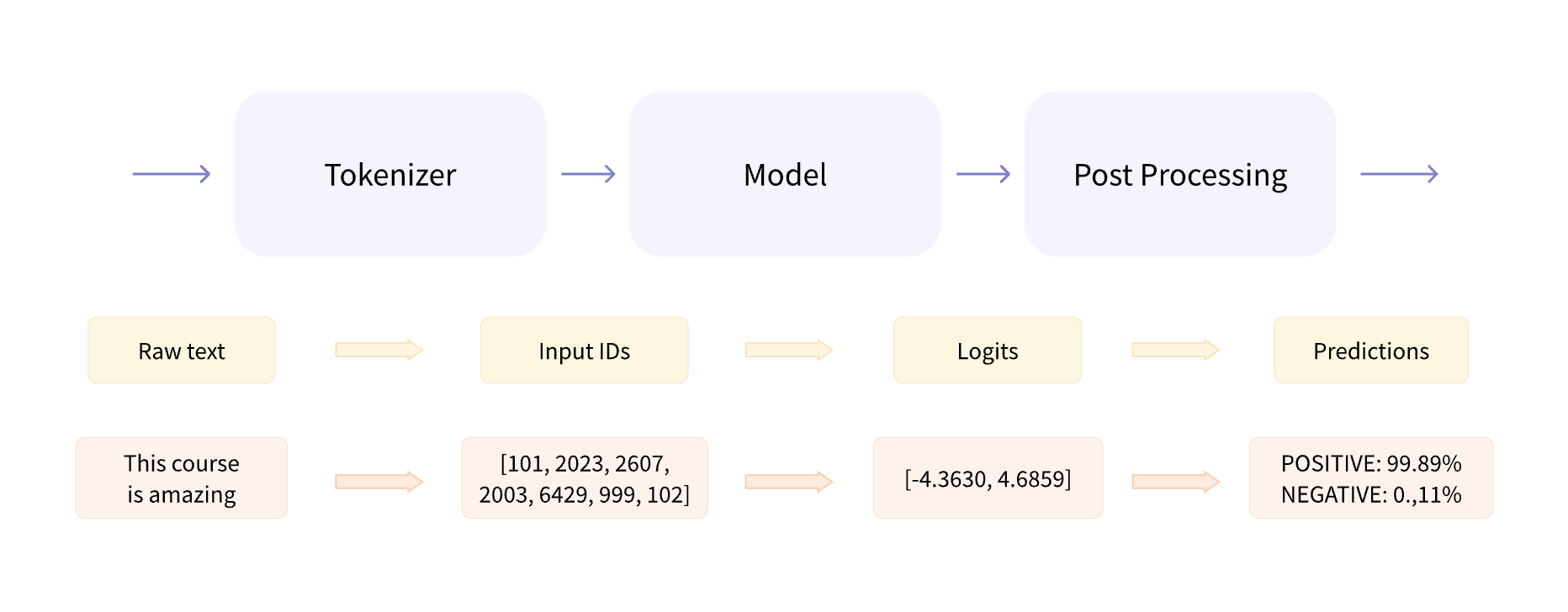
• As we saw in Chapter 1, this pipeline groups together three steps:– Preprocessing– Passing the inputs through the model– Post-processing
Figure 1:HF example pipeline
3. Preprocessing with a tokenizer• The tokenizer is responsible for:– Splitting the input into words, subwords, or symbols (like punctuation) that are called tokens– Mapping each token to an integer– Adding additional inputs that may be useful to the model– • Note: All this preprocessing needs to be done in exactly the same way as when the model was pretrained, so we first need to download that information from the Model Hub.• • To do this, we use the AutoTokenizer class and its from_pretrained() method. – Using the checkpoint name of our model, it will automatically fetch the data associated with the model’s tokenizer and cache it (so it’s only downloaded the first time you run the code below).– Since the default checkpoint of the sentiment-analysis pipeline is distilbert-base-uncased-finetuned-sst-2-english (you can see its model card here), we run the following:
from transformers import AutoTokenizercheckpoint ="distilbert-base-uncased-finetuned-sst-2-english"tokenizer = AutoTokenizer.from_pretrained(checkpoint)
• Once we have the tokenizer, we can directly pass our sentences to it and we’ll get back a dictionary that’s ready to feed to our model! The only thing left to do is to convert the list of input IDs to tensors.• Note: You can use HF Transformers without having to worry about which ML framework is used as a backend; it might be PyTorch or TensorFlow, or Flax for some models. However, Transformer models only accept tensors as input.• To specify the type of tensors we want to get back (PyTorch, TensorFlow, or plain NumPy), we use the return_tensors argument:
raw_inputs =["I've been waiting for a HuggingFace course my whole life.","I hate this so much!",]inputs = tokenizer(raw_inputs, padding=True, truncation=True, return_tensors="pt")print(inputs)
• Here’s what the results look like as PyTorch tensors.• The output itself is a dictionary containing two keys, input_ids and attention_mask. input_ids contains two rows of integers (one for each sentence) that are the unique identifiers of the tokens in each sentence.
4. Going through the model• We can download our pretrained model the same way we did with our tokenizer. HF Transformers provides an AutoModel class which also has a from_pretrained() method:
from transformers import AutoModelcheckpoint ="distilbert-base-uncased-finetuned-sst-2-english"model = AutoModel.from_pretrained(checkpoint)
• This architecture contains only the base Transformer module: given some inputs, it outputs what we’ll call hidden states, also known as features. – For each model input, we’ll retrieve a high-dimensional vector representing the contextual understanding of that input by the Transformer model.• While these hidden states can be useful on their own, they’re usually inputs to another part of the model, known as the head. • In Chapter 1, the different tasks could have been performed with the same architecture, but each of these tasks will have a different head associated with it.4.1. A high-dimensional vector• To be continued ...Back To Top