1. Intro• Express is a minimal and flexible Node.js web application framework that provides a robust set of features for web and mobile applications. It is an open source framework developed and maintained by the Node.js foundation.• ExpressJS is a web application framework that provides you with a simple API to build websites, web apps and back ends. With ExpressJS, you need not worry about low level protocols, processes, etc.• Why ExpressJS?– Unlike its competitors like Rails and Django, which have an opinionated way of building applications, Express has no "best way" to do something. It is very flexible and pluggable.• Pug → Pug (earlier known as Jade) is a terse language for writing HTML templates.• Mongoose → Mongoose is a client API for node.js which makes it easy to access our database from our Express application.1.1. Getting Started• Installation• Hello World Example• Express Generator• Basic Routing• Static Files• More Examples2. Routing• Web frameworks provide resources such as HTML pages, scripts, images, etc. at different routes.• The app.method(path, handler) method is used to define routes in an Express application.– It can be applied to any one of the HTTP verbs – get, set, put, delete.– Path is the route at which the request will run.– Handler is a callback function that executes when a matching request type is found on the relevant route. For example,* What is a Callback Function? A callback function is a function passed into another function as an argument, which is then invoked inside the outer function to complete some kind of routine or action. See this page for more info.
var express =require('express');var app =express();app.get('/hello',function(req, res){ res.send("Hello World!");});app.listen(3000);
• If we run our application and go to localhost:3000/hello, the server receives a get request at route "/hello", our Express app executes the callback function attached to this route and sends "Hello World!" as the response.• We can also have multiple different methods at the same route. For example,
var express =require('express');var app =express();app.get('/hello',function(req, res){ res.send("Hello World!");});app.post('/hello',function(req, res){ res.send("You just called the post method at '/hello'!\n");});app.listen(3000);
• A special method, all, is provided by Express to handle all types of http methods at a particular route using the same function. – This method is generally used for defining middleware.
app.all('/test',function(req, res){ res.send("HTTP method doesn't have any effect on this route!");});
2.1. Routers• Defining routes like above is very tedious to maintain. • To separate the routes from our main index.js file, we will use Express.Router. Create a new file called things.js and type the following in it.
var express =require('express');var router = express.Router();router.get('/',function(req, res){ res.send('GET route on things.');});router.post('/',function(req, res){ res.send('POST route on things.');});//export this router to use in our index.jsmodule.exports = router;
• Now to use this router in our index.js, type in the following before the app.listen function call.
var express =require('Express');var app =express();var things =require('./things.js');//both index.js and things.js should be in same directoryapp.use('/things', things);app.listen(3000);
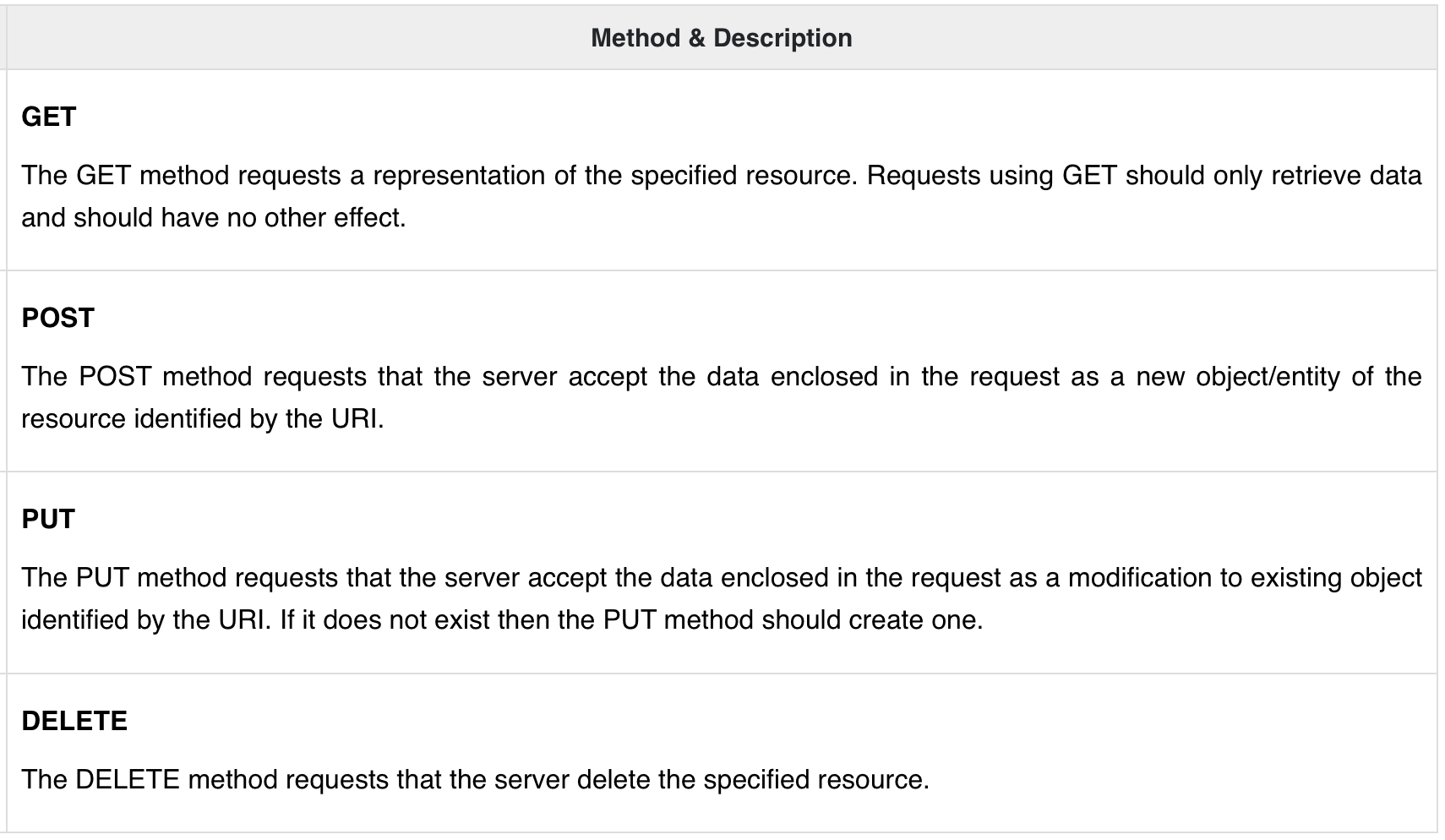
• The app.use function call on route '/things' attaches the things router with this route. Now whatever requests our app gets at the '/things', will be handled by our things.js router. The '/' route in things.js is actually a subroute of '/things'. Visit localhost:3000/things/ and you will see the following output → "GET route on things."• You should define your routes relating to an entity in a single file and include it using the above method in your index.js file.3. HTTP Methods• The following table lists the most used HTTP methods −
4. URL Building• We can now define routes, but those are static or fixed. • To use the dynamic routes, we SHOULD provide different types of routes. • Using dynamic routes allows us to pass parameters and process based on them.• Here is an example of a dynamic route.– To test this go to http://localhost:3000/123.
var express =require('express');var app =express();app.get('/:id',function(req, res){ res.send('The id you specified is '+ req.params.id);});app.listen(3000);
• You can replace '123' in the URL with anything else and the change will reflect in the response.
var express =require('express');var app =express();app.get('/things/:name/:id',function(req, res){ res.send('id: '+ req.params.id +' and name: '+ req.params.name);});app.listen(3000);
• You can use the req.params object to access all the parameters you pass in the url. • Note that the above 2 are different paths. They will never overlap. • Also if you want to execute code when you get '/things' then you need to define it separately.4.1. Pattern Matched Routes• You can also use regexto restrict URL parameter matching. • Let us assume you need the id to be a 5-digit long number. You can use the following route definition:
var express =require('express');var app =express();app.get('/things/:id([0-9]{5})',function(req, res){ res.send('id: '+ req.params.id);});app.listen(3000);
• Note that this will only match the requests that have a 5-digit long id. • You can use more complex regexes to match/validate your routes. • If none of your routes match the request, you'll get a "Cannot GET <your-request-route>" message as response. • This message be replaced by a 404 not found page using this simple route.
var express =require('express');var app =express();//Other routes hereapp.get('*',function(req, res){ res.send('Sorry, this is an invalid URL.');});app.listen(3000);
• Note: This should be placed after all your routes, as Express matches routes from start to end of the index.js file, including the external routers you required.5. Middleware• Middleware functions are functions that have access to the request object (req), the response object (res), and the next middleware function in the application’s request-response cycle. • These functions are used to modifyreq and res objects for tasks like parsing request bodies, adding response headers, etc.• Here is a simple example of a middleware function in action:
var express =require('express');var app =express();//Simple request time loggerapp.use(function(req, res, next){ console.log("A new request received at "+ Date.now());//This function call is very important. It tells that more processing is//required for the current request and is in the next middlewarefunction route handler.next();});app.listen(3000);
• The above middleware is called for every request on the server. So after every request, we will get the following message in the console:
A new request received at 1467267512545
• To restrict it to a specific route (and all its subroutes), provide that route as the first argument of app.use(). For Example,
var express =require('express');var app =express();//Middleware function to log request protocolapp.use('/things',function(req, res, next){ console.log("A request for things received at "+ Date.now());next();});// Route handler that sends the responseapp.get('/things',function(req, res){ res.send('Things');});app.listen(3000);
• Now whenever you request any subroute of '/things', only then it will log the time.5.1. Order of Middleware Calls• One of the most important things about middleware in Express is the order in which they are written/included in your file; the order in which they are executed, given that the route matches also needs to be considered.– For example, in the following code snippet, the first function executes first, then the route handler and then the end function. – This example summarizes how to use middleware before and after route handler; also how a route handler can be used as a middleware itself.
var express =require('express');var app =express();//First middleware before response is sentapp.use(function(req, res, next){ console.log("Start");next();});//Route handlerapp.get('/',function(req, res, next){ res.send("Middle");next();});app.use('/',function(req, res){ console.log('End');});app.listen(3000);
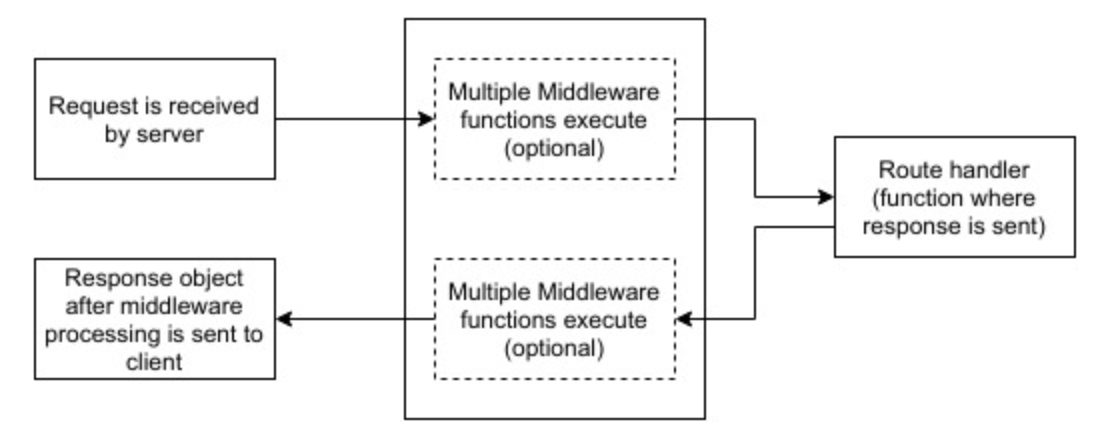
• When we visit '/' after running this code, we receive the response as Middle and on our console → Start, End• The following diagram summarizes what we have learned about middleware:
• Let's discuss some of the most commonly used community created middleware.5.2. Third-party Middleware• A list of Third party middleware for Express is available here.• Following are some of the most commonly used middleware.5.2.1. body-parser• This is used to parse the body of requests which have payloads attached to them. To mount body parser, we need to install it using npm install --save body-parser and to mount it, include the following lines in your index.js.
5.2.2. cookie-parser• It parses Cookieheader and populate req.cookies with an object keyed by cookie names. • To mount cookie parser, we need to install it using npm install --save cookie-parser and to mount it, include the following lines in your index.js.
var cookieParser =require('cookie-parser');app.use(cookieParser())
5.2.3. express-session• It creates a session middleware with the given options. We will discuss its usage in the Sessions section.6. Templating• Pug is a templating engine for Express. • Templating engines are used to remove the cluttering of our server code with HTML, concatenating strings wildly to existing HTML templates. • Pug is a very powerful templating engine which has a variety of features including filters, includes, inheritance, interpolation, etc. There is a lot of ground to cover on this.• To use Pug with Express, we need to install it → npm install --save pug• Now that Pug is installed, set it as the templating engine for your app. – You don't need to 'require' it. Add the following code to your index.js file.
• You will get the output as − Hello World! Pug converts this very simple looking markup to html. • We don’t need to keep track of closing our tags, no need to use class and id keywords, rather use '.' and '#' to define them.
• Note: Pug is capable of doing much more than simplifying HTML markup.6.1. Important Features of Pug6.1.1. Simple Tags• Tags are nested according to their indentation. Like in the above example, <title> was indented within the <head> tag, so it was inside it. But the <body> tag was on the same indentation, so it was a sibling of the <head> tag.• We don’t need to close tags, as soon as Pug encounters the next tag on same or outer indentation level, it closes the tag for us.• To put text inside of a tag, we have 3 methods:– Space separated → –
h1 Welcome to Pug
– Piped text →–
div| To insert multiline text, | You can use the pipe operator.
– Block of text → –
div. But that gets tedious if you have a lot of text. You can use "." at the end of tag to denote block of text. To put tags inside this block, simply enter tag in a new line and indent it accordingly.
6.1.2. Comments• Pug uses the same syntax as JavaScript(//) for creating comments. • These comments are converted to the html comments(<!--comment-->). For example:
//This is a Pug comment
• This comment gets converted to the following.
<!--This is a Pug comment-->
6.1.3. Attributes• To define attributes, we use a comma separated list of attributes, in parenthesis. • Class and ID attributes have special representations. • The following line of code covers defining attributes, classes and id for a given html tag.•
• This line of code, gets converted to the following.• •
<div class="container column main" id ="division" width ="100" height ="100"></div>
6.1.4. Passing Values to Templates• When we render a Pug template, we can actually pass it a value from our route handler, which we can then use in our template. Create a new route handler with the following.
var express =require('express');var app =express();app.get('/dynamic_view',function(req, res){ res.render('dynamic',{ name:"TutorialsPoint", url:"http://www.tutorialspoint.com"});});app.listen(3000);
• And create a new view file in views directory, called dynamic.pug, with the following code:
htmlheadtitle=name bodyh1=name a(href = url) URL
• We can also use these passed variables within text. • To insert passed variables in between text of a tag, we use #{variableName} syntax. • For example, in the above example, if we wanted to put Greetings from TutorialsPoint, then we could have done the following:
htmlhead title = name body h1 Greetings from #{name} a(href = url) URL
• his method of using values is called interpolation.6.1.5. Conditionals• We can use conditional statements and looping constructs as well.• Consider the following:– If a User is logged in, the page should display "Hi, User" and if not, then the "Login/Sign Up" link. To achieve this, we can define a simple template like:–
htmlhead title Simple template body if(user) h1 Hi, #{user.name}else a(href ="/sign_up") Sign Up
• When we render this using our routes, we can pass an object as in the following program:
6.1.6. Include & Components• Pug provides a very intuitive way to create components for a web page. • For example, if you see a news website, the header with logo and categories is always fixed. • Instead of copying that to every view we create, we can use the include feature. Following example shows how we can use this feature.• header.pug
div.header. I'm the header for this website.
content.pug
htmlhead title Simple template body include ./header.pug h3 I'm the main content include ./footer.pug
footer.pug
div.footer. I'm the footer for this website.
• Create a route for this as follows:
var express =require('express');var app =express();app.get('/components',function(req, res){ res.render('content');});app.listen(3000);
7. Serving Static Files• Static files are files that clients download as they are from the server. • Create a new directory, public. • Express, by default does not allow you to serve static files. • You need to enable it using the following built-in middleware.
app.use(express.static('public'));
• Note: Express looks up the files relative to the static directory, so the name of the static directory is not part of the URL.• Note that the root route is now set to your public dir, so all static files you load will be considering public as root. • To test that this is working fine, add any image file in your new public dir and change its name to "testimage.jpg". • In your views, create a new view and include this file like:
htmlhead body h3 Testing static file serving: img(src ="/testimage.jpg", alt = "Testing Image
7.1. Multiple Static Directories• We can also set multiple static assets directories using the following program:
var express =require('express');var app =express();app.use(express.static('public'));app.use(express.static('images'));app.listen(3000);
7.2. Virtual Path Prefix• We can also provide a path prefix for serving static files. For example, if you want to provide a path prefix like '/static', you need to include the following code in your index.js file.
var express =require('express');var app =express();app.use('/static', express.static('public'));app.listen(3000);
• Now whenever you need to include a file, for example, a script file called main.js residing in your public directory, use the following script tag:
<scriptsrc="/static/main.js"/>
• This technique can come in handy when providing multiple directories as static files. These prefixes can help distinguish between multiple directories.8. Form Data• Forms are an integral part of the web. • Almost every website we visit offers us forms that submit or fetch some information for us. • To get started with forms, we will first install the body-parser (for parsing JSON and url-encoded data) and multer (for parsing multipart/form data) middleware.• Replace your index.js file contents with the following code:
var express =require('express');var bodyParser =require('body-parser');var multer =require('multer');var upload =multer();var app =express();app.get('/',function(req, res){ res.render('form');});app.set('view engine','pug');app.set('views','./views');// for parsing application/jsonapp.use(bodyParser.json());// for parsing application/xwww-app.use(bodyParser.urlencoded({ extended:true}));//form-urlencoded// for parsing multipart/form-dataapp.use(upload.array());app.use(express.static('public'));app.post('/',function(req, res){ console.log(req.body); res.send("recieved your request!");});app.listen(3000);
• After importing the body-parser and multer, we will use the body-parser for parsing json and x-www-form-urlencoded header requests, while we will use multer for parsing multipart/form-data.• Let us create an html form to test this out. Create a new view called form.pug with the following code:
htmlhead title Form Tester body form(action ="/", method ="POST") div label(for ="say") Say: input(name ="say" value ="Hi") br div label(for ="to") To: input(name ="to" value ="Express forms") br button(type ="submit") Send my greetings
• Run your server using the following → nodemon index.js.• Have a look at your console; it will show you the body of your request as a JavaScript object as in the following screenshot:
• The req.body object contains your parsed request body. To use fields from that object, just use them like normal JS objects.• This is the most recommended way to send a request. There are many other ways, but those are irrelevant to cover here, because our Express app will handle all those requests in the same way. • To read more about different ways to make a request, have a look at this page.9. Database, Mongoose• In order to use Mongo with Express, we need a client API for node. • There are multiple options for us, but for this tutorial, we will stick to Mongoose. • Mongoose is used for Document Modeling in Node for MongoDB. • For document modeling, we create a Model (much like a class in document oriented programming), and then we produce documents using this Model (like we create documents of a class in OOP). • All our processing will be done on these "documents", then finally, we will write these documents in our database.9.1. Setting Up Mongoose• After installing Mongo, you can install Mongoose:
npm install --save mongoose
• Before we start using mongoose, we have to create a database using the Mongo shell. To create a new database, open your terminal and enter "mongo". A Mongo shell will start, enter the following code:
use my_db
• Note: Whenever you open up the mongo shell, it will default to "test" db and you will have to change to your database using the same command as above.• • To use Mongoose, we will require it in our index.js file and then connect to the mongodb service running on mongodb://localhost.
var mongoose =require('mongoose');mongoose.connect('mongodb://localhost/my_db');
• Now our app is connected to our database, let us create a new Model. • This model will act as a collection in our database. • To create a new Model, use the following code, before defining any route.• The following code defines the schema for a person and is used to create a Mongoose Model Person.
var personSchema = mongoose.Schema({ name: String, age: Number, nationality: String});var Person = mongoose.model("Person", personSchema);
9.2. Saving Documents• Now, we will create a new html form. • This form will help you get the details of a person and save it to our database. • To create the form, create a new view file called person.pug in views directory with the following content:
htmlhead title Person body form(action ="/person", method ="POST") div label(for ="name") Name: input(name ="name") br div label(for ="age") Age: input(name ="age") br div label(for ="nationality") Nationality: input(name ="nationality") br button(type ="submit") Create new person
• Also add a new get route in index.js to render this document:
• In the above code, if we receive any empty field or do not receive any field, we will send an error response. • But if we receive a well-formed document, then we create a newPerson document from Person model and save it to our DB using the newPerson.save() function. • This is defined in Mongoose and accepts a callback as argument. • This callback has 2 arguments – error and response. These arguments will render the show_message view.• To show the response from this route, we will also need to create a show_message view. Create a new view with the following code:
html head title Person bodyif(type =="error")h3(style ="color:red") #{message}else h3 New person, name: #{person.name}, age: #{person.age} and nationality: #{person.nationality} added!
9.3. Retrieving Documents• Mongoose provides a lot of functions for retrieving documents, we will focus on 3 of those. • All these functions also take a callback as the last parameter, and just like the save function, their arguments are error and response.9.3.1. Model.find(conditions, callback)• This function finds all the documents matching the fields in conditions object. Same operators used in Mongo also work in mongoose. For example,
• We can also provide projection we need, i.e., the fields we need. • For example, if we want only the names of people whose nationality is "Indian", we use:
9.3.2. Model.findOne(conditions, callback)• This function always fetches a single, most relevant document. It has the same exact arguments as Model.find().9.3.3. Model.findById(id, callback)• This function takes in the _id (defined by mongo) as the first argument, an optional projection string and a callback to handle the response. For example,
9.4. Updating Documents• Mongoose provides 3 functions to update documents.9.4.1. Model.update(condition, updates, callback)• This function takes a conditions and updates an object as input and applies the changes to all the documents matching the conditions in the collection. • For example, following code will update the nationality "American" in all Person documents:
9.4.2. Model.findOneAndUpdate(condition, updates, callback)• It finds one document based on the query and updates that according to the second argument. It also takes a callback as last argument. • Let us perform the following example to understand the function:
• Let us now create a route to update people. This will be a PUT route with the id as a parameter and details in the payload.
var express =require('express');var app =express();var mongoose =require('mongoose');mongoose.connect('mongodb://localhost/my_db');var personSchema = mongoose.Schema({ name: String, age: Number, nationality: String});var Person = mongoose.model("Person", personSchema);app.put('/people/:id',function(req, res){ Person.findByIdAndUpdate(req.params.id, req.body,function(err, response){if(err) res.json({message:"Error in updating person with id "+ req.params.id}); res.json(response);});});app.listen(3000);
• To test this route, enter the following in your terminal (replace the id with an id from your created people). This will update the document associated with the id provided in the route with the above details.
9.5. Deleting Documents• We have 3 functions here, exactly like update.9.5.1. Model.remove(condition, [callback])• This function takes a condition object as input and removes all documents matching the conditions. • For example, if we need to remove all people aged 20, use the following syntax:
Person.remove({age:20});
9.5.2. Model.findOneAndRemove(condition, [callback])• This functions removes a single, most relevant document according to conditions object. • Let us execute the following code to understand the same.
Person.findOneAndRemove({name:"Ayush"});
9.5.3. Model.findByIdAndRemove(condition, [callback])• This function removes a single document identified by its id. For example,
• Let us now create a route to delete people from our database.
var express =require('express');var app =express();var mongoose =require('mongoose');mongoose.connect('mongodb://localhost/my_db');var personSchema = mongoose.Schema({ name: String, age: Number, nationality: String});var Person = mongoose.model("Person", personSchema);app.delete('/people/:id',function(req, res){ Person.findByIdAndRemove(req.params.id,function(err, response){if(err) res.json({message:"Error in deleting record id "+ req.params.id});else res.json({message:"Person with id "+ req.params.id +" removed."});});});app.listen(3000);
• To check the output, use the following curl command. • This will remove the person with given id producing the following message → {message: "Person with id 507f1f77bcf86cd799439011 removed."}
10. Cookies• Cookies are simple, small files/data that are sent to client with a server request and stored on the client side. • Every time the user loads the website back, this cookie is sent with the request. This helps us keep track of the user’s actions.• The following are the numerous uses of the HTTP Cookies:– Session management– Personalization (recommendation systems)– User tracking• To use cookies with Express, we need the cookie-parser middleware. To install it, use the following code:
npminstall --save cookie-parser
• Now to use cookies with Express, we will require the cookie-parser. • cookie-parser is a middleware which parses cookies attached to the client request object. • To use it, we will require it in our index.js file; this can be used the same way as we use other middleware. • Here, we will use the following code:
var cookieParser =require('cookie-parser');app.use(cookieParser());
• cookie-parser parses Cookie header and populates req.cookies with an object keyed by the cookie names. • To set a new cookie, let us define a new route in your Express app like:
var express =require('express');var app =express();app.get('/',function(req, res){ res.cookie('name','express').send('cookie set');//Sets name = express});app.listen(3000);
• To check if your cookie is set or not, just go to your browser, fire up the console, and enter → console.log(document.cookie);• You will get the output like: "name = express" (you may have more cookies set maybe due to extensions in your browser).• The browser also sends back cookies every time it queries the server. • To view cookies from your server, on the server console in a route, add the following code to that route → console.log('Cookies: ', req.cookies);• Next time you send a request to this route, you will receive the following output → Cookies: { name: 'express' }10.1. Adding Cookie Expiration Time• You can add cookies that expire. To add a cookie that expires, just pass an object with property 'expire' set to the time when you want it to expire. For example,
//Expires after 360000 ms from the time it is set.res.cookie(name,'value',{expire:360000+ Date.now()});
• Another way to set expiration time is using 'maxAge' property. • Using this property, we can provide relative time instead of absolute time. Following is an example of this method.
//This cookie also expires after 360000 ms from the time it is set.res.cookie(name,'value',{maxAge:360000});
10.2. Deleting an Existing Cookie• To delete a cookie, use the clearCookie function. • For example, if you need to clear a cookie named foo, use the following code.
var express =require('express');var app =express();app.get('/clear_cookie_foo',function(req, res){ res.clearCookie('foo'); res.send('cookie foo cleared');});app.listen(3000);
11. Sessions• HTTP is stateless.• In order to associate a request to any other request, you need a way to store user data between HTTP requests. • Cookies and URL parameters are both suitable ways to transport data between the client and the server → But they are both readable and on the client side. • Sessions solve exactly this problem. • You assign the client an ID and it makes all further requests using that ID. Information associated with the client is stored on the server linked to this ID.• We will need the express-session, so install it using the following code.
npm install --save express-session
• We will put the session and cookie-parser middleware in place. • In this example, we will use the default store for storing sessions, i.e., MemoryStore. – Never use this in production environments. • The session middleware handles all things for us, i.e., creating the session, setting the session cookie and creating the session object in req object.• Whenever we make a request from the same client again, we will have their session information stored with us (given that the server was not restarted). • We can add more properties to the session object. • In the following example, we will create a view counter for a client.
var express =require('express');var cookieParser =require('cookie-parser');var session =require('express-session');var app =express();app.use(cookieParser());app.use(session({secret:"Shh, its a secret!"}));app.get('/',function(req, res){if(req.session.page_views){ req.session.page_views++; res.send("You visited this page "+ req.session.page_views +" times");}else{ req.session.page_views =1; res.send("Welcome to this page for the first time!");}});app.listen(3000);
• What the above code does is, when a user visits the site, it creates a new session for the user and assigns them a cookie. • Next time the user comes, the cookie is checked and the page_view session variable is updated accordingly.12. Authentication• Authentication is a process in which the credentials provided are compared to those on file in a database of authorized users' information on a local operating system or within an authentication server. • If the credentials match, the process is completed and the user is granted authorization for access.• For us to create an authentication system, we will need to create a sign up page and a user-password store. • The following code creates an account for us and stores it in memory. • This is just for the purpose of demo; it is recommended that a persistent storage (database or files) is always used to store user information.
• Now for the signup form, create a new view called signup.jade.
htmlhead title Signup body if(message) h4 #{message} form(action ="/signup" method ="POST") input(name ="id"type="text" required placeholder ="User ID") input(name ="password"type="password" required placeholder ="Password") button(type ="Submit") Sign me up!
• We have set the required attribute for both fields, so HTML5 enabled browsers will not let us submit this form until we provide both id and password. • If someone tries to register using a curl request without a User ID or Password, an error will be displayed. • Create a new file called protected_page.pug in views with the following content:
htmlhead title Protected page body div Hey #{id}, How are you doing today? div Want to log out? div Logout
• This page should only be visible if the user has just signed up or logged in. • Let us now define its route and also routes to log in and log out:
var express =require('express');var app =express();var bodyParser =require('body-parser');var multer =require('multer');var upload =multer();var session =require('express-session');var cookieParser =require('cookie-parser');app.set('view engine','pug');app.set('views','./views');app.use(bodyParser.json());app.use(bodyParser.urlencoded({ extended:true}));app.use(upload.array());app.use(cookieParser());app.use(session({secret:"Your secret key"}));var Users =[];app.get('/signup',function(req, res){ res.render('signup');});app.post('/signup',function(req, res){if(!req.body.id ||!req.body.password){ res.status("400"); res.send("Invalid details!");}else{ Users.filter(function(user){if(user.id === req.body.id){ res.render('signup',{ message:"User Already Exists! Login or choose another user id"});}});var newUser ={id: req.body.id, password: req.body.password}; Users.push(newUser); req.session.user = newUser; res.redirect('/protected_page');}});functioncheckSignIn(req, res){if(req.session.user){next();//If session exists, proceed to page}else{var err =newError("Not logged in!"); console.log(req.session.user);next(err);//Error, trying to access unauthorized page!}}app.get('/protected_page', checkSignIn,function(req, res){ res.render('protected_page',{id: req.session.user.id})});app.get('/login',function(req, res){ res.render('login');});app.post('/login',function(req, res){ console.log(Users);if(!req.body.id ||!req.body.password){ res.render('login',{message:"Please enter both id and password"});}else{ Users.filter(function(user){if(user.id === req.body.id && user.password === req.body.password){ req.session.user = user; res.redirect('/protected_page');}}); res.render('login',{message:"Invalid credentials!"});}});app.get('/logout',function(req, res){ req.session.destroy(function(){ console.log("user logged out.")}); res.redirect('/login');});app.use('/protected_page',function(err, req, res, next){console.log(err);//User should be authenticated! Redirect him to log in. res.redirect('/login');});app.listen(3000);
• We have created a middleware function checkSignIn to check if the user is signed in. • The protected_page uses this function. To log the user out, we destroy the session.• • Let us now create the login page. • Name the view as login.pug and enter the contents:
html head title Signup bodyif(message) h4 #{message}form(action ="/login" method ="POST")input(name ="id" type ="text" required placeholder ="User ID")input(name ="password" type ="password" required placeholder ="Password")button(type ="Submit") Log in
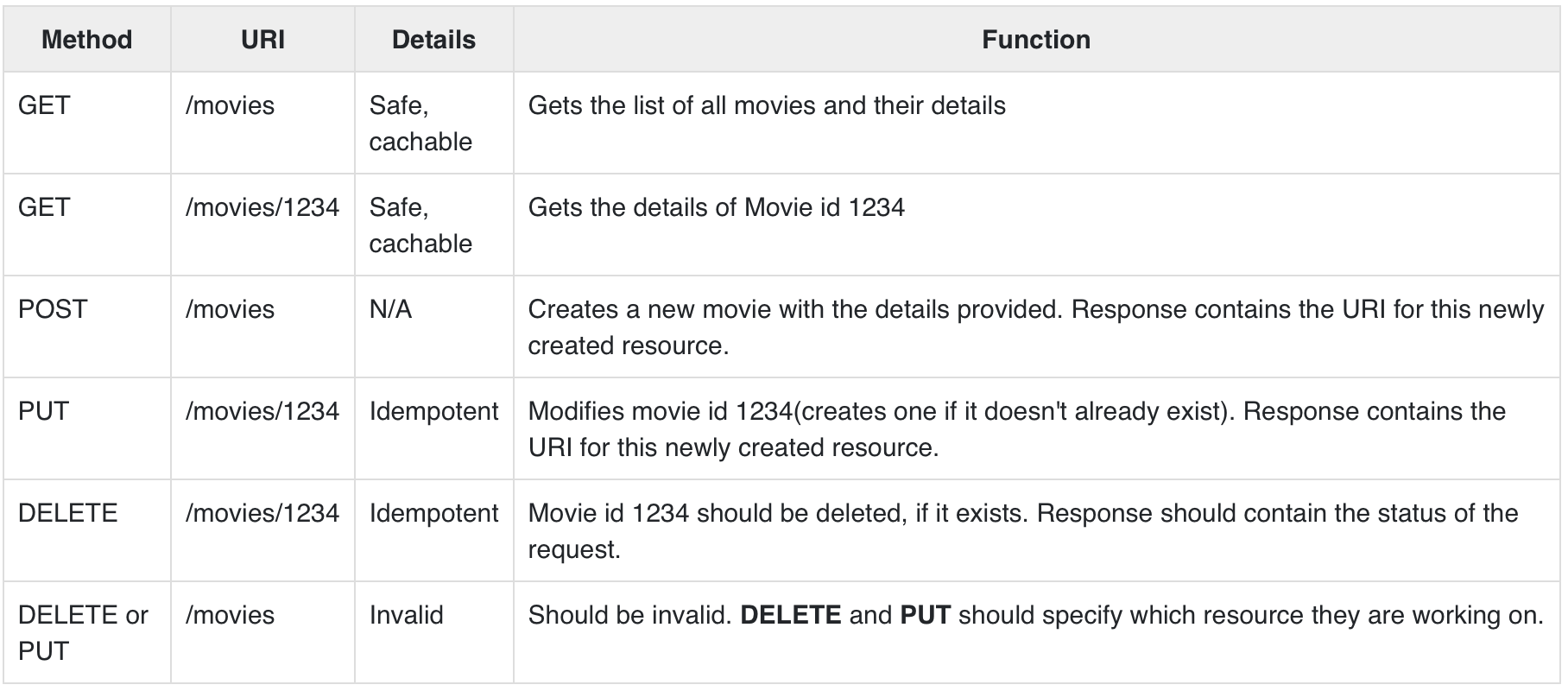
13. RESTful APIs• An API is always needed to create mobile applications, single page applications, use AJAX calls and provide data to clients. • An popular architectural style of how to structure and name these APIs and the endpoints is called REST (Representational Transfer State). • HTTP 1.1 was designed keeping REST principles in mind. • REST was introduced by Roy Fielding in 2000 in his Paper Fielding Dissertations.• RESTful URIs and methods provide us with almost all information we need to process a request. • The table given below summarizes how the various verbs should be used and how URIs should be named. • We will be creating a movies API towards the end; let us now discuss how it will be structured.
• Let us now create this API in Express. • We will be using JSON as our transport data format as it is easy to work with in JavaScript and has other benefits. • Replace your index.js file with the movies.js file as in the following program.
var express =require('express');var bodyParser =require('body-parser');var multer =require('multer');var upload =multer();var app =express();app.use(cookieParser());app.use(bodyParser.json());app.use(bodyParser.urlencoded({ extended:true}));app.use(upload.array());//Require the Router we defined in movies.jsvar movies =require('./movies.js');//Use the Router on the sub route /moviesapp.use('/movies', movies);app.listen(3000);
• Now that we have our application set up, let us concentrate on creating the API.• Start by setting up the movies.js file. • We are not using a database to store the movies but are storing them in memory; so every time the server restarts, the movies added by us will vanish. • This can easily be mimicked using a database or a file (using node fs module).• Once you import Express then, create a Router and export it using module.exports:
var express =require('express');var router = express.Router();var movies =[{id:101, name:"Fight Club", year:1999, rating:8.1},{id:102, name:"Inception", year:2010, rating:8.7},{id:103, name:"The Dark Knight", year:2008, rating:9},{id:104, name:"12 Angry Men", year:1957, rating:8.9}];//Routes will go heremodule.exports = router;
13.1. GET Route• Let us define the GET route for getting all the movies:
[{"id":101,"name":"Fight Club","year":1999,"rating":8.1},{"id":102,"name":"Inception","year":2010,"rating":8.7},{"id":103,"name":"The Dark Knight","year":2008,"rating":9},{"id":104,"name":"12 Angry Men","year":1957,"rating":8.9}]
• We have a route to get all the movies. Let us now create a route to get a specific movie by its id.
router.get('/:id([0-9]{3,})',function(req, res){var currMovie = movies.filter(function(movie){if(movie.id == req.params.id){returntrue;}});if(currMovie.length ==1){ res.json(currMovie[0])}else{ res.status(404);//Set status to 404 as movie was not found res.json({message:"Not Found"});}});
• This will get us the movies according to the id that we provided. • To check the output, use the following command in your terminal
• If you visit an invalid route, it will produce a cannot GET error while if you visit a valid route with an id that doesn’t exist, it will produce a 404 error.13.2. POST Route• Use the following route to handle the POSTed data:
router.post('/',function(req, res){//Check if all fields are provided and are valid:if(!req.body.name ||!req.body.year.toString().match(/^[0-9]{4}$/g)||!req.body.rating.toString().match(/^[0-9]\.[0-9]$/g)){ res.status(400); res.json({message:"Bad Request"});}else{var newId = movies[movies.length-1].id+1; movies.push({ id: newId, name: req.body.name, year: req.body.year, rating: req.body.rating}); res.json({message:"New movie created.", location:"/movies/"+ newId});}});
• This will create a new movie and store it in the movies variable. To check this route, enter the following code in your terminal:
13.3. PUT Route• The PUT route is almost the same as the POST route. • We will be specifying the id for the object that'll be updated/created. • Create the route in the following way:
router.put('/:id',function(req, res){//Check if all fields are provided and are valid:if(!req.body.name ||!req.body.year.toString().match(/^[0-9]{4}$/g)||!req.body.rating.toString().match(/^[0-9]\.[0-9]$/g)||!req.params.id.toString().match(/^[0-9]{3,}$/g)){ res.status(400); res.json({message:"Bad Request"});}else{//Gets us the index of movie with given id.var updateIndex = movies.map(function(movie){return movie.id;}).indexOf(parseInt(req.params.id));if(updateIndex ===-1){//Movie not found, create new movies.push({ id: req.params.id, name: req.body.name, year: req.body.year, rating: req.body.rating}); res.json({message:"New movie created.", location:"/movies/"+ req.params.id});}else{//Update existing movie movies[updateIndex]={ id: req.params.id, name: req.body.name, year: req.body.year, rating: req.body.rating}; res.json({message:"Movie id "+ req.params.id +" updated.", location:"/movies/"+ req.params.id});}}});
• This route will perform the function specified in the above table. • It will update the object with new details if it exists. If it doesn't exist, it will create a new object. • To check the route, use the following curl command. This will update an existing movie. • To create a new Movie, just change the id to a non-existing id.
13.4. DELETE Route• Use the following code to create a delete route.
router.delete('/:id',function(req, res){var removeIndex = movies.map(function(movie){return movie.id;}).indexOf(req.params.id);//Gets us the index of movie with given id.if(removeIndex ===-1){ res.json({message:"Not found"});}else{ movies.splice(removeIndex,1); res.send({message:"Movie id "+ req.params.id +" removed."});}});
• Check the route in the same way as we checked the other routes. • On successful deletion(for example id 105), you will get the following output → {message: "Movie id 105 removed."}• Finally, our movies.js file will look like the following:
var express =require('express');var router = express.Router();var movies =[{id:101, name:"Fight Club", year:1999, rating:8.1},{id:102, name:"Inception", year:2010, rating:8.7},{id:103, name:"The Dark Knight", year:2008, rating:9},{id:104, name:"12 Angry Men", year:1957, rating:8.9}];router.get('/:id([0-9]{3,})',function(req, res){var currMovie = movies.filter(function(movie){if(movie.id == req.params.id){returntrue;}});if(currMovie.length ==1){ res.json(currMovie[0])}else{ res.status(404);//Set status to 404 as movie was not found res.json({message:"Not Found"});}});router.post('/',function(req, res){//Check if all fields are provided and are valid:if(!req.body.name ||!req.body.year.toString().match(/^[0-9]{4}$/g)||!req.body.rating.toString().match(/^[0-9]\.[0-9]$/g)){ res.status(400); res.json({message:"Bad Request"});}else{var newId = movies[movies.length-1].id+1; movies.push({ id: newId, name: req.body.name, year: req.body.year, rating: req.body.rating}); res.json({message:"New movie created.", location:"/movies/"+ newId});}});router.put('/:id',function(req, res){//Check if all fields are provided and are valid:if(!req.body.name ||!req.body.year.toString().match(/^[0-9]{4}$/g)||!req.body.rating.toString().match(/^[0-9]\.[0-9]$/g)||!req.params.id.toString().match(/^[0-9]{3,}$/g)){ res.status(400); res.json({message:"Bad Request"});}else{//Gets us the index of movie with given id.var updateIndex = movies.map(function(movie){return movie.id;}).indexOf(parseInt(req.params.id));if(updateIndex ===-1){//Movie not found, create new movies.push({ id: req.params.id, name: req.body.name, year: req.body.year, rating: req.body.rating}); res.json({ message:"New movie created.", location:"/movies/"+ req.params.id});}else{//Update existing movie movies[updateIndex]={ id: req.params.id, name: req.body.name, year: req.body.year, rating: req.body.rating}; res.json({message:"Movie id "+ req.params.id +" updated.", location:"/movies/"+ req.params.id});}}});router.delete('/:id',function(req, res){var removeIndex = movies.map(function(movie){return movie.id;}).indexOf(req.params.id);//Gets us the index of movie with given id.if(removeIndex ===-1){ res.json({message:"Not found"});}else{ movies.splice(removeIndex,1); res.send({message:"Movie id "+ req.params.id +" removed."});}});module.exports = router;
14. Scaffolding• Scaffolding allows us to easily create a skeleton for a web application. • We manually create our public directory, add middleware, create separate route files, etc. • A scaffolding tool sets up all these things for us so that we can directly get started with building our application.• The scaffolder we will use is called Yeoman. • It is a scaffolding tool built for Node.js but also has generators for several other frameworks (like flask, rails, Django, etc.). • To install Yeoman, enter the following command in your terminal → npm install -g yeoman• Yeoman uses generators to scaffold out applications. • To check out the generators available on npm to use with Yeoman, you can click on this link. • In this tutorial, we will use the 'generator-express-simple'. • To install this generator, enter the following command in your terminal → npm install -g generator-express-simple• To use this generator, enter the following command → yo express-simple test-app• You will be asked a few simple questions like what things you want to use with your app.• It will then create a new application for you, install all the dependencies, add few pages to your application(home page, 404 not found page, etc.) and give you a directory structure to work on.• Note: This generator creates a very simple structure for us. Explore the many generators available for Express and choose the one that fits you right. Steps to working with all generators is the same.15. Error Handling• Error handling in Express is done using middleware. • But this middleware has special properties. • The error handling middleware are defined in the same way as other middleware functions, except that error-handling functions MUST have four arguments instead of three – err, req, res, next. • For example, to send a response on any error, we can use:
• Till now we were handling errors in the routes itself. • The error handling middleware allows us to separate our error logic and send responses accordingly. • The next() method we discussed in middleware takes us to next middleware/route handler.• For error handling, we have the next(err) function. • A call to this function skips all middleware and matches us to the next error handler for that route. • Let us understand this through an example.
var express =require('express');var app =express();app.get('/',function(req, res){//Create an error and pass it to the next functionvar err =newError("Something went wrong");next(err);});/* * other route handlers and middleware here * .... *///An error handling middlewareapp.use(function(err, req, res, next){ res.status(500); res.send("Oops, something went wrong.")});app.listen(3000);
• This error handling middleware can be strategically placed after routes or contain conditions to detect error types and respond to the clients accordingly.16. Best Practices• Unlike Django and Rails which have a defined way of doing things, file structure, etc., Express does not follow a defined way → This means you can structure the application the way you like. • But as your application grows in size, it is very difficult to maintain it if it doesn't have a well-defined structure. In this chapter, we will look at the generally used directory structures and separation of concerns to build our applications.• First, we will discuss the best practices for creating node and Express applications.– Always begin a node project using npm init.– Always install dependencies with a --save or --save-dev. * This will ensure that if you move to a different platform, you can just run npm install to install all dependencies.– Stick with lowercase file names and camelCase variables. If you look at any npm module, its named in lowercase and separated with dashes. Whenever you require these modules, use camelCase.– Don’t push node_modules to your repositories. Instead npm installs everything on development machines.– Use a config file to store variables– Group and isolate routes to their own file. For example, take the CRUD operations in the movies example we saw in the REST API page.16.1. Directory Structure16.1.1. Websites• Express does not have a community defined structure for creating applications. • The following is a majorly used project structure for a website.
test-project/ node_modules/ config/ db.js //Database connection and configuration credentials.js //Passwords/API keys for external services used by your app config.js //Other environment variables models///For mongoose schemas users.js things.js routes///All routes for different entities in different files users.js things.js views/ index.pug404.pug...public///All static content being served images/ css/ javascript/ app.js routes.js //Require all routes in this and then require this file in app.js package.json
• Note: There are other approaches to build websites with Express as well. You can build a website using the MVC design pattern. For more information, you can visit this link.16.1.2. RESTful APIs• APIs are simpler to design; they don't need a public or a views directory. Use the following structure to build APIs:
test-project/ node_modules/ config/ db.js //Database connection and configuration credentials.js //Passwords/API keys for external services used by your app models///For mongoose schemas users.js things.js routes///All routes for different entities in different files users.js things.js app.js routes.js //Require all routes in this and then require this file in app.js package.json