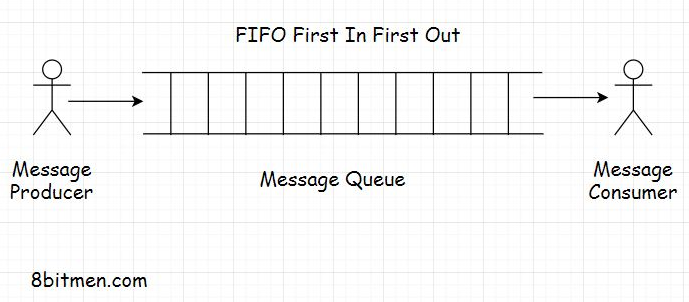
1. What is a message queue?• A message queue, as the name says, is a queue that routes messages from the source to the destination or the sender to the receiver following the FIFO (First in, first out) policy.• The message that is added to the queue first is delivered first. Besides FIFO, messages queues also support priority-based message delivery. Messages have a priority assigned to them and the queue processes the messages based on the priority set. These message queues are called priority queues.
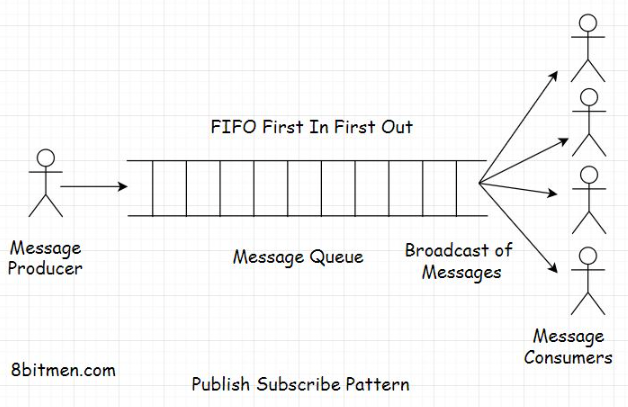
1.1. Features of a message queue• Message queues facilitate asynchronous behavior. We have already learned what asynchronous behavior is in the AJAX lesson. Asynchronous behavior allows the modules to communicate in the background without hindering their primary tasks.• Message queues facilitate cross-module communication, which is key in service-oriented and microservices architecture. They enable communication in a heterogeneous environment, providing temporary storage for storing messages until they are processed and consumed by the consumer.1.2. Real-world example of a message queue• Take an email service as an example. Both the sender and receiver of the email don’t have to be online at the same time to communicate with each other. The sender sends an email, and the message is temporarily stored on the message server until the recipient comes online and reads the message.• Message queues enable us to run background processes, tasks, and batch jobs. Speaking of background processes, let’s understand this better with the help of a use case.• • Think of a user signing up on a portal. After they sign up, they are immediately allowed to navigate to the application’s homepage, but the sign-up process isn’t complete yet. The system has to send a confirmation email to the user’s registered email id. Then, the user has to click on the confirmation email to confirm the sign-up event.• • However, the website cannot keep the user waiting until it sends the email to the user. They are immediately allowed to navigate to the application’s home page to avert them from bouncing off.• • So, the task of sending a sign-up confirmation email to the user is assigned as an asynchronous background process to a message queue. It sends an email while the user continues to browse the website.• • This is how message queues are leveraged to add asynchronous behavior to an application. Message queues are also used to implement notification systems similar to Facebook notifications. I’ll discuss this in the upcoming lessons.• • Moving on to the batch jobs.1.3. Message queue in running batch jobs• Do you remember the stock market game use case from the caching lesson where I discussed how I leveraged a cache to reduce application hosting costs?• The batch job, which updated the stock prices at regular intervals in the database, was run by a message queue.• • So, we now know what a message queue is and why we use it in applications. In a message queue, there is a message sender called the producer, and there is a message receiver called the consumer.• • Both the producer and the consumer don’t have to reside on the same machine to communicate. This is pretty obvious.• • While routing messages through the queue, we can define several rules based on our business requirements. Adding priority to the messages is one that I pointed out. Other essential queuing features include message acknowledgments, retrying failed messages, etc.• • Speaking of the size of the queue, how big can it get, how many messages it can contain? Well, there is no definite size to it, and it can be an infinite buffer, considering the business has unlimited resources to run its infrastructure.• • Now, let’s look into the messaging models widely used in the industry, beginning with the publish-subscribe message routing model, which is responsible for how we consume information at large.2. Publish-Subscribe Model• A publish-subscribe model, aka pub-sub, is a model that enables a single or multiple producers to broadcast messages to multiple consumers.
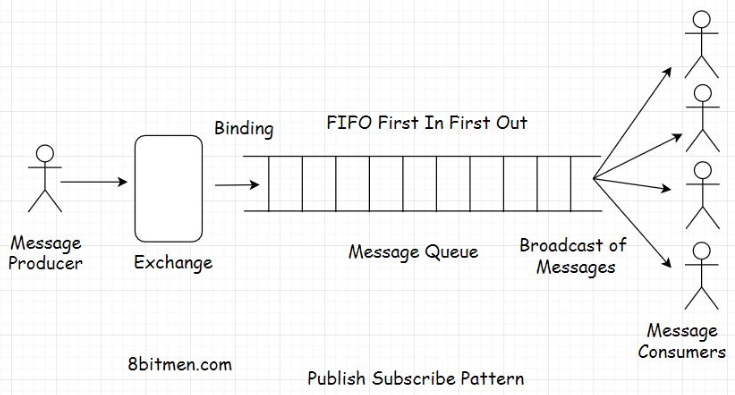
• A good analogy of this model is a newspaper service. Consumers subscribe to a newspaper service, and the service delivers the news to multiple consumers of its service every single day.• In the online world, we often subscribe to various topics, such as sports, politics, economics, etc., in applications to be continually notified of the latest updates on that particular segment.2.1. Exchanges• To implement the pub-sub pattern, message queues have exchanges that push the messages to the message queues based on the exchange type and the set rules. Exchanges here are just like telephone exchanges that route messages from the sender to the receiver through the infrastructure based on certain logic.
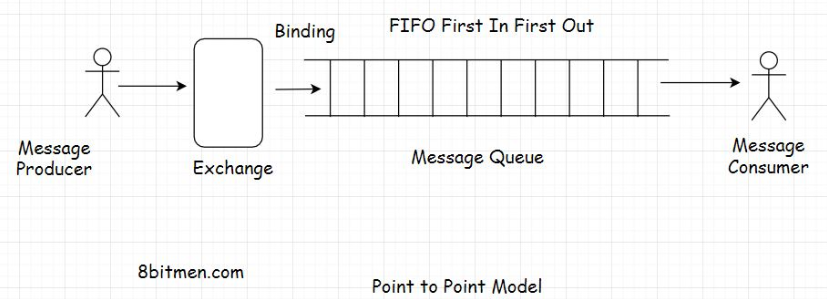
• There are different types of exchanges available in message queues, some of which are: direct, topic, headers, and fanout. Each exchange type has specific functionality and a use case.• Different message queue technologies have different implementations of exchange types. I just brought up the commonly used exchange types in message queues.• • The fanout exchange will fit best for implementing a pub-sub pattern. It will push the messages to the queue and the consumers will receive the message broadcast. The relationship between the exchange and the queue is known as binding.• • Message queues and publish-subscribe pattern are responsible for delivering real-time news, updates, notifications on social apps to the end-users. The end-users follow certain pages, and they start receiving updates on the content published by those pages continually.• • In the upcoming lessons, I will discuss how real-time feeds and notification systems work in social networks powered by the message queues in detail.3. Point-to-Point Model• In a point-to-point model, a message from the producer is consumed by only one consumer.• It’s like a one-to-one relationship, while a publish-subscribe model is a one-to-many relationship.
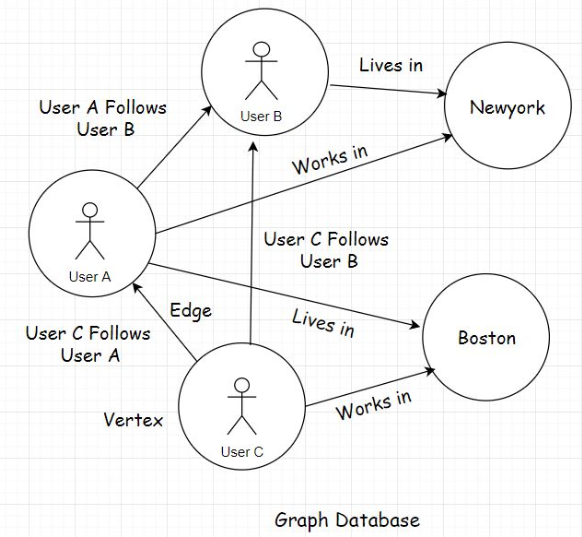
• Though based on the business requirements, we can set up multiple combinations in this messaging model, including adding multiple producers and consumers to a queue. However, only one consumer will consume a message sent by the producer. This is why this model is called a point-to-point queuing model. It’s not a broadcast of messages rather an entity to entity communication.3.1. Messaging protocols• There are two popular protocols when working with message queues: AMQP Advanced Message Queue Protocol and STOMP Simple or Streaming Text Oriented Message Protocol.• Since they are protocols, I won’t be delving into them further. Every messaging technology, RabbitMQ, ActiveMQ, Apache Kafka, will have its own implementations of these protocols.4. Notification Systems and Real-Time Feeds with Message Queues• This is the part where you get an insight into how notification systems and real-time feeds are designed with the help of message queues.• Folks! Notification systems and real-time feed are complex modules in today’s modern Web 2.0 applications. They involve a lot of tasks such as understanding user behavior, recommending new and relevant content to the users on the platform, ingesting data from different sources, matching user behaviour with that data, and so on. They also leverage machine learning in order to be more effective.• • We won’t get into that level of complexity simply because it’s not required. I present a very simple use case to wrap our heads around it.• • Also, as I discuss this use case, I need you to think how you would do it if you were to design such a notification system from the bare bones. This will help you understand the concept better.4.1. Notification system - use case• Imagine building a social network like Facebook using a relational database. A message queue is required to add asynchronous behavior to our application.• In the application, a user will have many friends and followers. This is a many-to-many relationship, like a social graph. One user has many friends, and they would be friends of many users.
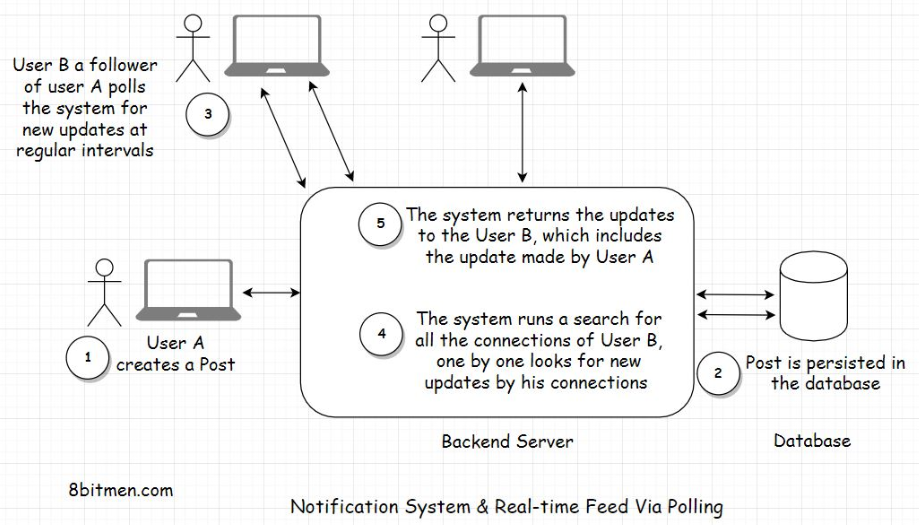
• So, when a user creates a post on the website, the application will persist it in the database. There will be one User table and another Post table. Since one user will create many posts, it will be a one-to-many relationship between the user and their posts.• As we persist the post in the database, we also have to show the information posted by the user on the home page of their friends and followers, even send notifications if needed.• • How would you implement this? Pause and think before you read further.4.2. Pull-based approach• One straightforward way to implement this without the message queue will be to have every user on the website poll the database at regular short intervals if any of their connections have a new update.• For this, for showing notifications on a certain user profile, we will query all the connections of the user from the database and then run a check on every connection one by one if any new information is posted by them.• • If there are new posts created by the user’s connections, the query will pull them all and display the posts on the home page of the user’s profile. We can also send the notifications to the user about the new posts, tracking them with the help of a boolean notification counter column in the User table and adding an extra AJAX poll query from the client for new notifications.• • Whenever the database query finds new posts, it changes the new notification counter to true. When the counter is true, responding to the Ajax poll request, the application sends a notification to the user that you have recent posts made by your connections.
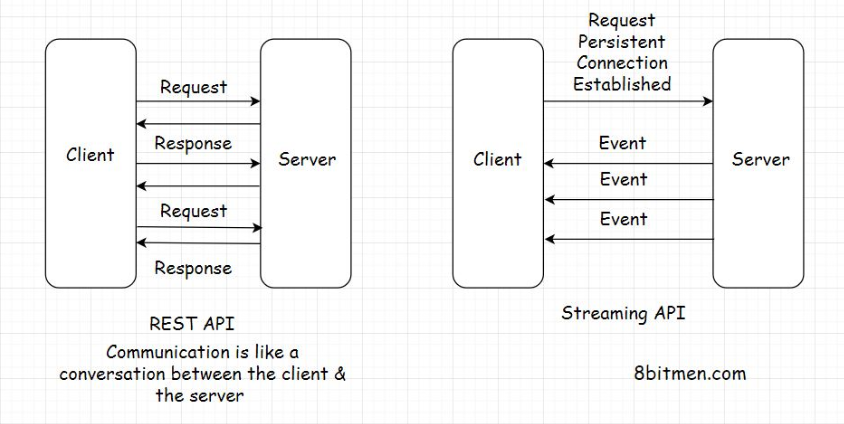
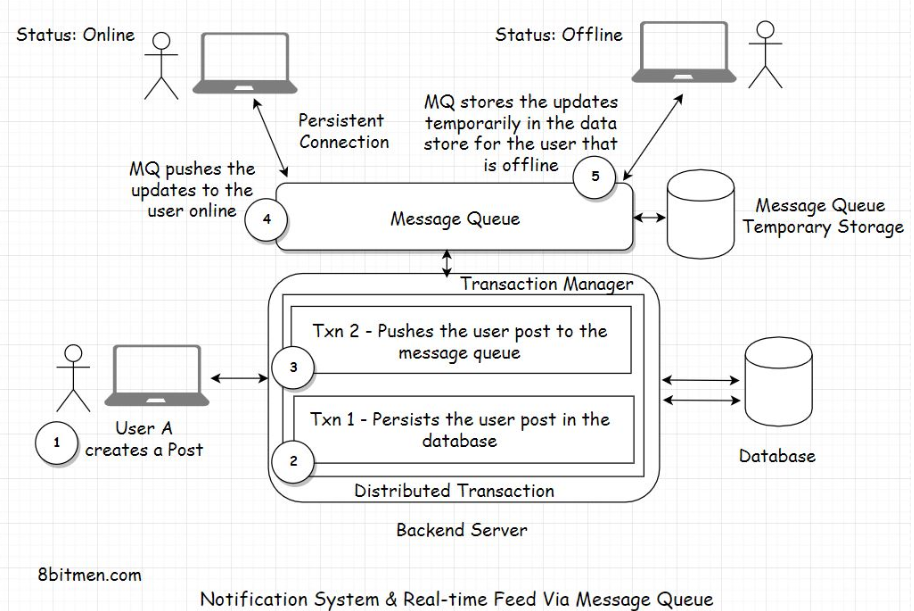
• What do you think of this approach? It’s pretty straightforward, right?• Well, there are two major downsides to this approach.• • First, we are polling the database so often. This is expensive. It will consume a lot of bandwidth and put a lot of unnecessary load on the database.• • The second downside is that a user’s post displayed on the home page of their connection’s homepage will not be in real-time. The posts won’t show until the database is polled. We may assume this as real-time, but it is not really real-time.4.3. Push-based approach• Let’s make our system more performant. Instead of polling the database now and then, we will take the help of a message queue.• In this scenario, when a user creates a new post, it will have a distributed transaction. One transaction will update the database, and the other will send the post payload to the message queue. Payload means the content of the message posted by the user.• • Notification systems and real-time feeds establish a persistent connection with the database to facilitate streaming data in real-time. We have already been through this.
• On receiving the message, the message queue will asynchronously and immediately push the post to the user’s connections that are online. There is no need for them to poll the database regularly to check if any of their connections have created a post.• We can also use the message queue temporary storage with a TTL for storing the payload until the connections of the user come online and then push the updates to them. We can also have a separate key-value database to store the user’s details required to push the notifications to their connections, like their connection list and stuff. This would avert the need to poll the database to get the connections of the user every time the user creates a post.• • So, did you see how we transitioned from a pull-based approach to a push-based approach with the help of message queues? This shift will spike the application’s performance and cut down a lot of resource consumption, saving truckloads of our hard-earned money.
• There are several ways we can handle distributed transactions. Though the transactions are distributed, they can still work as a single unit. In case the database persistence fails, the application will roll back the entire transaction. There won’t be any message push to the message queue either.• What if the message queue push fails? And the database transaction succeeds? Do you want to roll back the transaction, or do you want to proceed? The decision depends entirely on you, how you want your system to behave.• • Even if the message queue push fails, the message isn’t lost. It can still be persisted in the database.• • When the user refreshes their homepage, you can write a query to poll the database for the new updates, taking the polling approach we discussed initially as a backup.• • Or you can totally roll back the transaction, even if the database persistence transaction is a success but the message queue push transaction fails. The post hasn’t gone into the database yet as it is generally a two-phase commit.• • We can always write custom code to manage the distributed transactions or can choose to leverage the distributed transaction managers that the frameworks offer.• • I can keep going on to the minutest of the details, but that would just make the lesson unnecessarily lengthy, complex and overkill. For now, I have just touched the surface of notification modules to help you understand how they work.• • Post creation is an event that a user triggers in the application. Similar events are liking a post, photo, video, watching a live-stream and so on.• • Just like posts, message queues can push these events too to the connections of a user.• • When designing systems, I want to emphasize that there is no perfect or best solution. The solution should serve us well, fulfilling our business requirements and simultaneously maintaining costs. Application maintenance and optimization are evolutionary, don’t sweat about it in the initial development cycles.• • First, get the skeleton in place and then optimize notch by notch.• • Recommended read - How does LinkedIn identify its users online?5. Handling Concurrent Requests with Message Queues5.1. Using a message queue to handle the traffic surge• In the distributed NoSQL databases lesson, we learned about eventual consistency and strong consistency. We discussed how both the consistency models come into effect when incrementing a “Like” counter value.• Here is a quick insight into how we can use a message queue to manage a high number of concurrent requests to update an entity.• • When millions of users around the world update an entity concurrently, we can queue all the update requests in a high throughput message queue. Then, we can process them one by one in a First in First Out (FIFO) approach sequentially.• • This would enable the system to be highly available and open to updates while remaining consistent at the same time.• • Though implementing this approach is not as simple as it sounds, implementing anything in a distributed, real-time environment is not so trivial.5.2. Facebook handles concurrent requests on its live video streaming service with a message queue• Facebook’s approach of handling concurrent user requests on its LIVE video streaming service is another good example of how queues can be used to efficiently handle the traffic surge.• On the platform, when a popular person goes LIVE, there is a surge of user requests on the LIVE streaming server. To avert the incoming load on the server, Facebook uses cache to intercept the traffic.• • However, since the data is streamed LIVE, the cache often is not populated with real-time data before the requests arrive. Now, this would naturally result in a cache-miss, and the requests would move on to hit the streaming server.• • To avert this, Facebook queues all the user requests, requesting the same data. It fetches the data from the streaming server, populates the cache, and then serves the queued requests from the cache.• • Here is a recommended read on Facebook’s Live streaming architecture.