1. A Web-Based Mapping Service Like Google Maps• Before I begin talking about the service’s architecture, I would like to state that this is not a system design lesson because it doesn’t contain any of the database design, traffic estimations, or code of any sort.• I will just discuss the fundamental architectural aspects of the service and how the concepts we’ve learned in the course apply here.• • With that being said, let’s get on with it.1.1. A little background on Google Maps• Google Maps is a web-based mapping service by Google. It offers satellite imagery, route planning features, real-time traffic conditions, an API for writing map-based games like Pokémon Go, and several other features.• These massive and successful services are a result of years of evolution and iterative development. Online services are built feature by feature and take years to perfect. Google Maps started as a desktop-based software written in C++ and evolved over the years to become what it is today, a beautiful mapping service used by over a billion users.• 1.2. Read-heavy application• Let’s get down to the technicalities of it. An application like this is read-heavy, not write-heavy. The end-users aren’t generating new content in the application exponentially. They do perform some write operations, marking certain locations and so on, though the application writes are negligible in comparison to the reads. This means the data can be largely cached to cut down the load on the database.• 1.3. Data Type: Spatial• Speaking of the data, a mapping application like this has spatial data. Spatial data is the data with objects representing geometric information like points, lines, polygons. The data also contains alphanumeric information, like Geohash, latitudes, longitudes, GIS (Geographical Information System) data, etc.• • There are dedicated spatial databases available for persisting this kind of data. Popular databases like MySQL, MongoDB, CouchDB, Neo4J, Redis, and Google Big Query GIS support the persistence of spatial data. They have additional plugins built for it.• • If you want to read more about spatial databases, this is a good read.• 1.4. Database• The coordinates of the places are persisted in the database. When a user runs a search for a specific location, the coordinates are fetched from the database, and the numbers are converted into a map image.• • We can expect a surge in traffic on the service during peak office hours, festivals or any significant events in the city. We would need instance autoscaling (horizontal scalability) to manage these traffic spikes. The app needs to be elastic to scale up and down on the fly.• • As I mentioned earlier, we have the option of picking from multiple databases as both relational and non-relational support the persistence of spatial data. I am more inclined to pick a non-relational NoSQL one because the map data doesn’t contain many relationships. It directly fetches the coordinates and processes them based on the user request. Also, a NoSQL database is inherently horizontally scalable. A NoSQL graph database would fit best as a database for this application.• • We can also scale well with a relational database with caching because the application is read-heavy. However, in real-time use cases with a lot of updates, it will be a bit of a challenge.• • Real-time features like LIVE traffic patterns, information on congested routes, and the alternative routes suggestions as we drive in real-time, etc., are pretty popular with the Google Maps users.• 1.5. Architecture• Naturally, to set up a service like this, we will pick a client-server architecture as we need control over the service. Otherwise, we could have thought about the P2P architecture, but it won’t do us any good here.• 1.6. Backend technology• We can pick Java, Scala, Python, and Go in the server-side language. Any of the mature backend technology stacks will do. My personal pick will be Java because it is performant and heavily used for writing scalable distributed systems and enterprise development.• 1.7. Monolith vs microservice• Monolithic architecture vs. microservice, which one do you think we should pick to write the app?• • Let’s figure this out by going through the features of the service. The core feature is the map search. The service also enables us to plan our routes based on different modes of travel, including cars, walking, cycling, etc.• • Once our trip starts, the map offers alternative route locations in real-time. The service adjusts the map based on the user’s real-time location and destination.• 1.8. APIs• For the third-party developers, Google offers different APIs such as the Direction API, Distance Matrix, Geocoding, Places, Roads, Elevation, Time zone, and Custom search API.• • The Distance Matrix API tells us how much time it will take to reach a destination depending on the mode of travel: walking, flying or driving.• • Real-time alternative routes are displayed with the help of predictive modeling based on machine learning algorithms. The Geocoding API is about converting numbers into actual places and vice versa.
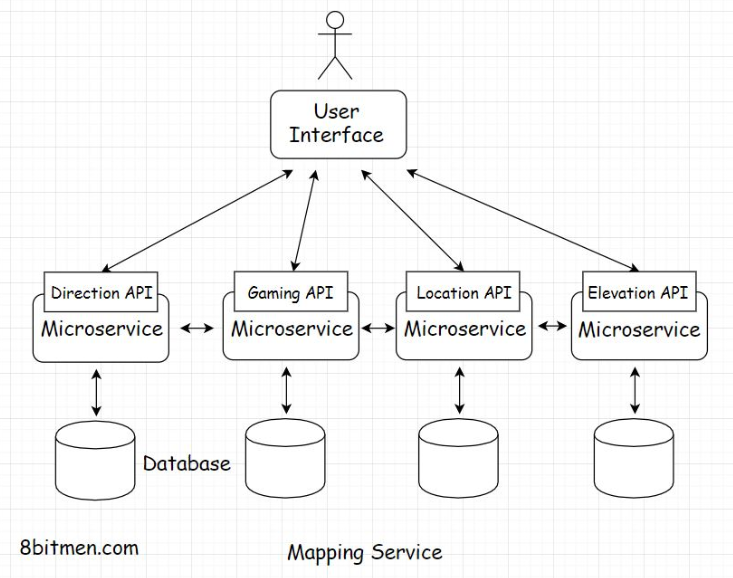
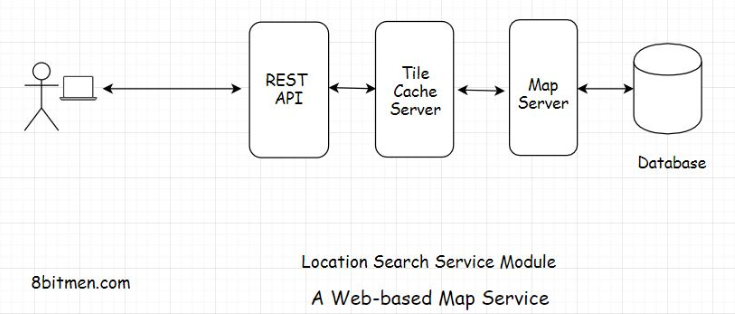
• Google Maps also has a gaming API for building map-based games. We may not have to implement everything in the first release, but this gives us a clue that monolithic architecture is totally out of the picture.• We need microservices to implement so many different functionalities. Let’s write a separate service for every feature. This is a cleaner approach and it will help the service scale and stay highly available. Even if a few services like real-time traffic, elevation API, etc., go down, the core search remains unaffected.• 1.9. Server-side rendering of map tiles• Speaking of the core location search service, when the user searches for a specific location, the service has to match the search text with the name of the location in the database and pull up the place’s coordinates.• • Once the service has the coordinates, how do we convert those into an image? Also, should we render the image on the client or the server?• • Server-side rendering is preferable in this scenario because we can cache the rendered image for future requests. The image is static content and will be the same for all the users.• • Also, as opposed to generating a single map image for the full web page, the entire map is broken down into tiles that enable the system to generate only the part of the map that the user engages with.• • Smaller tiles help with the zoom in and out operations. You might have observed this when using Google Maps. Instead of the entire web page being refreshed, the map is refreshed in sections or tiles. Rendering the entire map instead of the tiles every time would be very resource-intensive.• • We can create the map in advance by rendering it on the server and caching the tiles. Also, we would need a dedicated map server to render the tiles on the backend.
1.10. User Interface• Speaking of the UI, we can write this using JavaScript, Html5. Vanilla JavaScript serves well for simple requirements. However, if you want to leverage a framework, you can look into React, Angular, Vue, etc.• • The UI having JavaScript events enables the user to interact with the map, pin locations, search for places, draw markers and other vectors on the map, etc.• • OpenLayers is a popular open-source UI library for making maps work with web browsers. You can leverage it if you do not want to write everything from the ground up.• • Okay!! So, here is the flow: the user runs a search for a particular location. The request is routed to the tile cache on the backend, which contains all the pre-generated tiles. It sits between the UI and the map server. If the requested tile is present in the cache, it is sent to the UI. If not, the map server hits the database, fetches the coordinates and related data, generates the tile and returns it to the user.• 1.11. Real-time features• Let’s talk about the real-time features. To implement real-time features, we have to establish a persistent connection with the server.• • Although real-time features are cool, they are very resource-intensive. There is a limit to the number of concurrent connections servers can handle. So, I’ll advise implementing real-time features only when they are really required.• • This is a recommended read on the topic. How Hotstar, a video streaming service, scaled with over 10 million concurrent users.• • Well, this is pretty much it for a web-based mapping service. We’ve covered the backend, database, caching, and the UI, and by now, you should have a fundamental understanding of how a service like Google Maps works.• • I’ll see you in the next lesson, where we discuss a baseball game online ticket booking service.2. A Baseball Game Ticket Booking Web Portal• In this lesson, you’ll gain an understanding of the architecture and key points to consider when designing an application like a baseball game ticket booking portal.• Let’s get started.• 2.1. Database• Starting with the database, the sale of tickets online is key in this particular use case. We need to set up a foolproof payment system for the fans to buy tickets for their most awaited baseball game.• • For setting up payments, what database should we pick and why? You know it :) Implementing an online payment system makes transactions and strong consistency vital. The database needs to be ACID compliant. This makes a relational database like MySQL an obvious pick for us.• 2.2. Handling concurrency• Another essential thing to note is that the application should be designed to handle a high number of concurrent connections. There will be a surge of fans on the portal to buy tickets for the baseball game as soon as they are made available.• • Also, the number of requests will naturally be a lot more than the number of tickets available. At a point, there will be n requests to buy one ticket. We need to make sure the system handles this concurrent scenario well. How will you implement this scenario? Think about it.• 2.3. Message queue• One way is to queue all the ticket buy requests using a message queue. Apply the FIFO principle. We talked about handling concurrent requests with the help of a message queue in the message queue lesson.• 2.4. Database locks and Caching• Another approach is to use database locks. Use the correct transaction isolation level.• • A transaction isolation level ensures consistency in a database transaction. It ensures that at one point, only one transaction has access to a resource in the database. You can read more on isolation in database systems here. Also, read snapshot isolation.• • Transaction isolation levels can only be implemented with a transactional ACID-compliant database like MySQL.• • Generally, on e-commerce sites or travel booking websites, the number of tickets/products shown on the website is not accurate, and they are inconsistent cached values. When a user moves on to buy a particular ticket/product and checks out the cart, the system polls the database for the accurate count and locks the resource for the transaction.• • We will do the same for our website. There will be a lot of user events on the portal where the users just browse the website to look at the current price of the tickets and not buy them. Caching will avert the load on the database in this scenario.• • To implement caching, we can pick any of the popular caches, like Redis, Memcached or Hazelcast.• 2.5. Backend tech• Speaking of the backend technology, we can pick from Java, Scala, Python, Go, etc.• • To send notifications to the users, we can pick a message queue like RabbitMQ or Kafka.• • Let’s move to the UI.• 2.6. User interface• We don’t really need to establish a persistent connection with the server because the application is a CRUD-based app. Simple Ajax queries will work well.• • It’s a good idea to make the UI responsive, as fans will access it via devices with different screen sizes. The UI should be smart enough to adjust itself based on the screen size.• • We can either design the responsive behavior from the ground up using CSS3 or leverage a popular open-source responsive framework like Bootstrap JS.• • If you are fond of JavaScript frameworks, you can use React, Angular, Vue, etc. These frameworks are pretty popular in the industry, and businesses prefer to use them to standardize the behavior and the implementation of their applications.• • Well, this pretty much sums up the case study on a baseball ticket booking web portal. In the next chapter, let’s delve into mobile applications.