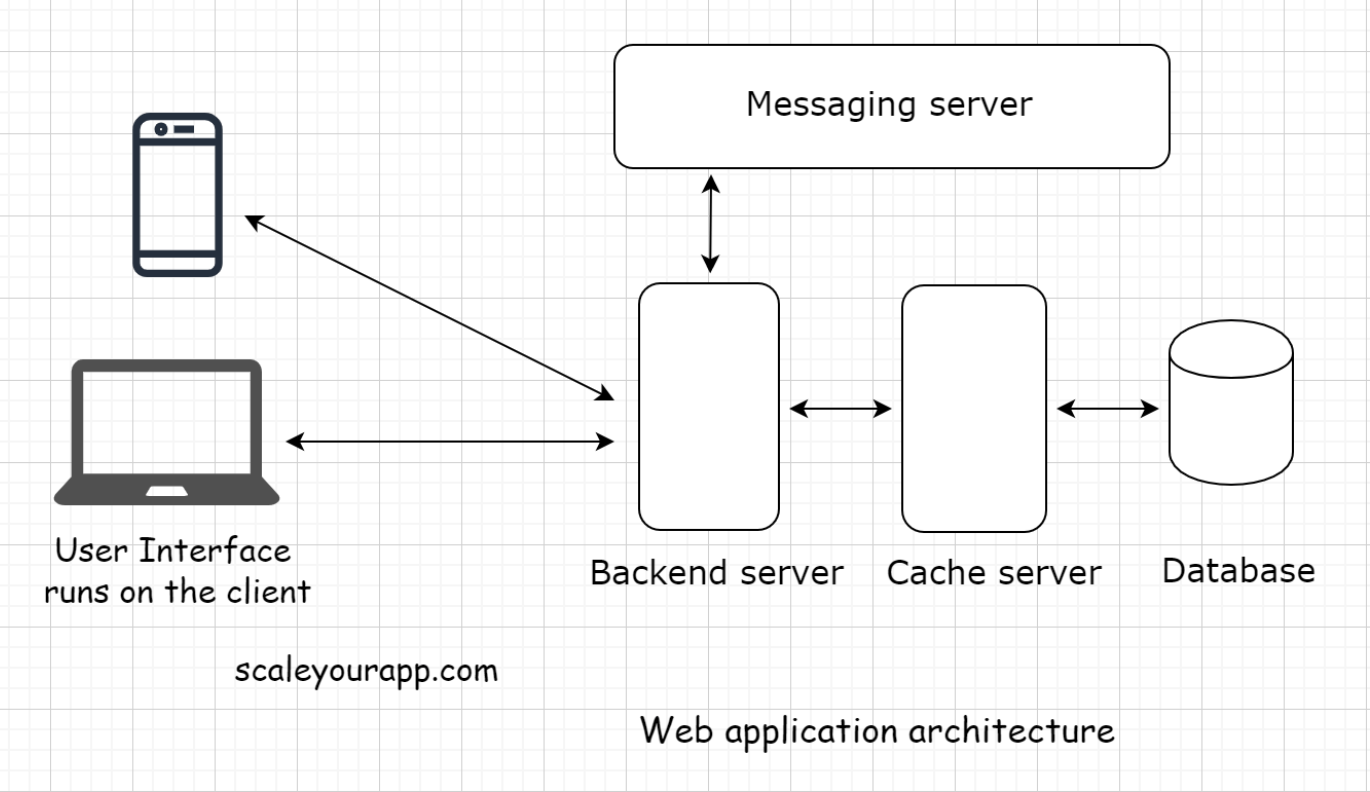
1. What is Web Architecture?• Web architecture involves multiple components like a database, message queue, cache, user interface, etc., all running in conjunction to form an online service.
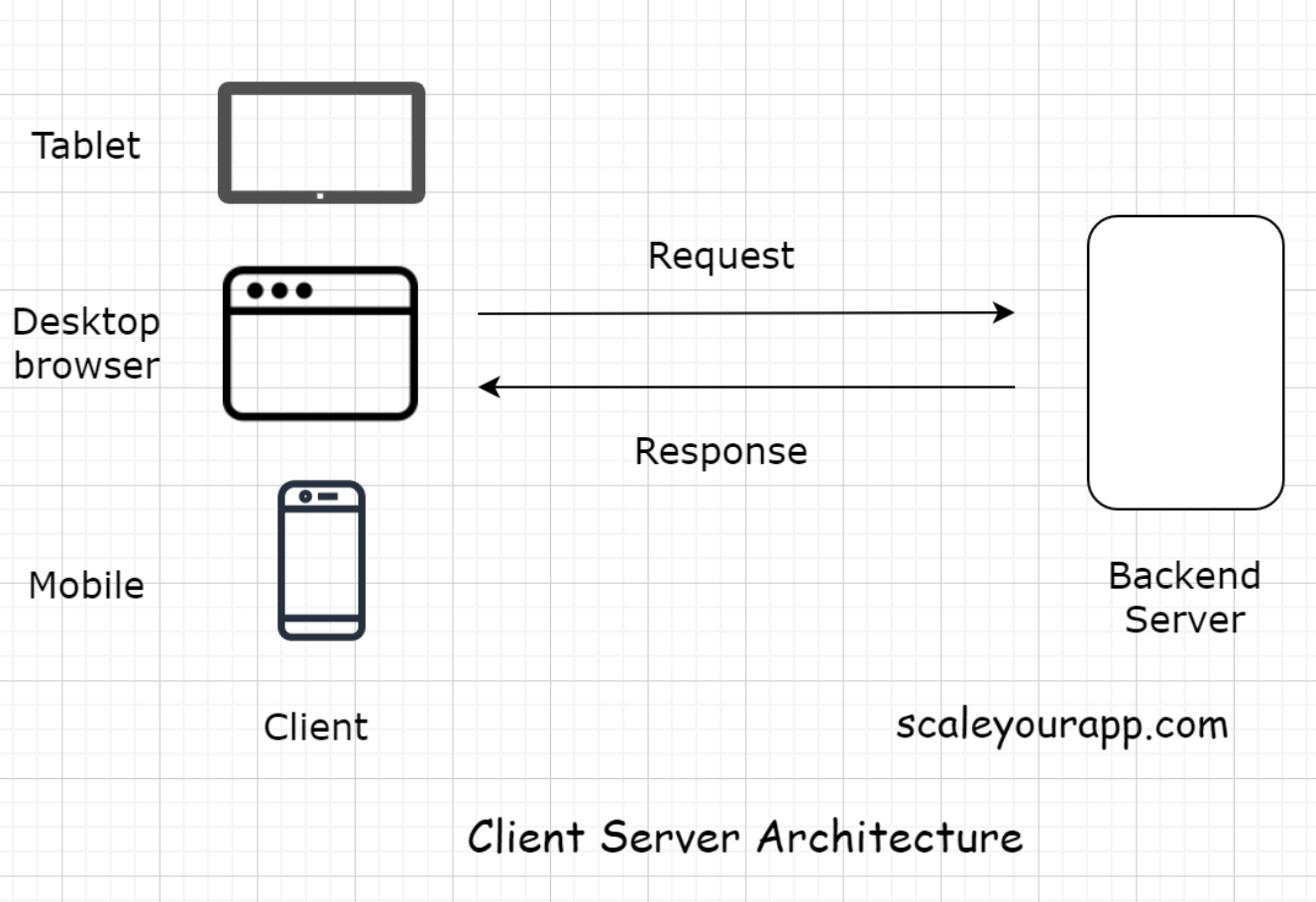
• This is a typical web application architecture used in most of the applications running online. If you understand the components involved in this diagram, you can build upon this architecture to fulfill complex requirements.2. Client-Server Architecture• You already learned a bit about the client-server architecture when we discussed the two-tier, three-tier and n-tier architecture. Now, we look at it in detail.
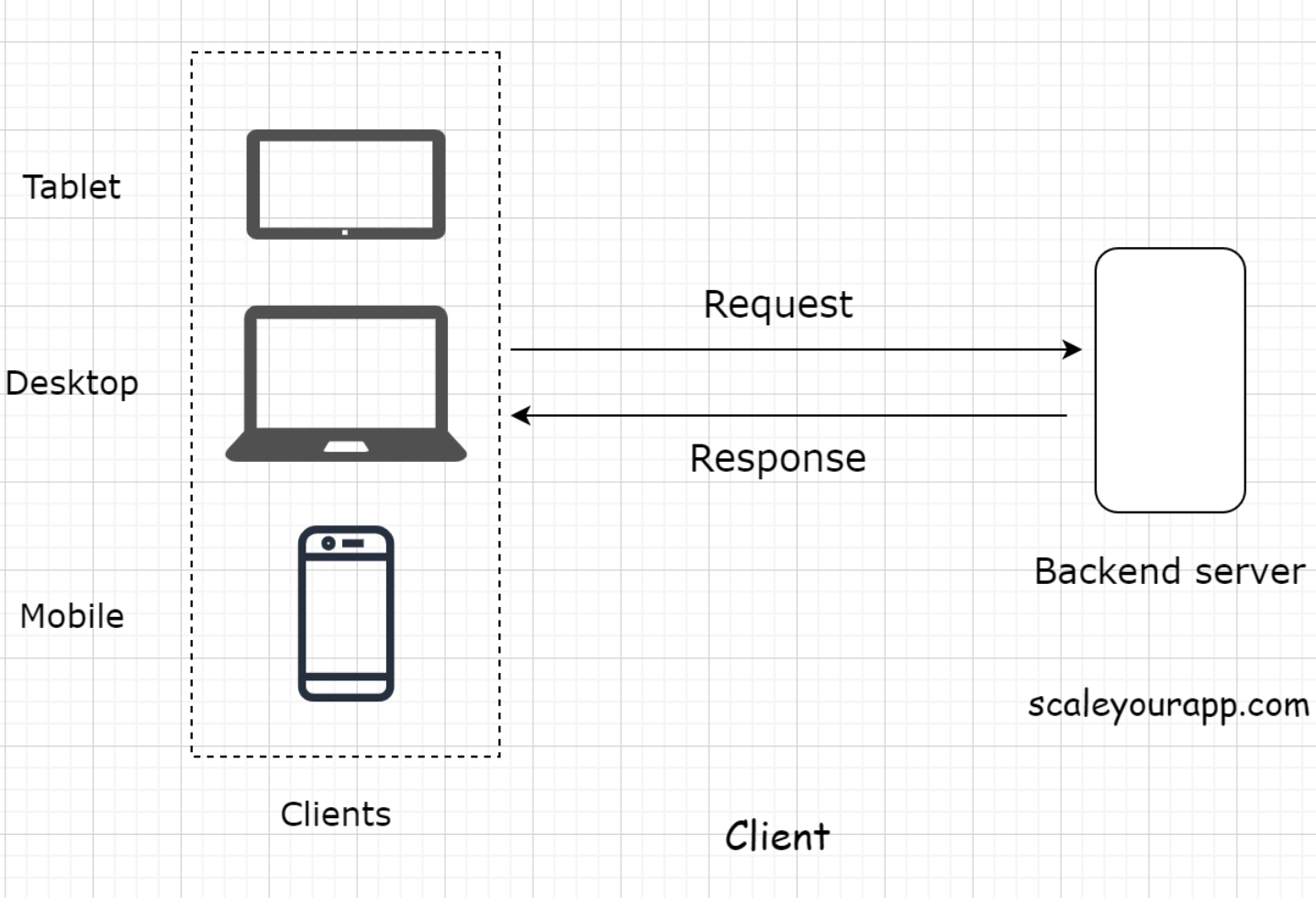
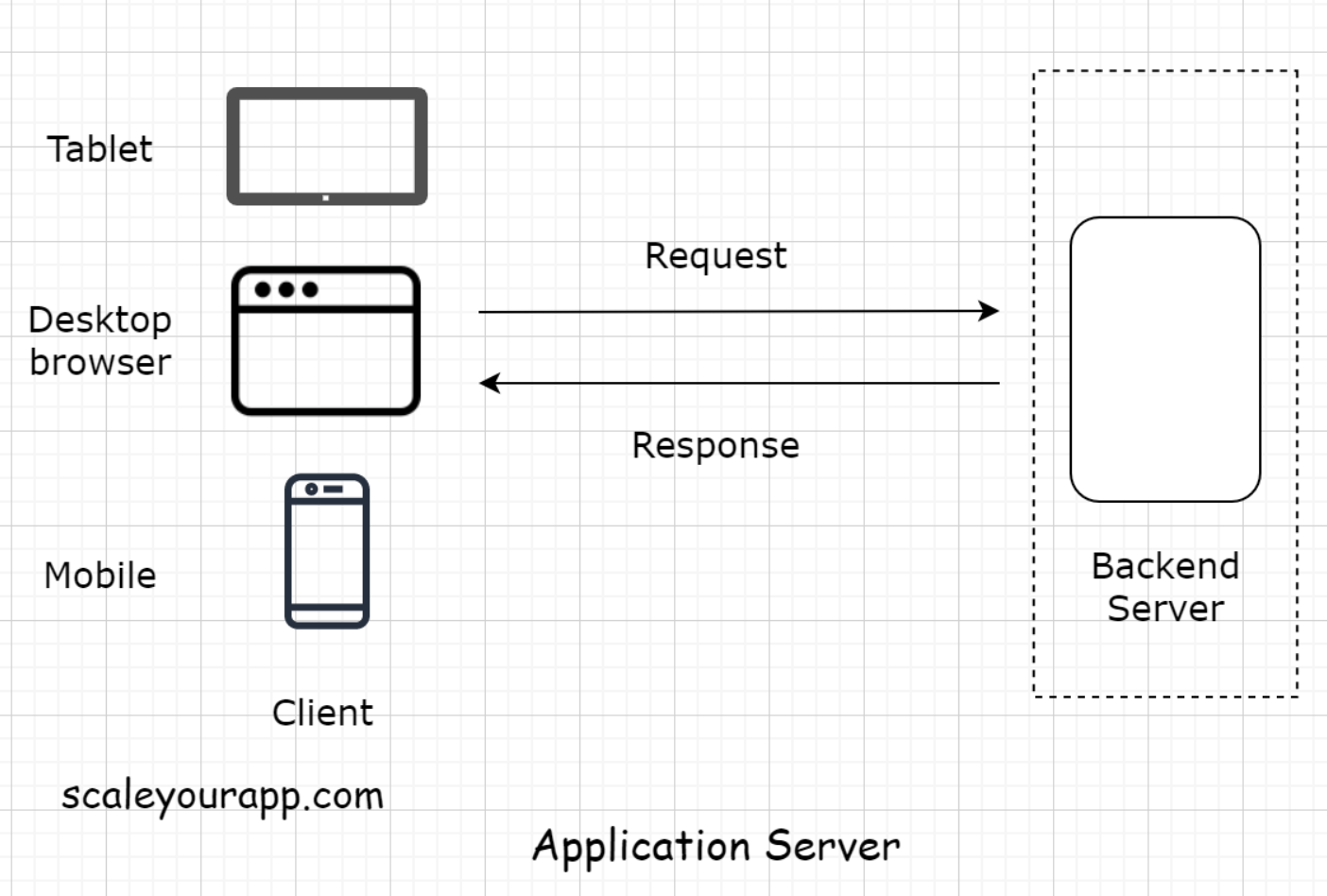
• Client-server architecture is the fundamental building block of the web.• The architecture works on a request-response model. The client sends the request to the server for information and the server responds with it.• • Every website you browse, be it a WordPress blog, an application like Facebook, Twitter, or your banking app, is built on the client-server architecture.• • A very small percentage of business websites and applications use the peer-to-peer architecture, which differs from the client-server.3. Client• The client holds our user interface. The user interface is the presentation part of the application. It’s written in HTML, JavaScript, CSS and is responsible for the look and feel of the application.• The user interface runs on the client. In very simple terms, a client is a gateway to our application. It can be a mobile app, a desktop or a tablet like an iPad. It can also be a web-based console, running commands to interact with the backend server.
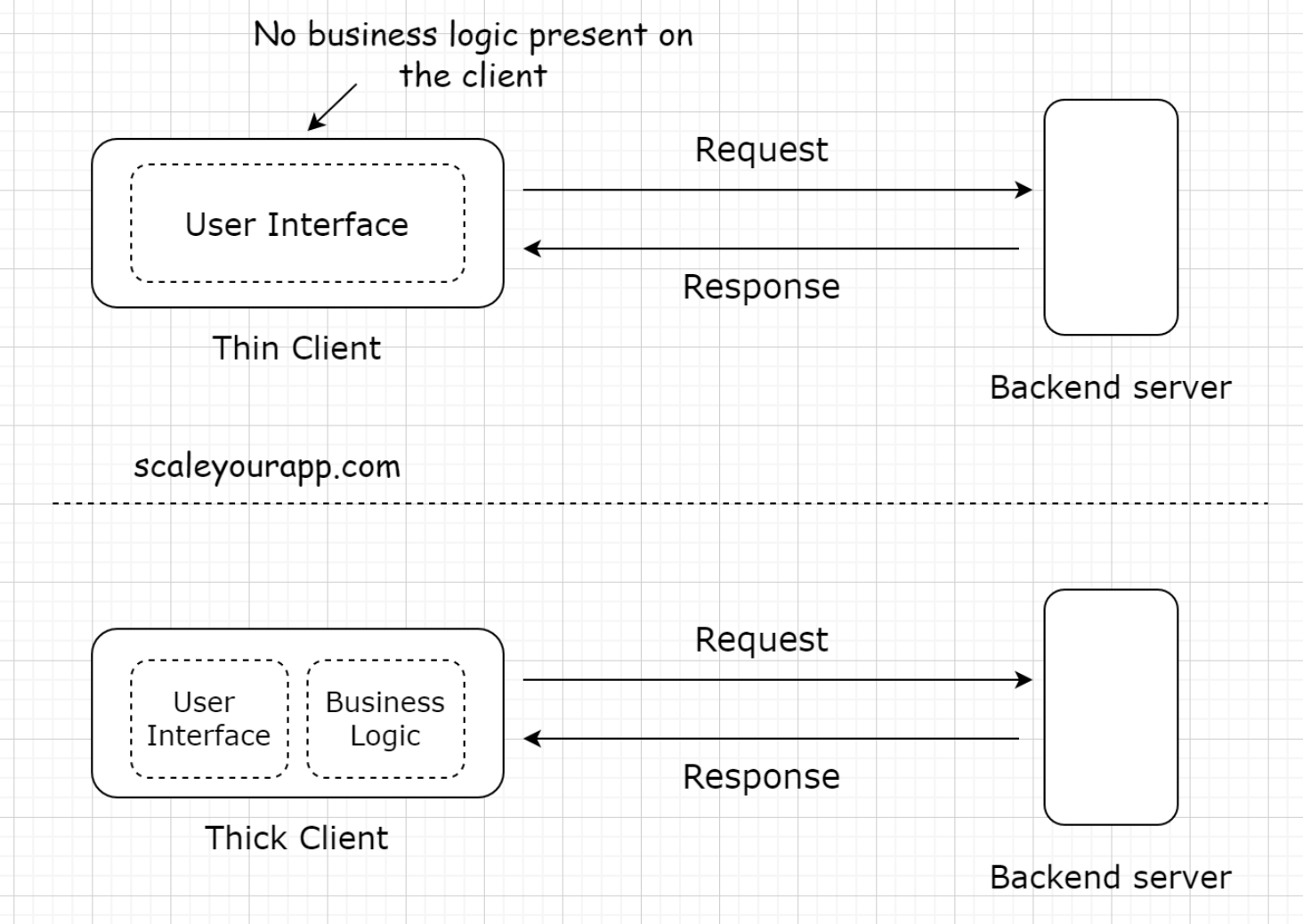
3.1. Technologies used to implement clients in web applications• The open-source technologies popular for writing the web-based user interface in the industry are vanilla JavaScript, jQuery, React, Angular, Vue, Svelte, etc. All these libraries are written in JavaScript.• There are a plethora of other technologies that can be leveraged as well for writing the front-end. I brought up the popular ones for now.• • Different platforms require different frameworks and libraries to write the front-end of our application. For instance, mobile phones running Android need a different set of tools than those running Apple or Windows OS.• • If you are intrigued about understanding the technologies popular in the industry, do take a look at the latest developer survey run by StackOverflow.4. Types of Clients• There are primarily two types of clients:– Thin client– Thick client (sometimes also called the Fat client)4.1. Thin client• A thin client is a client that holds just the user interface of the application. It contains no business logic of any sort. For every action, the client sends a request to the backend server, just like in a three-tier application.
4.2. Thick client• On the contrary, the thick client holds all or some part of the business logic. These are the two-tier applications. We’ve already been through them.• The typical examples of fat clients are utility apps, online games, and so on.5. Server5.1. What is a web server?• The primary task of a web server is to receive the requests from the client and provide the response after executing the business logic based on the request parameters received from the client.• Every online service needs a server to run. Servers running web applications are commonly known as application servers.
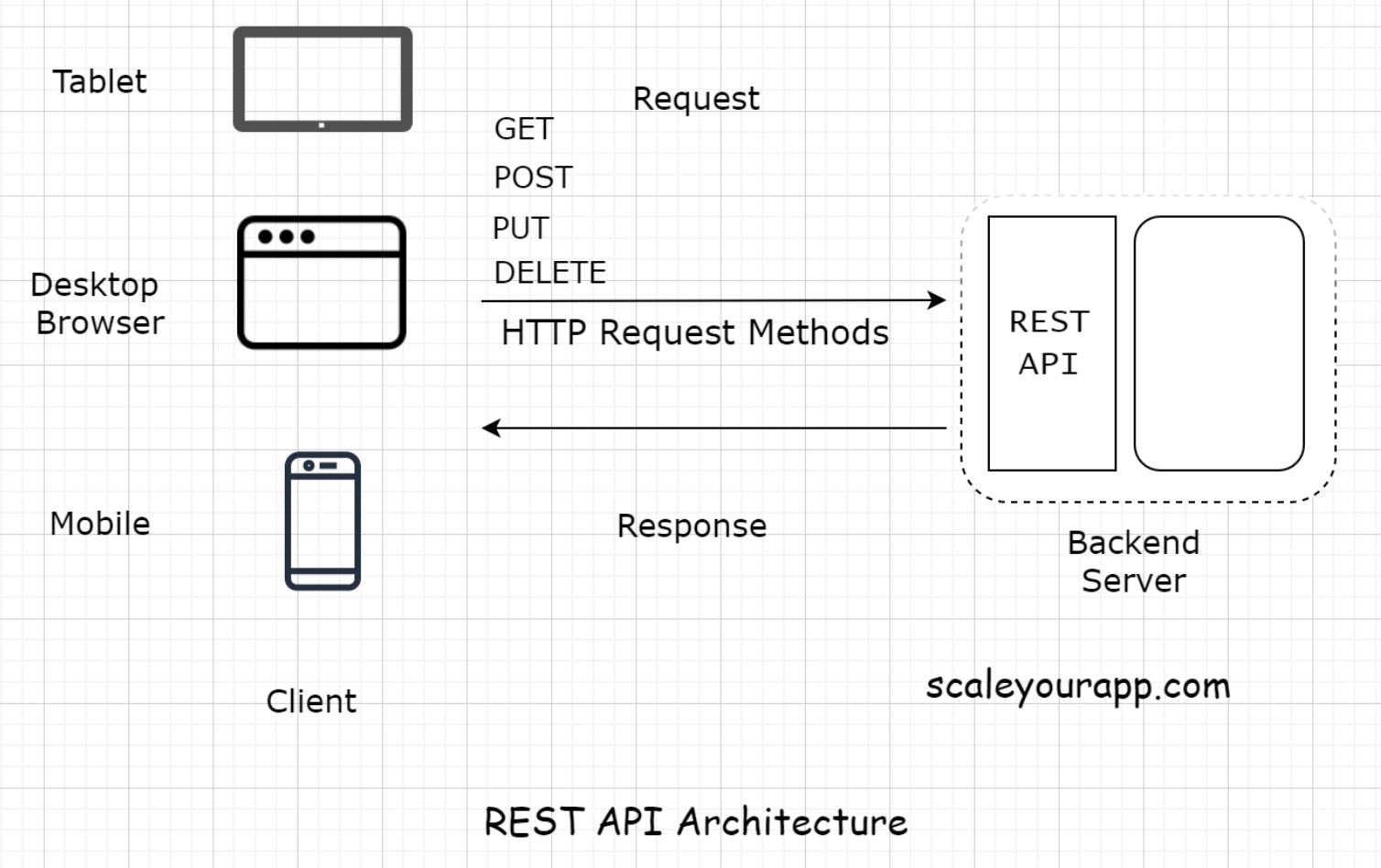
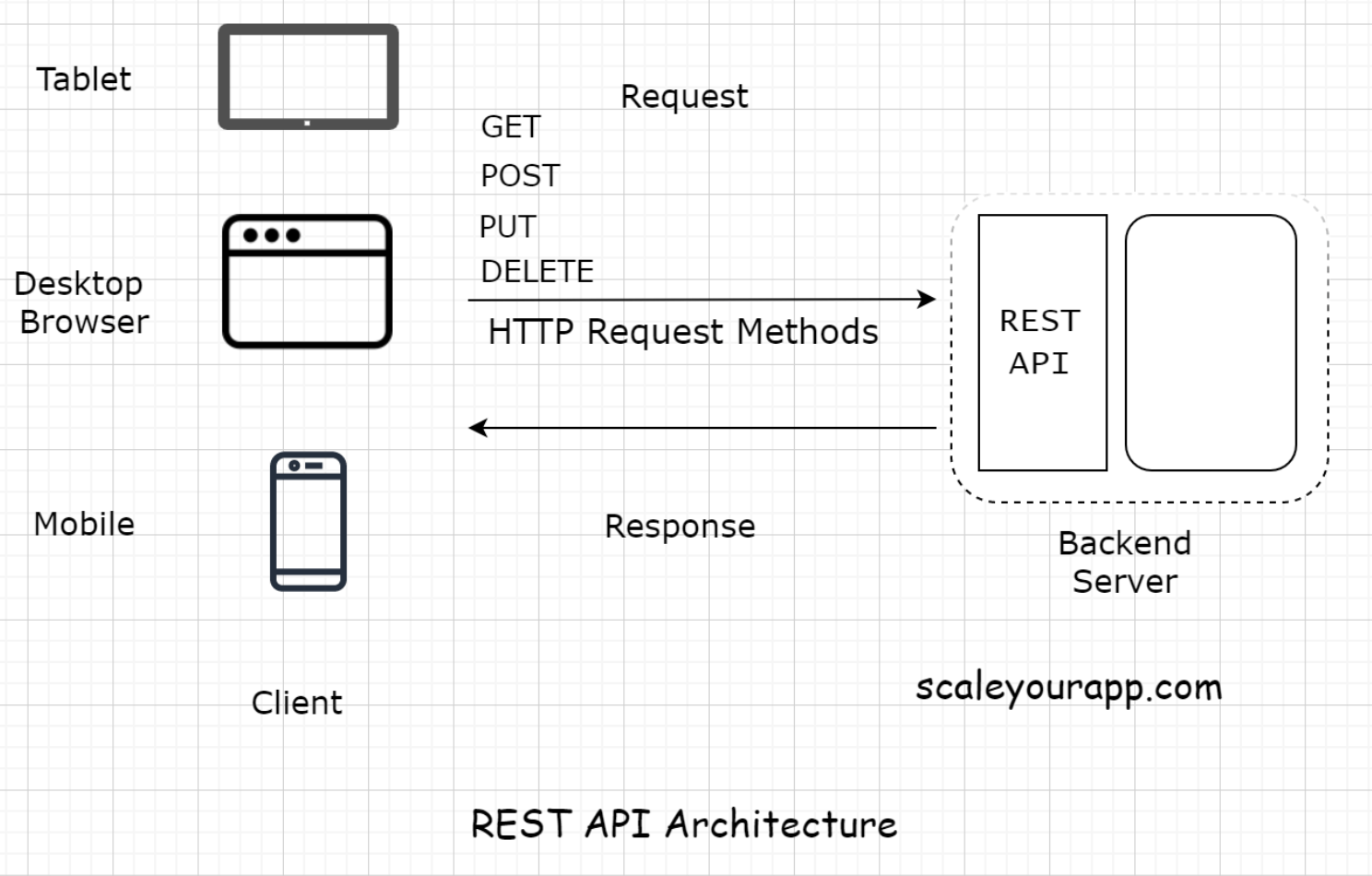
• Besides the application servers, there are also other kinds of servers with specific tasks assigned. These include:– Proxy server– Mail server– File server– Virtual server– Data storage server– Batch job server and so on• • The server configuration and the type can differ depending on the use case. For instance, if we run a backend application code written in Java, we would pick Apache Tomcat or Jetty. For simple use cases such as hosting websites, we would pick the Apache HTTP Server.• Here, we'll stick to the application layer.• All the components of a web application need a server to run, be it a database, a message queue, a cache, or any other component. In modern application development, even the user interface is hosted separately on a dedicated server.5.2. Server-side rendering• Often the developers use a server to render the user interface on the backend and then send the generated data to the client. This technique is known as server-side rendering. I will discuss the pros and cons of client-side vs. server-side rendering further down the course.6. Communication Between the Client and the Server6.1. Request-response model• The client and the server have a request-response model. The client sends the request and the server responds with the data.• If there is no request, there is no response.6.2. HTTP protocol• The entire communication happens over the HTTP protocol. It is the protocol for data exchange over the World Wide Web. HTTP protocol is a request-response protocol that defines how information is transmitted across the web.• It’s a stateless protocol, and every process over HTTP is executed independently and has no knowledge of previous processes.• • If you want to read more about the protocol, this Mozilla article is a good resource on it.6.3. REST API and API Endpoints• Speaking from the context of modern n-tier web applications, every client has to hit a REST endpoint to fetch the data from the backend.• Note: If you aren’t aware of the REST API and the API Endpoints, we will discuss it in the next lesson in detail. I’ve brought up the terms in this lesson just to give you a heads up on how modern distributed web applications communicate.• • The backend application code has a REST-API implemented. This acts as an interface to the outside world requests. Every request, be it from the client written by the business or the third-party developers, those who consume our API data have to hit the REST endpoints to fetch the data.
6.4. Real world example of using a REST API• Let’s say we want to write an application to keep track of the birthdays of all our Facebook friends. The app would then send us a reminder a couple of days before the birthday of a certain friend.• To implement this, the first step would be to get the data of the birthdays of all our Facebook friends. We would write a client to hit the Facebook Social Graph API, which is a REST-API, to get the data and then run our business logic on the data.• • Implementing a REST-based API has several upsides. Let’s delve into it in detail in the next lesson to have a deeper understanding.7. What is a REST API?7.1. What is REST?• REST stands for Representational State Transfer. It’s a software architectural style for implementing web services. Web services implemented using the REST architectural style are known as the RESTful web services.7.2. REST API• A REST API is an API implementation that adheres to the REST architectural constraints. It acts as an interface. The communication between the client and the server happens over HTTP. A REST API takes advantage of the HTTP methodologies to establish communication between the client and the server. REST also enables servers to cache the response that improves the application’s performance.
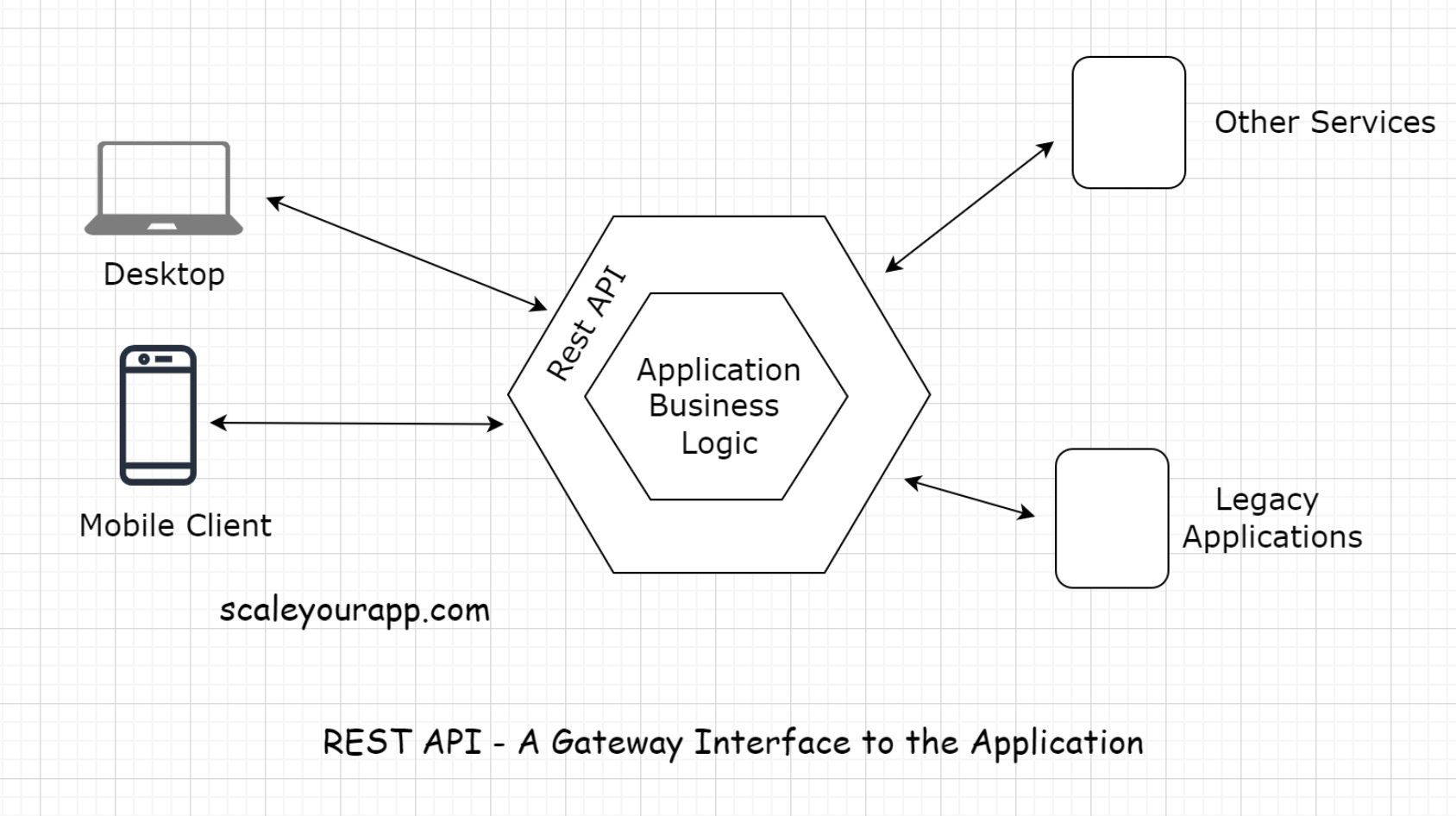
• The communication between the client and the server is a stateless process. By that, I mean every communication between the client and the server is like a new one.• There is no information or memory carried over from the previous communications. So, every time a client interacts with the backend, the client has to send the authentication information to it as well. This enables the backend to figure out whether the client is authorized to access the data or not.• • When implementing a REST API, the client communicates with the backend endpoints. This entirely decouples the backend and the client code.7.3. REST endpoint• An API/REST/Backend endpoint means the URL of the service that the client could hit. For instance, https://myservice.com/users/{username} is a backend endpoint for fetching the user details of a particular user from the service.• The REST-based service will expose this URL to all its clients to fetch the user details using the above stated URL.7.4. Decoupling clients and the backend service• With the availability of the endpoints, the backend service does not have to worry about the client implementation. It just calls out to its multiple clients and says, “Hey Folks! Here is the URL address of the resource/information you need. Hit it when you need it. Any client with the required authorization to access a resource can access it”.• With the REST implementation, developers can have different implementations for different clients, leveraging different technologies with separate codebases. Different clients accessing a common REST API could be a mobile browser, a desktop browser, a tablet or an API testing tool. Introducing new types of clients or modifying the client code does not affect the functionality of the backend service.• This means the clients and the backend service are decoupled.7.5. Application development before the REST API• Before the REST-based API interfaces became mainstream in the industry, we often tightly coupled the backend code with the client. Java Server Pages (JSP) is one example of this.• We would always put business logic in the JSP tags. This made code refactoring and adding new features difficult because the business logic spread across different layers.• • Also, on the backend, we had to write separate code/classes for handling requests from different types of clients. We needed a separate servlet for handling requests from a mobile client and a separate one for a web-based client.• • After REST APIs implementation backend developers didn’t need to worry about the type of the client. All the devs had to do was provide the service endpoints to the clients and they would receive the response in a standard data transport format like JSON. It was now the responsibility of the clients to parse and render the response data.• • This cut down a lot of unnecessary work for the backend developers. Also, adding new clients became a lot easier. Now, with REST, we can introduce any number of new clients without having to worry about the backend implementation.• • In today’s application development landscape, there is hardly any online service implemented without a REST API. Want to access the public data of any social network? Just use their REST API.7.6. API Gateway• The REST-API acts as a gateway or a single-entry point into the system. It encapsulates the business logic and handles all the client requests, taking care of the authorization, authentication, sanitizing the input data, and other necessary tasks before providing access to the application resources.• So, now we are aware of the client-server architecture. We also know what a REST API is. It acts as the interface, and the communication between the client and the server happens over HTTP.
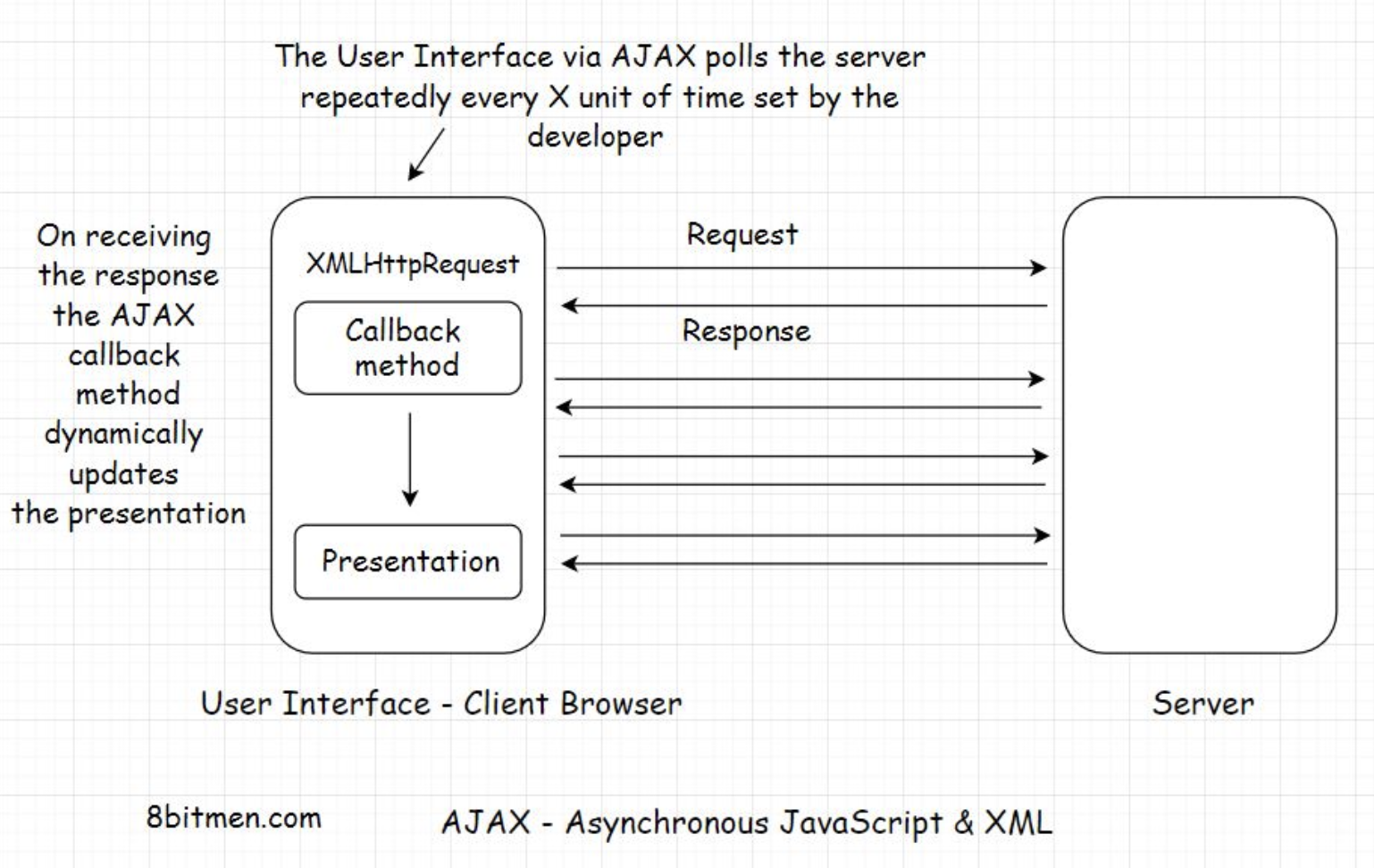
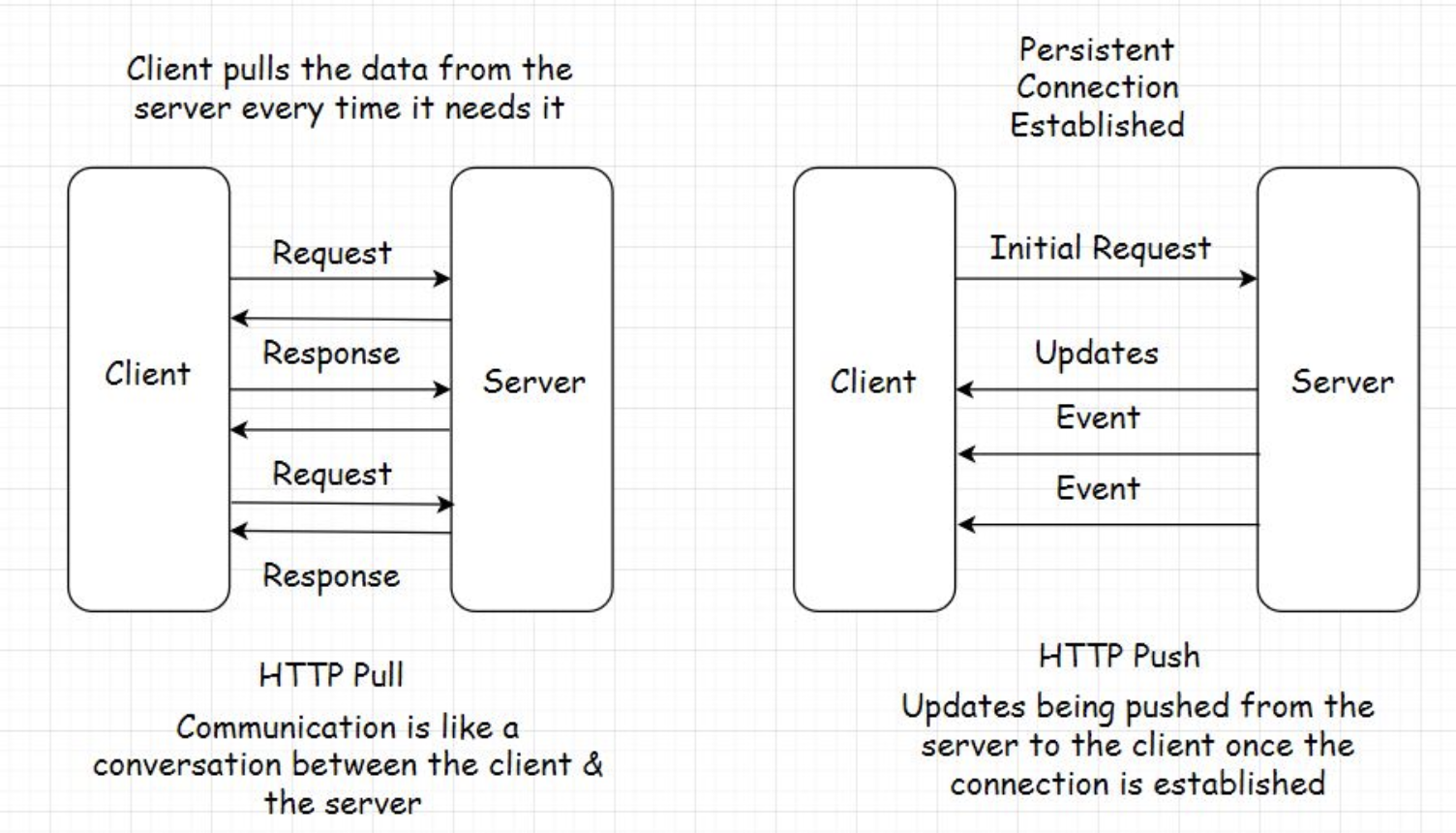
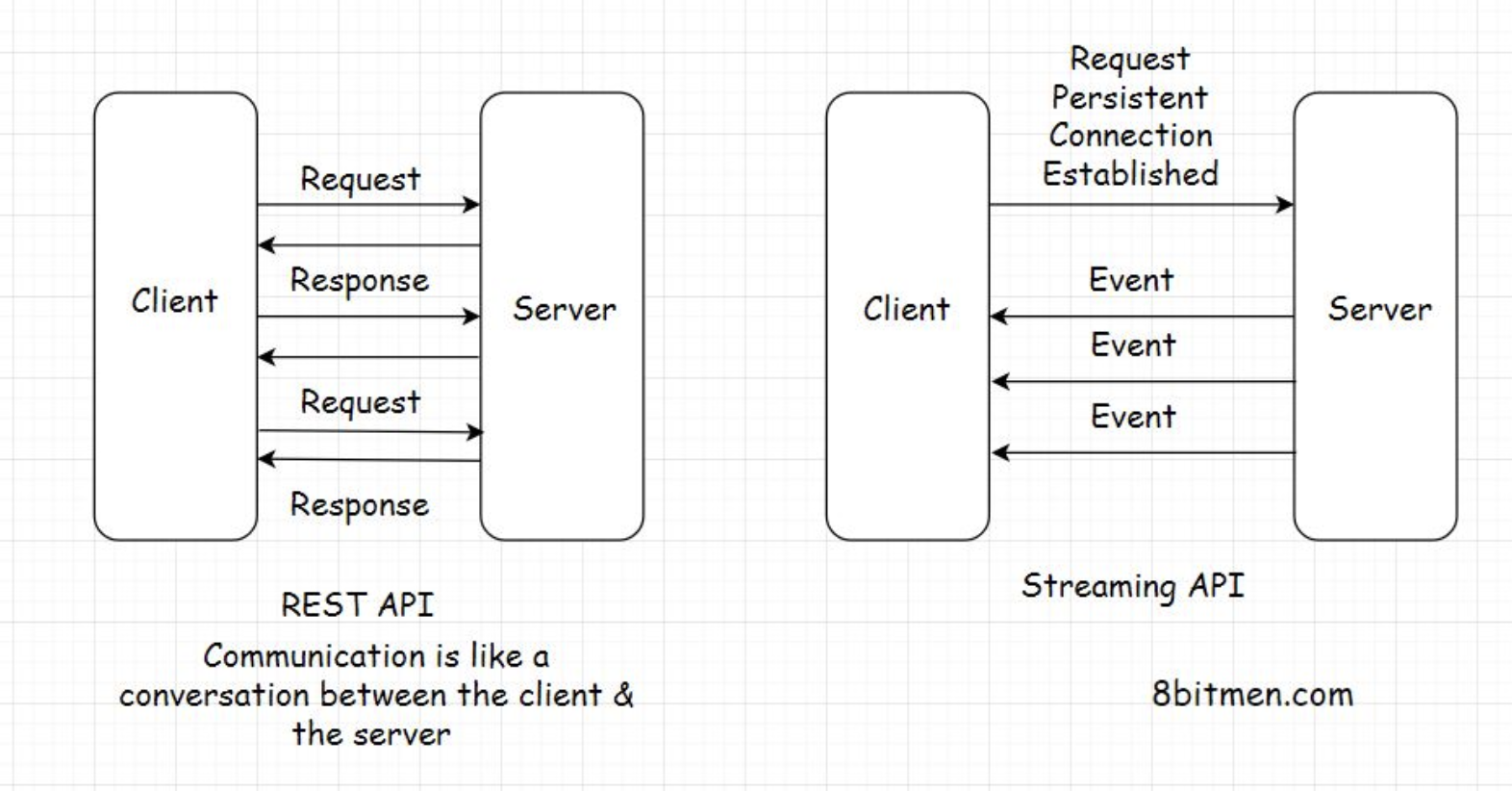
8. HTTP Push and Pull - Introduction• In this lesson, you will get an insight into the HTTP Push and Pull mechanism. We know that most of the communication on the web happens over HTTP, especially whenever the client-server architecture is involved.• There are two modes of data transfer between the client and the server: HTTP PUSH and HTTP PULL.8.1. HTTP PULL• As I stated earlier, for every response, there has to be a request first. The client sends the request and the server responds with the data. This is the default mode of HTTP communication, called the HTTP PULL mechanism.• The client pulls the data from the server whenever required. It keeps doing this over and over to fetch the latest data.• • An important thing to note here is that every request to the server and the response to it consumes bandwidth. Every hit on the server costs the business money and adds to the load on the server.• • What if there is no updated data available on the server every time the client sends a request?• • The client doesn’t know that, so naturally, it would keep sending the requests to the server over and over. This is not ideal and a waste of resources. Excessive pulls by the clients have the potential to bring down the server.8.2. HTTP PUSH• To tackle this, we have the HTTP PUSH-based mechanism. In this mechanism, the client sends the request for certain information to the server just once. After the first request, the server keeps pushing the new updates to the client whenever they are available.• The client doesn’t have to worry about sending additional requests to the server for data. This saves a lot of network bandwidth and cuts down the load on the server by notches.• • This is also known as a callback. The client phones the server for information. The server responds, “Hey!! I don’t have the information right now, but I’ll call you back whenever it is available”.• • A very common example of this is user notifications. We have them in almost every web application today. We get notified whenever an event happens on the backend.• • Clients use Asynchronous JavaScript & XML (AJAX) to send requests to the server in both the HTTP PULL and the HTTP PUSH mechanism.• • There are multiple technologies involved in the HTTP PUSH-based mechanism, such as:– Ajax Long polling– Web Sockets– HTML5 Event Source– Message Queues– Streaming over HTTP9. HTTP Pull - Polling With AJAX• There are of pulling/fetching data from the server.• The first is sending an HTTP GET request to the server manually by triggering an event on the user interface by clicking a button or interacting with any other element on the web page.• • The other is pulling data dynamically at regular intervals using AJAX without any human intervention.9.1. AJAX – Asynchronous JavaScript and XML• AJAX stands for Asynchronous JavaScript and XML. The name says it all. AJAX is used for adding asynchronous behavior to the web page.
• As you can see in the illustration above, instead of requesting the data manually every time with the click of a button, AJAX enables us to fetch the updated data from the server by automatically sending the requests over and over at stipulated intervals.• Upon receiving the updates, a particular section of the web page is updated dynamically by the callback method. We see this behavior all the time on news and sports websites, where the updated event information is dynamically displayed on the page without needing to reload it.• • AJAX uses an XMLHttpRequest object to send the requests to the server. This object is built in the browser and uses JavaScript to update the HTML DOM (Document Object Model).• • AJAX is commonly used with the jQuery framework to implement the asynchronous behavior on the UI.• • This dynamic technique of requesting information from the server at regular intervals is known as polling.• • It is important to note here that AJAX polling and AJAX Long polling are different techniques. Do not confuse them as one.• • AJAX polling is the HTTP Pull mechanism and AJAX Long polling is a hybrid between the HTTP Push and the Pull, based on the BAYEUX protocol. I’ve discussed it in the HTTP Push-based technologies lesson.10. HTTP Push10.1. Time to Live (TTL)• In the regular client-server communication, which is HTTP PULL, there is a Time to Live (TTL) for every request. It could be 30 secs to 60 secs, varying from browser to browser.• If the client doesn’t receive a response from the server within the TTL, the browser kills the connection and the client has to re-send the request hoping it receives the data from the server before the TTL ends again.• • Open connections consume resources, and there is a limit to the number of open connections a server can handle at one point. If the connections don’t close and new ones are introduced regularly over time, the server will run out of memory. Hence, the TTL is used in client-server communication.• • But what if we are certain that the response will take more time than the TTL set by the browser?10.2. Persistent connection• In this case, we need a persistent connection between the client and the server.• A persistent connection is a network connection between the client and the server that remains open for future requests and responses, as opposed to being closed after a single communication.• • This facilitates HTTP PUSH-based communication between the client and the server.
10.3. Heartbeat interceptors• Now you might wonder how a persistent connection is possible if the browser kills the open connections to the server every x seconds?• The connection between the client and the server stays open with the help of Heartbeat Interceptors.• • These are just blank request responses between the client and the server to prevent the browser from killing the connection.• • Isn’t this resource-intensive?10.4. Resource intensive• es, it is. Persistent connections consume a lot of resources compared to the HTTP PULL behavior. However, there are use cases where establishing a persistent connection is vital to an application’s feature.• For instance, a browser-based multiplayer game has a pretty large amount of request-response activity within a limited time than a regular web application.• • It would be apt to establish a persistent connection between the client and the server in this use case from a user experience standpoint.• • Long opened connections can be implemented by multiple techniques such as AJAX Long Polling, Web Sockets, Server-Sent Events, etc.11. HTTP Push-Based Technologies11.1. Web Sockets• A Web Socket connection is preferred when we need a persistent bi-directional low latency data flow from the client to the server and back.• Typical use-cases of web sockets are messaging, chat applications, real-time social streams, browser-based massive multiplayer games, etc. These are apps with quite a significant number of read writes compared to a regular web app.• • With web sockets, we can keep the client-server connection open as long as we want.• • Have bi-directional data? Go ahead with web sockets. One more thing, web sockets don’t work over HTTP. The mechanism runs over TCP. Also, the server and the client should both support web sockets. Else it won’t work.• • The WebSocket API and Introducing WebSockets – Bringing Sockets to the Web are good resources for further reading on web sockets.11.2. AJAX – Long polling• Long polling lies somewhere between AJAX and Web Sockets. In this technique, instead of immediately returning the empty response, the server holds the response until it finds an update to be sent to the client.• The connection in long polling stays open a bit longer compared to polling. The server doesn’t return an empty response. If the connection breaks, the client has to re-establish the connection to the server.• • The upside of using this technique is that there are fewer requests sent from the client to the server than the regular polling mechanism. This cuts down a lot of network bandwidth consumption.• • Long polling can be used in simple asynchronous data fetch use cases when you do not want to poll the server every now and then.11.3. HTML5 Event-Source API and Server-Sent Events• The Server-Sent Events (SSE) implementation takes a different approach. Instead of the client polling for data, the server automatically pushes the data to the client whenever the updates are available. The incoming messages from the server are treated as events.• Via this approach, the servers can initiate data transmission towards the client once the client has established the connection with an initial request.• • This helps eliminate a considerable number of blank request-response cycles cutting down the bandwidth consumption by notches.• • To implement the server-sent events, the backend language should support the technology. On the UI, HTML5 Event-Source API is used to receive the incoming data from the backend.• • An important thing to note here is that once the client establishes a connection with the server, the data flow is in one direction only, from the server to the client.• • SSE is ideal for scenarios like a real-time Twitter feed, displaying stock quotes on the UI, real-time notifications, etc.• • This is a good resource for further reading on SSE.• 11.4. Streaming over HTTP• Streaming over HTTP is ideal for cases where we need to stream extensive data over HTTP by breaking it into smaller chunks. This is made possible with HTML5 and a JavaScript Stream API.
• • Both the client and the server must agree to conform to the streaming settings to stream data. This helps them determine when the stream begins and ends over an HTTP request-response model.• The technique is primarily used for streaming multimedia content, like large images, videos, etc., over HTTP. Empowered by this technique, we can watch a partially downloaded video as it downloads by playing the downloaded chunks on the client.• • For further reading on Stream API, this is a good resource.11.5. Summary• So, now we understand what HTTP Pull and Push are. We went through different technologies that help us establish a persistent connection between the client and the server.• Every tech has a specific use case, and AJAX is used to dynamically update the web page by polling the server at regular intervals.• • Long polling has a connection open time slightly longer than the polling mechanism.• • Web Sockets have bi-directional data flow, whereas server-sent events facilitate data flow from the server to the client.• • Streaming over HTTP facilitates the streaming of large objects like multimedia files.• • What tech would fit best for our use case depends on the application we intend to build.12. Client-Side vs. Server-Side Rendering12.1. Client-side rendering - How does a browser render a web page?• When a browser receives a web page from the server in response, it has to render the response on the window in the form of an HTML page.• To pull this off, the browser has several components, such as:– The browser engine– Rendering engine– JavaScript interpreter– Networking and the UI backend– Data storage etc.– • I won’t go into much detail; the gist is the browser has to do a lot of work to convert the response from the server into an HTML page. The rendering engine constructs the DOM tree and renders and paints the construction and so on.• • Naturally, all this activity takes some time before the user can interact with the page.12.2. Server-side rendering• To cut down all this rendering time on the client, developers often render the UI on the server, generate HTML there and directly send the HTML page to the UI.• This technique is known as server-side rendering. It ensures faster rendering of the UI, averting the UI loading time in the browser window because the page is already created and the browser doesn’t have to do much assembling and rendering work.• • Here are some use cases for both approaches of rendering the UI—on the client and the server.12.3. Use cases for server-side & client-side rendering• The server-side rendering approach is perfect for delivering static content, such as WordPress blogs. It’s also good for SEO because the crawlers can easily read the generated content.• However, modern websites are highly dependent on AJAX. On such websites, content for a particular module or a page section has to be fetched and rendered on the fly. In this use case, the server-side rendering doesn’t help much.• • If we render the UI on the server for AJAX-based websites, for every AJAX request, the approach will generate the entire page on the server as opposed to just sending the updated content to the client in response.• • This process will prove to be resource-intensive and would consume unnecessary bandwidth, failing to provide a smooth user experience.• • Also, once the number of concurrent users on the website goes up, server-side rendering will exert an unnecessary load on the server.• • So, for modern dynamic AJAX-based websites, the client-side rendering works best.• • Moreover, we can leverage a hybrid approach to get the best of both worlds. We can use server-side rendering for the static content of our website and client-side rendering for dynamic content.• • Okay, before we move on to the database, message queue and caching components, it’s essential for us to understand concepts such as:– Scalability– High availability– Load balancing– Monolith and microservices• • Understanding these concepts will help us understand the rest of the web components better.