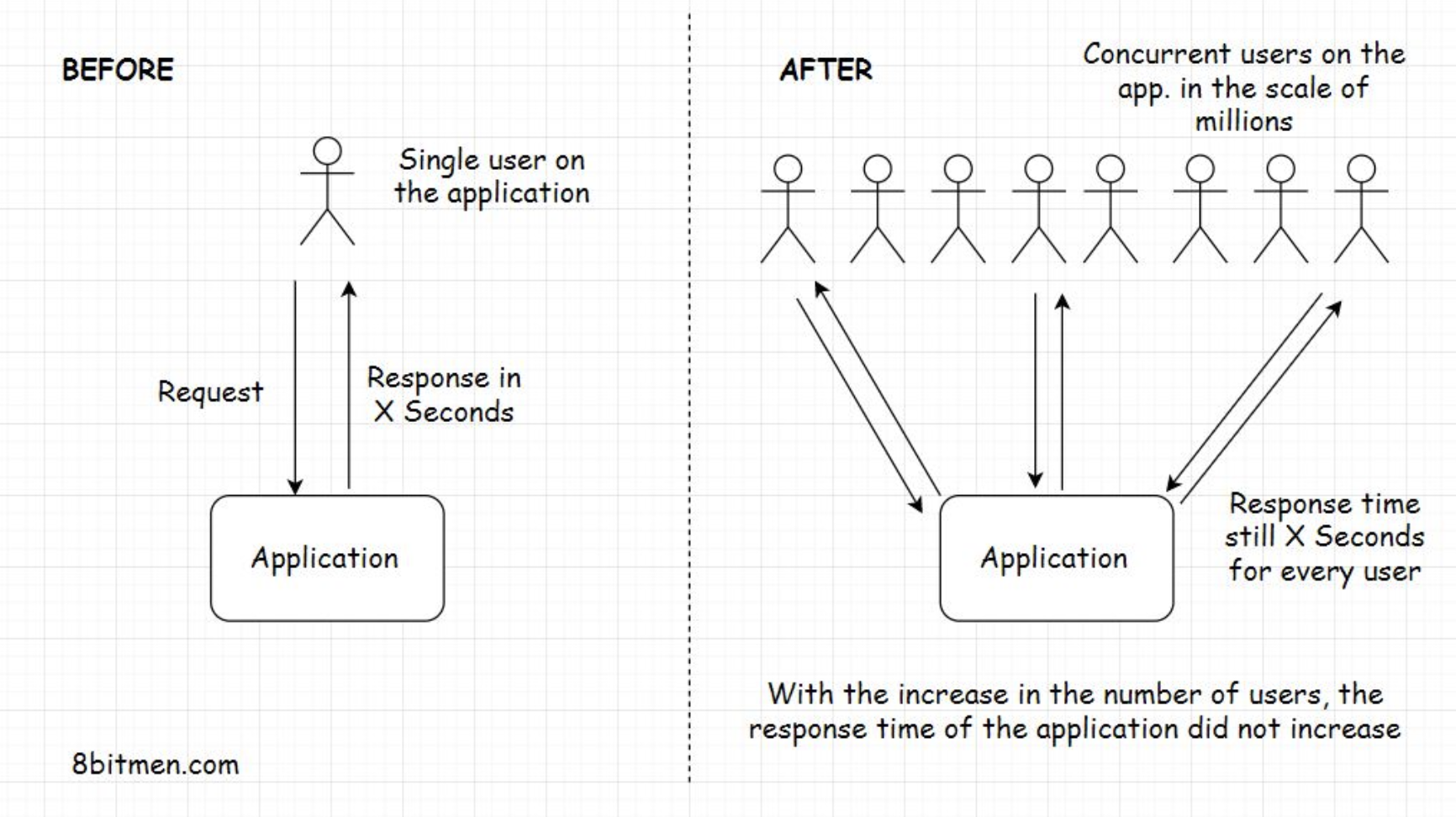
1. What is scalability?• Scalability means the application’s ability to handle and withstand increased workload without sacrificing performance.• For example, if your app takes x seconds to respond to a user request. It should take the same x seconds to respond to each of your app’s million concurrent user requests.• • The app’s back-end infrastructure should not crumble under a load of a million concurrent requests. It should scale well when subjected to a heavy traffic load and maintain the system’s latency.
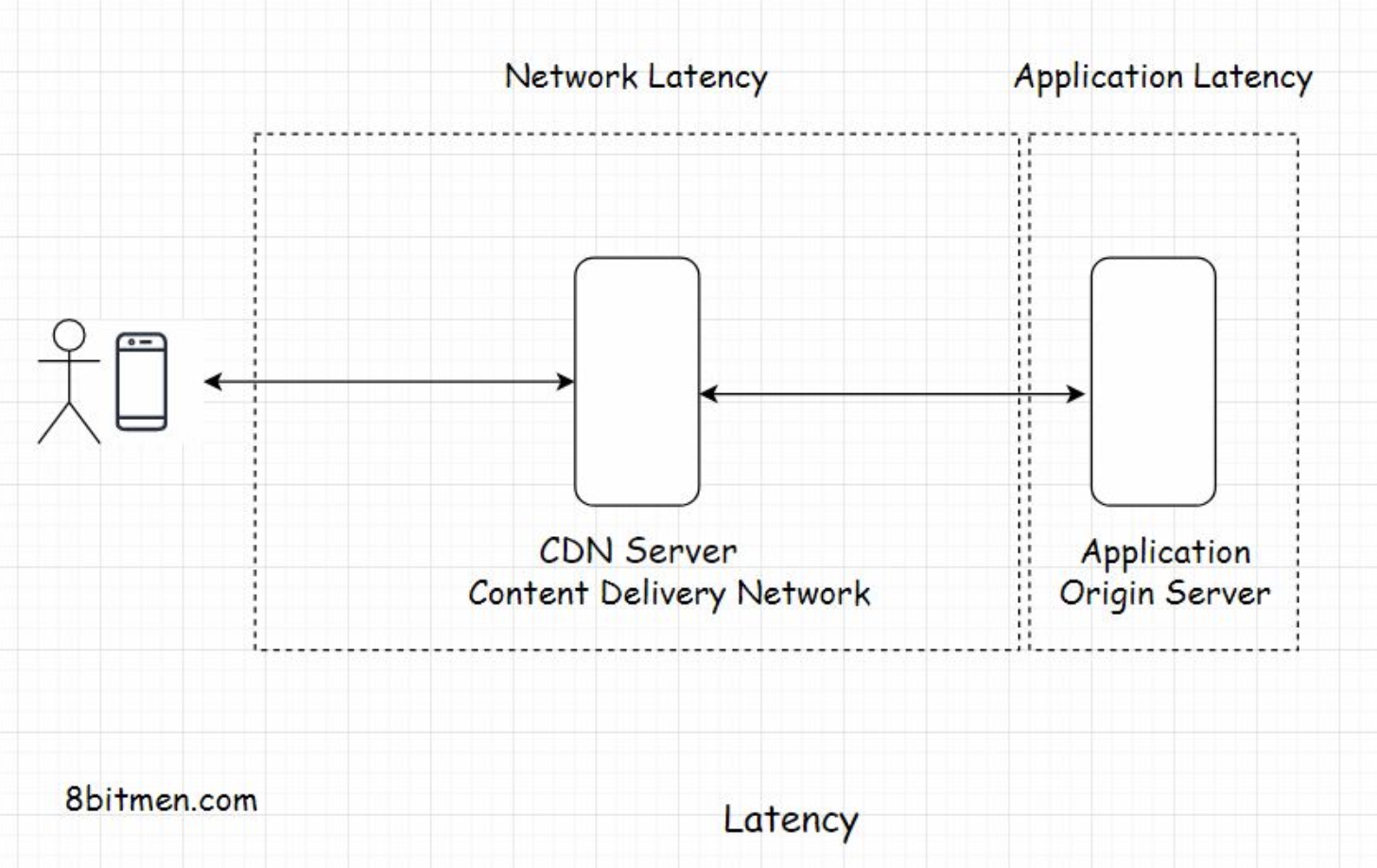
1.1. What is latency?• Latency is the time a system takes to respond to a user request. Let’s say you send a request to an app to fetch an image and the system takes 2 seconds to respond to your request. The latency of the system is 2 seconds.• Minimum latency is what efficient software systems strive for. No matter how much the traffic load on a system builds up, the latency should not go up. This is what scalability is.• • If the latency remains the same, we can say that the application scaled well with the increased load and is highly scalable.• • Let’s see scalability in terms of Big-O notation. Ideally, the complexity of a system or an algorithm should be O(1) which is constant time like in a map or a key-value database.• • A program with the complexity of O(n^2) where n is the size of the data set is not scalable. As the size of the data set increases, the system will need more computational power and other resources to process the tasks.1.2. Measuring latency• Latency is measured as the time difference between the action that a user takes on the website and the system’s response in reaction to that action. The action can be an event like clicking a button, scrolling down a web page, etc.• This latency is generally divided into two parts:– Network latency– Application latency
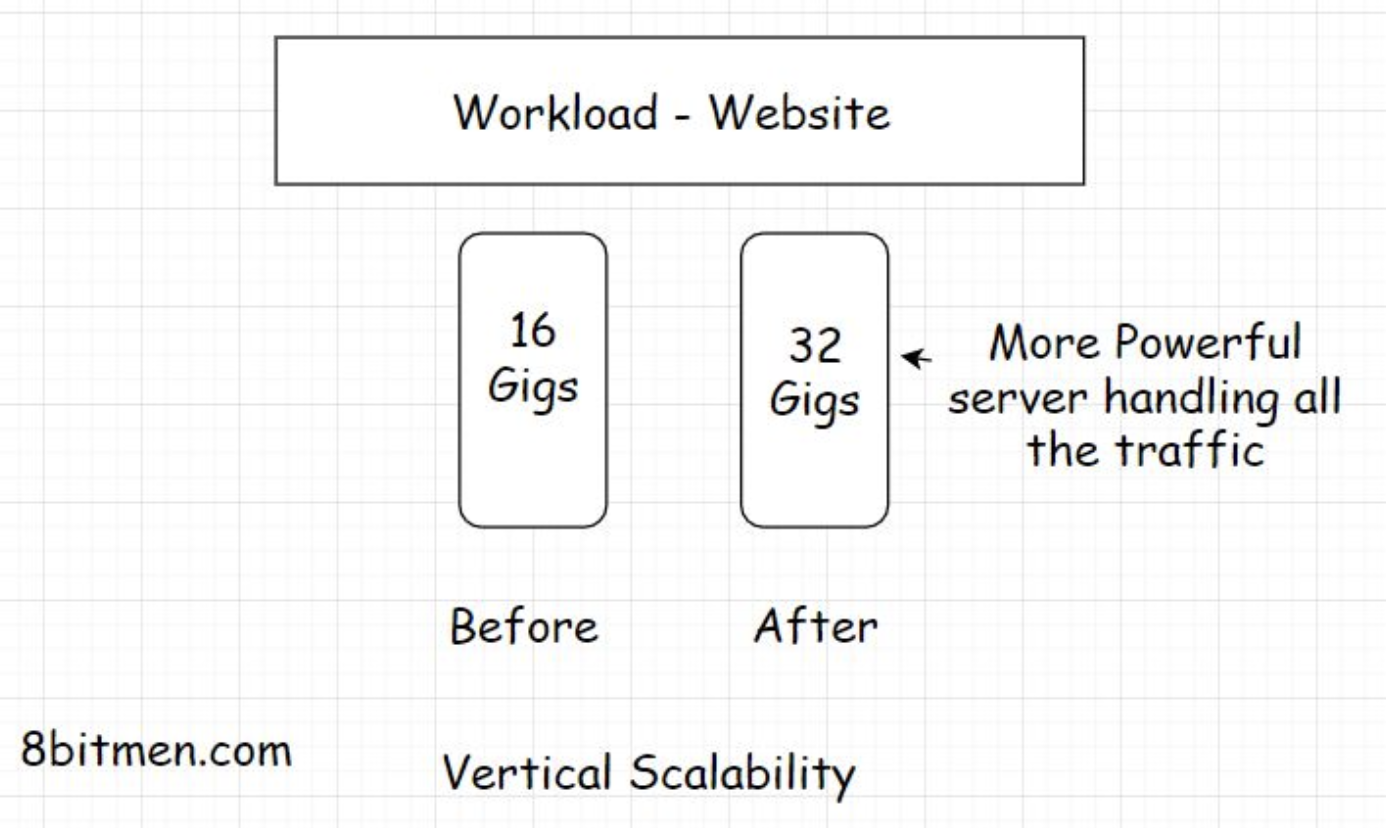
1.3. Network latency• Network latency is the time that the network takes to send a data packet from point A to point B. The network should be efficient enough to handle the increased traffic load on the website. To cut down the network latency, businesses use a CDN (Content Delivery Network) to deploy their servers across the globe as close to the end-user as possible. These close to the user locations are also known as Edge locations.• If you wish to understand the Edge locations and how apps are deployed in the cloud. Check out my cloud computing 101 course on my platform.• • After having spent a decade in the industry writing code, I firmly believe that every software engineer should have knowledge of cloud computing. It’s the present and the future of application development and deployment.1.4. Application latency• Application latency is the time the application takes to process a user request. There are more than a few ways to cut down the application latency. The first step is to run stress and load tests on the application and scan for the bottlenecks that slow down the system as a whole. I’ll talk more about it in the upcoming lessons.1.5. Why is low latency so crucial for online services?• Latency plays a significant role in determining if an online business wins or loses a customer. Nobody likes to wait for a response on a website. There is a well-known saying, “If you want to test a person’s patience, give them a slow internet connection.”• If the visitor gets the response within a stipulated time, great otherwise, they’ll bounce off to another website. There is ample market research that concludes high latency in applications is a big factor in customers bouncing off a website. If there is money involved, zero latency is what businesses want. Only if this was possible.• • Think of massive multiplayer online (MMO) games. A slight lag in an in-game event ruins the whole experience. A gamer with a high latency internet connection will have a slow response time despite having the best reaction time of all the players in an arena.• • Algorithmic trading services need to process events within milliseconds. Fintech companies have dedicated networks to run low-latency trading. The regular network just won’t cut it.• • We can realize the importance of low latency by the fact that in 2011 Huawei and Hibernia Atlantic started laying a fiber-optic link cable across the Atlantic Ocean between London and New York. This property was estimated to cost approximately $300M just to save traders six milliseconds of latency.2. Types of Scalability• To scale well, an application needs solid computing power. The servers should be powerful enough to handle increased traffic loads.• There are two ways to scale an application:– Vertically– Horizontally2.1. What is vertical scaling?• Vertical scaling means adding more power to our server. Let’s say our app is hosted by a server with 16 gigs of RAM. To handle the increased load, we now augment the RAM to 32 gigs. Here, we have vertically scaled the server.
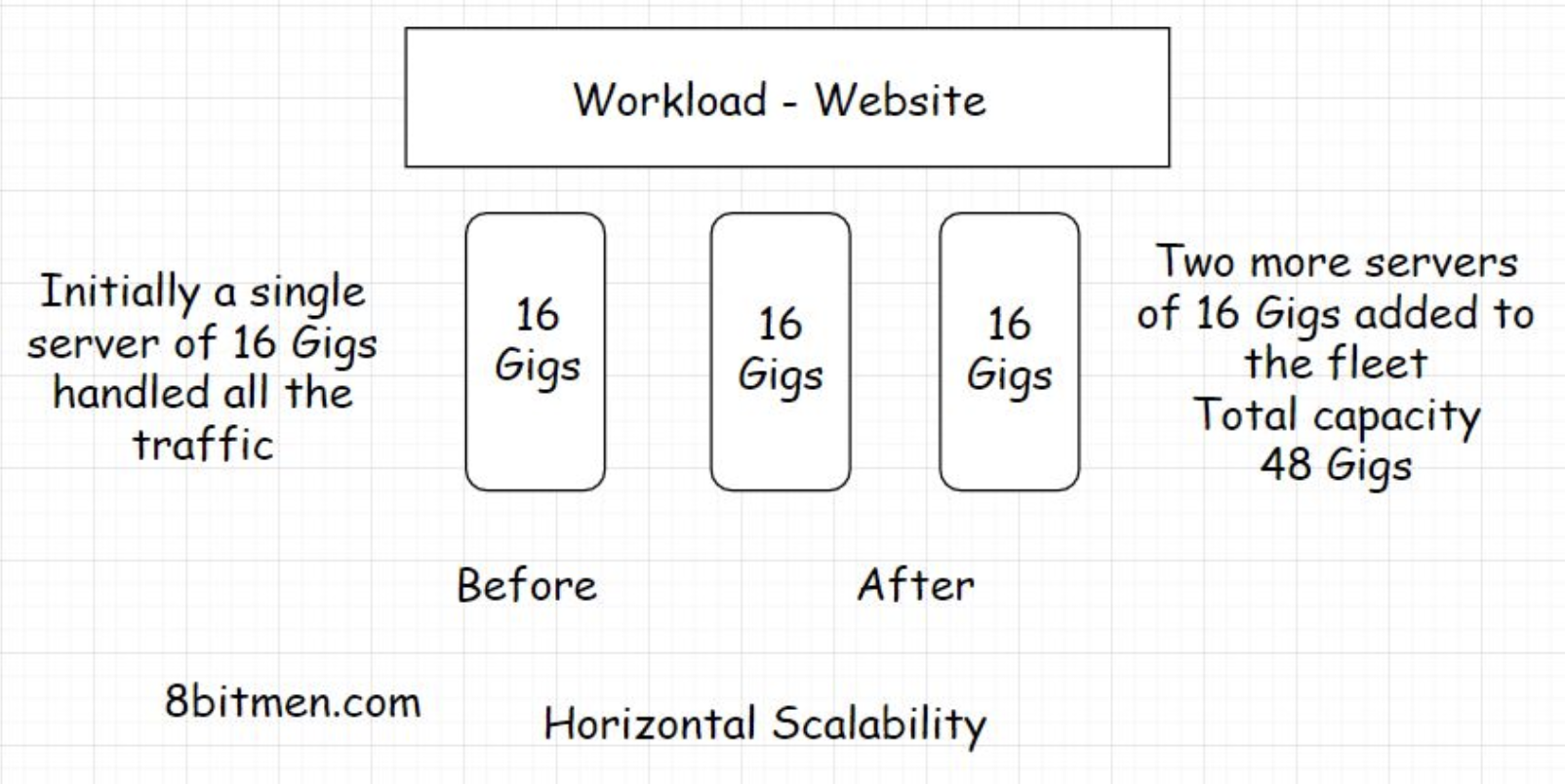
• Ideally, when the traffic starts to build on the app, the first step should be to scale vertically. Vertical scaling is also called scaling up.• In this type of scaling, we augment the power of the hardware running the app. This is the simplest way to scale as it doesn’t require any code refactoring or the need to make any complex configurations and such. I’ll discuss in the next lesson why code refactoring is needed when we horizontally scale our app.• • However, there is only so much we can do when scaling vertically. There is a limit to the compute power we can augment for a single server.• • A good analogy would be to think of a multi-story building. We can keep adding floors to it but only up to a certain point. What if the number of people in need of a flat keeps rising? We can’t scale the building up to the moon for obvious reasons.• • Now is the time to build more buildings. This is where horizontal scalability comes in.• • When the traffic is too large to be handled by a single server, we bring in more servers to work together.2.2. What is horizontal scaling?• Horizontal scaling, also known as scaling out, means adding more hardware to the existing hardware resource pool. This increases the computational power of the system as a whole.
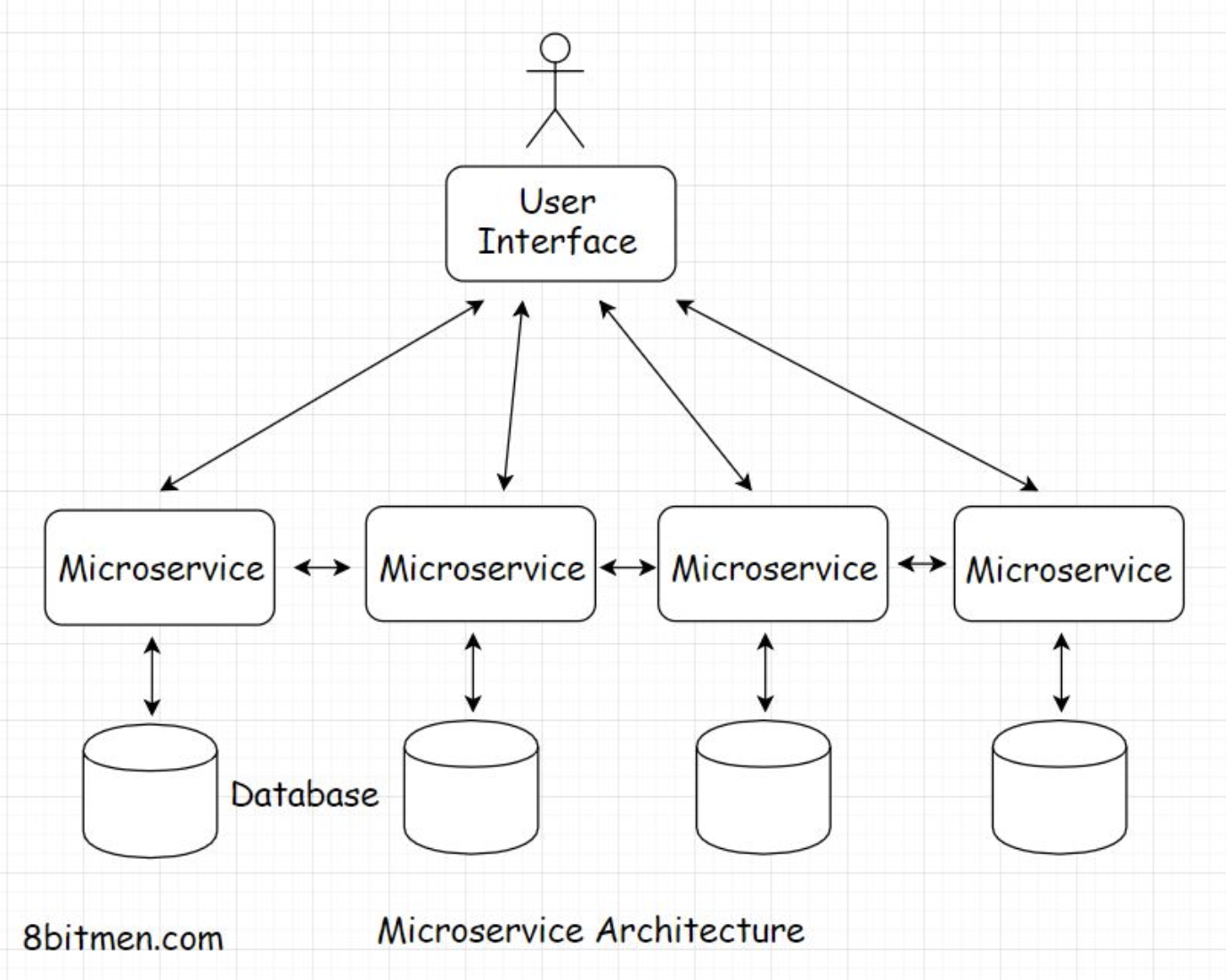
• With this, the increased traffic influx can be efficiently dealt with. And there is no limit to how much we can scale horizontally, assuming we have infinite resources. We can keep adding servers after servers, setting up data centers after data centers.• • Horizontal scaling also allows us to scale dynamically in real-time as the traffic on our website climbs and drops over a period of time. Dynamic scaling is not possible when scaling vertically.2.3. Cloud elasticity• The most prominent reason cloud computing became mainstream in the industry is the ability of the cloud to scale dynamically. In case of the traffic climb, the cloud adds additional servers to the hardware resource pool and when it drops, the servers added are removed.• The ability to use and pay only for the hardware resources used by the website got popular with businesses for obvious economic reasons.• • The process of adding and removing servers, stretching and returning to the original infrastructural computational capacity, on the fly is popularly known as cloud elasticity. It saves businesses truckloads of money every single day.• • If you wish to learn in detail how cloud platforms scale our apps and make them highly available, how clustering works and how cloud companies deploy our apps across continents, I’ve discussed the concepts in my cloud computing 101 course.• • Having multiple server nodes on the backend also helps the website stay online even if a few server nodes crash. This is known as high availability. We’ll get to that in the upcoming lessons.3. Which Scalability Approach is Right for our App?3.1. Pros and cons of vertical and horizontal scaling• This is where I talk about the pluses and minuses of both scaling approaches.• Vertical scaling, as we learned before, is simpler in comparison to horizontal scaling because we do not have to touch the code or make any complex system configurations. It takes much less administrative, monitoring, and management efforts than managing a distributed environment when scaling horizontally.• • A significant downside of vertical scaling is the availability risk. The servers are powerful but few in number. There is always a risk of them going down and the entire website going offline, which doesn’t happen when the system is scaled horizontally. In this scenario, the system is more highly available.3.2. What about the code? Why does the code need to change when it has to run on multiple machines?• If you intend to run the code in a distributed environment, it needs to be stateless. There should be no state in the code. What do I mean by this?• There should be no static instances in the class. Static instances hold application data and when a particular server goes down, all the static data/state is lost. The app is left in an inconsistent state.• • In object-oriented programming, the instance variables hold object state in them. Static variables moreover hold state that spans across multiple objects. They generally hold state per classloader. Now, if the server instance running that classloader goes down, all the data is lost.• • Also, whatever data static variables hold, it’s not application-wide. For this reason, distributed memory like Redis, Memcache, etc., are used to maintain a consistent state application-wide. When writing applications for distributed systems, it’s a good practice to avoid using static instances in the class. The state is typically persisted in a distributed memory store; this facilitates components to be stateless.• • This is why functional programming got popular with distributed systems. The functions don’t retain any state. However, the same behavior can also be achieved with prominent OOP languages.• • I’ve delved into the concept (making code changes in the application layer when scaling horizontally) in much detail in the distributed transactions chapter of my system design course. Check it out.3.3. Which scalability approach is right for our app?• Always have a ballpark estimate in mind when designing your app. How much traffic will it have to deal with?• Today, development teams are adopting a distributed microservices architecture right from the start, and workloads (applications) are meant to be deployed on the cloud. So, inherently the workloads are horizontally scaled out on the fly.
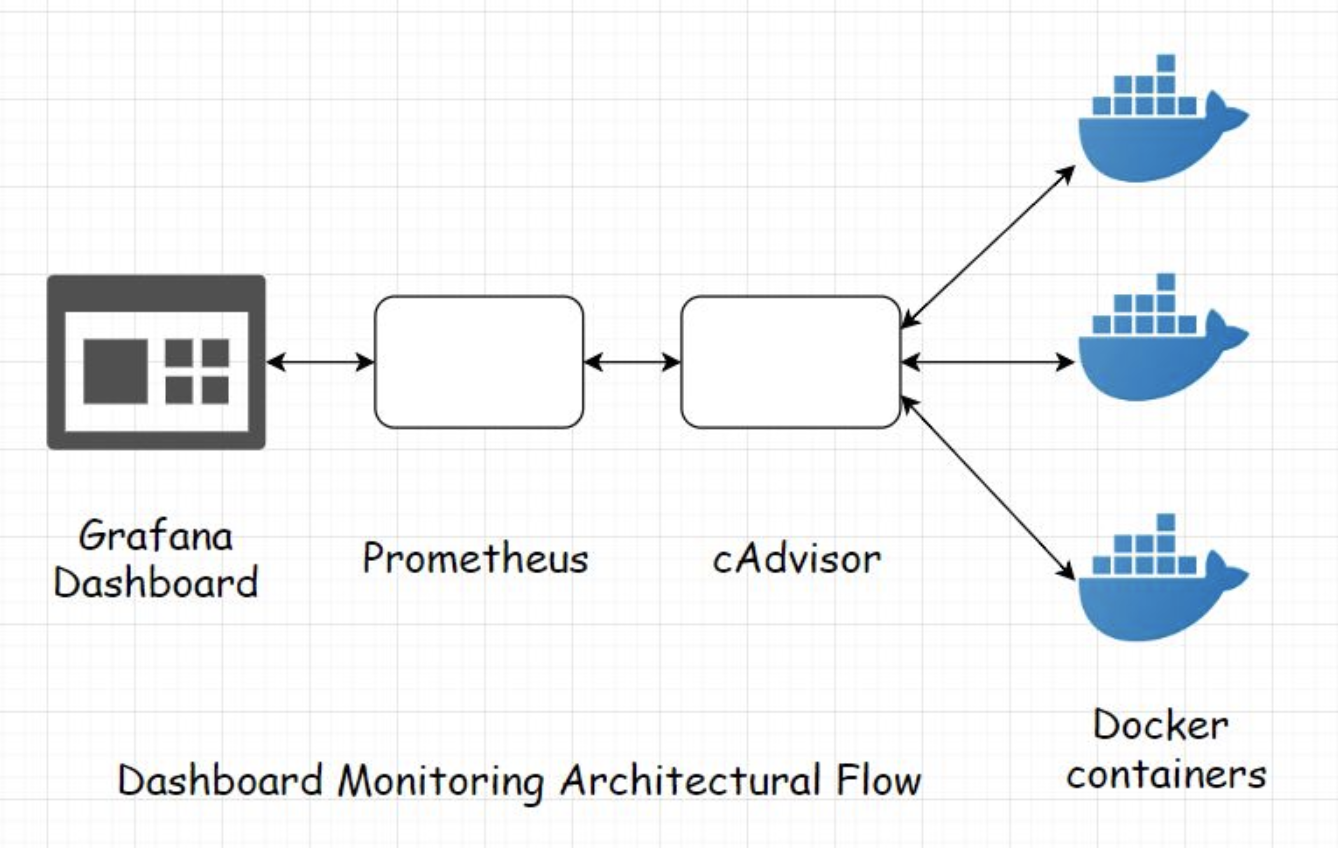
• The upsides of horizontal scaling include no limit to augmenting the hardware capacity. Data is replicated across different geographical regions as nodes and data centers are set up across the globe.• If our app is a utility or tool expected to receive minimal predictable traffic. For instance, an internal tool of an organization or something similar that is not mission-critical. We need not bother hosting it in a distributed environment. A single server is enough to manage the traffic. We can go ahead with vertical scaling when we are certain that the traffic load will not spike significantly in the near future.• • If our app is a public-facing social app like a social network, a fitness app, an online game, or something similar, where the traffic is unpredictable. Both high availability and horizontal scalability are important to us.• • Build these apps to deploy them on the cloud, and always have horizontal scalability in mind right from the start.3.4. Primary Bottlenecks That Hurt the Scalability of our Application3.4.1. Database• Imagine we have an application that appears to be well architected. Everything looks good. The workload runs on multiple nodes, and it can scale horizontally.• However, the database is a poor single monolith, where just one server has the onus of handling the data requests from all the server nodes of the workload.• • This scenario is a bottleneck. The server nodes work well, handle millions of requests at a point in time efficiently, yet, the response time of these requests and the latency of the application are abysmal due to the presence of a single database. There is only so much it can handle.• • Just like workload scalability, the database needs to be scaled well.• • Make wise use of database partitioning, sharding with multiple database servers to make your system efficient.3.4.2. Application design• A poorly designed application’s architecture can become a major bottleneck as a whole.• A typical architectural mistake is not using asynchronous processes and modules wherever required; rather, all the processes are scheduled sequentially.• • For example, if a user uploads a document on the portal, tasks such as sending a confirmation email to the user, sending a notification to all subscribers/listeners of the upload event should be done asynchronously.• • Tasks like these should be forwarded to a messaging server or a task queue for asynchronous processing as opposed to being processed sequentially, making the user wait.3.4.3. Not using caching in the application wisely• Caching can be deployed at several layers of the application. It speeds up the response time by notches. A cache cuts down the overall load on the app, intercepting all the requests before they hit the origin servers.• We should use caching exhaustively throughout the application to speed up things significantly.• • If the system has a lot of static data, caching can bring down the deployment costs significantly. I’ve written an article on my blog: How PolyHaven manages 5 million page views and 80TB traffic a month for less than 400 USD.• • Polyhaven is a 3D asset library with a large amount of static data. The article delineates how it leverages caching to bring down it’s deployment costs.3.4.4. Inefficient configuration and setup of load balancers• Load balancers are the gateway to our application. Using too many or too few of them impacts the latency of our application. More on load balancers in the upcoming lessons.3.4.5. Adding business logic to the database• No matter what justification anyone provides, I’ve never been a fan of adding business logic to the database.• The database is just not the place to put business logic. Business logic in the database makes the application components tightly coupled. Imagine how much code refactoring this would require when migrating to a different database. Also, the testing gets complex.3.4.6. Not picking the right database• Picking the right database technology is vital for businesses. Need transactions and strong consistency? Pick a relational database. If you can do without strong consistency and rather need horizontal scalability, pick a NoSQL database.• Trying to pull things off with a not-so-suitable tech always has a profound impact on the latency of the entire application in negative ways. More on this in the upcoming lessons.3.4.7. At the code level• This shouldn’t come as a surprise, but inefficient and poorly written code has the potential to bring down the entire service in production. This typically includes:– Using unnecessary loops or nested loops– Writing tightly coupled code– Not paying attention to the Big-O complexity while writing the code. (Be ready to do a lot of firefighting in production)– • Ideally, we should always do a DENTTAL (Documentation, Exception Handling, Null pointers, Time complexity, Test coverage, Analysis of code complexity, Logging) check of our code when doing a dry run.• • In this lesson, don’t worry if a few things are not clear to you, such as strong consistency, how the message queue facilitates asynchronous behavior, or how to pick the right database. I’ll discuss all that in the upcoming lessons. Stay tuned.3.5. How to Improve and Test the Scalability of our Application?• Here are some of the standard strategies to fine-tune the performance of our web application. If the application is performance-optimized, it can withstand more traffic load with less resource consumption than an application that is not optimized for performance.• Now you might be wondering, “Why are you talking about performance when you should be talking about scalability? Isn’t it what the lesson title says?”• • Well, the application’s performance is directly proportional to scalability. If an application is not performant, it will certainly not scale well.• • These performance optimization strategies can be implemented even before the pre-production testing stage of the application.3.5.1. Tuning the performance of the application – Enabling it to scale better Profiling• Profile the hell out of your app. Run application profiler and code profiler. See what processes are taking too long and are eating up too many resources. Find out the bottlenecks. Get rid of them.• Profiling is the dynamic analysis of our code. It helps us measure the space and the time complexity of our code and enables us to figure out issues like concurrency errors, memory errors and robustness and safety of the program. This Wikipedia resource contains a good list of performance analysis tools used in the industry.3.5.2. Caching• Cache wisely, and cache everywhere. Cache all the static content. Hit the database only when it is really required. Try to serve all the read requests from the cache. Use a write-through cache.3.5.3. CDN• Use a Content Delivery Network (CDN). Using a CDN further reduces the application’s latency due to the proximity of the data from the requesting user.3.5.4. Data compression• Compress data. Use apt compression algorithms to compress data and store data in compressed form. Since compressed data consumes less bandwidth, the data download on the client will be faster.3.5.5. Avoid unnecessary requests response cycles• Avoid unnecessary round trips between the client and server. Try to club multiple requests into one.• These are a few of the things we should bear in mind in the context of application performance.3.5.6. Testing the scalability of our application• Once we are done with the essential performance testing of the application, it is time for capacity planning, provisioning the right amount of hardware—compute and storage power.• The right approach for testing the application for scalability largely depends on the design of our system. There is no standard rule for this.• • Testing can be performed at both the hardware and the software level. Different services and components need to be tested—individually and collectively.• • During the scalability testing, different system parameters are taken into account, such as:– CPU usage– Network bandwidth consumption– Throughput– Number of requests processed within a stipulated time– Latency– Memory usage of the program– End-user experience when the system is under heavy load and so on.– • In this testing phase, simulated traffic is routed to the system to study how the system behaves and scales under the heavy load. Contingencies are planned for unforeseen situations.• • As per the anticipated traffic, the appropriate hardware and computational power are provisioned to handle the traffic smoothly with some buffer.• • Several load and stress tests are run on the application. Tools like JMeter are pretty popular for running concurrent user tests on the application; if you are on the Java ecosystem. There are a lot of cloud-based testing tools available that help us simulate test scenarios just with a few mouse clicks.• • Businesses test for scalability all the time to get their systems ready to handle a traffic surge. If it’s a sports website, it prepares itself for the sports event day. If it’s an e-commerce website, it makes itself ready for festival season sale and so on.• • Here are a couple of good reads on the topic:– How production engineers support global events on Facebook– How Hotstar a video streaming service scaled with over 10 million concurrent users• In the industry, tech like Cadvisor, Prometheus and Grafana are pretty popular for tracking the system profile via web-based dashboards.